
1. Producte acabatview
The WANBO T-Type Ceiling Mount is a robust and adjustable mounting solution designed specifically for the Wanbo X5 Pro home projector. Constructed from high-quality aluminum alloy, this mount provides a secure and stable platform for ceiling installation. Its adjustable design allows for precise positioning of your projector, ensuring optimal viewing angles. The minimalist aesthetic integrates seamlessly into various room decors.
2. Contingut del paquet
Verifiqueu que tots els components siguin presents al paquet abans de continuar amb la instal·lació.
- Braç de muntatge
- Maquinari de muntatge (cargols, ancoratges)
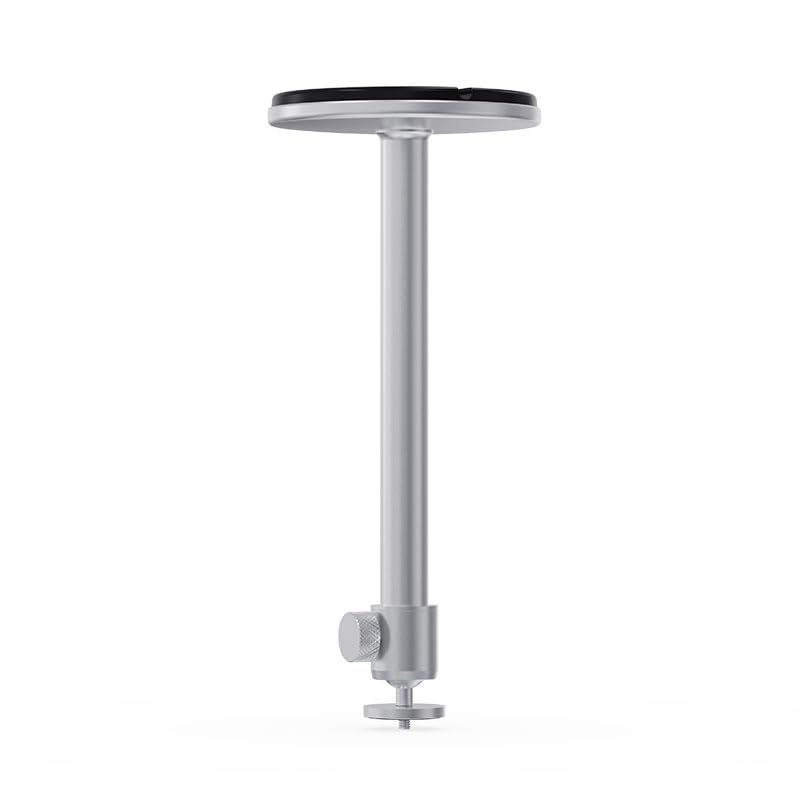
Image 2.1: Components of the WANBO T-Type Ceiling Mount, including the main arm and the ceiling base.
3. Informació de seguretat
- Llegiu atentament totes les instruccions abans de la instal·lació.
- Ensure the mounting surface (ceiling) can safely support the combined weight of the mount and the projector (maximum 10 pounds).
- Utilitzeu les eines i els equips de seguretat adequats durant la instal·lació.
- If unsure about installation, consult a qualified professional.
- Do not overtighten screws, as this may damage the mount or the projector.
- Mantingueu els nens i les mascotes allunyats de la zona d'instal·lació.
4. Configuració i instal·lació
Follow these steps to securely install your WANBO T-Type Ceiling Mount.
4.1 Identify Mounting Location
- Choose a suitable location on the ceiling that provides a clear projection path and is structurally sound.
- Ensure there are no electrical wires or plumbing in the drilling path.
4.2 Munta la Muntanya
- Attach the mounting arm to the circular ceiling base by screwing them together. Ensure it is hand-tightened securely.

Image 4.1: The WANBO T-Type Ceiling Mount fully assembled before ceiling installation.
4.3 Mount to Ceiling
- Hold the assembled mount against the chosen ceiling location and mark the drilling points through the holes in the circular base.
- Drill pilot holes into the ceiling at the marked points. Use appropriate drill bits for your ceiling material.
- Insert the provided wall anchors (if necessary for your ceiling type) into the pilot holes.
- Align the mount's base with the drilled holes and secure it to the ceiling using the provided screws. Ensure the mount is firmly attached and does not wobble.
4.4 Attach Projector
- Locate the mounting screw hole on the bottom of your Wanbo X5 Pro projector.
- Align the projector's mounting hole with the threaded screw at the end of the mount's arm.
- Carefully screw the projector onto the mount until it is secure. Do not overtighten.
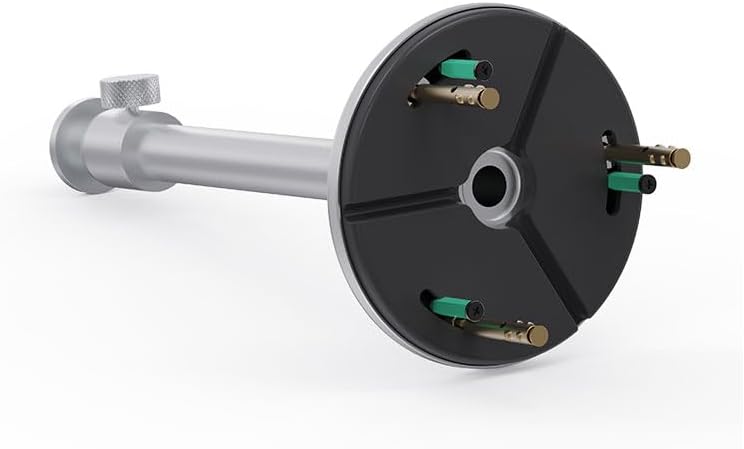
Image 4.2: Detail of the projector attachment mechanism on the mount.
5. Instruccions de funcionament
The WANBO T-Type Ceiling Mount offers adjustable features for optimal projector positioning.
5.1 Ajust de l'alçada
The mount features a telescoping design. To adjust the height, loosen the knob on the side of the mounting arm, extend or retract the arm to the desired length (up to 13.0 inches), and then tighten the knob firmly to secure the position.
5.2 Rotating the Projector
The mount allows for rotation. Gently rotate the projector to achieve the desired horizontal angle. Ensure the projector is stable after adjustment.
6. Manteniment
- Neteja: Netegeu el suport amb un drap suau i sec. No utilitzeu productes de neteja abrasius ni dissolvents.
- Comprovacions periòdiques: Reviseu periòdicament tots els cargols i connexions per assegurar-vos que estiguin ben ajustats i segurs.
- Límit de pes: No supereu la capacitat màxima de pes de 10 lliures.
7. Solució De Problemes
- La muntura sembla inestable: Ensure all mounting screws are securely tightened to the ceiling and the projector is firmly attached to the mount. Verify the ceiling structure is adequate.
- Difficulty adjusting height/rotation: Loosen the adjustment knob sufficiently before attempting to move the arm or rotate the projector. Do not force adjustments.
- Projector not level: Re-adjust the rotation and ensure the ceiling mount itself is installed level.
8. Especificacions
| Marca | WANBO |
| Nom del model | T-Type Ceiling Mount |
| Número de model | WBUS-T-X5 Pro (WBCA01) |
| Dispositius compatibles | Wanbo X5 Pro Projector |
| Tipus de muntatge | Muntatge al sostre |
| Material | Aliatge d'alumini |
| Color | Plata |
| Capacitat màxima de pes | 10 lliures (4.5 kg) |
| Pes de l'article | 0.7 lliures (0.32 kg) |
| Longitud del braç | 13.0 polzades (33 cm) |
| Característiques addicionals | Adjustable, Rotatable |
9. Garantia i Suport
9.1 Informació de la garantia
This WANBO T-Type Ceiling Mount comes with a 1 anys de garantia del fabricant des de la data de compra. Aquesta garantia cobreix els defectes de materials i fabricació en condicions d'ús normal. No cobreix els danys causats per una instal·lació incorrecta, un mal ús, accidents o modificacions no autoritzades.
9.2 Atenció al client
For technical assistance, warranty claims, or any questions regarding your WANBO T-Type Ceiling Mount, please contact WANBO customer support through the official WANBO website or your retailer's support channels. Please have your model number (WBUS-T-X5 Pro) and proof of purchase ready when contacting support.