1. Introducció
Thank you for choosing the GenMachine Mini PC AMD Ryzen 3 4300U. This compact and high-performance mini computer is designed for both home and office use, offering efficient multitasking, 4K visuals, and advanced connectivity. This manual provides essential information for setting up, operating, and maintaining your device.
2. Què hi ha a la caixa
Verifiqueu que tots els elements siguin presents al vostre paquet:
- GenMachine Mini PC (R3 4300U 8G 256G)
- Manual d'usuari
- Adaptador d'alimentació
- Cable HDMI
- Mounting Bracket (for VESA mounting)

3. Producte acabatview (Maquinari)
The GenMachine Mini PC features a compact design with various ports for connectivity and expansion.
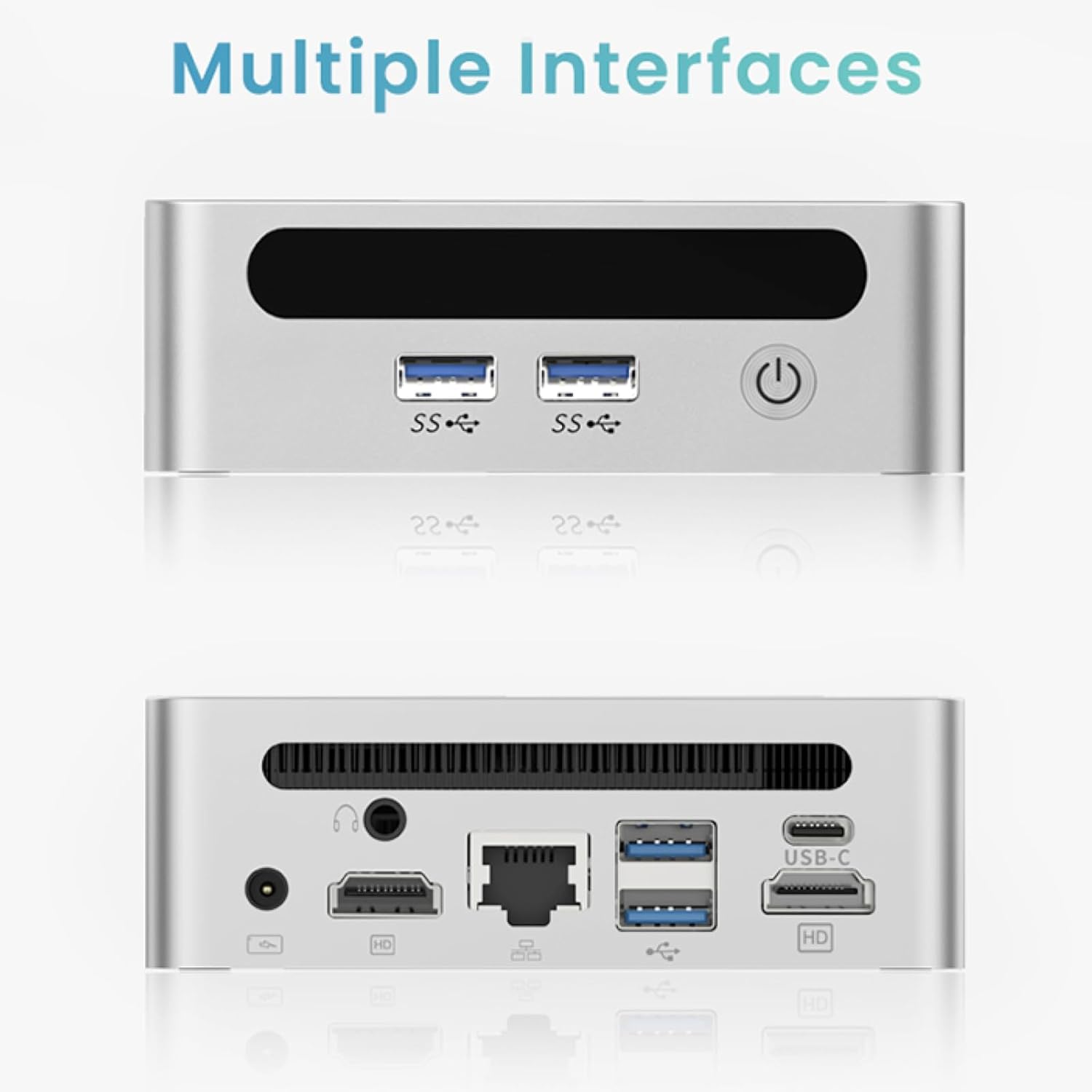
Panell frontal
- Botó d'encesa: Per encendre/apagar el dispositiu.
- Ports USB 3.0 (x2): For high-speed data transfer and peripheral connections.
- Port USB 2.0 (x1): For standard peripheral connections.
Panell posterior
- Entrada d'alimentació de CC: Connecteu aquí l'adaptador de corrent proporcionat.
- Port USB 2.0 (x1): For standard peripheral connections.
- Ports HDMI (x2): For connecting displays, supporting up to 4K resolution.
- Port Ethernet (LAN): Per a la connexió de xarxa amb cable.
- Conector d'àudio de 3.5 mm: Per a auriculars o altaveus.
- Ranura de bloqueig Kensington: Per assegurar el dispositiu.
4. Guia de configuració
Connexió inicial
- Apagueu el mini PC i desconnecteu tots els cables.
- Connect your monitor(s) to the HDMI port(s) on the rear panel.
- Connecteu el teclat i el ratolí als ports USB disponibles.
- (Optional) For a wired network connection, plug an Ethernet cable into the LAN port.
- Connecteu l'adaptador de corrent al port d'entrada de CC i després a una presa de corrent.
- Press the power button on the front panel to turn on the Mini PC.
Operating System Setup (Windows 11)
Your GenMachine Mini PC comes with Windows 11 pre-installed. Upon first boot, you will be guided through the initial Windows setup process, including:
- Selecció de regió i disposició de teclat.
- Network connection (Wi-Fi 6 or Ethernet).
- Microsoft account sign-in or local account creation.
- Configuració de la privadesa.
Seguiu les instruccions a la pantalla per completar la configuració.
5. Performance and Usage
The AMD Ryzen 3 4300U processor, combined with 8GB DDR4 RAM and a 256GB SSD, provides robust performance for various tasks.
Característiques principals:
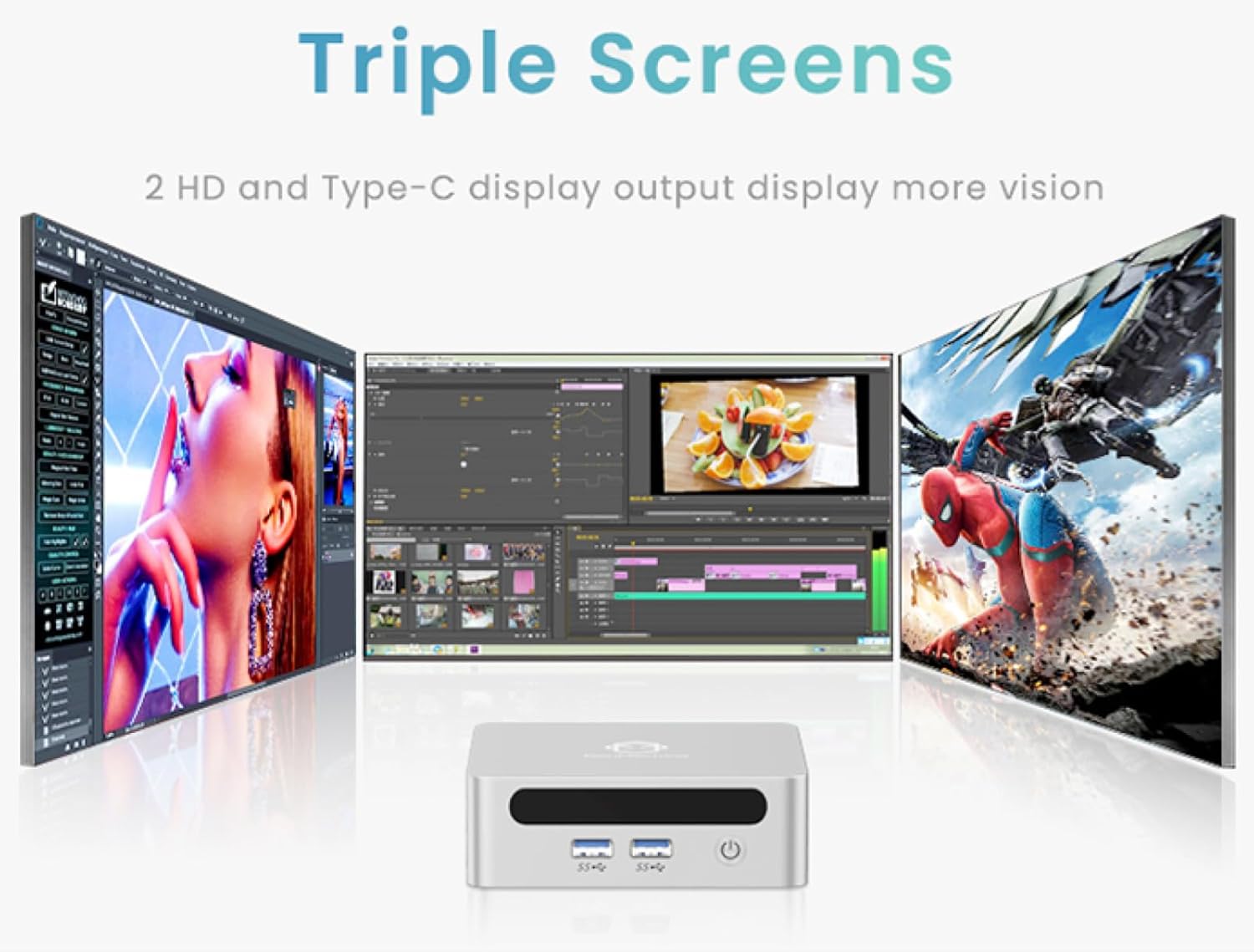
- 4K Ultra HD Visuals & Dual Display Support: Connect up to two 4K monitors for enhanced productivity or immersive entertainment.
- Wi-Fi 6 i Bluetooth 5.2: Enjoy faster and more stable wireless internet and seamless connectivity with Bluetooth peripherals.
- Compact and Quiet Design: Its small footprint and ultra-quiet cooling system make it suitable for any workspace without distraction.

6. Upgrading Components (Maintenance)
The GenMachine Mini PC allows for easy upgrades of its RAM and SSD to further enhance performance or storage capacity.
Eines necessàries:
- Tornavís petit Phillips
- Plastic pry tool (optional, for opening the case)
- New SSD (M.2 2280 NVMe or 2.5-inch SATA SSD)
- New RAM (DDR4 SODIMM)
Procediment:
- Apagueu el mini PC i desconnecteu tots els cables.
- Carefully remove the four rubber foot pads on the bottom of the Mini PC to reveal the hidden screws.
- Desenrosqueu els quatre cargols.
- Gently pry open the bottom plate along the edges. Be careful with the internal clips.
- Locate the existing SSD and RAM modules.
- To remove the SSD: If fixed by screws, unscrew them. If by clips, open the clips and pull out the original SSD.
- To remove RAM: Open the clips at both ends of the memory slot and pull out the original memory vertically.
- Insert the new SSD/RAM into the respective slots, ensuring they are properly seated and secured.
- Replace the bottom plate, aligning it with the clips and screw holes.
- Screw on the previously removed screws and reattach the foot pads.
7. Opcions de muntatge
The GenMachine Mini PC can be mounted behind a VESA-compatible monitor using the included mounting bracket, saving desk space and creating a clean setup.

8. Especificacions
| Característica | Detall |
|---|---|
| Processador | AMD Ryzen 3 4300U (2.7 GHz) |
| RAM | 8 GB DDR4 SDRAM |
| Emmagatzematge | 256GB 2280 SSD (PCIE x 16 interface) |
| Gràfics | Gràfics integrats d'AMD Radeon |
| Sistema operatiu | OS (Windows 11 pre-installed) |
| Connectivitat | Wi-Fi 6, Bluetooth 5.2, Ethernet |
| Sortida de vídeo | 2x HDMI (4K @ 60Hz), USB-C (DisplayPort Alt Mode) |
| Ports USB | 2 USB 3.0, 2 USB 2.0, 1 USB-C |
| Dimensions | 6.26 x 6.26 x 3.6 polzades |
| Pes | 2 lliures |
9. Solució De Problemes
- Sense energia: Assegureu-vos que l'adaptador de corrent estigui connectat correctament tant al Mini PC com a una presa de corrent que funcioni.
- Sense pantalla: Verify that the HDMI cable(s) are correctly connected to the monitor(s) and the Mini PC. Check monitor input source settings.
- No Internet (Wi-Fi): Ensure Wi-Fi is enabled in Windows settings and you are connected to the correct network.
- No Internet (Wired): Check the Ethernet cable connection and ensure your router is functioning correctly.
- Rendiment lent: Close unnecessary applications. Check for background updates. Consider upgrading RAM or SSD if issues persist.
10. Garantia i Suport
For warranty information, technical support, or service inquiries, please refer to the contact details provided in your product packaging or visit the official GenMachine weblloc. Conserveu el rebut de compra per a reclamacions de garantia.