
Introducció
This manual provides detailed instructions for the safe and efficient operation of your Phomemo M836-B Portable Thermal Printer. The M836-B is an inkless, wireless thermal printer designed for portability and convenience, supporting various paper sizes including US Letter and A4. Please read this manual thoroughly before using the printer to ensure optimal performance and longevity.
Producte acabatview
Característiques clau
- Impressió tèrmica sense tinta: Utilizes thermal technology, eliminating the need for ink cartridges or ribbons.
- Connectivitat sense fils: Supports Bluetooth for seamless connection with iOS and Android devices.
- Connectivitat USB: Compatible with Windows, macOS, ChromeOS, and Linux via USB Type-C.
- Alta resolució: Offers a print resolution of 300 DPI for clear text and graphics.
- Disseny portàtil: Compact and lightweight, ideal for travel and on-the-go printing.
- Multi-Size Paper Support: Accommodates various thermal paper sizes, including US Letter (8.5'' x 11'') and A4.
- Sortida monocroma: Prints in black and white.

Image: The Phomemo M836-B printer demonstrating its inkless thermal printing capability, highlighting no mess from ink.

Imatge: Un cop mésview of the Phomemo M836-B's key features, including wireless connectivity, inkless operation, 2600mAh battery capacity, and 300 DPI resolution.
Contingut del paquet
Verifiqueu que tots els elements siguin presents al paquet:
- Phomemo M836-B Portable Thermal Printer
- Thermal Paper (as specified in the box)
- Cable USB-Type C
- Manual d'usuari (aquest document)
Guia de configuració
1. Càrrega de la impressora
- Connect the provided USB Type-C cable to the printer's charging port.
- Connecteu l'altre extrem del cable USB a un adaptador de corrent USB compatible (no inclòs) o al port USB d'un ordinador.
- The indicator light will show charging status. Charge the printer fully before first use.
2. Carregant paper
The Phomemo M836-B supports both thermal paper rolls and sheet-fed thermal paper.
- Obriu la coberta del compartiment de paper.
- For roll paper: Insert the thermal paper roll into the designated slot, ensuring the printing side faces upwards. Gently pull a small length of paper out.
- For sheet-fed paper: Insert the thermal paper sheet into the input slot, ensuring it is straight and aligned.
- Tanqueu bé la tapa del compartiment de paper.

Image: Illustration of how to load different types of thermal paper (roll and sheet) into the Phomemo M836-B printer, showing the paper selection mechanism.
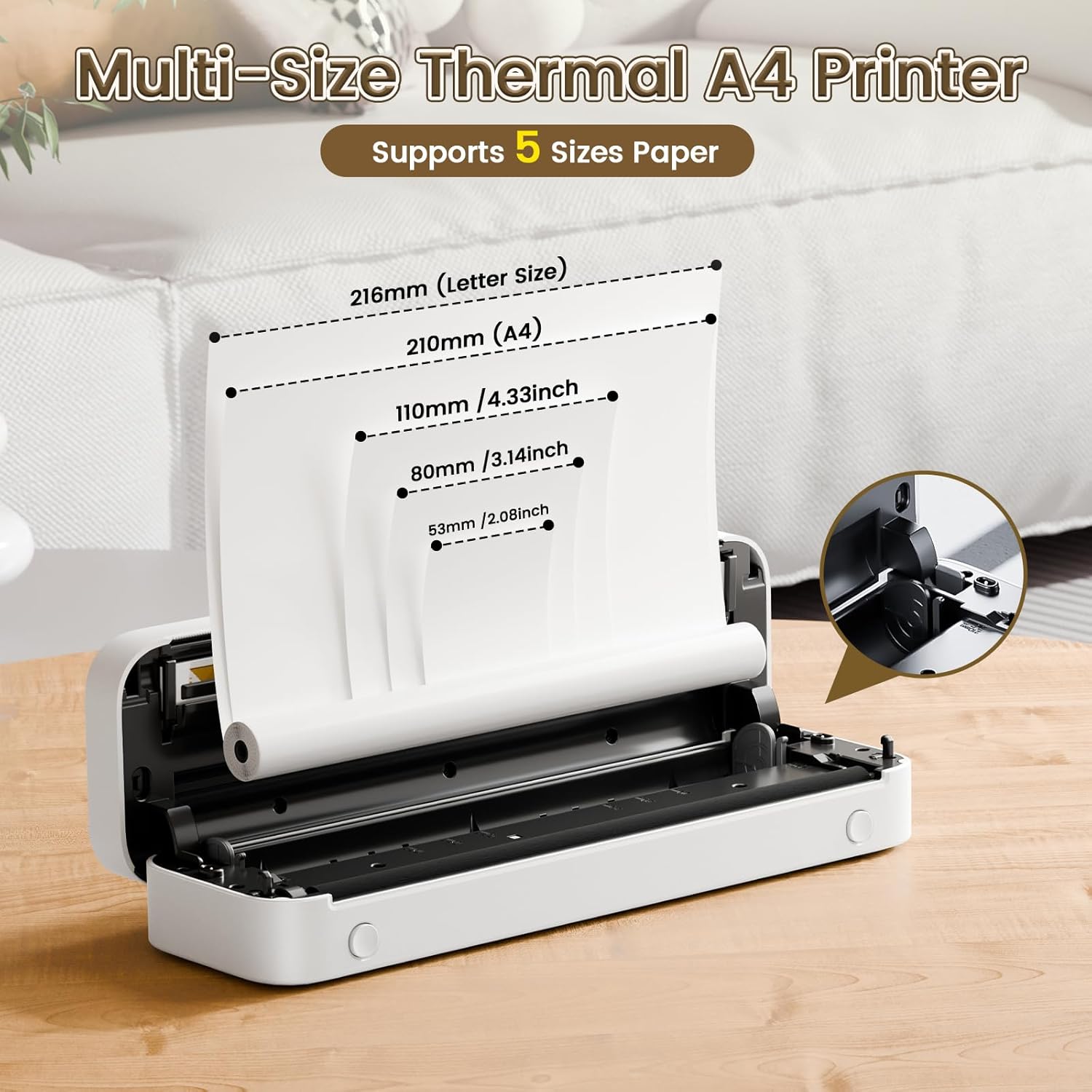
Image: The Phomemo M836-B printer demonstrating support for multiple paper sizes, including US Letter (216mm) and A4 (210mm).
3. Connexió a dispositius
The printer supports both Bluetooth and USB connections.
Bluetooth Connection (for iOS/Android)
- Download the official Phomemo app from your device's app store.
- Turn on the printer by pressing and holding the power button.
- Activa el Bluetooth al teu dispositiu mòbil.
- Open the Phomemo app, search for the printer (M836-B), and pair with it.
- Seguiu les indicacions de la pantalla per completar el procés de vinculació.
USB Connection (for Windows/macOS/ChromeOS/Linux)
- Assegureu-vos que la impressora estigui encesa.
- Connect the printer to your computer using the provided USB Type-C cable.
- Visita el lloc web oficial de Phomemo weblloc (www.phomemo.com) to download and install the appropriate drivers for your operating system.
- Once drivers are installed, the printer should be recognized by your computer.

Image: Diagram illustrating the two types of connections supported by the Phomemo M836-B: Bluetooth for Android, iOS, and iPad, and USB for Windows, macOS, ChromeOS, and Linux.
Instruccions de funcionament
Printing from Mobile Devices
- Ensure your printer is charged, loaded with paper, and connected via Bluetooth to your mobile device.
- Obriu l'aplicació Phomemo.
- Select the document or image you wish to print from within the app.
- Adjust print settings (e.g., paper size, density) as needed.
- Toqueu el botó d'impressió per iniciar la impressió.
Printing from Computers
- Ensure your printer is charged, loaded with paper, and connected via USB to your computer with drivers installed.
- Obriu el document o file you wish to print on your computer.
- Anar a "File" > "Print" (or use the shortcut Ctrl+P/Cmd+P).
- Select the Phomemo M836-B from the list of available printers.
- Adjust print preferences (e.g., paper size, orientation) as required.
- Feu clic a "Imprimeix".
Paper Handling Tips
- Always use high-quality thermal paper for best results.
- Ensure the paper is loaded correctly with the printable side facing the print head.
- Avoid exposing thermal paper to direct sunlight or high temperatures, as this can degrade print quality over time.
- Manually tear off printed documents carefully after printing, as the printer does not have an automatic cutter.
Manteniment
Neteja de la impressora
- Apagueu la impressora i desconnecteu-la de la font d'alimentació.
- Utilitzeu un drap suau i sense pelusa lleugerament dampHumitejat amb alcohol isopropílic per netejar suaument el capçal d'impressió. Deixeu-lo assecar completament abans d'utilitzar-lo.
- Clean the exterior of the printer with a soft, dry cloth. Do not use abrasive cleaners or solvents.
Emmagatzematge
- Guardeu la impressora en un lloc fresc i sec, allunyat de la llum solar directa i de temperatures extremes.
- If storing for an extended period, ensure the printer is fully charged to maintain battery health.
- Keep thermal paper in its original packaging in a dark, cool place to prevent premature fading.
Resolució de problemes
If you encounter issues with your Phomemo M836-B printer, refer to the following common problems and solutions:
Printer Not Turning On
- Comproveu la bateria: Ensure the printer is sufficiently charged. Connect it to a power source and try again.
- Botó d'encesa: Press and hold the power button for a few seconds to ensure it's properly activated.
Connectivity Issues (Bluetooth/USB)
- Bluetooth:
- Ensure Bluetooth is enabled on your device and the printer is within range.
- Unpair and re-pair the printer in your device's Bluetooth settings.
- Reinicieu tant la impressora com el dispositiu mòbil.
- USB:
- Verifiqueu que el cable USB estigui connectat correctament tant a la impressora com a l'ordinador.
- Ensure the correct printer drivers are installed on your computer. Reinstall if necessary.
- Prova amb un port o cable USB diferent.
Poor Print Quality (Blurry, Faded, Streaks)
- Neteja el capçal d'impressió: Follow the cleaning instructions in the Maintenance section.
- Paper Quality/Type: Ensure you are using high-quality thermal paper and that it is loaded correctly.
- Densitat d'impressió: Adjust print density settings in the Phomemo app or printer driver.
- Emmagatzematge de paper: Thermal paper exposed to heat or light can degrade. Try a fresh roll of paper.
Embussos de paper
- Apaga la impressora: Immediately turn off the printer.
- Eliminar paper: Gently pull out any jammed paper. Do not force it, as this can damage the printer.
- Recarregar: Ensure paper is loaded correctly and not wrinkled or bent before restarting.
Especificacions tècniques
| Característica | Especificació |
|---|---|
| Marca | Phomemo |
| Nom del model | M836-B |
| Tecnologia de connectivitat | Bluetooth, USB tipus C |
| Tecnologia d'impressió | Tèrmica |
| Sortida de la impressora | Monocrom |
| Resolució màxima d'impressió | 300 DPI |
| Velocitat màxima d'impressió (monocrom) | 1.5 pàgines per minut |
| Dispositius compatibles | Android Devices, Mac, Windows, iPhone, iPad |
| Mida màxima del suport | 8.5 x 11 polzades (carta dels EUA) |
| Compatibilitat amb la mida del paper | US Letter, A4 |
| Printing Media Type | Paper tèrmic |
| Pes de l'article | 1.53 lliures (aprox. 694 g) |
| Dimensions del producte (P x A x A) | 7.8P x 26.4A x 4.5H centímetres |
| Mètode de control | App |
| País d'origen | Xina |
Garantia i Suport
Specific warranty details for the Phomemo M836-B Portable Thermal Printer are not provided within this document. For information regarding warranty coverage, technical support, or service, please refer to the warranty card included with your product or contact Phomemo customer service directly through their official weblloc web o la informació de contacte que es proporciona a l'embalatge del producte.
Official Phomemo Weblloc: www.phomemo.com