1. Introducció
Gràcies per la compraasing the Generic L018 Projector. This portable projector is designed to deliver a high-quality home theater experience with its Native 1080P resolution, 650 ANSI Lumens brightness, and 4K support. Featuring Android 11, Wi-Fi 6, Bluetooth 5.2, and automatic keystone correction and focus, it offers versatile entertainment options for various environments, including bedrooms, home theaters, outdoor settings, and gaming.

Figure 1.1: The L018 Projector, showcasing its compact design and included remote control. The projected image highlights its visual capabilities.

Figure 1.2: Versatile applications of the L018 Projector, suitable for gaming, bedroom viewing, dedicated home theaters, and outdoor movie nights.
2. Informació important de seguretat
Please read all safety instructions carefully before using the projector. Keep this manual for future reference.
- No mireu directament a la lent del projector quan estigui encès.amp està encès. La llum brillant pot causar lesions oculars.
- Assegureu-vos una ventilació adequada. No bloquegeu les obertures de ventilació.
- No exposeu el projector a la pluja o la humitat per evitar incendis o descàrregues elèctriques.
- Utilitzeu només accessoris/accessoris especificats pel fabricant.
- Desendolleu el projector durant tempestes o quan no l'utilitzeu durant períodes prolongats.
- Demaneu tot el servei a personal de servei qualificat.
3. Contingut del paquet
Verifiqueu que tots els elements siguin presents al vostre paquet:
- Generic L018 Projector
- Control remot
- Power Adapter (not explicitly listed but implied for operation)
- Manual d'usuari (aquest document)
4. Producte acabatview
Familiarize yourself with the components of your L018 Projector.

Figure 4.1: Key features and components of the L018 Projector, highlighting its advanced capabilities.
4.1. Interfícies
The projector includes various ports for connectivity:
- Port USB: Per connectar dispositius d'emmagatzematge USB.
- Port HDMI: For connecting external video sources like laptops, gaming consoles, or Blu-ray players.
- Sortida d'àudio: Per connectar altaveus externs o auriculars.
- Entrada d'alimentació: Per connectar l'adaptador de corrent.
5. Configuració
5.1. Col·locació
The L018 Projector features a 360° removable adjustable stand, allowing for flexible placement and projection angles. You can easily rotate and tilt the projector to achieve the perfect viewing angle on a wall, ceiling, or screen.
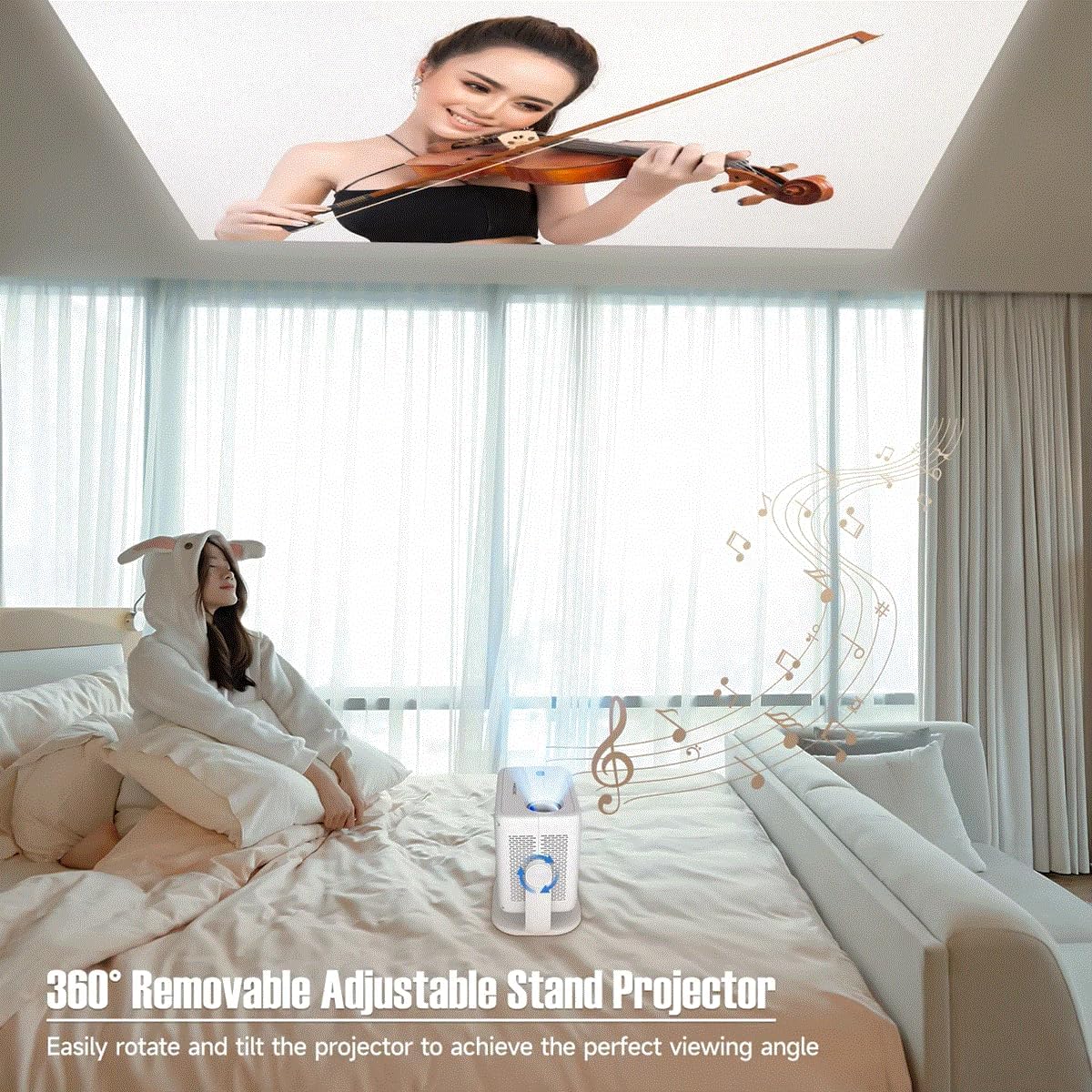
Figure 5.1: The projector's adjustable stand enables projection onto various surfaces, including ceilings, for comfortable viewing.
5.2. Connexió d'alimentació
- Connecteu l'adaptador de corrent al port d'entrada d'alimentació del projector.
- Connecteu l'adaptador d'alimentació a una presa de corrent adequada.
5.3. Engegada inicial
Press the power button on the projector or the remote control to turn on the device. The projector will automatically perform keystone correction and focus.
6. Instruccions de funcionament
Video 6.1: This video demonstrates key features of the L018 Projector, including its 360° adjustable stand, automatic focus and keystone correction, projection throw distance capabilities, integrated Bluetooth 5.2 Hi-Fi stereo speaker, 1080P native resolution with 4K support, and wireless screen mirroring functionality.
6.1. Auto Keystone Correction & Focus
The L018 Projector features automatic keystone correction and focus. This means the image will automatically adjust to be rectangular and sharp, even if the projector is placed at an angle. This process typically takes only 2 seconds.
Figure 6.1: The projector automatically corrects image distortion and focuses for a clear picture.
6.2. Image Adjustment (Zoom In & Zoom Out)
You can easily adjust the image size from 50% to 100% without physically moving the projector. After using this function, it may be necessary to slightly move the projector for the auto-focus and keystone correction to re-engage and optimize the image.
6.3. Mirall de pantalla sense fil
Seamlessly cast content from your phone, tablet, or laptop to the projector. The built-in Android 11 system and high-performing Allwinner H713 Chip ensure a smooth mirroring experience.

Figure 6.2: The projector delivers sharp and detailed images with high brightness and contrast.
6.4. Connectivitat
- Dual-band WiFi 6 (2.4G+5G): Provides ultra-fast and stable connection for streaming and online content without delay.
- Bluetooth 5.2: Connecteu altaveus o auriculars Bluetooth externs per a una experiència d'àudio millorada.
- HDMI i USB: Wired connectivity options for various devices.

Figure 6.3: The benefits of Dual-band WiFi 6 for fast and stable streaming.
6.5. So
The projector is equipped with a built-in Hi-Fi Stereo Speaker, allowing you to enjoy an immersive sound experience directly from the device. For private listening or enhanced audio, connect external speakers or headphones via Bluetooth 5.2 or the audio output port.
6.6. Projection Modes
The projector offers three distinct projection modes to suit your viewing needs:
- Mode estàndard: Balanced settings for general viewing.
- Mode de ressaltat: Increases brightness for clearer visibility in brighter environments.
- Mode d'estalvi d'energia: Reduces power consumption, ideal for extended viewing or when battery life is a concern.
7. Manteniment
Un manteniment regular ajuda a garantir la longevitat i el rendiment òptim del projector.
- Neteja de lents: Feu servir un drap suau i sense borrissol dissenyat específicament per a lents òptiques. No utilitzeu productes de neteja abrasius ni dissolvents.
- Ports de ventilació: Periodically check and clean the ventilation openings to prevent dust buildup, which can lead to overheating. Use a soft brush or compressed air.
- Neteja exterior: Netegeu l'exterior del projector amb un drap suau i sec. Per a marques difícils, netegeu lleugeramentamp es pot utilitzar un drap, seguit d'una neteja en sec.
- Emmagatzematge: Quan no l'utilitzeu durant períodes prolongats, guardeu el projector en un lloc fresc i sec, allunyat de la llum solar directa i de temperatures extremes.
8. Solució De Problemes
Si teniu problemes amb el projector, consulteu els problemes i solucions més comuns següents:
| Problema | Causa possible | Solució |
|---|---|---|
| Sense poder | Cable d'alimentació no connectat; Problema amb la presa de corrent. | Assegureu-vos que el cable d'alimentació estigui ben connectat. Proveu una altra presa de corrent. |
| Sense imatge | Input source not selected; Cable connection issue; Lens cap on. | Select correct input source. Check HDMI/USB cable connections. Remove lens cap. |
| Imatge borrosa | Out of focus; Projector moved after zoom adjustment. | Allow auto-focus to re-engage (slight movement may help). Ensure projector is within optimal throw distance. |
| Distorted Image (Trapezoid) | Projector no perpendicular a la pantalla. | Auto keystone correction should fix this. If not, slightly adjust projector position. |
| Sense so | Volum massa baix; Silenciat; Dispositiu d'àudio extern no connectat/seleccionat. | Augmenta el volum. Activa el so. Comprova la connexió Bluetooth o el cable d'àudio extern. |
| Wireless Mirroring Issues | Network instability; Device compatibility. | Ensure both devices are on the same Wi-Fi network. Restart both devices. Check device compatibility. |
9. Especificacions
| Característica | Descripció |
|---|---|
| Nom de marca | Genèric |
| Número de model de l'article | Projector L018 |
| Nom del color | Blanc |
| Característiques especials | 360° Removable Adjustable Stand Projector, BT5.2 & Hl-Fl Stereo Speaker, Ultra-fast connection Dual-band WiFi6 (2.4G+5G), High-Performing Processor Allwinner H713 Chip |
| Usos recomanats | Educació, Home Cinema, Jocs, Negocis |
| Tecnologia de connectivitat | Bluetooth, Wi-Fi, USB, HDMI |
| Resolució de visualització | 1920 x 1080 (1080P natiu, compatible amb 4K) |
| Lúmens ANSI | 650 ANSI |
| Dimensió projectada | 30-300 polzades |
| Font de llum | LED |
| Escala de pantalla | 16:09 |
| Relació de contrast | 10,001:1-20,000:1 |
| Correcció de pedra clau | Correcció automàtica |
| Sistema operatiu | Android 11 |
| Processador | Allwinner H713 Chip |
| Bluetooth | BT5.2 |
| Altaveu incorporat | Sí |
| Control remot | Sí |
| Projection Throw Ratio | 1.2:1 |
10. Garantia i Suport
For warranty information and customer support, please refer to the documentation provided at the time of purchase or contact the manufacturer directly. Keep your purchase receipt as proof of purchase.
For technical assistance or further inquiries, please visit the official Generic brand weblloc o poseu-vos en contacte amb el seu servei d'atenció al client.


