
1. Introducció
The Schlage Arrive WiFi Deadbolt Smart Lock offers advanced security and convenient keyless access for your home. This smart deadbolt features a push-button keypad, built-in WiFi for remote control via the Schlage Home app, and compatibility with smart home systems like Alexa and Google Home. This manual provides detailed instructions for the installation, setup, operation, and maintenance of your Schlage Arrive Smart Lock.

Image: Schlage Arrive Smart WiFi Deadbolt highlighting its key features including push-button keypad, app control, built-in WiFi, remote access, smart home readiness, voice control, 250 schedule codes, and battery operation.
2. Informació de seguretat
Si us plau, llegiu atentament totes les instruccions abans de la instal·lació i l'ús. Conserveu aquest manual per a futures consultes.
- Do not use harsh chemicals or abrasive cleaners on the lock.
- Ensure all components are installed correctly and securely.
- Keep fingers clear of moving parts during operation.
- Only use specified battery types (4 AA alkaline batteries).
- Do not attempt to disassemble or modify the lock beyond the instructions provided.
- Protect your access codes and change them regularly.
3. Contingut del paquet
Verifiqueu que hi hagi totes les peces abans de començar la instal·lació:
- Muntatge de teclat exterior
- Muntatge interior
- Pestillo de cèrcol
- Placa de vaga
- Placa de reforç
- Cargols de muntatge
- 4 piles alcalines AA
- Clau de còpia de seguretat
- Guia d'instal·lació

Image: All components included in the Schlage Arrive Smart WiFi Deadbolt package.
4. Instal·lació
4.1 Comprovacions prèvies a la instal·lació
Before you begin, ensure your door is compatible with the Schlage Arrive Deadbolt:
- Gruix de la porta: 1-3/8 inches to 1-3/4 inches (35mm to 44mm)
- Part posterior: 2-3/8 polzades (60 mm) o 2-3/4 polzades (70 mm)
- Cross Bore Hole Diameter: 2-1/8 polzades (54 mm)
- Latch Bore Diameter: 1 mm
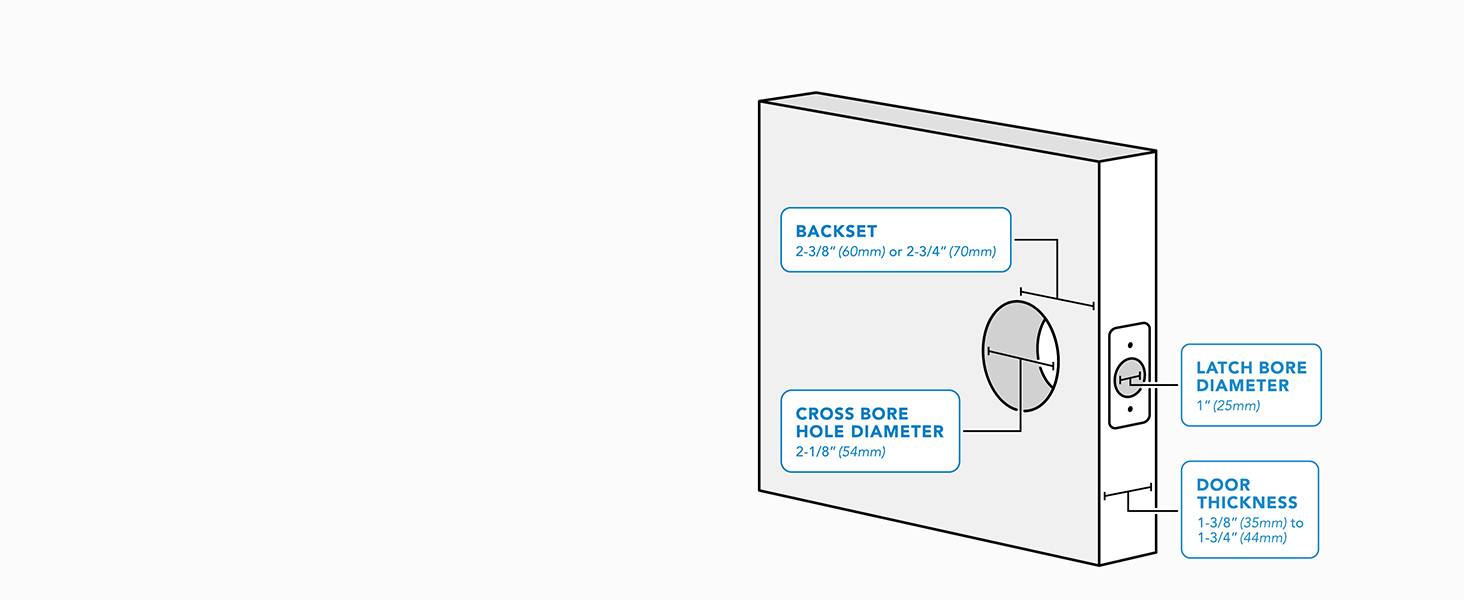
Image: Diagram illustrating required door dimensions for proper deadbolt fit.
4.2 Passos d'instal·lació
Follow these steps to install your deadbolt. A screwdriver is the only tool required.
- Prepara la porta: If replacing an existing deadbolt, remove it. Ensure the door frame is clear.
- Instal·leu el tancament: Insert the deadbolt latch into the door edge. Ensure the 'UP' arrow is facing upwards.
- Instal·leu el teclat exterior: Feed the cable through the cross bore hole and position the keypad on the exterior side of the door.
- Instal·leu el conjunt interior: Connect the cable from the exterior keypad to the interior assembly. Secure the interior assembly to the door using the provided screws.
- Instal·leu les bateries: Insert the 4 AA alkaline batteries into the interior assembly.
- Perform Handing Process: The lock will automatically detect door handing. Follow any prompts from the lock.

Image: A person using a screwdriver to install the Schlage Arrive Smart WiFi Deadbolt, highlighting the ease of installation.
Video: Schlage Arrive OverviewAquest vídeo ofereix una visió generalview of the product, including aspects of its installation and features.
5. Configuració
5.1 App Pairing and WiFi Connection
To unlock the full potential of your Schlage Arrive Smart Lock, download the Schlage Home app and connect it to your home's WiFi network.
- Descarrega't el Schlage Home app des de la botiga d'aplicacions del teu dispositiu.
- Creeu un compte o inicieu sessió.
- Follow the in-app instructions to add your new Schlage Arrive lock. This typically involves scanning a QR code on the lock or entering a pairing code.
- Connect the lock to your home's 2.4 GHz WiFi network through the app.

Image: A smartphone displaying the Schlage Home app interface, demonstrating remote control and monitoring capabilities.
Video: Schlage Home App. This video demonstrates the features and functionality of the Schlage Home mobile application.
5.2 Programació de codis d'accés
You can program up to 250 unique access codes for keyless entry using the Schlage Home app.
- Obriu el Schlage Home app and select your lock.
- Navigate to the 'Access Codes' or 'Manage Access' section.
- Follow the prompts to create a new access code. You can set permanent, recurring, or temporary codes.
- Assign a name to each code for easy identification.

Image: A hand interacting with the backlit push-button keypad to enter an access code.
6. Funcionament del pany
6.1 Tancar la porta
- Des de l'exterior: Press the 'Lock' button on the keypad.
- Des de l'interior: Rotate the thumbturn to the locked position.
- Via Schlage Home App: Use the app to remotely lock the deadbolt.

Image: A finger pressing the dedicated lock button on the keypad for quick locking.
6.2 Desbloqueig de la porta
- Des de l'exterior: Enter a valid 4-8 digit access code on the keypad, then press the 'Schlage' button.
- Des de l'interior: Rotate the thumbturn to the unlocked position.
- Via Schlage Home App: Use the app to remotely unlock the deadbolt.
- Amb clau: Use the physical backup key in the keyhole.
6.3 Funció de bloqueig automàtic
The auto-lock feature automatically relocks the door after a set period. This can be configured in the Schlage Home app with various time delay options or turned off completely.
7. Manteniment
7.1 Substitució de la bateria
The lock operates on 4 AA alkaline batteries. The Schlage Home app will notify you when battery levels are low. To replace:
- Remove the cover from the interior assembly.
- Traieu les piles velles.
- Introduïu quatre piles alcalines AA noves, assegurant-vos de la polaritat correcta.
- Substituïu la coberta.

Image: A woman replacing the batteries in the interior unit of the smart lock.
7.2 Neteja
Netegeu el pany amb un drap suauamp drap. Eviteu utilitzar netejadors o dissolvents abrasius, ja que poden danyar l'acabat i els components electrònics.
8. Solució De Problemes
Consulteu la taula següent per veure els problemes habituals i les seves solucions.
| Problema | Causa possible | Solució |
|---|---|---|
| El pany no respon a les entrades del teclat. | Low batteries; incorrect code; keypad malfunction. | Replace batteries; re-enter code; perform a factory reset if necessary. |
| No es pot connectar a la xarxa Wi-Fi. | Incorrect WiFi password; router too far; 5GHz network selected. | Verify WiFi password; move router closer or install extender; ensure 2.4GHz network is used. |
| El bloqueig automàtic no s'activa. | Feature disabled; incorrect time delay setting. | Check settings in the Schlage Home app; ensure door is fully closed. |
| El pany fa sorolls estranys. | Misalignment; obstruction. | Check door alignment and ensure no obstructions in the door frame or latch path. |
9. Especificacions
Key technical specifications for the Schlage Arrive WiFi Deadbolt Smart Lock:
| Característica | Detall |
|---|---|
| Marca | ESCHAGE |
| Número de model | BE459WBCEN622 |
| Tipus de bloqueig | Teclat Deadbolt |
| Connectivitat | Bluetooth, WiFi |
| Font d'alimentació | 4 piles alcalines AA |
| Material | Zinc |
| Color | Negre mat |
| Estil de retall | segle |
| Dimensions de l'article (L x A x A) | 0.83 x 2.5 x 4.49 inches (Exterior Keypad) |
| Pes de l'article | 2.4 lliures |
| Característiques especials | Back-Lit Keypad, Battery Indicator, Remote Access, Voice Control |
| Compatibilitat | Alexa, Google Home |
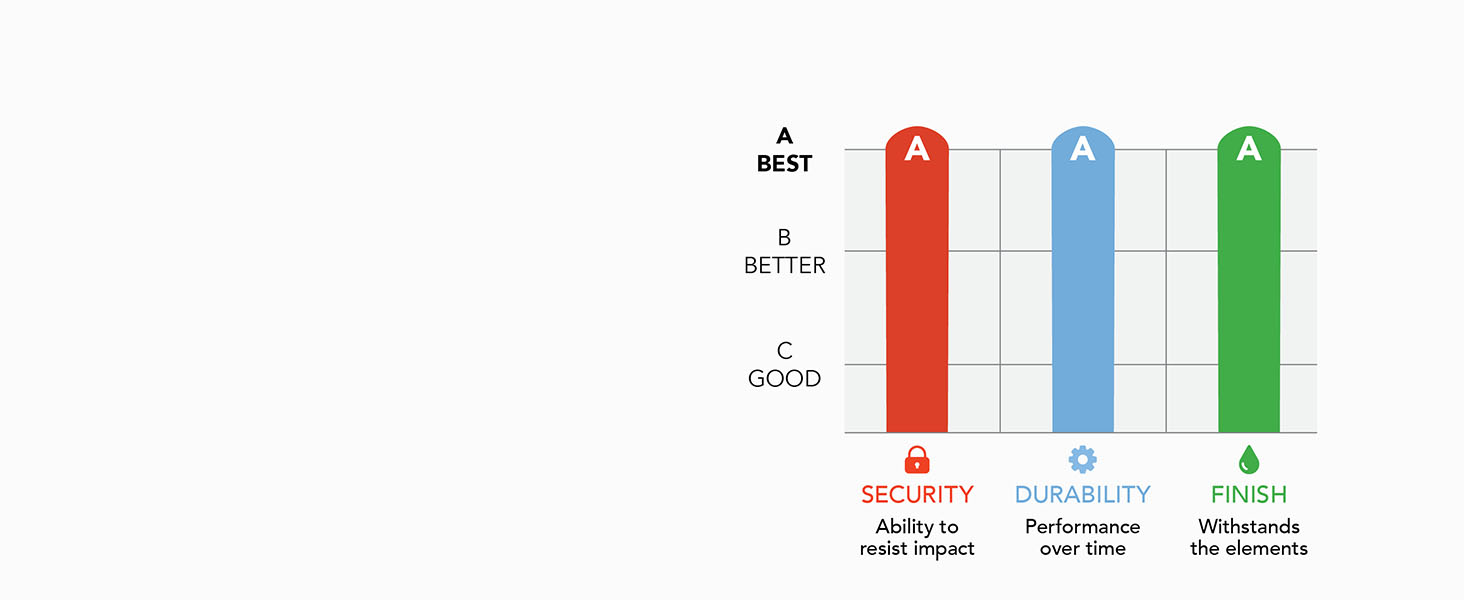
Image: BHMA certification ratings for Security, Durability, and Finish, indicating the product's high standards.
10. Garantia i Suport
Schlage products are backed by a limited lifetime mechanical and finish warranty and a 3-year limited electronics warranty. For specific warranty details, please refer to the official Schlage weblloc o contacteu amb el servei d'atenció al client.
For technical assistance, troubleshooting, or warranty claims, please visit the official Schlage support weblloc web o poseu-vos en contacte amb el seu departament d'atenció al client. La informació de contacte normalment es pot trobar a l'embalatge del producte o a la pàgina de Schlage. weblloc.