
THINKYA Y19
THINKYA Portable CD Player User Manual
Model: Y19 | Brand: THINKYA
1. Introducció
Thank you for choosing the THINKYA Portable CD Player Y19. This multi-functional device combines classic CD playback with modern connectivity options, including Bluetooth, USB, AUX, and Optical modes. Featuring built-in HiFi stereo speakers and a convenient remote control, it offers a versatile audio experience for your home or on the go. Please read this manual thoroughly before use to ensure proper operation and longevity of your device.
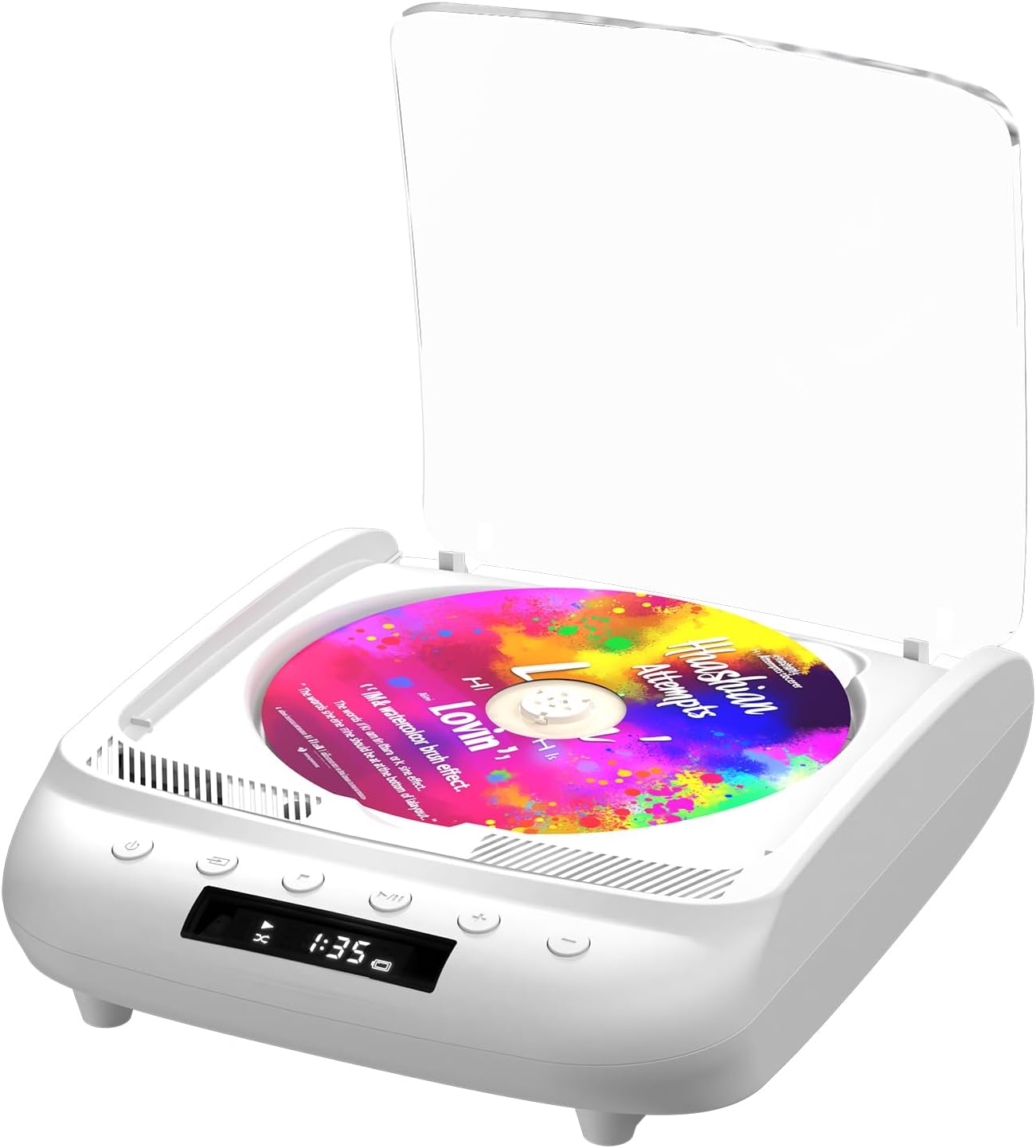
Figure 1.1: THINKYA Portable CD Player Y19
2. Contingut del paquet
Assegureu-vos que tots els articles estiguin presents i en bon estat en desembalar-los:
- Portable CD Player x 1
- Control remot x 1
- Cable USB-C x 1
- Cable auxiliar de 3.5 mm x 1
- Manual d'usuari x 1
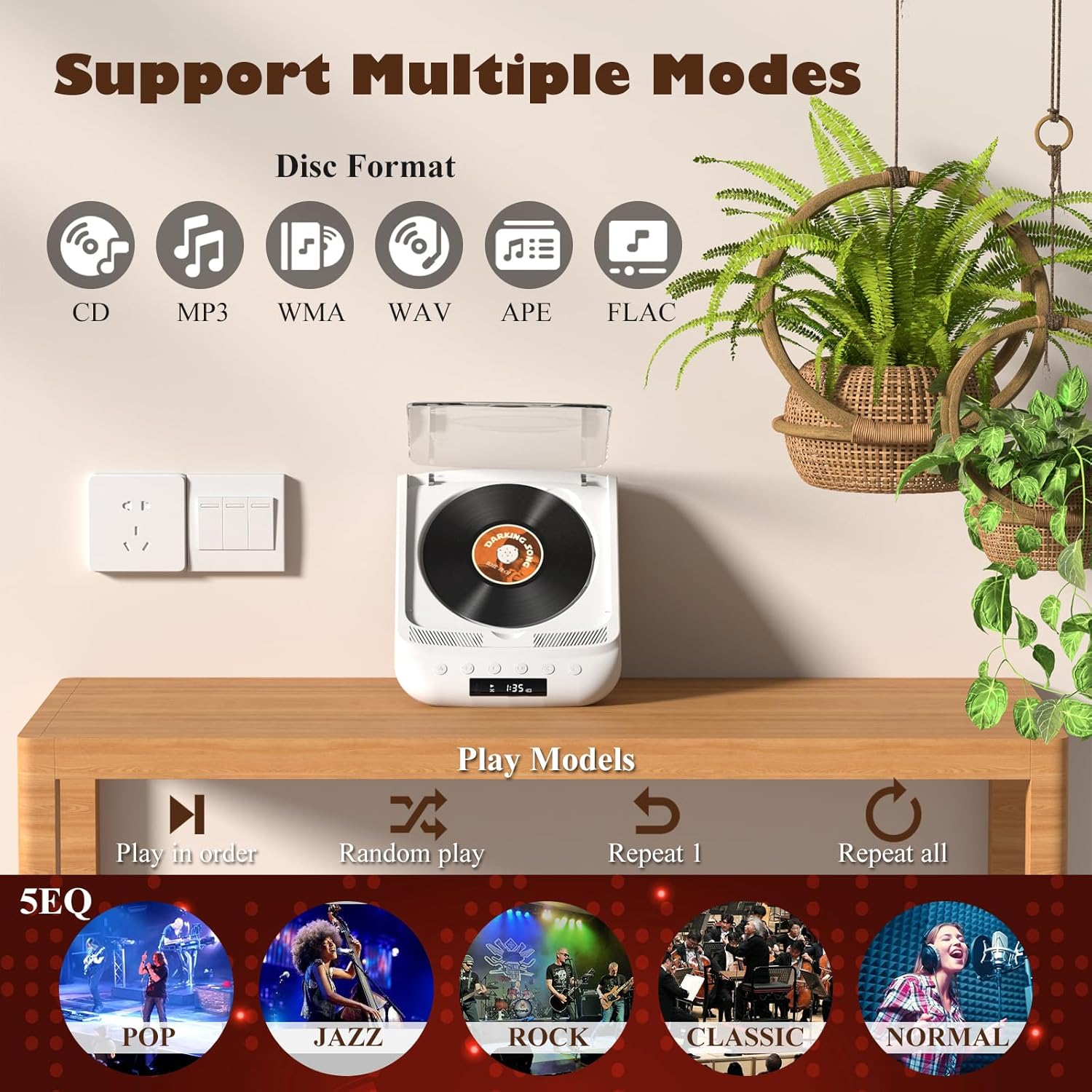
Figure 2.1: All items included in the package.
3. Producte acabatview & Controls
Familiarize yourself with the player's layout and functions:

Figure 3.1: Front panel controls and rear ports. (1) Optical, (2) Headphone, (3) AUX, (4) USB, (5) DCIN 5V, (6) On/Off switch.
Botons del tauler frontal:
- Botó d'encesa: Encén/apaga el dispositiu.
- Botó de mode: Cycles through playback modes (CD, USB, Bluetooth, AUX, Optical).
- Botó d'aturada: Atura la reproducció.
- Botó Reproduir/Pausa: Inicia o posa en pausa la reproducció.
- Volum - / Pista anterior: Disminueix el volum o salta a la pista anterior.
- Volum + / Pista següent: Augmenta el volum o salta a la pista següent.
Ports del panell posterior:
- SPDIF (Optical) Output: Per connectar sistemes d'àudio externs mitjançant cable òptic.
- Presa d'auriculars (3.5 mm): For private listening with headphones.
- Entrada AUX (3.5 mm): Per connectar dispositius d'àudio externs mitjançant un cable AUX.
- Port USB: Per reproduir àudio files d'una unitat USB.
- DCIN 5V (USB-C): Power input for charging and continuous operation.
- Interruptor d'encesa/apagada: Interruptor principal d'alimentació del dispositiu.

Figura 3.2: Detallada view of 3.5mm Earphone Jack and USB Playback port.

Figure 3.3: Enjoying purer singing with Optical Mode connection to external speakers.
4. Configuració inicial
4.1 Càrrega del dispositiu
The THINKYA CD Player has a built-in 2600mAh rechargeable battery. Before first use, fully charge the device.
- Connect the provided USB-C cable to the DCIN 5V port on the rear of the player.
- Connect the other end of the USB-C cable to a compatible 5V/2A USB power adapter (not included), power bank, or computer USB port.
- The LED screen will indicate charging status. A full charge takes approximately 3 hours and provides 4-8 hours of playback time.

Figure 4.1: Flexible charging options for the built-in rechargeable battery.
4.2 Inserció d'un CD
To insert a CD:
- Gently lift the transparent lid of the CD player.
- If present, remove the protective cardboard from the CD compartment.
- Place the CD onto the spindle with the label side facing up. Ensure it clicks securely into place.
- Close the transparent lid.
Figure 4.2: Correct placement of a CD in the player.
5. Instruccions de funcionament
The THINKYA CD Player supports multiple playback modes. Press the Botó de mode on the front panel or remote control to switch between them.
5.1 CD Playback Mode
After inserting a CD and powering on the device, it will automatically enter CD mode and begin playback. The LED screen will display the track number and playback time.
- Reproduir/pausa: Premeu el botó Reproduir/Pausa.
- Seguiment anterior / següent: Use the Volume +/- buttons (short press) to skip tracks.
- Atura: Premeu el botó Atura.

Figure 5.1: Dual HiFi Stereo Speakers and CD playback options (Repeat All, Random, In Order, Repeat 1).
5.2 Bluetooth Mode (Input & Output)
The player can act as both a Bluetooth transmitter and receiver.
Bluetooth Receiver (Connect your phone/tablet to the CD Player):
- Switch the CD player to Bluetooth mode (BT will flash on the LED screen).
- On your mobile device, search for "THINKYA Y19" in the Bluetooth settings.
- Select to pair. Once connected, the BT indicator will stop flashing. You can now play audio from your device through the CD player's speakers.
Bluetooth Transmitter (Connect the CD Player to Bluetooth headphones/speakers):
- Ensure the CD player is in CD, USB, or AUX mode.
- Activeu el mode de sincronització als auriculars o altaveus Bluetooth.
- The CD player will automatically search for and connect to nearby Bluetooth audio devices. Once connected, audio will be transmitted to your external Bluetooth device.

Figure 5.2: Bluetooth 5.0 connectivity for both transmitting and receiving audio.
Video 5.1: Demonstration of THINKYA Portable CD Player's Bluetooth functionality, including pairing with external speakers.
5.3 USB Playback Mode
Insert a USB flash drive into the USB port on the rear panel. The player supports MP3/WMA/WAV/APE/FLAC formats. Switch to USB mode using the Mode button.
5.4 Mode AUX
Connect an external audio device (e.g., smartphone, MP3 player) to the AUX input port using the provided 3.5mm AUX cable. Switch to AUX mode using the Mode button.
5.5 Optical Mode
Connect the SPDIF (Optical) output port to an external audio system with an optical input. This mode is for digital audio output from the CD player to a compatible receiver or soundbar.
6. Ús del comandament a distància
The included remote control allows for convenient operation from a distance (up to 15ft). It requires 2 AAA batteries (not included).
Figura 6.1: Comandament a distància per a un funcionament convenient.
Funcions de control remot:
- Potència: On/Off.
- VOL +/-: Ajusta el volum.
- Anterior/Següent: Skips tracks.
- Reproduir/pausa: Inicia o posa en pausa la reproducció.
- Atura: Atura la reproducció.
- EQ: Cycles through equalizer presets (POP, JAZZ, ROCK, CLASSIC, NORMAL).
- BT: Switches to Bluetooth mode.
- Altres botons: May include Bass, Treble adjustments depending on the remote version.
7. Especificacions tècniques
| Característica | Especificació |
|---|---|
| Model | Y19 |
| Entrada Voltage | 5V-2A |
| Capacitat de la bateria | 2600 mAh d'ions de liti |
| Temps de càrrega | Aprox. 3 hores |
| Temps de reproducció | Aprox. 4-8 hores |
| Mida portàtil | 8.27 x 6.69 x 3.03 polzades |
| Pes | 2.2 lb (1.72 pounds listed in specs, using A+ content for consistency) |
| Altaveu | 4Ω-2*2W (Independent Sound Cavity) |
| CD Format Support | CD-DA, CD-R, MP3 |
| USB Format Support | MP3 / WMA / WAV / APE / FLAC |
| Interfície | 3.5mm Audio, USB, Optical, Headphone, USB-C Charge |
| Mode de jugador | CD Play, Bluetooth, USB, AUX, Optical |
8. Cura i Manteniment
- Neteja: Feu servir un drap suau i sec per netejar l'exterior del reproductor. Per a la lent de CD, feu servir un netejador de lents de CD especialitzat. No utilitzeu netejadors abrasius ni dissolvents.
- Manipulació de CD: Always hold CDs by their edges. Avoid touching the playing surface. Store CDs in their cases to prevent scratches and dust accumulation.
- Emmagatzematge: When not in use for extended periods, store the player in a cool, dry place away from direct sunlight and extreme temperatures.
- Cura de la bateria: Per allargar la durada de la bateria, eviteu descarregar-la completament amb freqüència. Carregueu el dispositiu regularment, fins i tot si no l'utilitzeu.
9. Guia de resolució de problemes
If you encounter issues with your THINKYA CD Player, refer to the common problems and solutions below:
9.1 Sense alimentació / El dispositiu no s'encén
- Ensure the main On/Off switch on the rear panel is in the 'On' position.
- Check if the device is properly charged. Connect the USB-C cable and verify the charging indicator.
- Proveu un cable USB-C o un adaptador d'alimentació diferent.
9.2 CD Not Playing / Disc Error
- Ensure the CD is clean and free of scratches or smudges. Clean with a soft, lint-free cloth from the center outwards.
- Verify the CD is inserted correctly with the label side facing up and securely on the spindle.
- Make sure the player is in CD mode.
- Try a different CD to rule out a faulty disc.
9.3 Sense so
- Adjust the volume using the buttons on the player or the remote control.
- If using headphones or external speakers, ensure they are properly connected and functional.
- If in Bluetooth mode, ensure the player is correctly paired with your external device and the volume on both devices is adjusted.
- If in AUX mode, check the AUX cable connection and ensure the external device's volume is up.
- Ensure the correct playback mode is selected (CD, USB, BT, AUX, Optical).
9.4 Problemes de connexió Bluetooth
- Ensure the player is in Bluetooth mode (BT flashing).
- Keep the player and the Bluetooth device within the effective range (typically 10 meters/33 feet).
- Turn off and on the Bluetooth function on both the player and your external device, then try pairing again.
- Clear previous Bluetooth pairings on your external device and try to connect again.
10. Garantia i atenció al client
10.1 Informació de la garantia
THINKYA products are manufactured to the highest quality standards. For specific warranty details, please refer to the warranty card included in your product packaging or contact THINKYA customer support. Keep your purchase receipt as proof of purchase.
10.2 Atenció al client
If you require further assistance or have questions not covered in this manual, please contact our customer support team:
- Correu electrònic: support@thinkya.com
- Weblloc: www.thinkya.com
Ask a question about this manual
Ask about setup, troubleshooting, compatibility, parts, safety, or missing instructions. Manuals+ will review the question and use this page’s manual context to help answer it.