
1. Introducció
This manual provides essential information for the safe and efficient operation, maintenance, and troubleshooting of your EAZYRC FMS Rochobby 1/18 Atlas RC Crawler. Please read this manual thoroughly before operating the vehicle to ensure proper usage and to maximize its lifespan.
The EAZYRC FMS Rochobby 1/18 Atlas is a high-performance remote-controlled crawler designed for various terrains. It features a robust 4x4 drivetrain, advanced lighting, a 2.4GHz radio system for reliable control, durable ball bearings, full metal gears, and a 4-link suspension system for superior climbing and driving capabilities. The rapid separation car body allows for quick access and battery changes.
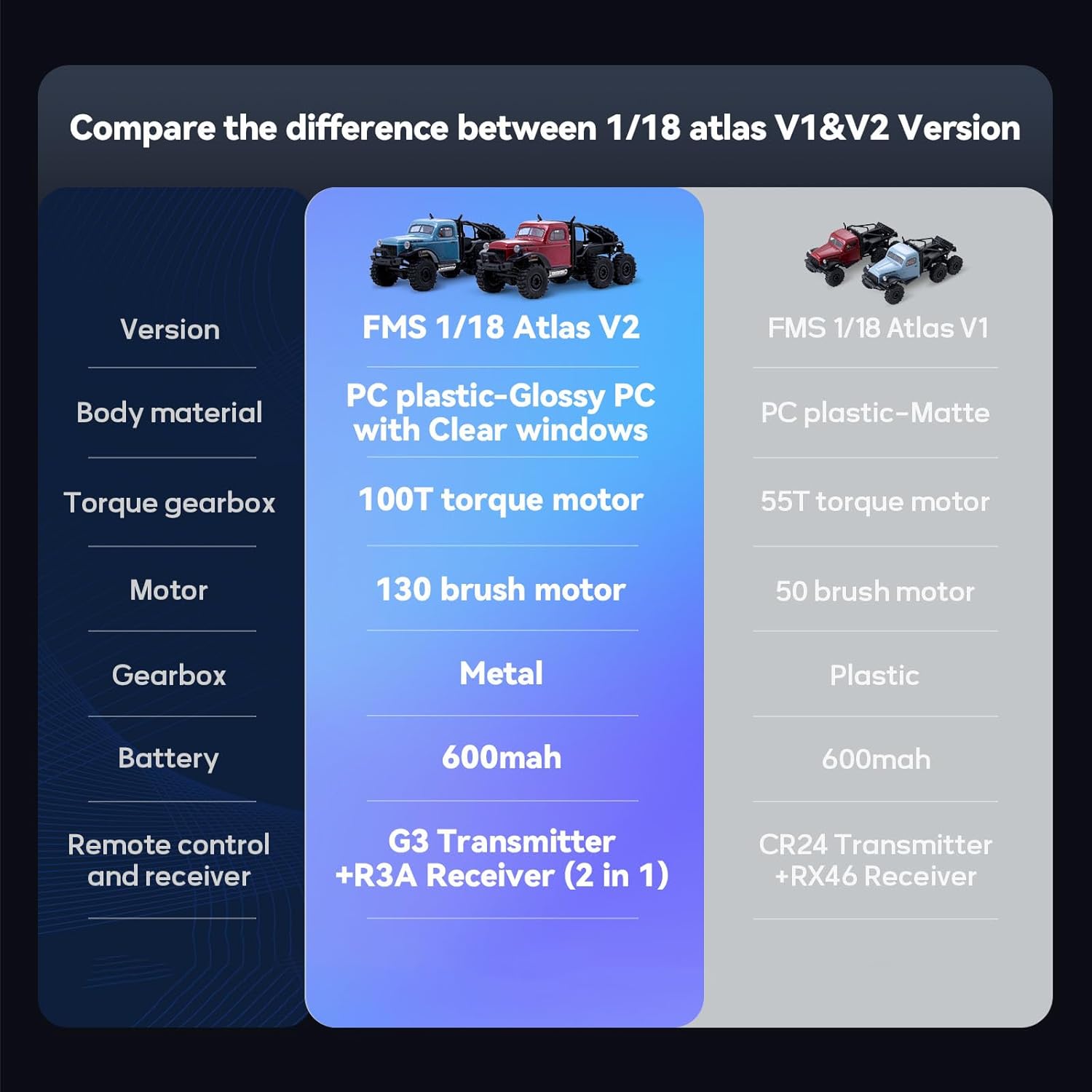
Image: Two EAZYRC FMS Rochobby 1/18 Atlas RC Crawlers navigating rocky terrain, showcasing their robust design and off-road capability.
2. Què hi ha a la caixa
En desembalar-lo, comproveu que tots els components que s'enumeren a continuació hi són presents i en bon estat:
- EAZYRC FMS Rochobby 1/18 Atlas RC Crawler (assembled)
- 2.4GHz Remote Control Transmitter
- Lithium Polymer Battery (pre-installed or separate)
- Cable de càrrega USB
- Manual d'instruccions (aquest document)
3. Guia de configuració
3.1 Instal·lació i càrrega de la bateria
The RC Crawler requires one Lithium Polymer battery, which is included. Ensure the battery is fully charged before first use.
- Accessing the Battery Compartment: The 1/18 Atlas features a rapid separation car body. Gently lift and detach the body shell to access the internal components, including the battery compartment.
- Connexió de la bateria: Connect the included Lithium Polymer battery to the vehicle's ESC (Electronic Speed Controller) connector. Ensure the polarity is correct.
- Càrrega de la bateria: Use the provided USB charging cable. Connect the battery to the charging cable, and then plug the USB end into a suitable USB power source (e.g., computer USB port, USB wall adapter). The charging indicator will show the charging status (refer to charger instructions for specific light patterns).
- Reattaching the Body: Once the battery is installed and charged, carefully reattach the car body, ensuring it is securely fastened.

Image: The rapid separation car body is shown lifted, providing easy access to the battery and other internal electronics for quick changes or maintenance.
3.2 Configuració del control remot
The remote control operates on a 2.4GHz frequency, providing stable and responsive control.
- Instal·leu les bateries: Insert the required batteries (typically AA, not included) into the remote control transmitter, observing correct polarity.
- Encès: Turn on the remote control transmitter first, then turn on the RC Crawler. The vehicle and transmitter should automatically bind. If not, refer to the binding procedure in the remote control's specific manual.
4. Instruccions de funcionament
Familiarize yourself with the controls before operating the vehicle in challenging environments.
4.1 Controls bàsics
- Activador de l'accelerador: Premeu el gallet per avançar, empenyeu per frenar o retrocedir.
- Volant: Turn the wheel left or right to steer the vehicle. The new servo steering system provides a wider turning radius for improved maneuverability.

Image: A diagram illustrating the improved turning radius provided by the new servo steering system, enhancing the crawler's agility.
4.2 Consells de conducció
- The 35T 550 motor provides strong power, allowing the crawler to reach speeds of up to 5km/h on flat surfaces.
- The full metal gears and 4-link suspension system contribute to strong climbing and driving ability, making it suitable for various terrains.
- The vehicle is equipped with all-terrain tires for optimal grip and performance on diverse surfaces.
- Avoid operating in deep water or extreme mud to prevent damage to electronic components.

Image: A collage demonstrating the EAZYRC FMS Rochobby 1/18 Atlas RC Crawler's capability to conquer various terrains, including marshland, grassland, mud, and indoor obstacles.
4.3 Vídeos de productes
Watch these official product videos for visual guidance on features and operation:
Vídeo: Un overview of the EAZYRC FMS Rochobby 1/18 Atlas RC Crawler, demonstrating its key features and performance (1:43 duration).
Video: A demonstration of the EAZYRC FMS Rochobby 1/18 Atlas RC Crawler in action, highlighting its off-road capabilities (1:52 duration).
5. Manteniment
Regular maintenance ensures optimal performance and extends the life of your RC Crawler.
5.1 Neteja
- After each use, especially in dirty or dusty conditions, clean the vehicle using a soft brush or compressed air to remove debris.
- Netegeu el cos amb anunciamp tela. Eviteu utilitzar productes químics aggressivs.
5.2 Cura de la bateria
- Always disconnect the battery from the vehicle when not in use.
- Guardeu les piles en un lloc fresc i sec, allunyat de la llum solar directa i de temperatures extremes.
- Do not overcharge or over-discharge Lithium Polymer batteries. Follow manufacturer guidelines for charging.
5.3 Inspecció de components
- Regularly inspect the ball bearings and metal gears for wear or damage. Replace as necessary to maintain smooth operation.
- Check the 4-link suspension components for any loose connections or damage.
- Assegureu-vos que tots els cargols i elements de fixació estiguin ben ajustats.

Imatge: Una imatge detallada view of the RC crawler's chassis, highlighting the full metal gears designed for superior strength and endurance.
6. Solució De Problemes
If you encounter issues with your RC Crawler, refer to the following common problems and solutions:
| Problema | Causa possible | Solució |
|---|---|---|
| El vehicle no respon al comandament a distància | Low battery in vehicle or remote; Not bound; Interference | Charge vehicle battery; Replace remote batteries; Re-bind transmitter and receiver; Move to an area with less interference. |
| Vehicle moves slowly or lacks power | Low vehicle battery; Motor or gear issue | Charge vehicle battery fully; Inspect motor and gears for obstructions or damage. |
| Steering is unresponsive or erratic | Servo damage; Loose steering linkage; Interference | Check steering servo and linkages; Re-bind; Move to an area with less interference. |
| Els llums no funcionen | Loose connection; Damaged LED | Check wiring connections to the lights; Contact support for replacement parts if LEDs are damaged. |
7. Especificacions
Key technical specifications for the EAZYRC FMS Rochobby 1/18 Atlas RC Crawler:
- Model: 1/18 Atlas
- Escala: 1/18
- Sistema d'accionament: 4 X 4
- Motor: 35T 550 Brushed Motor
- Caixa de canvis: Full Metal Gearbox
- Suspensió: 4 Suspensió d'enllaços
- Direcció: New Servo Steering System
- Sistema de ràdio: 2.4 GHz
- Bateria: 1 bateria de polímer de liti (inclosa)
- Dimensions del producte: 21 x 9 x 10 polzades
- Pes de l'article: 2.55 lliures
- Edat recomanada: 16 anys i més
- Fabricant: EAZYRC

Image: A diagram illustrating the key dimensions of the EAZYRC FMS Rochobby 1/18 Atlas RC Crawler, including length, width, and height.
8. Garantia i Suport
Your EAZYRC FMS Rochobby 1/18 Atlas RC Crawler is covered by a 3-month repaired service guarantee. This warranty covers manufacturing defects and ensures repair services for eligible issues within the specified period.
For technical support, warranty claims, or inquiries regarding replacement parts, please contact EAZYRC customer service through their official weblloc web o el distribuïdor on es va comprar el producte. Si us plau, tingueu a mà el model del producte i la informació de compra quan us poseu en contacte amb el servei d'assistència.