1. Producte acabatview
The Generic 3 Axis GRBL 32 Bit Controller Board is designed for precise and efficient control of stepper motors in woodworking engraving machines, CNC milling machines, and similar applications. Featuring a 32-bit processor, it ensures stable and accurate movements for your projects.
Característiques principals:
- Offline Support: Supports offline control, eliminating the need for constant computer connection for independent operation.
- Compatibilitat versàtil: Compatible with various software applications that support GRBL firmware, such as Grblcontrol (Candle).
- Àmplies aplicacions: Suitable for woodworking engraving machines, CNC milling machines, and other precision applications.
- 32-bit Controller: Features a 32-bit processor for enhanced processing performance and precise stepper motor control.
- Y-axis Drive: Includes a Y-axis USB drive board that can independently control two Y-axis stepper motors for synchronous and coordinated movements, reducing misalignment.

Figure 1.1: Generic 3 Axis GRBL 32 Bit Controller Board with connections.
2. Contingut del paquet
Verifiqueu que tots els elements que s'enumeren a continuació s'inclouen al vostre paquet:
- 1 x 3 Axis GRBL Controller Board
- 1 x cable de dades
- 1 x Motor Cable
3. Especificacions tècniques
The following table outlines the technical specifications of the controller board:
| Paràmetre | Valor |
|---|---|
| Tipus d'element | 3 Axis GRBL Controller Board |
| Material | Aliatge d'alumini |
| Font d'alimentació | DC12-48V |
| Spindle Output | 24V 0-500W |
| Dimensions del paquet | 7.87 x 5.91 x 1.97 polzades |
| Pes de l'article | 7.2 unces |
| Número de model | Genericktx2uc7afv |

Figure 3.1: Dimensions of the 3 Axis GRBL Controller Board.
4. Identificació de components
Refer to the diagram below for a detailed identification of the controller board's components and their functions.

Figure 4.1: Labeled diagram of the 3 Axis GRBL Controller Board showing input, output, and control interfaces.
Descripcions dels components:
- Canvi: Main power On/Off switch for the board.
- Input Power Supply (DC12-48V): Terminal for connecting the main DC power input.
- 24V Spindle (Left): Power input for the spindle (0-48V).
- 24V Spindle (Right): Control input for the spindle (0-500W).
- X/Y1/Y2/Z Stepper Motor Ports: Connections for the X, Y1, Y2, and Z axis stepper motors.
- Ventilador: Connector for a cooling fan.
- 4P (2P: 12V 2P:PWM): PWM output for various accessories.
- Interfície USB: Port for connecting the board to a computer.
- Parada d'emergència: Input for an external emergency stop button.
- Tool Setting: Input for a tool probe or Z-axis setter.
- Inici: Input for a start button.
- Pausa: Input for a pause button.
- Final de carrera: Inputs for X, Y, and Z axis limit switches (endstops).
- Controlador fora de línia: Port for connecting an optional offline control module.
- Disc dur extern: Connection points for external stepper motor drivers.
- Vol constant de 24 Vtage Power Output: Auxiliary 24V power output.
- 3P (3P: 12V+/-/PWM): Another PWM output.
- Y2 Motor Movement Direction: Jumpers or settings for Y2 motor direction (REU - Reverse to Y1, SYN - Same direction as Y1).
5. Guia de configuració
Follow these steps to correctly set up your GRBL controller board for operation.
5.1. Connexió a la font d'alimentació
Connect a DC12-48V power supply to the designated input terminals on the board. Ensure the polarity is correct to prevent damage to the board.
5.2. Stepper Motor Connection
Connect your X, Y1, Y2, and Z axis stepper motors to their respective ports. For dual Y-axis operation, ensure both Y1 and Y2 motors are connected and configured correctly for synchronous movement. Refer to your motor's wiring diagram for proper connection.
5.3. Spindle Connection
If using a spindle, connect its power (0-48V) and control (0-500W) wires to the spindle terminals. Consult your spindle's manual for specific wiring instructions.
5.4. Connexió USB
Connect the controller board to your computer using the provided USB data cable. This connection is used for initial setup, firmware flashing, and real-time control via GRBL-compatible software.
5.5. Offline Controller (Optional)
If you are using an optional offline controller, connect it to the dedicated 'Offline controller' port. This allows for independent operation without a computer connection.
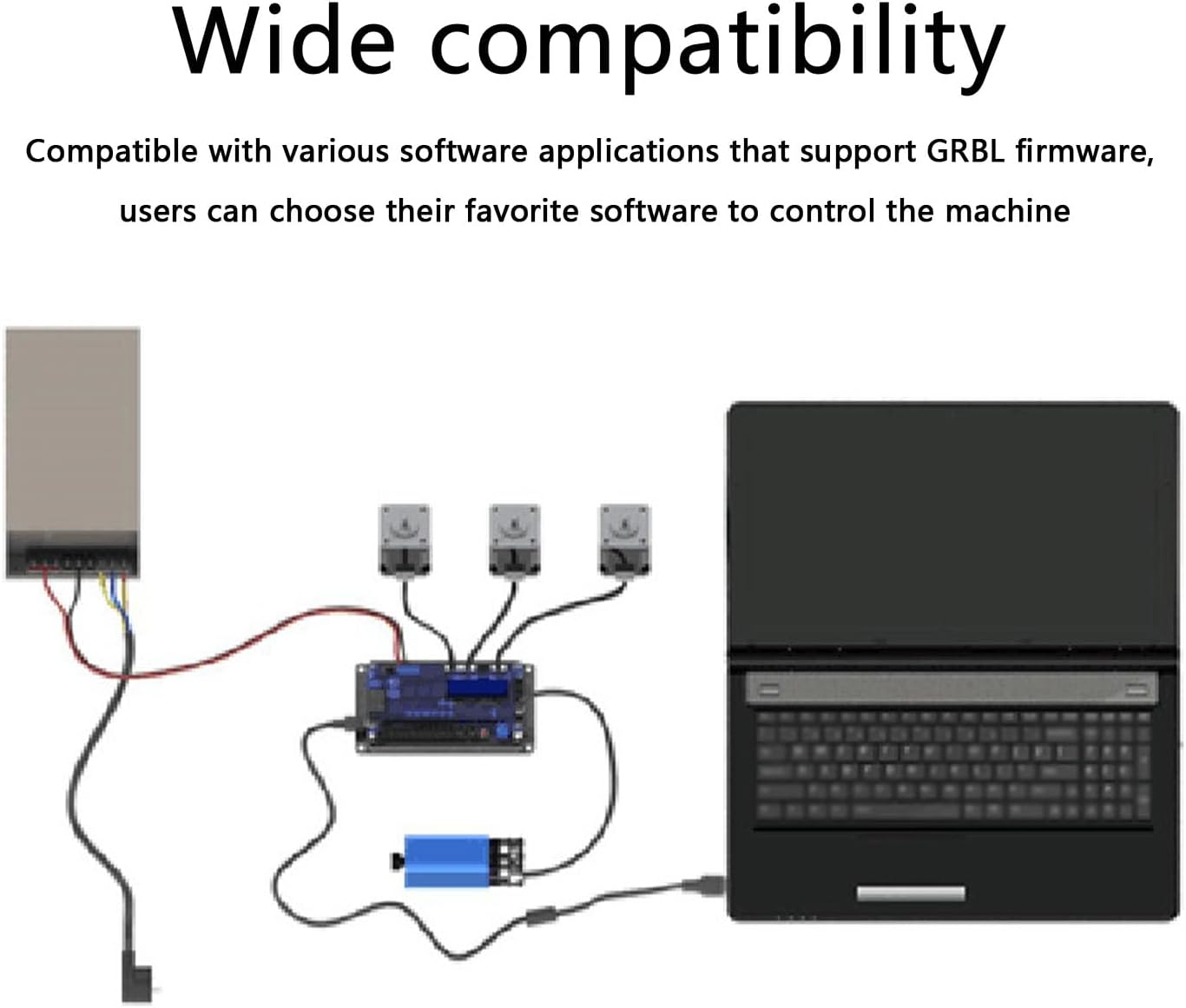
Figure 5.1: Diagram illustrating the connection of the GRBL controller board to a computer, power supply, and stepper motors.
6. Instruccions de funcionament
Once the board is set up, follow these instructions to operate your CNC machine.
6.1. Compatibilitat del programari
The board is compatible with various GRBL firmware-supporting software, such as Grblcontrol (Candle). Install your preferred software on your computer and ensure it can communicate with the controller board via the USB connection.
6.2. Configuració Inicial
After connecting, open your GRBL control software. Establish communication with the board. You may need to configure GRBL settings (e.g., steps per mm, maximum feed rates, acceleration) according to your machine's mechanical specifications. Consult your machine's documentation for recommended GRBL settings.
6.3. Running G-Code
Carrega el teu codi G file into the software. Ensure your workpiece is properly secured on the machine bed and the tool is correctly installed and zeroed. Initiate the carving or cutting process from the software interface.
6.4. Offline Control
If an offline controller is connected, you can load G-code files directly onto it (if supported by the offline module) and operate the machine without a continuous computer connection. Refer to the offline controller's manual for specific operation details.

Figura 6.1: Examples of CNC machines and engraving applications where the controller board can be used.
7. Manteniment
To ensure the longevity and optimal performance of your controller board, follow these maintenance guidelines:
- Mantenir net: Regularly clean the board to prevent dust and debris accumulation, which can affect performance and lead to overheating. Use compressed air or a soft brush.
- Condicions ambientals: Operate the board in a dry, well-ventilated environment, away from excessive heat, humidity, and corrosive substances.
- Connexions de cable: Periodically check all cable connections for tightness and wear. Loose connections can cause intermittent operation or damage to components.
- Actualitzacions de firmware: Check for official firmware updates periodically to benefit from performance improvements and bug fixes. Follow manufacturer instructions for updating firmware.
8. Solució De Problemes
This section provides solutions to common issues you might encounter with your GRBL controller board.
| Problema | Causa possible | Solució |
|---|---|---|
| Board not powering on | Volum d'alimentació incorrectatage or polarity; Loose power connection. | Verify power supply is DC12-48V and connected correctly. Check all power cables for secure connections. |
| Stepper motors not moving | Incorrect wiring; Driver issues; Software configuration error; Emergency stop engaged. | Check motor wiring against the diagram in Section 4. Ensure GRBL settings are correct. Verify emergency stop is disengaged. Test individual motor drivers if possible. |
| Inaccurate movements or skipped steps | Motor current too low/high; Mechanical issues (binding); GRBL steps/mm incorrect; Overheating drivers. | Adjust motor current settings. Inspect mechanical components for smooth movement. Calibrate steps/mm in GRBL. Ensure adequate cooling for drivers. |
| Problemes de connexió USB | Faulty USB cable; Driver not installed; Incorrect COM port selected. | Try a different USB cable. Install necessary USB drivers for the board. Select the correct COM port in your GRBL software. |
| Spindle not responding | Incorrect wiring; Spindle power supply issue; Software control settings. | Check spindle wiring. Verify spindle power supply. Ensure M3/M5 commands are correctly configured in GRBL for spindle control. |
9. Informació de seguretat
Adhere to the following safety precautions to prevent injury and damage to equipment:
- Always disconnect power before making any wiring changes, performing maintenance, or troubleshooting.
- Ensure proper grounding for all connected equipment to prevent electrical hazards.
- Operate CNC machines in a well-ventilated area to dissipate fumes and dust generated during operation.
- Wear appropriate personal protective equipment (PPE), such as safety glasses, hearing protection, and gloves, during machine operation.
- Keep hands, loose clothing, and long hair away from moving parts of the machine.
- No excedeixi el vol especificattage and current ratings for the board and all connected components.
- Never leave a running CNC machine unattended.
10. Garantia i Suport
As this product is from a generic brand, warranty terms and technical support may vary. Please refer to the seller or retailer from whom you purchased the product for specific warranty information and technical assistance.
For general GRBL-related inquiries, numerous online communities, forums, and open-source documentation can provide valuable resources and support for configuring and operating GRBL-based systems.