
1. Informació important de seguretat
Si us plau, llegiu atentament totes les instruccions abans del muntatge i l'ús. Si no seguiu aquestes instruccions, podeu patir lesions o danys al producte.
- Always keep children and pets away from the desk when in motion.
- Use the child lock feature (if available) to prevent unintended height adjustments.
- Be aware of the anti-collision feature; do not force the desk to move if it encounters an obstacle.
- Assegureu-vos que tots els cables estiguin correctament col·locats per evitar que s'enredin durant els ajustaments d'alçada.
- Do not overload the desk. The maximum weight capacity is 180 lbs.
- Feu servir l'escriptori només sobre una superfície plana.
2. Contingut del paquet
Verifiqueu que tots els components siguin presents abans de començar el muntatge. Si falta alguna peça o hi ha alguna peça danyada, poseu-vos en contacte amb el servei d'atenció al client.
- Desktop (0.6" thick, Rustic Brown)
- Potes d'escriptori (2)
- Foot Pads (2)
- Crossbar/Frame Assembly
- Control Panel with LED Touchscreen
- Adaptador d'alimentació i cable
- Ganxo per a auriculars
- Assembly Hardware (screws, L-shaped installation tools)
- Manual d'usuari
3. Instruccions de muntatge
The DEVAISE ASJZ021 desk is designed for quick and simple assembly, typically within 15 minutes. All holes are pre-drilled, and accessories are clearly labeled.
Eines necessàries:
- Tornavís Phillips (no inclòs)
- L-shaped installation tools (included)
Muntatge pas a pas:
- Desempaquetar components: Traieu amb cura totes les peces de l'embalatge i col·loqueu-les sobre una superfície neta i suau per evitar ratllades.
- Fixeu les coixinetes dels peus: Secure the foot pads to the bottom of each desk leg using the provided screws.
- Muntatge del marc: Connect the desk legs to the crossbar/frame assembly. Ensure all connections are tight and secure.
- Adjunta l'escriptori: Carefully place the desktop onto the assembled frame. Align the pre-drilled holes on the desktop with the frame. Secure the desktop to the frame using the provided screws.
- Instal·leu el tauler de control: Mount the LED touchscreen control panel to the underside of the desktop in the designated location. Connect the control panel cable to the motor.
- Connectar l'alimentació: Plug the power adapter into the desk's motor and then into a wall outlet.
- Fixeu el ganxo per als auriculars: Install the headphone hook to the side of the desk as desired.

Imatge: Explosió view of desk components illustrating the 15-minute quick installation process.
4. Instruccions de funcionament
The DEVAISE ASJZ021 Electric Standing Desk features a tri-motor system for smooth and quiet height adjustments and a smart LED touchscreen controller.
Tauler de control acabatview:

Imatge: Detallada view of the multi-function control panel with LED display, up/down arrows, memory presets (1, 2, 3), and 'S' button.
- Pantalla LED: Shows the current desk height in real-time.
- Fletxes amunt/avall (▲ / ▼): Premeu i manteniu premut per ajustar l'alçada de l'escriptori manualment. Deixeu anar per aturar-lo a l'alçada desitjada.
- Preajustos de memòria (1, 2, 3): Store and recall up to three personalized height settings.
- Botó 'S': Used for saving memory presets and activating the child lock function.
Ajust d'alçada:
The desk can be adjusted between 28.35 inches (sitting height) and 46.45 inches (standing height).

Image: Comparison of the desk at its minimum height of 28.35 inches and maximum height of 46.45 inches.
- Ajust manual: Press and hold the ▲ (Up) or ▼ (Down) button until the desk reaches your desired height.
- Configuració de preajustos de memòria:
- Adjust the desk to your preferred height using the Up/Down buttons.
- Press the 'S' button. The LED display will show 'S-'.
- Immediately press one of the memory buttons (1, 2, or 3). The display will show 'S-1', 'S-2', or 'S-3' to confirm the height is saved.
- Recuperació de preajustos de memòria: Simply press the corresponding memory button (1, 2, or 3) once. The desk will automatically move to the saved height.
Funcionament silenciós:
The tri-motor system operates quietly, typically below 50dB, ensuring minimal disruption in your workspace.

Image: Graphic illustrating the quiet operation of the desk, comparing its sound level (below 50dB) to soft breaths (10dB), whisper (25dB), and car horns (80dB).
5. Especificacions
Detailed technical specifications for the DEVAISE ASJZ021 Electric Standing Desk.
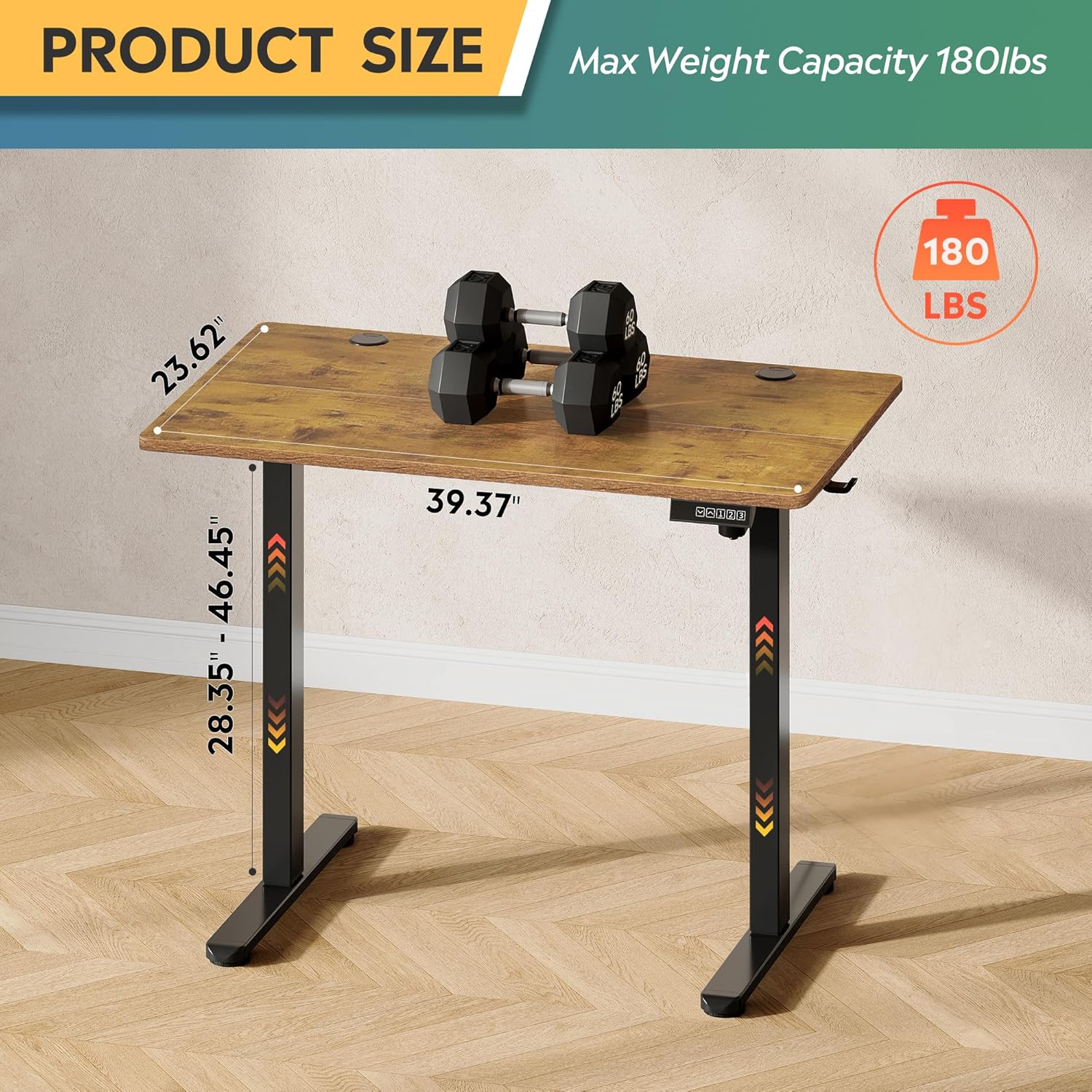
Image: Product dimensions (39.37"W x 23.62"D) and height range (28.35"-46.45"), highlighting the 180 lbs maximum weight capacity.
| Característica | Especificació |
|---|---|
| Número de model | ASJZ021 |
| Dimensions del producte (P x A x A) | 23.62 "P x 39.37" W x 28.34" H |
| Altura mínima | 28.35 polzades |
| Altura màxima | 46.45 polzades |
| Gruix de la taula | 0.6 polzades |
| Recomanació de pes màxim | 180 lliures |
| Pes de l'article | 37 lliures |
| Mecanisme d'elevació | Electric (Tri-motor system) |
| Nombre de posicions d'alçada | 3 Preajustos de memòria |
| Nivell de soroll | <50dB |
| Tipus de material superior | Fusta d'enginyeria |
| Material base | Ferro |
| Color | Rustic Brown (Desktop), Black (Base) |
| Característiques especials | Adjustable Height, Compact, Electric, LED Touchscreen |
6. Manteniment
Un manteniment regular ajuda a garantir la longevitat i el rendiment òptim del vostre escriptori de peu.
- Neteja: Netegeu l'escriptori i el marc amb un drap suauamp drap. Eviteu productes químics agressius o netejadors abrasius que puguin danyar l'acabat.
- Gestió de cables: Periodically check and organize cables to prevent them from snagging or getting pinched during height adjustments.
- Estancament del cargol: De tant en tant, comproveu tots els cargols i perns per assegurar-vos que estiguin ben ajustats. Torneu-los a apretar si cal.
- Inspecció de motors: Listen for any unusual noises during operation. If you notice any issues, refer to the troubleshooting section or contact support.
7. Solució De Problemes
If you encounter any issues with your DEVAISE ASJZ021 Electric Standing Desk, please refer to the following common problems and solutions.
| Problema | Causa possible | Solució |
|---|---|---|
| L'escriptori no es mou | Cable d'alimentació desconnectat; Sobrecàrrega; Error del motor | Comproveu les connexions d'alimentació. Reduïu el pes sobre l'escriptori. Desendolleu-lo durant 10 segons i torneu-lo a endollar. |
| Ajust d'alçada desigual | Obstruction; Sensor issue | Clear any obstructions. Perform a reset (refer to control panel instructions or contact support). |
| La pantalla mostra un codi d'error | Specific system error | Note the error code and consult the DEVAISE support website or contact customer service for specific guidance. |
| Desk stops moving unexpectedly | Anti-collision activated; Overheating protection | Check for obstructions. Allow the motor to cool down for 20 minutes before attempting to operate again. |
If the problem persists after attempting these solutions, please contact DEVAISE customer support.
8. Garantia i Suport
DEVAISE is committed to providing quality products and customer satisfaction. Your purchase is backed by our support services.
- Atenció al client: For any questions, concerns, or assistance with assembly or operation, please contact our 24/7 US-based support team. Refer to your purchase documentation for contact details.
- Informació de la garantia: Specific warranty terms and conditions may vary. Please refer to the warranty card included with your product or visit the official DEVAISE weblloc per obtenir informació detallada.