
1. Introducció
Gràcies per la compraasing the WVCLTVJA 318C Digital Microscope Camera. This device is designed for detailed observation and analysis, featuring a 12MP camera, up to 1600X magnification, and a 7-inch IPS touch screen for intuitive control. This manual provides essential information for the safe and effective use of your microscope. Please read it thoroughly before operation and retain it for future reference.
2. Informació de seguretat
To ensure safe operation and prolong the lifespan of your device, please observe the following precautions:
- Do not expose the microscope to extreme temperatures, humidity, or corrosive substances.
- Avoid direct exposure of the lens to strong light sources, as this may damage the sensor.
- Feu servir només l'adaptador de corrent proporcionat. L'ús d'un adaptador incorrecte pot fer malbé el dispositiu o representar un perill d'incendi.
- Mantingueu el dispositiu lluny dels nens per evitar accidents.
- Do not attempt to disassemble or modify the microscope. Refer all servicing to qualified personnel.
- Clean the device with a soft, dry cloth. Avoid liquid cleaners directly on the screen or lens.
3. Contingut del paquet
Please check the package contents upon receipt. If any items are missing or damaged, contact your retailer immediately.
- WVCLTVJA 318C Digital Microscope Camera
- Ordinary Lens
- Suport ajustable
- Cable d'alimentació USB
- Adaptador d'alimentació
- Regla de calibratge
- Manual d'usuari (aquest document)
4. Producte acabatview
Familiarize yourself with the main components and controls of your WVCLTVJA 318C Digital Microscope.
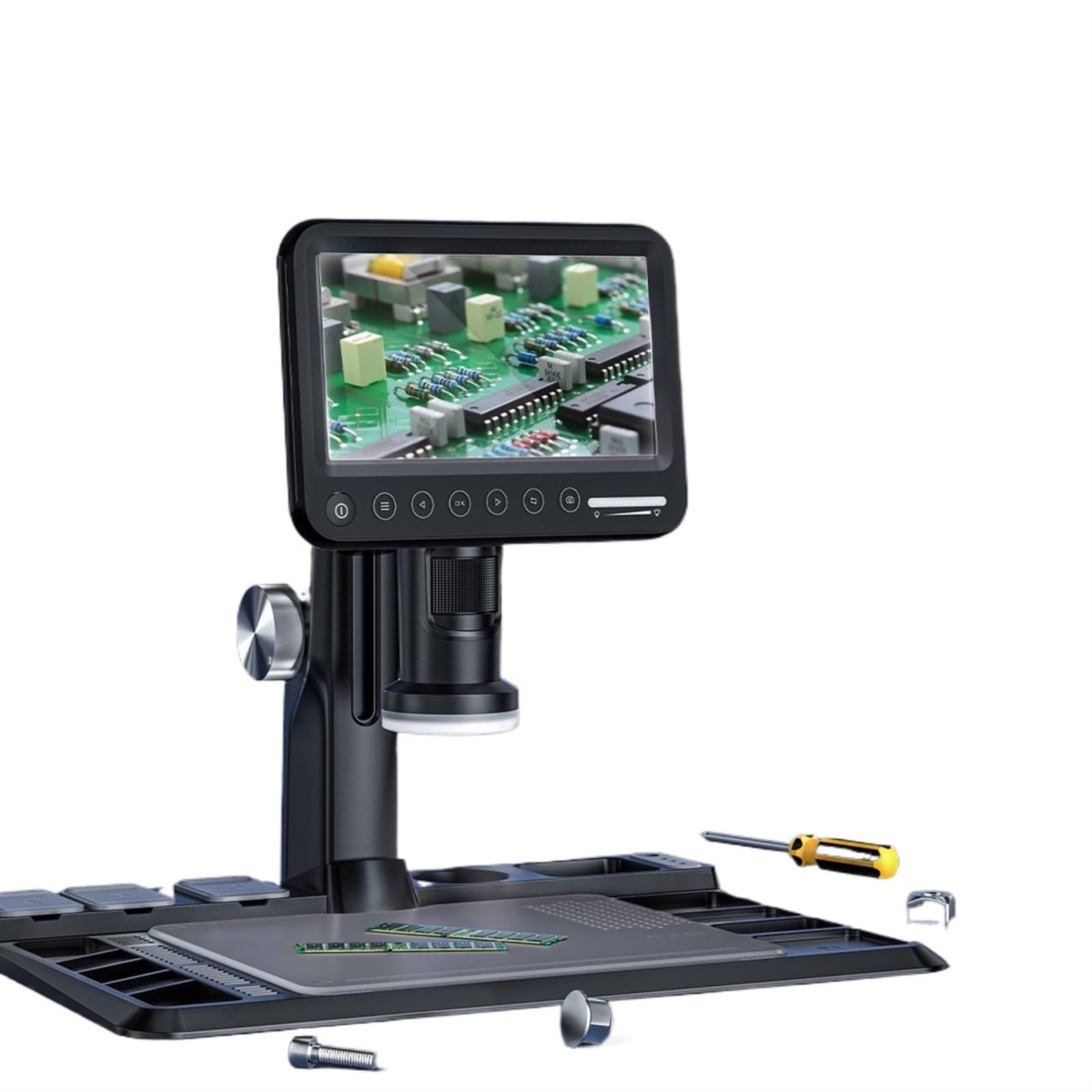
Figura 4.1: WVCLTVJA 318C Digital Microscope Camera. This image illustrates the main unit, including the 7-inch IPS touch screen, the adjustable stand, and the attached ordinary lens. Key components include the screen, focus wheel, magnification adjustment, and power input port.
Components clau:
- Pantalla tàctil IPS d'7 polzades: Per viewing live images, navigating menus, and adjusting settings.
- Ordinary Lens: The primary lens for standard magnification.
- Roda de focus: Adjusts the focus for clear images.
- Ajust d'ampliació: Controls the optical magnification level.
- Il·luminació LED: Built-in lights to illuminate the specimen.
- Botó d'encesa: Encén i apaga el dispositiu.
- Port USB: For power input and data transfer.
- Ranura per a targeta MicroSD: For storing captured images and videos.
5. Configuració
5.1 Desembalatge i muntatge
- Traieu amb cura tots els components de l'embalatge.
- Place the adjustable stand on a stable, flat surface.
- Attach the microscope main unit to the stand, ensuring it is securely fastened.
5.2 Lens Installation
- Gently screw the ordinary lens onto the microscope body until it is firm. Do not overtighten.
- Ensure the lens is clean and free of dust before use.
5.3 Connexió d'alimentació
- Connect the USB power cable to the microscope's USB port.
- Connecteu l'altre extrem del cable USB a l'adaptador de corrent proporcionat.
- Inseriu l'adaptador de corrent a una presa de corrent estàndard.
5.4 Encès inicial
- Press and hold the Power button on the microscope for a few seconds until the screen illuminates.
- The device will boot up and display the live view de la càmera.
6. Instruccions de funcionament
6.1 Encès/Apagat
- Per encendre: Premeu i manteniu premut el botó d'engegada fins que la pantalla s'encengui.
- Per apagar: Press and hold the Power button until a shutdown prompt appears on the screen. Confirm to power off.
6.2 Col·locació d'una mostra
Place the object you wish to observe directly on the stage beneath the lens. Ensure it is stable and centered.
6.3 Ajust del focus
- Adjust the distance between the lens and the specimen using the stand's height adjustment mechanism.
- Rotate the Focus Wheel slowly until the image on the screen becomes clear and sharp.
6.4 Ajust d'ampliació
The 318C offers digital magnification up to 1600X. Optical magnification is adjusted by rotating the lens barrel or by changing the distance between the lens and the object. Digital zoom can be controlled via the touch screen interface.
6.5 Captura d'imatges i vídeo
The 318C allows you to capture high-resolution images and videos directly to a MicroSD card (not included).
- Ensure a MicroSD card (Class 10 or higher, up to 32GB recommended) is inserted into the card slot.
- Del directe view, tap the camera icon on the touch screen to take a photo.
- Tap the video camera icon to start recording. Tap again to stop recording.
- Capturat files pot ser reviewed in the gallery mode, accessible via the main menu.
6.6 Menu Navigation (Touch Control)
The 7-inch IPS screen supports touch control for navigating the microscope's settings and features.
- Toca: Select an option or icon.
- Llisca: Scroll through lists or images in gallery mode.
- Pessiga per fer zoom: Adjust digital zoom in live view or gallery (if supported by software).
Common menu options include:
- Resolució: Adjust image/video capture resolution.
- Exposició: Control brightness.
- Balanç de blancs: Ajusteu la temperatura del color.
- Data/Hora: Estableix la data i l'hora del sistema.
- Idioma: Seleccioneu l'idioma de visualització.
- Format de la targeta SD: Esborra totes les dades de la targeta MicroSD.
6.7 Transferència de dades
Per transferir files a un ordinador:
- Connect the microscope to your computer using the USB cable.
- The microscope should appear as a removable storage device.
- Alternatively, remove the MicroSD card from the microscope and insert it into a card reader connected to your computer.
7. Manteniment
7.1 Neteja
- Lent: Use a soft, lint-free lens cleaning cloth and specialized lens cleaning solution. Do not use abrasive materials.
- Pantalla: Wipe the touch screen gently with a microfiber cloth. For stubborn smudges, slightly dampNetegeu el drap amb aigua o un netejador de pantalles.
- Cos: Use a soft, dry cloth to wipe the microscope body. Avoid harsh chemicals.
7.2 Emmagatzematge
When not in use, store the microscope in a clean, dry, and dust-free environment. Use the original packaging or a protective case to prevent damage.
7.3 Battery Care (if applicable)
If your model includes a rechargeable battery, ensure it is charged periodically even when not in use to maintain battery health. Avoid fully discharging the battery for extended periods.
8. Solució De Problemes
If you encounter issues with your WVCLTVJA 318C Digital Microscope, refer to the following table for common problems and solutions.
| Problema | Causa possible | Solució |
|---|---|---|
| El dispositiu no s'encén. | No power, loose connection, or discharged battery. | Check power adapter and cable connection. Ensure the power outlet is functional. Charge the device if it has an internal battery. |
| La imatge és borrosa. | Out of focus, dirty lens, or incorrect working distance. | Adjust the focus wheel. Clean the lens. Adjust the height of the microscope relative to the specimen. |
| Cannot capture images/videos. | No MicroSD card, full card, or card error. | Insert a MicroSD card. Check if the card is full and delete unnecessary files or replace it. Format the MicroSD card (this will erase all data). |
| La pantalla no respon. | Software glitch or temporary freeze. | Restart the device by holding the power button. If unresponsive, disconnect power and reconnect after a few seconds. |
| La imatge és massa fosca/brillant. | Incorrect LED illumination or exposure settings. | Adjust the brightness of the LED lights. Modify exposure settings in the menu. |
Si el problema persisteix després de provar aquestes solucions, poseu-vos en contacte amb l'atenció al client.
9. Especificacions
Technical specifications for the WVCLTVJA 318C Digital Microscope Camera:
| Característica | Detall |
|---|---|
| Model | 318C |
| Resolució de la càmera | 12 megapíxels |
| Ampliació | Up to 1600X (Digital) |
| Mostra | Pantalla tàctil IPS de 7 polzades |
| Emmagatzematge | MicroSD Card (up to 32GB, Class 10 recommended) |
| Connectivitat | USB |
| Il·luminació | Llums LED ajustables |
| Entrada de potència | 5V DC via USB |
| Pes | Approximately 50 Grams (main unit) |
10. Garantia i Suport
The WVCLTVJA 318C Digital Microscope Camera comes with a standard manufacturer's warranty. Please refer to the warranty card included in your package for specific terms and conditions. For technical support, troubleshooting assistance, or warranty claims, please contact your retailer or the manufacturer directly using the contact information provided with your purchase.
Please have your model number (318C) and purchase date available when contacting support.