1. Introducció
This manual provides comprehensive instructions for the safe and efficient operation, maintenance, and troubleshooting of your KW-TRIO 5360R / 5885 Full Strip Stapler. Designed for office use, this stapler offers precise and accurate stapling with an adjustable paper guide and depth positioning. Please read this manual thoroughly before using the product to ensure optimal performance and longevity.
The KW-TRIO stapler is manufactured by Pao Shen Enterprises Co., Ltd, a company with over 45 years of experience in manufacturing excellence, holding ISO 9001:2015 accreditation.
2. Instruccions de seguretat
- Keep fingers clear of the stapling mechanism during operation to prevent injury.
- Use only staples of the correct size and type recommended for this stapler.
- Do not force the stapler if it jams. Refer to the troubleshooting section for jam clearance.
- Keep the stapler out of reach of small children.
- Avoid dropping the stapler, as this may damage its internal components.
3. Identificació de peces
Familiarize yourself with the main components of your KW-TRIO stapler:
- Stapler Head: The upper part that presses down to drive the staple.
- Revista Staple: The compartment where staples are loaded.
- Base: The lower part that supports the paper and clinches the staple.
- Guia de paper ajustable: A movable guide to ensure consistent stapling depth and alignment.
- Staple Pusher/Follower: The mechanism that pushes staples forward in the magazine.
- Rotation Mechanism (for 5360R model): Allows the stapler head to rotate 360 degrees for various stapling angles.
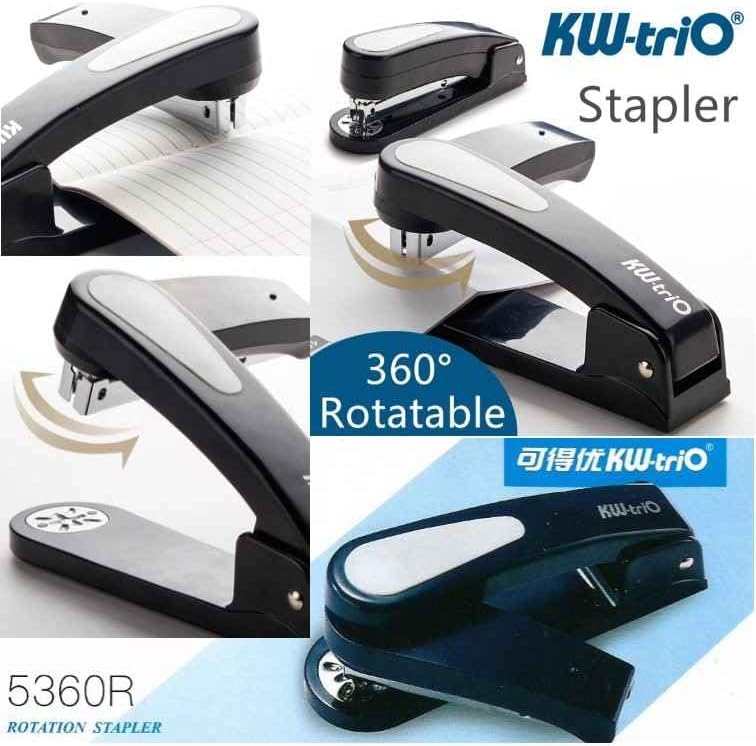
Imatge: Més deview of the KW-TRIO 5360R Rotation Stapler, showing its rotatable head and general design. This image illustrates the versatility of the stapler for different stapling angles.
4. Configuració
4.1 Càrrega de grapes
- Ensure the stapler is empty of any old staples.
- Pull the staple magazine release button or mechanism (if present) or gently pull the staple pusher/follower back until it locks.
- Insert a full strip of compatible staples into the magazine with the staple points facing down.
- Gently push the staple pusher/follower forward until it rests against the staples.
- Close the staple magazine securely.

Image: A standard view of the black KW-TRIO stapler, ready for use. This image represents the general appearance of the stapler.
5. Instruccions de funcionament
5.1 Basic Stapling
- Gather the papers you wish to staple, ensuring they are neatly aligned.
- Place the papers under the stapler head, positioning them where you want the staple to be.
- Press down firmly and evenly on the stapler head until the staple is fully inserted and clinched.
- Release the stapler head and remove the stapled papers.
5.2 Using the Adjustable Paper Guide
The stapler features an adjustable paper guide for precise stapling depth and consistent results.
- Locate the adjustable paper guide on the base of the stapler.
- Slide the guide to the desired depth, aligning it with the edge of your paper. This ensures the staple is placed at a consistent distance from the paper's edge.
- For the 5360R model, the feeding depth can reach up to 95mm, allowing for stapling further into the paper.

Image: The KW-TRIO 5360R rotary stapler demonstrating its 360-degree rotation capability and the maximum feeding depth of 95mm. This highlights the stapler's flexibility for various stapling needs.
5.3 360° Rotation Feature (Model 5360R)
The KW-TRIO 5360R model is equipped with a unique 360-degree rotation mechanism, allowing for versatile stapling angles, including corner stapling and booklet stapling.
- To rotate the stapler head, gently lift and turn the upper part of the stapler to the desired angle.
- Ensure the head clicks into place at the chosen angle before stapling.
- This feature is particularly useful for binding documents in different orientations or creating booklets.

Image: The KW-TRIO 5360R Heavy Duty Stapler showcasing its 360-degree rotation feature, indicating its ability to staple at various angles.
6. Manteniment
- Neteja: Wipe the stapler regularly with a soft, dry cloth to remove dust and debris. Avoid using harsh chemicals or abrasive cleaners.
- Lubricació: The stapler is designed for maintenance-free operation. Do not apply oil or lubricants to any part of the stapler.
- Emmagatzematge: Store the stapler in a dry, clean environment when not in use.
7. Solució De Problemes
| Problema | Causa possible | Solució |
|---|---|---|
| Stapler jams frequently. | Incorrect staple size; bent staples; too many sheets; debris in magazine. | Ensure correct staple size. Remove bent staples. Do not exceed maximum sheet capacity. Clear any debris from the staple magazine. |
| Staples do not clinch properly. | Insufficient pressure; incorrect staple size; worn clincher plate. | Apply firm, even pressure. Verify staple size. If issue persists, contact support. |
| La grapadora no dispara. | Empty staple magazine; staple pusher stuck. | Reload staples. Check if the staple pusher moves freely. |
8. Especificacions
- Model: KW-TRIO 5885 (also known as 5360R for rotary function)
- Mode de funcionament: Manual
- Capacitat: Tira completa
- Material: Metall
- Pes de l'article: 350 grams
- Guia de paper ajustable: Sí
- Depth Positioning: Yes (up to 95mm for 5360R)
- Rotació: 360° (for 5360R model)
- Fabricant: Pao Shen Enterprises Co., Ltd
9. Garantia i Suport
For warranty information or technical support, please refer to the documentation provided at the time of purchase or contact your retailer. As per the available product information, specific warranty details are not provided in this manual.
For further assistance, you may contact the manufacturer, Pao Shen Enterprises Co., Ltd, or the seller from whom you purchased the product.


