1. Introducció
Thank you for choosing the Drone E88 Pro. This foldable quadcopter with camera and remote control is designed for aerial photography and videography enthusiasts. Its compact design, advanced features, and user-friendly controls make it an excellent choice for exploring the world from a new perspective. Please read this manual thoroughly before operating the drone to ensure safe and optimal performance.
2. Pautes de seguretat
Operating a drone requires responsibility. Adhere to the following safety guidelines to prevent injury or damage.
- Comprovació prèvia al vol: Always inspect the drone, remote control, and batteries for any damage before each flight.
- Condicions ambientals: Do not fly in strong winds, rain, snow, or fog. Avoid flying near power lines, buildings, or crowded areas.
- Línia de visió: Mantingueu sempre la línia de visió amb el dron durant el vol.
- Seguretat de la bateria: Use only the provided charger and batteries. Do not overcharge or puncture batteries. Store batteries in a cool, dry place.
- Seguretat de l'hèlix: Keep hands, face, and loose clothing away from rotating propellers. Ensure propellers are securely attached before flight.
- Restricció d'edat: This product is recommended for adults.
- Respectar la privadesa: Be mindful of privacy laws when capturing aerial footage.
- Emergency Landing: In case of emergency, land the drone immediately in a safe, open area.
3. Contingut del paquet
Verifiqueu que tots els elements que s'enumeren a continuació s'inclouen al vostre paquet:
- 1 x Drone E88 Pro
- 1 x comandament a distància
- 1 x cable de càrrega USB
- 1 x Manual d'usuari
- Hèlixs de recanvi (la quantitat pot variar)
- Drone Battery (pre-installed or separate)
- AAA Batteries for Remote Controller (2 included)
4. Identificació de components
4.1 Drone E88 Pro
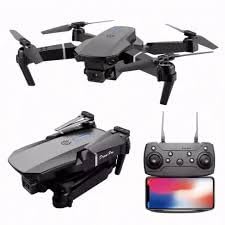
Descripció de la imatge: This image displays the Drone E88 Pro in both its unfolded flight configuration and its compact, folded state. Alongside the drone, the remote control is shown with a smartphone mounted in its holder, illustrating the complete operational setup.
- Braços plegables: Allow for compact storage and portability.
- Hèlixs: Quatre hèlixs principals per a sustentació i empenyiment.
- Motors: Power the propellers.
- Càmera HD: Located at the front, capable of capturing photos and videos.
- Compartiment de la bateria: Located on the underside or rear of the drone.
- Llums indicadores LED: Provide status information (e.g., power, pairing, low battery).
4.2 Control remot
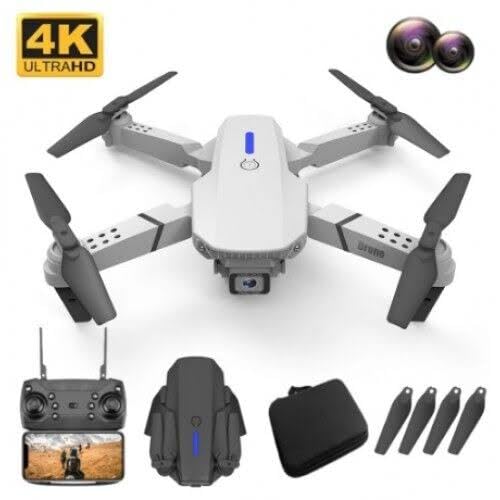
Descripció de la imatge: This image features a white version of the Drone E88 Pro, accompanied by its remote control, a carrying case, and a set of spare propellers. This illustrates the typical contents of the product package.
- Joystick esquerre: Controla l'altitud (amunt/avall) i la rotació (esquerra/dreta).
- Joystick dret: Controla el moviment endavant/enrere i esquerra/dreta.
- One-Key Take-off/Landing Button: Inicia l'enlairament o l'aterratge automàtic.
- Botó de mode sense cap: Activates headless flight mode.
- One-Key Return Button: Commands the drone to return to its take-off point.
- Botó de canvi de velocitat: Toggles between different flight speeds (e.g., low, medium, high).
- Botó foto/vídeo: Captura fotos o inicia/atura la gravació de vídeo.
- Botó d'encesa: Encén/apaga el comandament a distància.
- Suport per a telèfon intel·ligent: For mounting your smartphone to view FPV (Primera Persona) View) footage.
5. Configuració
5.1 Càrrega de la bateria del dron
- Traieu la bateria del dron.
- Connecteu el cable de càrrega USB a la bateria.
- Plug the other end of the USB cable into a 5V/1A USB power adapter (not included) or a computer USB port.
- The indicator light on the USB cable will show charging status (e.g., red for charging, off when fully charged).
- Charging typically takes 60-90 minutes. Do not leave unattended while charging.
5.2 Installing Propellers
The drone comes with pre-installed propellers. If replacement is needed, ensure correct orientation. Propellers are marked 'A' and 'B'. Match them to the corresponding motor arms.
5.3 Installing Drone Battery
- Assegureu-vos que el drone estigui apagat.
- Introduïu la bateria completament carregada al compartiment de la bateria del dron fins que encaixi al seu lloc.
5.4 Instal·lació de les piles del comandament a distància
- Obriu la tapa de la bateria a la part posterior del comandament a distància.
- Insert 2 x AAA batteries (included) according to the polarity markings (+/-).
- Tanqueu la tapa de la bateria amb seguretat.
5.5 Emparellar el dron i el comandament a distància
- Col·loqueu el drone sobre una superfície plana i plana.
- Power on the drone by pressing and holding the power button. The drone's LED lights will flash.
- Power on the remote controller. The remote's indicator light will flash.
- Push the left joystick (throttle) all the way up, then pull it all the way down.
- The drone's and remote's indicator lights will stop flashing and become solid, indicating successful pairing.
5.6 App Installation (Optional for FPV)
Per a FPV (Primera Persona) View) and advanced features, download the dedicated app (e.g., "WiFi_CAM" or similar, refer to packaging for exact app name) from your smartphone's app store (iOS/Android).
- Scan the QR code on the packaging or search for the app name in your app store.
- Instal·leu l'aplicació.
- Connect your smartphone to the drone's Wi-Fi network (usually named "WiFi_UFO" or similar) in your phone's Wi-Fi settings.
- Obriu l'aplicació a view the live camera feed and access additional controls.
6. Instruccions de funcionament
6.1 Comprovacions prèvies al vol
- Assegureu-vos que les bateries del dron i del comandament a distància estiguin completament carregades.
- Comproveu que les hèlixs estiguin ben fixades i no estiguin danyades.
- Confirm drone and remote are successfully paired.
- Choose an open, clear area free from obstacles, people, and animals.
6.2 Enlairament i aterratge
- Enlairament manual: After pairing, push both joysticks simultaneously outwards and downwards to unlock the motors. Then, slowly push the left joystick (throttle) up to ascend.
- Enlairament amb una sola clau: Press the One-Key Take-off/Landing button. The drone will automatically ascend to a certain height and hover.
- Aterratge manual: Slowly pull the left joystick (throttle) down until the drone lands. Once landed, hold the joystick down for a few seconds until the motors stop.
- Aterratge d'una sola clau: Press the One-Key Take-off/Landing button again. The drone will automatically descend and land.
6.3 Controls bàsics de vol
| Control | Acció | Descripció |
|---|---|---|
| Left Joystick Up/Down | Pujar/Baixar | Controls the drone's altitude. |
| Left Joystick Left/Right | Gira a l'esquerra/dreta | Controls the drone's yaw (rotation around its vertical axis). |
| Right Joystick Up/Down | Endavant/Enrere | Controls the drone's pitch (movement along its longitudinal axis). |
| Right Joystick Left/Right | Fly Left/Right (Sideways) | Controls the drone's roll (movement along its lateral axis). |
6.4 Funcions avançades
- Manteniment d'altitud: The drone will automatically maintain its current altitude when the left joystick is released, providing stable hovering.
- Mode sense cap: Press the Headless Mode button. In this mode, the drone's orientation is relative to the pilot, regardless of the drone's actual front. This simplifies control for beginners. Press again to exit.
- Devolució d'una sola clau: Press the One-Key Return button. The drone will attempt to fly back towards its take-off point. This feature is basic and relies on the drone's internal compass; it is not GPS-accurate. Press any joystick to cancel.
- Interruptor de velocitat: Press the Speed Switch button to cycle through different flight speeds (e.g., low, medium, high). Low speed is recommended for beginners.
6.5 Funcionament de la càmera
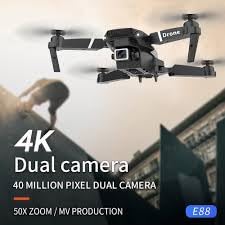
Descripció de la imatge: This image shows the Drone E88 Pro in flight, with text overlays highlighting its "4K Dual camera" capability and "40 MILLION PIXEL DUAL CAMERA" feature, emphasizing its high-resolution imaging.
- Fent fotos: While flying, press the Photo/Video button once on the remote control to take a photo. The drone's lights may flash to indicate a photo has been taken.
- Gravació de vídeo: Press and hold the Photo/Video button for 2-3 seconds to start video recording. Press and hold again to stop recording. The drone's lights may flash differently or continuously during recording.
- Viewing Footage: If using the app, photos and videos will be saved directly to your smartphone's gallery. If using an SD card (not included, if applicable), remove the card from the drone and insert it into a card reader to view files en un ordinador.
7. Manteniment
- Neteja: Feu servir un drap suau i sec per netejar el dron i el comandament a distància. No utilitzeu aigua ni productes de neteja químics.
- Substitució de l'hèlix: If propellers are damaged or bent, replace them immediately with spare parts. Ensure correct 'A' and 'B' propeller types are installed on the correct motor arms.
- Cura de la bateria:
- No sobrecarregueu ni descarregueu excessivament les bateries.
- Guardeu les piles en un lloc fresc i sec, allunyat de la llum solar directa i de la calor.
- Si guardeu les bateries durant períodes prolongats, carregueu-les fins a un 50% de la seva capacitat aproximadament.
- Emmagatzematge: Store the drone and its accessories in a cool, dry environment, preferably in its original packaging or a protective case, away from direct sunlight and extreme temperatures.
8. Solució De Problemes
| Problema | Causa possible | Solució |
|---|---|---|
| El dron no respon al comandament a distància. | No emparellat; bateria baixa; interferències. | Re-pair drone and remote; charge batteries; move to an area with less interference. |
| El dron es desplaça durant el vol. | No calibrat; superfície irregular a l'enlairament; vent. | Calibrate the drone (refer to app or specific remote sequence); take off from a flat surface; avoid flying in windy conditions. |
| Les hèlixs no giren. | Motors locked; damaged propellers; motor issue. | Unlock motors (joysticks outwards/downwards); replace damaged propellers; contact support if motors are faulty. |
| El senyal de la càmera és entretallat o desconnectat. | Weak Wi-Fi signal; too far from drone; app issue. | Ensure strong Wi-Fi connection; fly closer to the drone; restart app and drone. |
| Temps de vol curt. | Bateria no completament carregada; bateria antiga; vol agressiu. | Ensure battery is fully charged; consider replacing old batteries; fly more conservatively. |
9. Especificacions
| Característica | Detall |
|---|---|
| Marca | Genèric |
| Nom del model | E88 Pro |
| Característiques especials | Headless Mode, Foldable, Wifi Fpv, Altitude Hold |
| Interval d'edat (descripció) | Adult |
| Color | Gris |
| Resolució de captura de vídeo | 1080p |
| Resolució de fixes efectius | 32 MP |
| Tecnologia de connectivitat | Bluetooth, WiFi |
| Components inclosos | User Manual, USB Cable, Drone, Remote Controller |
| Nivell d'habilitat | Principiant |
| Pes de l'article | 220 grams |
| Capacitat de la bateria | 2 Amp Hores |
| Tecnologia de control remot | 2.4 GHz |
| Tipus de control | Control remot |
| Tipus de suport | Micro SDXC (if applicable, not included) |
| Material | Plàstic, metall |
| Tecnologia de comunicació sense fils | Wi-Fi |
| Composició de les cèl·lules de la bateria | Ió de liti |
| Piles incloses | Sí (2 AAA per a comandament a distància) |
| Format d'imatge compatible | JPEG, MP4 |
| Resolució de sortida de vídeo | 1080p |
| Dimensions del producte | 25L x 15W x 5H centímetres |
| Fabricant | Riya global |
| Data de primera disponibilitat | 2 de desembre de 2024 |
10. Garantia i Suport
This product is manufactured by Riya global. For any manufacturing defects or issues not covered by troubleshooting, please contact the seller or manufacturer directly.
Please retain your proof of purchase for any warranty claims. Specific warranty terms and conditions may vary by region and retailer.
For further assistance, refer to the contact information provided with your purchase or visit the manufacturer's official weblloc.


