
Introducció
This manual provides detailed instructions for the setup, operation, and maintenance of your LFF Atomic Clock LWC204-TEMU. This digital wall clock features a large LCD display, atomic time synchronization, indoor and outdoor temperature readings, and date display. Please read this manual thoroughly before using the device to ensure proper function and longevity.
Contingut del paquet
Si us plau, reviseu atentament el contingut del paquet. Si falta algun article o hi ha algun malmès, poseu-vos en contacte amb el servei d'atenció al client.
- Clock Unit (Main Display)
- Manual d'instruccions (Aquest document)
- Sensor de temperatura exterior
- Maquinari de muntatge (cargols, ancoratges de paret)
- Power Adapter (for optional continuous power)
Note: Batteries are not included and must be purchased separately. The main clock unit requires 3x AA batteries, and the outdoor sensor requires 2x AAA batteries.
Característiques del producte
- Large LCD Digital Display for easy readability
- Atomic Clock (RCC) for precise time synchronization
- Indoor Temperature display (°C/°F)
- Outdoor Temperature display (°C/°F) with wireless sensor
- Date and Weekday display
- Alarm Clock function with snooze
- Daylight Saving Time (DST) symbol
- Supports up to 3 outdoor remote sensors (one included)
- Wireless range of up to 330 feet (100 meters)
Producte acabatview
Familiarize yourself with the main display and control buttons of your LFF Atomic Clock.

Imatge: Davant i darrere view of the LFF Atomic Clock. The front display shows time, indoor temperature, date, weekday, and outdoor temperature, along with icons for alarm, RCC reception, and DST. The back panel highlights the 'SET', 'ALARM', 'CHANNEL', 'DOWN/WAVE/°C/°F', and 'UP/ALARM' buttons.
Elements de visualització:
- Visualització de l'hora: Shows current time (HH:MM).
- Indicador PM: Appears for afternoon hours.
- DST Symbol: Indicates Daylight Saving Time is active.
- RCC Reception Icon: Shows status of atomic clock signal reception.
- Icona de despertador: Indicates alarm is set.
- Temperatura interior: Current temperature inside (°C/°F).
- Date/Month/Weekday: Current date and day of the week.
- Temperatura exterior: Current temperature from the wireless sensor (°C/°F).
Control Buttons (Rear Panel):
- Botó SET: Enters setup mode for time, date, and other settings.
- Botó ALARMA: Activates/deactivates the alarm and enters alarm setting mode.
- CHANNEL Button: Switches between outdoor sensor channels (if multiple sensors are used).
- DOWN/WAVE/°C/°F Button: Decreases values during setting, manually initiates atomic signal search (WAVE), and switches temperature units.
- UP/ALARM Button: Increases values during setting, and can also activate/deactivate alarm.
Configuració
1. Instal·lació de la bateria
The clock unit and outdoor sensor require batteries for operation. Ensure correct polarity (+/-) when inserting batteries.
- Unitat de rellotge principal: Open the battery compartment on the back and insert 3x AA batteries (not included).
- Sensor exterior: Open the battery compartment and insert 2x AAA batteries (not included).

Imatge: This image illustrates the battery requirements for the LFF Atomic Clock. The main clock unit requires three AA batteries, and the wireless outdoor sensor requires two AAA batteries. Batteries are not included with the product.
Alternatively, the main clock unit can be powered continuously using the included power adapter. Insert the adapter into the DC port on the back of the clock.
2. Initial Synchronization (Atomic Clock)
After inserting batteries, the clock will automatically attempt to synchronize with the atomic time signal (RCC). This process may take several minutes to several hours, depending on your location and signal strength. The RCC reception icon will flash during synchronization and become solid when a stable signal is received.
- For best reception, place the clock near a window and away from electronic devices that may cause interference.
- To manually initiate an atomic signal search, press and hold the DOWN/WAVE/°C/°F botó durant uns segons.
3. Outdoor Sensor Placement
Place the outdoor sensor in a shaded, dry location, protected from direct sunlight and precipitation, to ensure accurate temperature readings. The sensor should be within the 330ft (100m) wireless range of the main clock unit.

Imatge: This image demonstrates the wireless range and ideal placement for the LFF Atomic Clock's outdoor sensor. The sensor should be placed outdoors, within 330 feet (100 meters) of the main unit, and in a location that allows for clear signal transmission, such as mounted on an exterior wall.
- Ensure the sensor is mounted vertically to allow for proper drainage.
- Avoid placing the sensor near heat sources (e.g., vents, windows) or reflective surfaces that could affect temperature accuracy.
- The clock supports up to 3 outdoor sensors. If using multiple sensors, press the CANAL button on the main unit to cycle through them.
Instruccions de funcionament
1. Configuració manual de la data i l'hora
If the atomic clock signal is not available or you prefer to set the time manually:
- Manteniu premut el botó SET button for 3 seconds to enter time setting mode. The hour digit will flash.
- Utilitza el UP/ALARM or DOWN/WAVE/°C/°F botons per ajustar el valor intermitent.
- Premeu SET again to confirm and move to the next setting (e.g., Minute, Year, Month, Day, Time Zone, 12/24-hour format).
- Repeat steps 2 and 3 until all settings are configured.
- Premeu SET one last time or wait 15 seconds for the clock to exit setting mode automatically.
2. Configuració de l'alarma
- Premeu el botó ALARMA botó una vegada per mostrar l'hora de l'alarma.
- Manteniu premut el botó ALARMA button for 3 seconds to enter alarm setting mode. The hour digit will flash.
- Utilitza el UP/ALARM or DOWN/WAVE/°C/°F botons per ajustar l'hora.
- Premeu ALARMA de nou per confirmar l'hora i passar a la configuració dels minuts.
- Utilitza el UP/ALARM or DOWN/WAVE/°C/°F botons per ajustar el minut.
- Premeu ALARMA una última vegada per confirmar i sortir del mode de configuració de l'alarma.
Per activar o desactivar l'alarma, premeu la tecla ALARMA button briefly when the current time is displayed. The alarm icon will appear or disappear on the display.
3. Selecció de la unitat de temperatura (°C/°F)
To switch between Celsius and Fahrenheit for temperature display, press the DOWN/WAVE/°C/°F button briefly during normal time display.
4. Horari d'estiu (DST)
The clock is designed to automatically adjust for Daylight Saving Time if the atomic signal is received. A DST icon will appear on the display when DST is active.
5. Large Display Readability
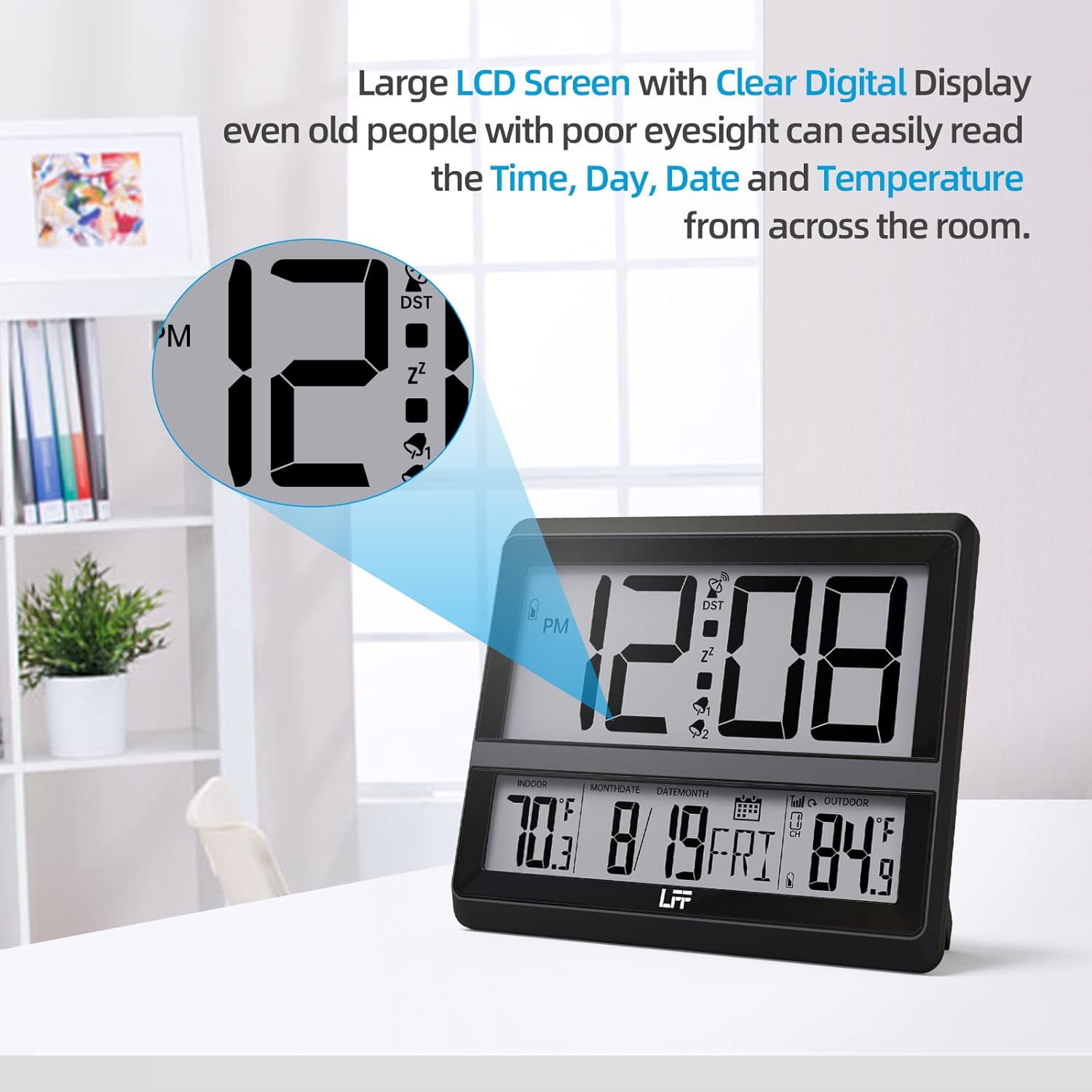
Imatge: This image highlights the large LCD screen of the LFF Atomic Clock, demonstrating its clear digital display. The large numbers for time, day, date, and temperature are easily readable from a distance, enhancing user convenience.
The LFF Atomic Clock features a large LCD screen with clear digital numbers, designed for easy readability of time, day, date, and temperature from various distances.
Manteniment
- Neteja: Wipe the clock and sensor with a soft, dry cloth. Do not use abrasive cleaners or chemicals.
- Substitució de la bateria: Replace batteries in both the main unit and outdoor sensor when the low battery indicator appears on the display. Always replace all batteries at once with new ones of the same type.
- Emmagatzematge: If storing the clock for an extended period, remove all batteries to prevent leakage.
Resolució de problemes
| Problema | Possible solució |
|---|---|
| No display on clock unit. | Check battery installation (polarity, charge). Ensure power adapter is securely connected if used. |
| L'hora és incorrecta o no s'està sincronitzant. | Ensure the clock is placed near a window, away from interference. Manually initiate atomic signal search (press and hold DOWN/WAVE/°C/°F). Check time zone setting. |
| La temperatura exterior no es mostra o és inexacta. | Check batteries in the outdoor sensor. Ensure sensor is within range (330ft/100m) and not obstructed. Press CANAL button to re-establish connection. Relocate sensor to a shaded, dry area. |
| L'alarma no sona. | Ensure the alarm is activated (alarm icon visible). Check alarm time setting. |
Especificacions
- Número de model: LWC204-TEMU
- Marca: Extensió LFF
- Tipus de visualització: LCD digital
- Font d'alimentació (unitat principal): 3x AA Batteries (not included) or Power Adapter (included)
- Font d'alimentació (sensor exterior): 2x piles AAA (no incloses)
- Característica especial: Alarm, Atomic Time (RCC), Indoor/Outdoor Temperature
- Color: Negre
- Dimensions del producte: 8.7 x 1.5 x 7.5 polzades (22.1 x 3.8 x 19.1 cm)
- Pes de l'article: 1.3 lliures (0.59 kg)
- Interval sense fil: Fins a 330 peus (100 metres)
- UPC: 799849203702
Garantia i Suport
LFF products are manufactured to high-quality standards. For warranty information or technical support, please refer to the contact details provided on the product packaging or visit the official LFF weblloc web. Conserveu el rebut de compra com a comprovant de compra per a qualsevol reclamació de garantia.