
1. Introducció
The UanTii All-in-One Smart Matter Plug is a versatile smart home device designed to integrate seamlessly with various smart home ecosystems, including Apple HomeKit, Amazon Alexa, Google Home, Samsung SmartThings, and Tuya/Smart Life. This smart plug allows you to control your home appliances remotely, set schedules, and use voice commands for a truly automated experience. Its Matter certification ensures enhanced compatibility and stability within your local network.

Figure 1: UanTii Smart Matter Plug and its multi-platform compatibility.
2. Informació de seguretat
Si us plau, llegiu i comprengui totes les instruccions de seguretat abans d'utilitzar aquest producte. Si no segueix aquestes instruccions, es poden produir descàrregues elèctriques, incendis o altres perills.
- No desmunteu ni modifiqueu el dispositiu.
- No exposeu el dispositiu a l'aigua ni a una humitat excessiva.
- Do not use the device with appliances that exceed its maximum load capacity (16A, 3680W).
- Assegureu-vos que l'endoll estigui completament inserit a la presa de corrent.
- Mantenir fora de l'abast dels nens.
- Utilitzeu-ho només en ambients interiors secs.
3. Contingut del paquet
Your UanTii Smart Matter Plug package should contain the following:
- 1 x UanTii All-in-One Smart Matter Plug
- 1 x Manual d'instruccions (aquest document)
4. Configuració
Before setting up your UanTii Smart Matter Plug, ensure your smartphone's operating system is iOS 16.1 or later, or Android 8.1 or later. The plug requires a 2.4GHz Wi-Fi network for initial setup and operation.
4.1 Matter Hub Requirement
A Matter-enabled hub is required to add Matter devices to Apple HomeKit, Google Home, and Alexa apps. Ensure your hub and the plug are on the same local area network (LAN) and that Bluetooth is enabled on your phone during the initial pairing process.

Figura 2: Examples of Matter-compatible hubs required for integration.
4.2 Afegir el dispositiu
- Plug the UanTii Smart Matter Plug into a standard wall outlet.
- Assegureu-vos que el Bluetooth del vostre telèfon intel·ligent estigui activat.
- Open your preferred smart home app (e.g., Apple Home, Google Home, Alexa, Tuya Smart, or Smart Life).
- Follow the app's instructions to add a new device. You will typically be prompted to scan the QR code located on the device or its packaging.
- Once scanned, the app will guide you through connecting the plug to your 2.4GHz Wi-Fi network.
- For Tuya/Smart Life App, no separate hub is needed, only a 2.4GHz Wi-Fi connection.

Figure 3: Scan the QR code on the device to add it to your smart home system. Example QR code: 0000-123-0000
4.3 Important Notes for Specific Apps:
- HomeKit/Google Home/Alexa APP: Primarily supports voice function and on/off control.
- Aplicació Tuya: Offers timer function, on/off control, and voice function (when integrated with Alexa and Google Home).
5. Funcionament de l'endoll intel·ligent
5.1 Control remot de l'aplicació
Once connected, you can control the smart plug from anywhere using the Tuya/Smart Life APP. Turn appliances on or off, and manage schedules directly from your smartphone.

Figure 4: Remote control of appliances via the Tuya Smart or Smart Life app.
5.2 Control de veu
The UanTii Smart Matter Plug supports voice commands through Siri, Amazon Alexa, and Google Assistant, providing a hands-free control experience.

Figure 5: Use voice commands with your preferred assistant to control the plug.
5.3 Funcions de temporitzador i programació
Automate your appliances by setting timers and schedules. This feature is exclusively available through the Tuya/Smart Life APP.

Figure 6: Set daily schedules for your appliances using the Tuya/Smart Life app.
5.4 Network Stability with Matter
Thanks to Matter certification, devices in your local network can operate smoothly even if your internet connection goes offline, ensuring reliable performance.

Figure 7: Enjoy stable control even without an internet connection. Learn more about Matter at 168150
5.5 High Power Capacity
The UanTii Smart Matter Plug supports a maximum current of 16A, making it suitable for a wide range of household appliances.
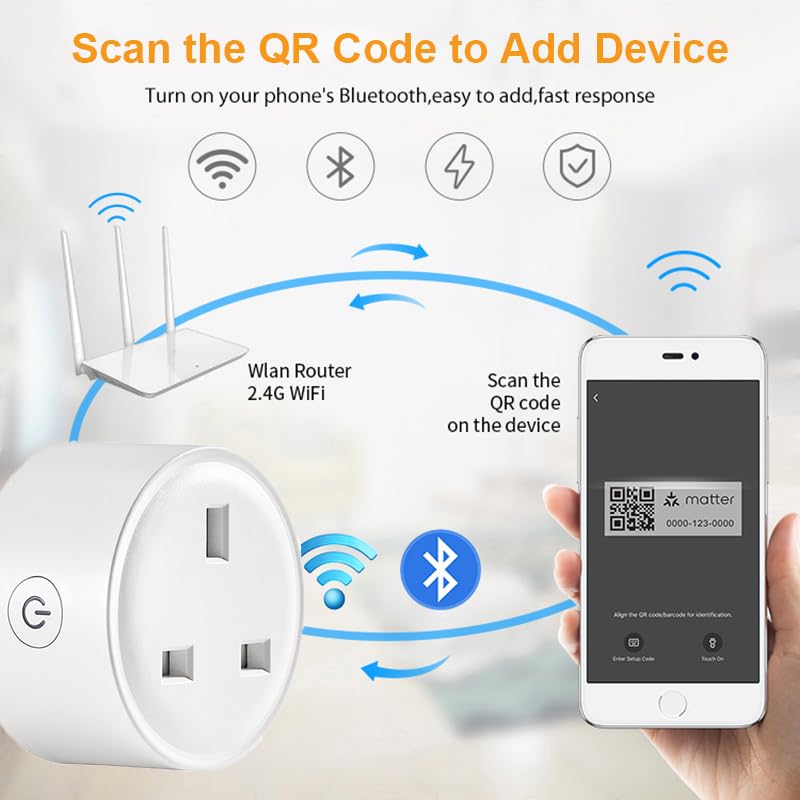
Figure 8: The 16A capacity allows connection to most electrical appliances.
6. Manteniment
To ensure the longevity and proper functioning of your UanTii Smart Matter Plug, follow these simple maintenance guidelines:
- Netegeu el dispositiu amb un drap suau i sec. No utilitzeu netejadors líquids ni en aerosol.
- Eviteu col·locar el dispositiu a la llum solar directa o a prop de fonts de calor.
- No exposeu el dispositiu a temperatures o humitat extremes.
- Ensure the plug pins are clean and free from debris before inserting into a socket.
7. Solució De Problemes
If you encounter issues with your UanTii Smart Matter Plug, refer to the following common solutions:
| Problema | Possible causa/solució |
|---|---|
| El dispositiu no es connecta a l'aplicació. |
|
| El control per veu no funciona. |
|
| Timer/Schedule not working. |
|
| L'endoll no respon. |
|
8. Especificacions
| Característica | Especificació |
|---|---|
| Número de model | UTMAPS012 |
| Potència nominal | CA 100~240V 50/60Hz |
| Corrent nominal | 16A |
| Capacitat de càrrega màxima | 3680W |
| Consum en espera | 0.46W |
| Tipus de Wi-Fi | 2.4 GHz |
| Wi-Fi estàndard | IEEE 802.11b/g/n |
| Humitat de treball | 0% ~ 85%RH (Non-Condensing) |
| Temperatura de treball | 0℃ ~ 50℃ (32°F ~ 122°F) |
| Material | Coure (material de contacte) |
| Dimensions | 7 x 7 x 6 cm |
| Pes | 80 g |
| País d'origen | Xina |
9. Garantia i Suport
For warranty information and technical support, please refer to the contact details provided with your purchase or visit the official UanTii weblloc web. Conserveu el rebut de compra com a comprovant de compra per a qualsevol reclamació de garantia.