1. Introducció
Thank you for choosing the Yaozher YW08 Wireless Earbuds. These earbuds are designed to provide a superior audio experience with advanced features such as Bluetooth 5.4 connectivity, Active Noise Cancellation (ANC), Environmental Noise Cancellation (ENC) for calls, and immersive 9D stereo surround sound. This manual will guide you through the setup, operation, and maintenance of your new earbuds to ensure optimal performance.
2. Contingut del paquet
Si us plau, reviseu el paquet amb cura per assegurar-vos que hi hagi tots els elements:
- 1 Pair of Yaozher YW08 Wireless Earbuds
- 1 Estoig de càrrega
- 1 cable de càrrega USB tipus C
- 1 Manual d'usuari
3. Producte acabatview

Figura 3.1: Yaozher YW08 Wireless Earbuds and Charging Case. This image shows the sleek design of the earbuds and their compact charging case, ready for use.

Figura 3.2: The YW08 charging case is equipped with a full-color touch screen for intuitive control and information display, including battery status and connection mode.

Figura 3.3: Control music playback, noise reduction settings, and equalizer functions directly from the LCD full-color touch screen on the charging case with a single finger.

Figura 3.4: The YW08 earbuds and charging case offer extended battery life, providing up to 48 hours of total playback with multiple charges from the case, ensuring long-lasting use.

Figura 3.5: Environmental Noise Cancellation (ENC) technology ensures clear voice calls by effectively reducing background noise, making your conversations crisp and audible even in noisy environments.
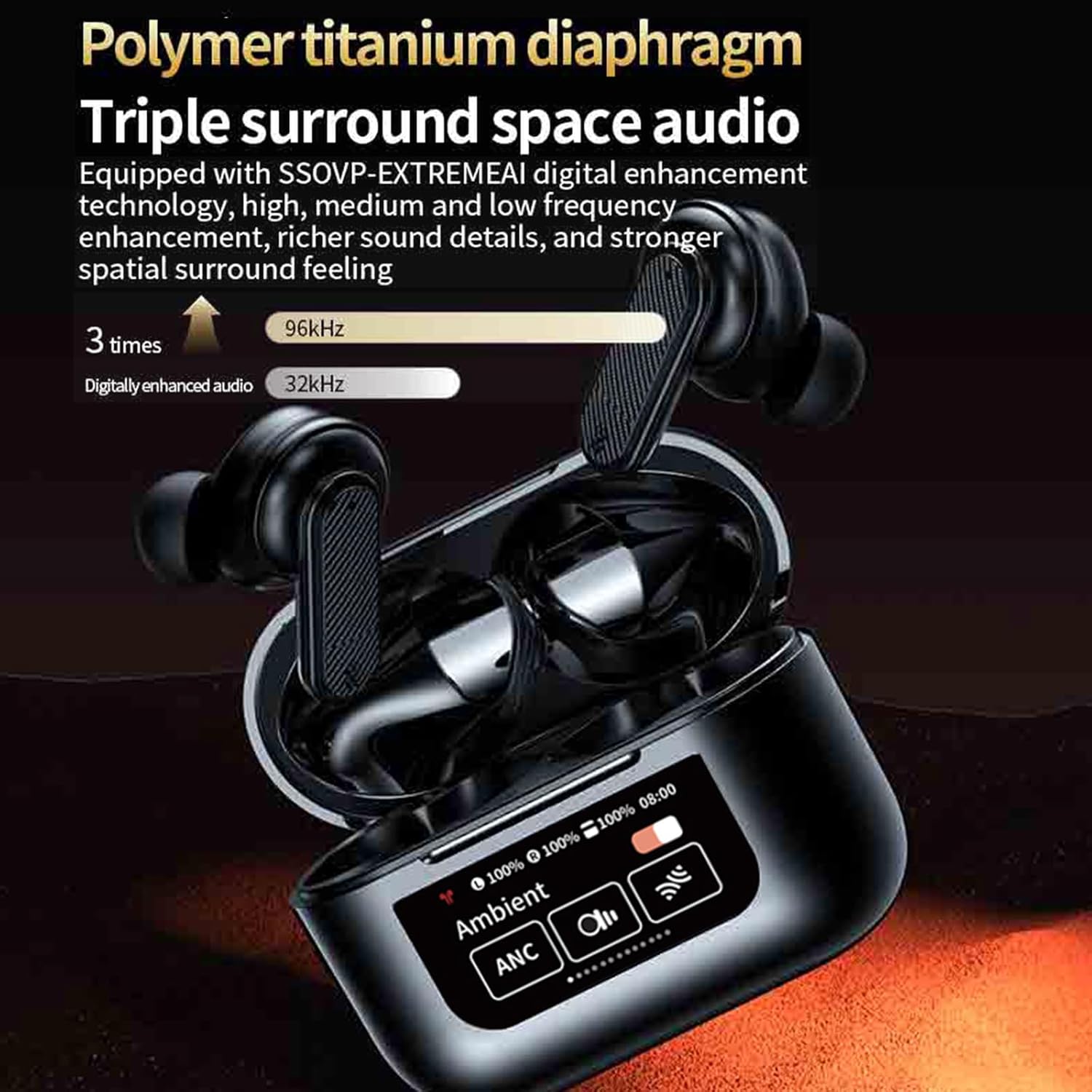
Figura 3.6: Equipped with a polymer titanium diaphragm and advanced digital enhancement technology, the YW08 delivers rich, dynamic triple surround space audio for an immersive listening experience.

Figura 3.7: The 13mm high-quality drive unit provides excellent sound quality across the full frequency range, ensuring clear and detailed audio reproduction for all your music.
4. Guia de configuració
4.1 Càrrega dels auriculars i l'estoig
Abans del primer ús, carregueu completament els auriculars i l'estoig de càrrega.
- Col·loca els auriculars a l'estoig de càrrega. Assegura't que estiguin correctament col·locats.
- Connect the provided USB Type-C cable to the charging port on the case and the other end to a DC5V/1A power source (e.g., a USB wall adapter or computer USB port).
- The screen on the charging case will indicate the charging status.
- Charging Time: Earbuds take approximately 40 minutes to fully charge. The charging case takes approximately 1 hour to fully charge.
4.2 Emparellament amb el dispositiu
Els auriculars entraran automàticament en mode d'emparellament quan es treguin de l'estoig de càrrega.
- Obre l'estoig de càrrega i treu els dos auriculars. S'encendran automàticament i entraran en mode d'emparellament.
- Al dispositiu (telèfon intel·ligent, tauleta, ordinador), activeu el Bluetooth.
- Cerca dispositius Bluetooth disponibles.
- Select "YW08" from the list of devices.
- Once connected, the earbuds will indicate successful pairing, and the charging case screen may show a connected status.
- Els auriculars es tornaran a connectar automàticament a l'últim dispositiu emparellat quan es treguin de l'estoig, si el Bluetooth està activat al dispositiu.
5. Instruccions de funcionament
5.1 Controls tàctils
The YW08 earbuds feature intuitive touch controls. Specific functions can be managed via the earbud touch sensors or the charging case's full-color touch screen.
- Reproduir/pausa: Un sol toc a qualsevol dels auriculars.
- Pista següent: Toqueu dues vegades l'auricular dret.
- Pista anterior: Toqueu dues vegades l'auricular esquerre.
- Respondre/Finalitzar la trucada: Un sol toc a qualsevol dels auriculars.
- Rebutja la trucada: Premeu llargament qualsevol dels auriculars.
- Activa l'Assistent de veu: Toqueu tres vegades qualsevol dels auriculars.
- Control de volum: Adjust via your connected device or the charging case screen.
5.2 Cancel·lació activa del soroll (ANC)
The YW08 earbuds feature Active Noise Cancellation to reduce ambient noise, allowing for a more immersive listening experience.
- Toggle ANC: Use the touch screen on the charging case to switch between ANC On, Transparency Mode, and ANC Off.
- ANC activat: Reduces external noise for focused listening.
- Mode de transparència: Et permet escoltar el teu entorn mentre gaudeixes de l'àudio.
5.3 Environmental Noise Cancellation (ENC) for Calls
ENC technology is automatically active during phone calls to ensure clear communication by minimizing background noise for the person on the other end.
5.4 9D Stereo Surround Sound
Experience rich and dynamic audio with the 9D stereo surround sound technology. This feature enhances the spatial audio experience, making music and movies more immersive.
6. Manteniment
6.1 Neteja
- Netegeu regularment els auriculars i l'estoig de càrrega amb un drap suau, sec i sense borrissol.
- No utilitzeu netejadors abrasius, alcohol ni dissolvents químics.
- Netegeu els contactes de càrrega tant dels auriculars com de la funda per garantir una càrrega correcta.
6.2 Emmagatzematge
- Guardeu els auriculars a la funda de càrrega quan no els feu servir per protegir-los i mantenir-los carregats.
- Avoid storing the device in extreme temperatures (hot or cold) or in highly humid environments.
7. Solució De Problemes
If you encounter any issues with your YW08 earbuds, please refer to the following common solutions:
- Auriculars que no s'emparellan:
- Assegureu-vos que els dos auriculars estiguin completament carregats.
- Desactiva el Bluetooth del dispositiu i torna'l a activar.
- Forget/delete "YW08" from your device's Bluetooth list and try pairing again.
- Torneu a col·locar els auriculars a l'estoig, tanqueu la tapa, espereu uns segons i, a continuació, obriu-los i torneu-ho a provar.
- Només funciona un auricular:
- Assegureu-vos que els dos auriculars estiguin carregats.
- Torneu a col·locar els dos auriculars a l'estoig de càrrega, tanqueu la tapa i torneu-los a treure per tornar-los a sincronitzar.
- Netegeu els contactes de càrrega dels dos auriculars i de l'interior de la funda.
- Sense so:
- Check the volume level on your device and on the earbuds.
- Assegureu-vos que els auriculars estiguin connectats correctament al dispositiu.
- Prova de reproduir àudio des d'una altra aplicació o font.
- La caixa de càrrega no es carrega:
- Ensure the USB Type-C cable is securely connected to both the case and the power source.
- Prova un cable de càrrega o un adaptador de corrent diferent.
- Assegureu-vos que la font d'alimentació estigui activa.
8. Especificacions
| Característica | Especificació |
|---|---|
| Nom del model | YW08 |
| Versió Bluetooth | 5.4 |
| Mida de l'altaveu | φ10 mm |
| Capacitat de la bateria dels auriculars | 30 mAh |
| Caixa de càrrega Capacitat de la bateria | 320 mAh |
| Temps de reproducció de música | 5 hores |
| Temps de conversa | 5 hores |
| Temps de càrrega dels auriculars | Aprox. 40 minuts |
| Temps de càrrega de la caixa de càrrega | Aprox. 1 hora |
| Distància de comunicació | 10 metres |
| Port de càrrega | Tipus-C |
| Vol. De càrregatage | DC5V/1A |
| Dimensions del producte | 9.5 x 9.5 x 4 cm |
| Control de soroll | Cancel·lació activa de soroll (ANC) |
| Factor de forma | In-orella |
9. Garantia i Suport
This product comes with a standard manufacturer's warranty. For specific warranty terms and conditions, please refer to the documentation provided with your purchase or contact the seller directly.
If you require further assistance or have questions not covered in this manual, please contact Yaozher customer support through the retailer where you purchased the product.


