
1. Introducció
Thank you for choosing the DEVAISE ASJZ025 Electric Standing Desk. This manual provides detailed instructions for the safe assembly, operation, and maintenance of your new electric standing desk. Please read this manual thoroughly before use and retain it for future reference.

Figure 1.1: The DEVAISE 71-inch electric standing desk in maple finish, showcasing its spacious desktop accommodating multiple monitors and office accessories.
2. Informació important de seguretat
AVÍS: Si no es segueixen aquestes instruccions de seguretat, es poden produir lesions o danys al producte.
- Always keep children and pets away from the desk when it is in motion.
- Utilize the child lock feature to prevent unintended height adjustments.
- Be aware of the anti-collision feature. Do not force the desk to move if it encounters an obstacle.
- Assegureu-vos que tots els cables estiguin correctament col·locats per evitar que s'enredin durant els ajustaments d'alçada.
- Do not overload the desk. The maximum weight capacity is 180 lbs.
- Only use the desk for its intended purpose as a workstation.
3. Contingut del paquet
Verifiqueu que tots els components siguin presents abans de començar el muntatge. Si falta alguna peça o hi ha alguna peça danyada, poseu-vos en contacte amb el servei d'atenció al client.
- Desktop (Maple, 71 x 28 inches)
- Desk Legs (2) with Dual Motors
- Tauler de control amb pantalla LED
- Adaptador d'alimentació i cable
- Crossbars and Support Frames
- Ganxo per a auriculars
- Maquinari de muntatge (cargols, perns, eines)
- Manual d'instruccions

Figura 3.1: Explotat view showing all components for the DEVAISE Electric Standing Desk, including the desktop, leg frames, control panel, and various hardware pieces, indicating a quick installation process.
4. Muntatge i muntatge
Assembly is designed to be straightforward with pre-drilled holes and labeled parts. It is recommended to have a Phillips head screwdriver for some placements. For detailed visual guidance, refer to the included assembly instructions booklet.
- Desempaquetar components: Traieu amb cura totes les peces de l'embalatge. Inspeccioneu-ho per veure si hi ha algun dany.
- Muntatge del marc: Attach the crossbars and support frames to the desk legs using the provided hardware. Ensure all connections are secure.
- Adjunta l'escriptori: Place the desktop upside down on a soft, clean surface. Align the pre-drilled holes on the desktop with the frame. Secure the desktop to the frame using the provided screws.
- Instal·leu el tauler de control: Mount the control panel to the underside of the desktop in the designated area. Connect the motor cables and power cable to the control panel.
- Gestió de cables: Use the included cable ties or clips to organize and secure all cables, preventing them from interfering with the desk's movement.
- Engegada inicial: Connect the power adapter to the desk and then to a power outlet.

Figure 4.1: The DEVAISE Electric Standing Desk set up in an office environment, showcasing its spacious maple desktop and white frame, accommodating multiple monitors and accessories.
5. Instruccions de funcionament
5.1. Tauler de control acabatview
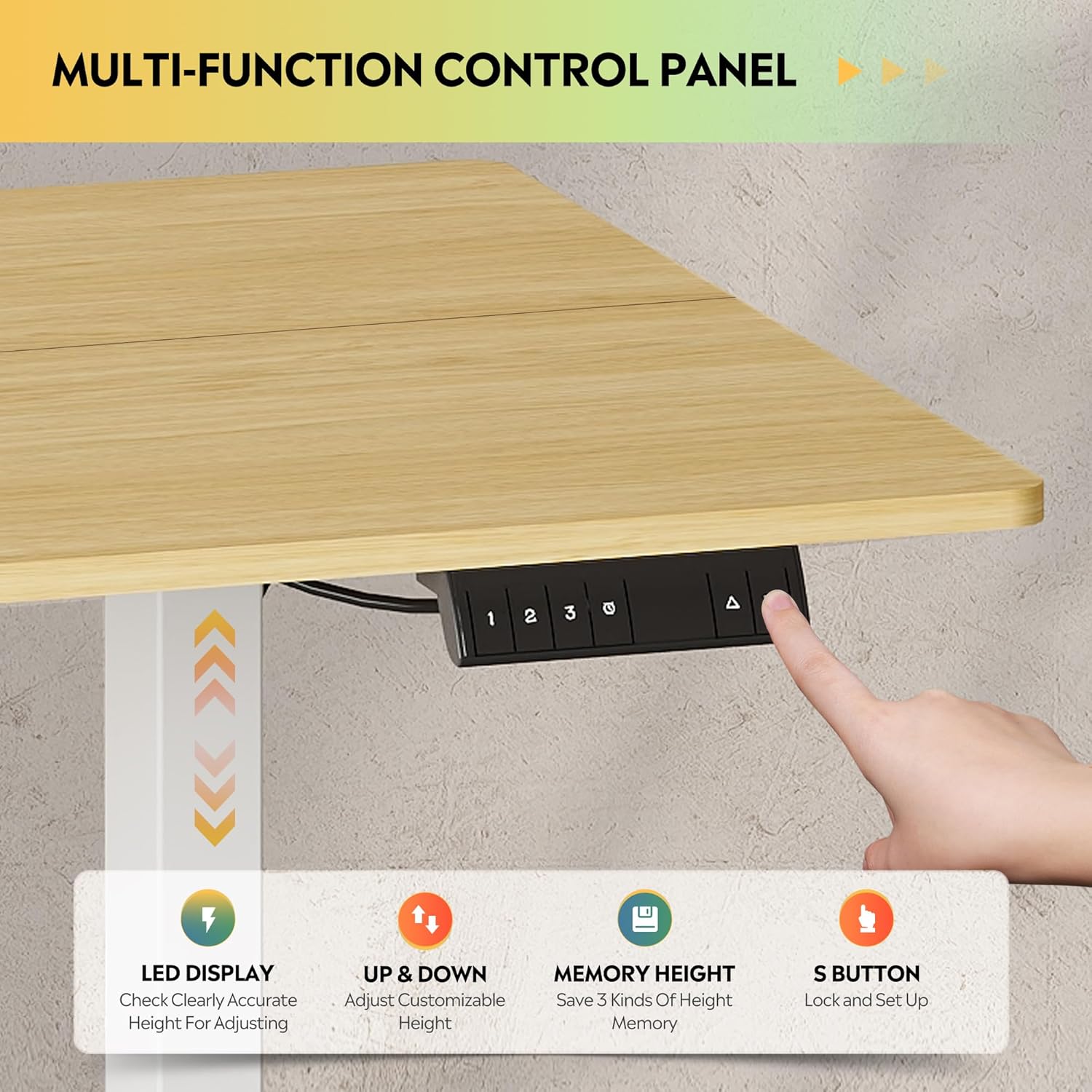
Figura 5.1: Detall view of the multi-function control panel, featuring an LED display, up/down adjustment buttons, three memory preset buttons (1, 2, 3), and an 'S' button for saving settings and child lock.
- Pantalla LED: Mostra l'alçada actual de l'escriptori en polzades.
- Botons amunt/avall (▲/▼): Premeu i manteniu premut per ajustar l'alçada de l'escriptori manualment. Deixeu anar per aturar-lo.
- Memory Preset Buttons (1, 2, 3): Quickly move the desk to a saved height.
- Botó 'S': Used to save height presets and activate the child lock.
5.2. Ajust d'alçada
The desk features a tri-motor system for quiet and smooth height transitions.
- Ajust manual: Press and hold the ▲ button to raise the desk or the ▼ button to lower it. The desk will move smoothly between 28.35 inches and 46.45 inches.
- Ús de preajustos de memòria: Press one of the preset buttons (1, 2, or 3) to automatically move the desk to the corresponding saved height.

Figure 5.2: Illustration of the DEVAISE Electric Standing Desk's adjustable height range, demonstrating its ability to transition from a sitting height of 28.35 inches to a standing height of 46.45 inches.
5.3. Configuració de preajustos de memòria
- Adjust the desk to your desired height using the ▲ or ▼ buttons.
- Press the 'S' button. The LED display will show "S-".
- Within 3 seconds, press the desired memory preset button (1, 2, or 3). The display will show "S-1", "S-2", or "S-3" to confirm the height has been saved.
5.4. Funció de bloqueig infantil
To prevent accidental adjustments, activate the child lock:
- Activar: Press and hold the 'S' button for 5 seconds until "LOC" appears on the LED display. All buttons will be disabled.
- Desactivar: Press and hold the 'S' button again for 5 seconds until "LOC" disappears and the current height is displayed.
6. Manteniment
- Neteja: Netegeu l'escriptori i el marc amb un drap suauamp drap. Eviteu productes de neteja abrasius o productes químics agressius.
- Gestió de cables: Periodically check that all cables are securely managed and not interfering with the desk's movement.
- Comprovació de fixació: Occasionally check all screws and bolts to ensure they remain tight.
- Capacitat de pes: Do not exceed the maximum weight capacity of 180 lbs to ensure longevity and proper function.
7. Solució De Problemes
| Problema | Causa possible | Solució |
|---|---|---|
| L'escriptori no es mou. | Power cable disconnected; Child lock active; Overload; Motor error. | Check power connection. Deactivate child lock (see Section 5.4). Reduce weight on desk. Unplug for 10 seconds, then plug back in to reset. |
| L'escriptori es mou de manera irregular o fa un soroll inusual. | Loose fasteners; Obstruction; Uneven weight distribution. | Check and tighten all assembly fasteners. Remove any obstructions. Distribute weight evenly on the desktop. |
| Anti-collision feature activates frequently. | Obstruction in path; Sensitivity setting (if adjustable, not specified). | Ensure clear path for desk movement. If problem persists, contact support. |
| La pantalla LED mostra un codi d'error. | Mal funcionament específic del sistema. | Refer to the full troubleshooting guide in the included manual or contact DEVAISE customer support with the error code. |
8. Especificacions
| Característica | Detall |
|---|---|
| Marca | DEVAISAR |
| Número de model | ASJZ025 |
| Dimensions del producte (P x A x A) | 27.59 "P x 70.86" W x 29.13" H |
| Color | Maple (Desktop), White (Frame) |
| Altura mínima | 28.35 polzades |
| Altura màxima | 46.45 polzades |
| Tipus de material superior | Fusta d'enginyeria |
| Material base | Ferro |
| Recomanació de pes màxim | 180 lliures |
| Característiques especials | 3-Button Memory Presets, Adjustable Height, Dual Motors, Electric, LED Touchscreen |
| Nivell de soroll | Under 50dB during adjustment |
| Components inclosos | Ganxo per a auriculars |
| Muntatge requerit | Sí |
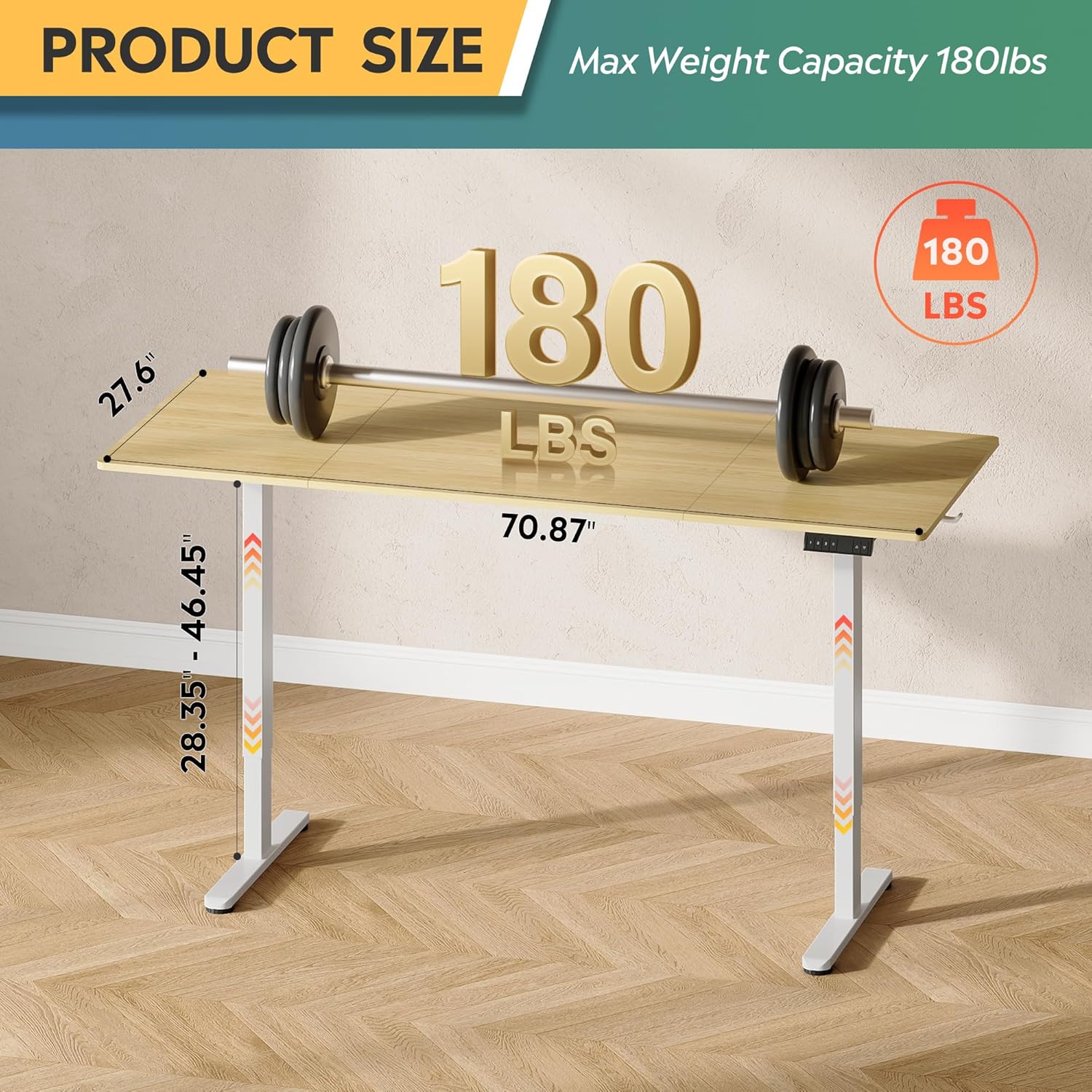
Figure 8.1: Diagram illustrating the product dimensions (70.87" width, 27.6" depth) and height adjustment range (28.35" - 46.45"), along with its maximum weight capacity of 180 lbs.
9. Garantia i Suport
9.1. Informació de la garantia
This DEVAISE Electric Standing Desk comes with a Garantia limitada. Please refer to the warranty card included in your package for specific terms and conditions. Retain your proof of purchase for warranty claims.
9.2. Atenció al client
For any questions regarding assembly, operation, troubleshooting, or product selection, please contact our U.S.-based product support team. Contact information can be found on the DEVAISE official weblloc web o a l'embalatge del producte.
You can also visit the official DEVAISE store for more information: DEVAISE Store