
1. Introducció
Gràcies per la compraasing the Kaiser MSA-2073M Professional One Body Speaker. This powerful and versatile audio system is designed to deliver clear, robust sound for various events, both indoors and outdoors. Featuring dual 8-inch woofers, 70W RMS power, Bluetooth connectivity, a wireless microphone, and dynamic Infinity Light effects, the MSA-2073M is built to enhance your audio experience. Please read this manual carefully to ensure proper setup, operation, and maintenance of your speaker.
2. Instruccions de seguretat
- No exposeu l'altaveu a la pluja ni a la humitat per evitar incendis o descàrregues elèctriques.
- No obriu l'altaveu casing. Demaneu totes les tasques de manteniment a personal qualificat.
- Mantingueu l'altaveu allunyat de fonts de calor com ara radiadors, registres de calor, estufes o altres aparells que produeixin calor.
- Utilitzeu només accessoris/accessoris especificats pel fabricant.
- Desendolleu l'altaveu durant tempestes amb llamps o quan no l'utilitzeu durant períodes prolongats.
- Assegureu-vos que hi hagi una ventilació adequada. No bloquegeu cap obertura de ventilació.
- No col·loqueu objectes pesats a sobre de l'altaveu.
- Avoid placing the speaker in unstable positions where it might fall.
3. Contingut del paquet
Si us plau, comproveu el contingut del vostre paquet. Si falta algun article o hi ha algun malmès, poseu-vos en contacte amb el vostre distribuïdor.
- Kaiser MSA-2073M Professional One Body Speaker
- Micròfon sense fil
- Cable de càrrega USB
- Cable d'àudio (auxiliar de 3.5 mm)
- Manual d'usuari
4. Producte acabatview
Familiarize yourself with the different parts and controls of your Kaiser MSA-2073M speaker.

Figura 4.1: Frontal View. Shows the speaker's front panel with dual 8-inch woofers and the dynamic Infinity Light display.

Figura 4.2: posterior View. Displays the speaker's rear, including the integrated handle and transport wheels for easy mobility.
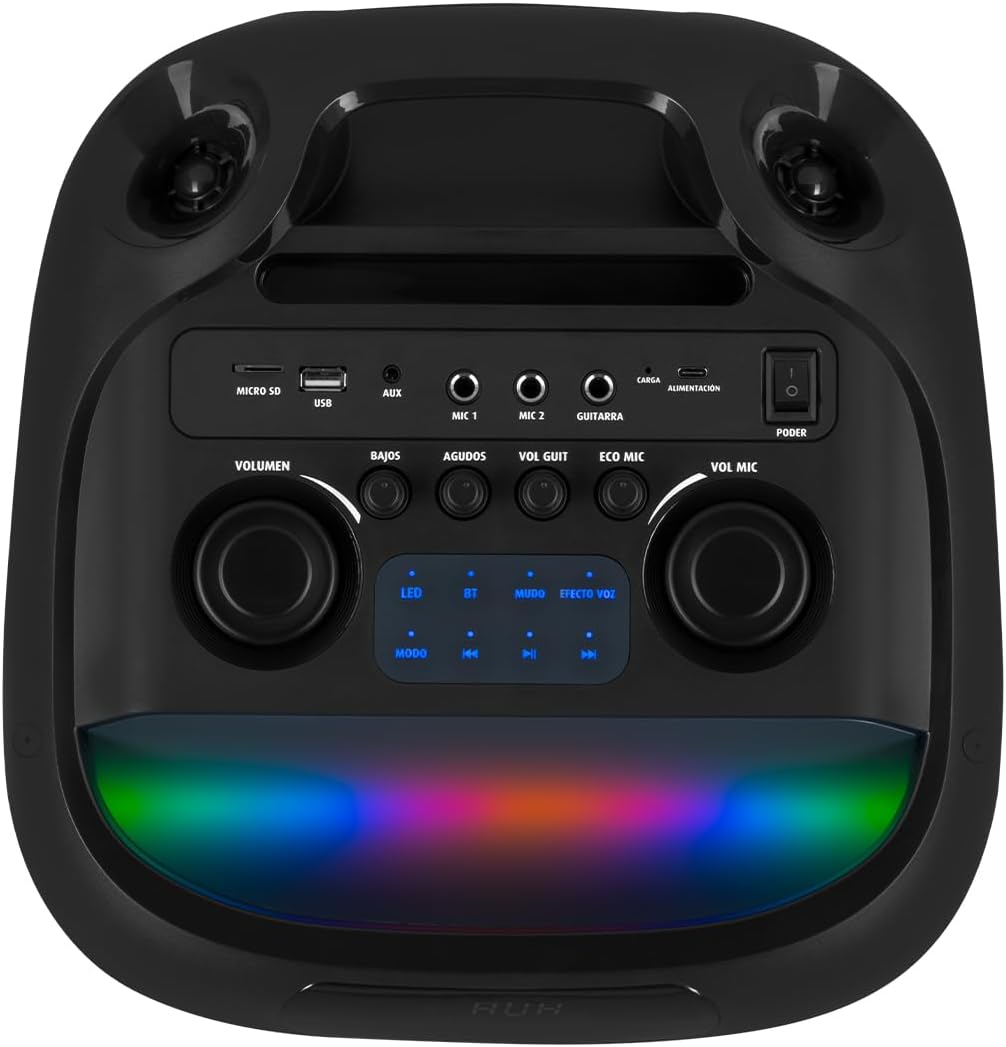
Figura 4.3: Tauler de control. Details the top-mounted control panel with inputs for USB, Micro SD, AUX, two microphones, and a guitar, along with volume, bass, treble, and effect controls.

Figure 4.4: Wireless Microphone. The included wireless microphone for vocal performances and announcements.
5. Configuració
5.1 Desembalatge
- Traieu amb cura l'altaveu i tots els accessoris de l'embalatge.
- Conserveu l'embalatge per a futurs transports o emmagatzematges.
5.2 Càrrega inicial
Before first use, it is recommended to fully charge the speaker's internal battery.
- Connect the provided USB charging cable to the speaker's charging port (labeled 'CARGA' or 'ALIMENTACIÓN' on the control panel).
- Connect the other end of the USB cable to a compatible USB power adapter (not included) or a powered USB port.
- The charging indicator light will illuminate. Allow several hours for a full charge.
- Once fully charged, the indicator light may change or turn off. Disconnect the charging cable.
5.3 Encès/Apagat
To power on the speaker, locate the 'PODER' (Power) switch on the control panel and slide it to the 'ON' position. To power off, slide it to 'OFF'.
6. Instruccions de funcionament
6.1 Connexió Bluetooth
Connect your mobile device wirelessly to the speaker.
- Turn on the speaker. The 'BT' indicator on the control panel should blink, indicating it's in pairing mode.
- Al dispositiu mòbil, activeu el Bluetooth i cerqueu els dispositius disponibles.
- Select "Kaiser MSA-2073M" from the list of devices.
- Once paired, the 'BT' indicator will stop blinking and remain solid. You can now play audio from your device through the speaker.
- L'abast del Bluetooth és de fins a 10 metres.
6.2 Entrada AUX
Connect external audio devices using the 3.5mm AUX cable.
- Connect one end of the 3.5mm audio cable to the 'AUX' port on the speaker.
- Connecteu l'altre extrem a la presa d'auriculars o a la sortida d'àudio del dispositiu extern.
- Press the 'MODE' button on the speaker until 'AUX' mode is selected.
- Reprodueix àudio des del teu dispositiu extern.
6.3 USB/Micro SD Playback
Play music directly from a USB flash drive or Micro SD card.
- Insert a USB flash drive into the 'USB' port or a Micro SD card into the 'MICRO SD' slot.
- The speaker will automatically switch to USB/Micro SD mode and begin playing compatible audio files. Si no és així, premeu el botó «MODE» per seleccionar l'entrada correcta.
- Use the playback controls (play/pause, next/previous track) on the speaker to manage your music.
6.4 Ús del micròfon
Use the included wireless microphone for karaoke or announcements.
- Assegureu-vos que el micròfon sense fil estigui encès.
- The microphone will automatically connect to the speaker.
- Adjust the microphone volume using the 'VOL MIC' knob on the control panel.
- Use the 'ECO MIC' knob to adjust the echo effect for the microphone.
- The speaker also features five voice effects for the microphone, accessible via the 'EFECTOS VOZ' button.
Entrada de guitarra 6.5
Connect an electric guitar to the speaker.
- Connect your guitar to the 'GUITARRA' input jack on the control panel.
- Adjust the guitar volume using the 'VOL GUIT' knob.
6.6 Ajustaments de so
Customize your audio output.
- VOLUM: Ajusta el volum general de l'altaveu.
- BAJOS (Bass): Ajusta la sortida de baixa freqüència.
- AGUDOS (Treble): Ajusta la sortida d'alta freqüència.
6.7 Infinity Light Effects
Enhance your listening experience with dynamic LED lighting.
- Press the 'LED' button on the control panel to cycle through different light modes or turn the lights off.
- The lights synchronize with the music for an immersive effect.
6.8 KSR-LINK (True Wireless Stereo)
Connect two MSA-2073M speakers for a true wireless stereo experience.
- Assegureu-vos que tots dos altaveus estiguin encesos i en mode Bluetooth, però no connectats a cap dispositiu.
- On one speaker, press and hold the 'MUDO' (Mute) button (which also functions as the KSR-LINK pairing button). You will hear a confirmation tone.
- Els dos altaveus s'aparellaran automàticament entre si.
- Once paired, connect your mobile device to one of the speakers via Bluetooth as described in section 6.1. Audio will now play in stereo through both speakers.
7. Càrrega
The speaker features a rechargeable battery for portable use. A full charge allows for prolonged use.
- Connect the USB charging cable to the speaker's charging port and a power source.
- L'indicador de càrrega mostrarà l'estat de càrrega.
- Avoid overcharging the battery. Disconnect the charger once the battery is full.
8. Manteniment
8.1 Neteja
- Netegeu l'altaveu amb un drap suau i sec.
- No utilitzeu netejadors abrasius, ceres ni dissolvents.
8.2 Emmagatzematge
- Guardeu l'altaveu en un lloc fresc i sec, allunyat de la llum solar directa i de temperatures extremes.
- Si l'emmagatzemeu durant un període prolongat, carregueu la bateria periòdicament per mantenir-ne la vida útil.
9. Solució De Problemes
| Problema | Causa possible | Solució |
|---|---|---|
| Sense poder | La bateria està esgotada; l'interruptor d'alimentació està apagat. | Charge the speaker; Turn the power switch to 'ON'. |
| Sense so | El volum és massa baix; S'ha seleccionat un mode d'entrada incorrecte; El dispositiu no està connectat correctament. | Increase volume; Press 'MODE' to select correct input; Reconnect device/Bluetooth. |
| Bluetooth no connectat | Speaker not in pairing mode; Device too far; Already connected to another device. | Ensure 'BT' indicator is blinking; Move device closer; Disconnect from other devices and try again. |
| El micròfon no funciona | Microphone is off; Microphone volume is low; Microphone battery is low. | Turn on microphone; Increase 'VOL MIC' knob; Charge/replace microphone battery. |
10. Especificacions
| Característica | Especificació |
|---|---|
| Marca | Kaiser |
| Model | MSA-2073M |
| Mida de l'altaveu | 2 x 8 polzades |
| Potència de sortida RMS | 70 watts |
| PMPO Power Output | 28000 watts |
| Tecnologia de connectivitat | Sense fil (Bluetooth) |
| Interval Bluetooth | Fins a 10 metres |
| Mode de sortida d'àudio | estèreo |
| Impedància | 3 ohms |
| Resposta de freqüència | 60 Hz |
| Mètode de control | Botó, botons rotatius |
| Font d'alimentació | Bateria |
| Dimensions (PxAxA) | 37.4 x 36.2 x 80 cm |
| Pes de l'article | 10.8 quilos |
| Accessoris inclosos | Micròfon sense fil |
11. Vídeo del producteview
Video 11.1: Product Features and Unboxing. Aquest vídeo ofereix una ràpida explicacióview of the Kaiser MSA-2073M speaker, showcasing its unboxing, key features like 70W RMS power, 10m Bluetooth range, included cables, and detailed views of the control panel with independent volume, bass, treble, microphone, guitar, and echo controls. It also highlights the five voice effects for the microphone, 3 Ohm impedance, and convenient transport wheels. The video also mentions the KSR-LINK technology for connecting two speakers.
12. Garantia i Suport
Your Kaiser MSA-2073M speaker comes with a 90-day factory warrantySi us plau, conserveu el comprovant de compra per a reclamacions de garantia.
For technical support, troubleshooting assistance, or warranty inquiries, please contact Kaiser customer service through their official website or the retailer where you purchased the product. Do not attempt to repair the device yourself, as this may void your warranty.