
1. Introducció
This manual provides detailed instructions for the proper use, setup, and maintenance of your CNBRO TWS Wireless Bluetooth Smart Touch Screen Ultra Open Ear Earbuds with Ear Hooks, Model YJ33. Please read this manual thoroughly before using the product to ensure optimal performance and longevity.
2. Contingut del paquet
Verifiqueu que tots els elements siguin presents al paquet:
- 1 Pair of Wireless Touch Screen Earbuds with Ear Hooks
- 1 cable de càrrega TIPUS C
- 1 Manual d'usuari
3. Producte acabatview
The CNBRO YJ33 earbuds feature an ultra-open ear design with ear hooks for a secure and comfortable fit. The charging case includes a smart touchscreen for convenient control of various functions.

Image 3.1: CNBRO YJ33 Earbuds and Smart Touch Screen Charging Case.
The open-ear design allows for situational awareness, making them suitable for activities like running or cycling. The earbuds are also equipped with ENC Noise Cancellation for clear calls and are IPX5 waterproof.

Image 3.2: Open Ear Design for situational awareness.

Image 3.3: ENC Noise Cancellation for clear calls.
4. Especificacions
| Característica | Especificació |
|---|---|
| Versió Bluetooth | 5.4 |
| Headphone Charging Case Battery Capacity | 600 mAh |
| Distància de transmissió | Aproximadament 10 metres |
| Single Playing Time | 6-8 hores |
| Temps de reproducció total (amb estoig de càrrega) | Fins a 48 hores |
| Temps de càrrega | 2 hores |
| Nivell impermeable | IPX5 |
| Mètode de control | Toca |
| Dispositius compatibles | All devices and mobile phones that support Bluetooth |
5. Configuració
5.1 Càrrega dels auriculars i l'estoig
- Col·loqueu els auriculars a la caixa de càrrega.
- Connect the TYPE-C cable to the charging port on the case and a power source.
- The smart screen on the case will indicate the charging status. A full charge takes approximately 2 hours.
5.2 Vinculació Bluetooth
- Assegureu-vos que els auriculars estiguin carregats i col·locats a l'estoig de càrrega.
- Obre l'estoig de càrrega. Els auriculars entraran automàticament en mode d'emparellament.
- Al dispositiu (telèfon intel·ligent, tauleta, etc.), activeu el Bluetooth.
- Cerca available Bluetooth devices and select "YJ33" (or similar name) from the list.
- Un cop connectats, els auriculars indicaran que l'emparellament s'ha realitzat correctament i el dispositiu els mostrarà com a connectats.
6. Instruccions de funcionament
6.1 Smart Touch Controls (Earbuds)
The earbuds feature touch-sensitive areas for easy control of various functions:
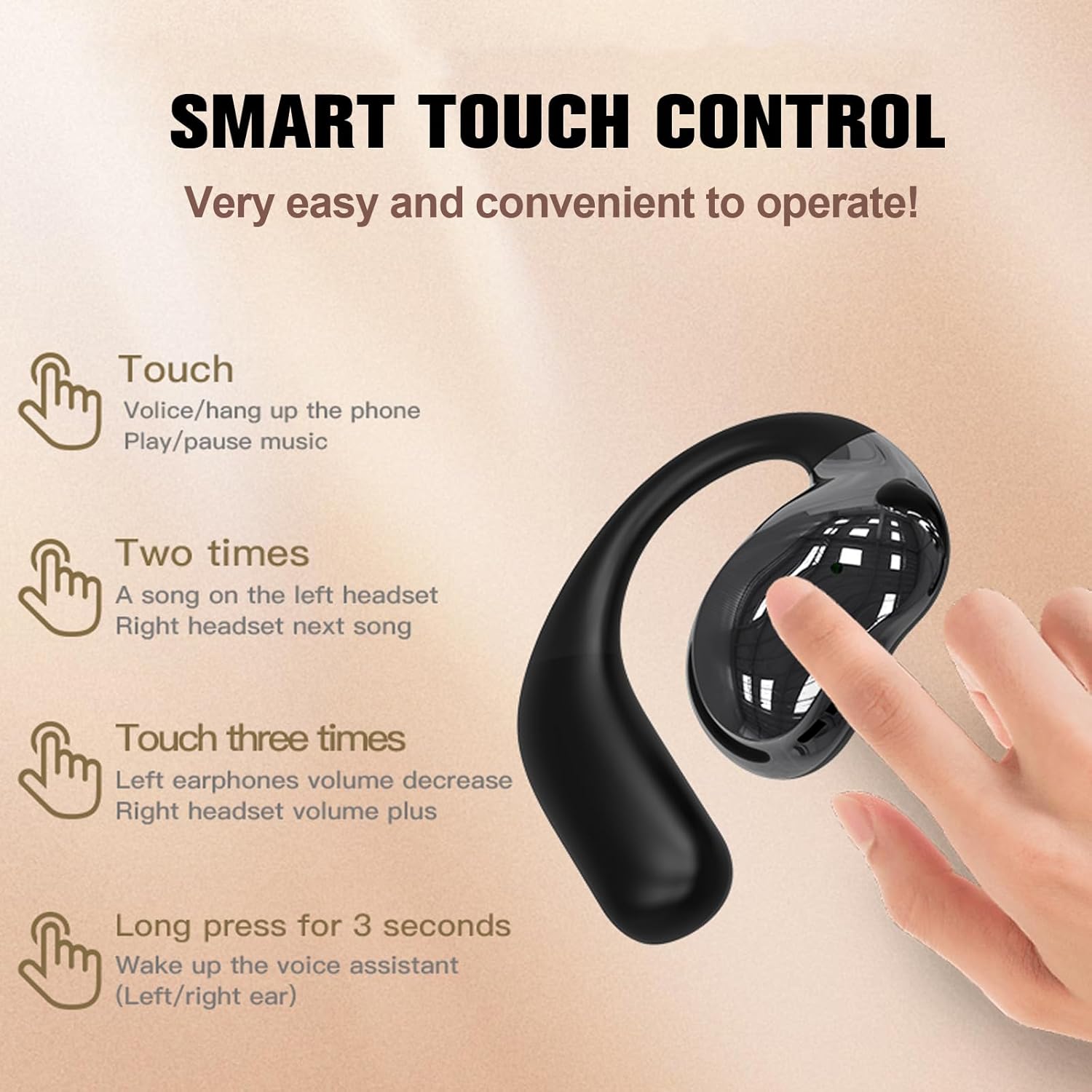
Image 6.1: Earbud Touch Control Gestures.
- Un sol toc: Answer/Hang up phone calls, Play/Pause music.
- Doble toc: Left earbud for previous song, Right earbud for next song.
- Triple toc: Left earbud for volume decrease, Right earbud for volume increase.
- Premda llarga (3 segons): Activate voice assistant (Left/Right earbud).
6.2 Smart Touch Screen Functions (Charging Case)
The charging case's touchscreen provides access to multiple functions:

Image 6.2: Smart Touch Screen Interface.
- Interfície principal: Displays time, battery level, and quick access icons.
- Control de música: Play, pause, skip tracks, and adjust volume directly from the screen.
- Gestió de trucades: Answer or reject calls.
- Modes d'equalització: Select from various equalizer presets (e.g., Pop, Rock, Classic, Jazz) to customize your audio experience.
- Ajust de brillantor: Control the screen brightness.
- Assistent de veu: Activa l'assistent de veu del teu dispositiu.
- Fotografia: Activa l'obturador de la càmera del telèfon de forma remota.
- Canvi d'idioma: Change the system language of the case.
7. Manteniment
7.1 Neteja
Una neteja regular ajuda a mantenir un rendiment i una higiene òptims:
- Feu servir un drap suau, sec i sense borrissol per netejar els auriculars i l'estoig de càrrega.
- No utilitzeu netejadors abrasius, dissolvents ni aerosols.
- Assegureu-vos que els contactes de càrrega estiguin lliures de pols i deixalles.
7.2 Resistència a l'aigua (IPX5)
The earbuds are rated IPX5 water-resistant, meaning they can withstand splashes and sweat. They are not designed for submersion in water. Ensure the charging port is dry before charging.

Imatge 7.1: Resistència a l'aigua IPX5.
8. Solució De Problemes
- Auriculars que no s'emparellan: Ensure earbuds are charged, Bluetooth is enabled on your device, and the earbuds are in pairing mode. Try restarting both the earbuds (by placing them in the case and closing/opening) and your device.
- Sense so: Check volume levels on both the earbuds and your connected device. Ensure earbuds are properly paired and selected as the audio output.
- Problemes de càrrega: Verify the TYPE-C cable is securely connected to both the case and the power source. Ensure the charging contacts on the earbuds and inside the case are clean.
- Els controls tàctils no responen: Assegura't que els dits estiguin nets i secs. Prova de reiniciar els auriculars.
9. Garantia i Suport
If you receive a defective product or have any questions during use, please contact the seller for assistance. Refer to your purchase documentation for specific warranty details.