
1. Introducció
This manual provides comprehensive instructions for the installation, operation, and maintenance of your MekedeTech Android Car Stereo. This unit is specifically designed for Toyota 4Runner models manufactured between 2003 and 2009. It features an 8-Core A53 1.8GHz CPU, 4GB RAM, 64GB ROM, a 9-inch IPS touch screen with 1280*720 resolution, built-in 4G LTE, Wireless CarPlay, Android Auto, and DSP sound processing.
2. Informació de seguretat
- Always ensure the vehicle is parked and the engine is off before attempting installation or maintenance.
- Desconnecteu la bateria del vehicle abans de la instal·lació per evitar curtcircuits.
- Consulteu un professional si teniu dubtes sobre algun dels passos d'instal·lació.
- No feu servir el dispositiu de manera que us distregui de la conducció.
- Mantingueu el dispositiu allunyat de l'aigua i de temperatures extremes.
3. Contingut del paquet
Verifiqueu que tots els elements siguin presents al paquet:
- 9-inch Touch Screen Head Unit
- Power Harness (Plug and Play)
- Frame Kit for Toyota 4Runner (2003-2009)
- Antena GPS
- Cables USB
- Cables RCA
- Antena 4G LTE
4. Compatibilitat
This Android car stereo is designed for a perfect fit in Toyota 4Runner models from 2003 to 2009. The package includes a frame kit and a plug-and-play harness to retain factory steering wheel controls. Please ensure your vehicle's dashboard configuration matches the compatible layout.

Image: This image illustrates the compatible and incompatible dashboard configurations for the Toyota 4Runner. The top panel shows an incompatible dashboard (marked with an 'X'), while the bottom panel shows a compatible dashboard (marked with a checkmark).
5. Configuració i instal·lació
5.1 Comprovació prèvia a la instal·lació
- Confirmeu que hi hagi tot el contingut del paquet.
- Ensure your vehicle's dashboard is compatible.
- Gather necessary tools (e.g., trim removal tools, screwdrivers).
5.2 Passos d'instal·lació
- Desconnecta la bateria: Desconnecta el terminal negatiu de la bateria del teu vehicle.
- Treure la ràdio de fàbrica: Carefully remove the existing factory radio and dashboard trim.
- Connectar arnès: Connect the provided plug-and-play harness to the vehicle's wiring and the new head unit. Ensure all connections are secure.
- Connexió d'antena: The factory AM/FM antenna may require an adapter (not included) for connection to the new unit.
- GPS and 4G LTE Antennas: Connect the GPS antenna and position it for optimal signal reception. Connect the 4G LTE antenna.
- Prova de connexions: Before fully reassembling, temporarily reconnect the battery and power on the unit to test basic functions (power, sound, touch screen).
- Unitat principal segura: Mount the new head unit into the dashboard using the provided frame kit.
- Remunta el tauler de control: Torneu a instal·lar totes les peces de guarnició del tauler de control.
- Final Battery Connection: Torneu a connectar la bateria del vehicle.

Image: This image displays the original Toyota 4Runner dashboard radio (bottom) and the new MekedeTech Android Car Stereo installed (top), showcasing the integrated navigation interface.
5.3 Cooling Fan Setup
The unit supports an external cooling fan to manage temperature, especially during prolonged use or in hot climates. Follow these steps to activate the cooling fan:
- Connecta el ventilador: Ensure the cooling fan is properly connected to the designated port on the head unit.
- Configuració d'accés: On the head unit, navigate to Configuració > Dispositiu > So.
- Activa AMP ACTIVITAT: Locate and enable the 'AMP ON' setting.
- Comproveu el funcionament del ventilador: The cooling fan should now be active, helping to maintain optimal operating temperature.

Image: This image details the cooling fan setup steps and highlights the unit's specifications: Octa-core CPU, 4GB RAM, 64GB ROM, and the Android system. It also shows temperature comparisons with and without a cooling fan.
6. Instruccions de funcionament
6.1 Funcionament bàsic
- Encès/apagat: Press and hold the power button (if available) or turn on the vehicle ignition.
- Pantalla tàctil: Navigate the interface using the responsive 9-inch IPS touch screen.
- Controls del volant: The unit supports factory steering wheel controls. These can often be programmed or mapped within the device settings.
6.2 CarPlay sense fil i Android Auto
The unit features built-in wireless CarPlay and Android Auto, allowing seamless integration with your smartphone.
For Wireless CarPlay (iOS System):
- Connectar Bluetooth: On your iPhone, go to Bluetooth settings and pair with the car stereo's Bluetooth.
- Select Car Link: On the car stereo, open the 'Car Link' application.
- Espera la connexió: The system will automatically connect to CarPlay. (CarPlay can also be connected via USB cable).
For Wireless Android Auto (Android System):
- Connectar Bluetooth: On your Android phone, go to Bluetooth settings and pair with the car stereo's Bluetooth.
- Select Car Link: On the car stereo, open the 'Car Link' application.
- Espera la connexió: The system will automatically connect to Android Auto. (Android Auto can also be connected via USB cable).

Image: This image illustrates the user interface for Wireless CarPlay and Android Auto, showing the connection steps for both iOS and Android devices.
6.3 Network Connectivity (4G LTE & WiFi)
The head unit supports both 4G LTE and WiFi for internet access.
- 4G LTE: Insert a compatible SIM card into the designated 4G LTE card slot. The unit has two SIM card slots: one on the back of the main unit and one on the RCA cable. This allows direct cellular network access without needing a phone hotspot.
- WiFi: Connect to a WiFi hotspot (e.g., from your smartphone) via the unit's WiFi module. Navigate to Configuració > Xarxa i Internet > Wi-Fi per connectar.
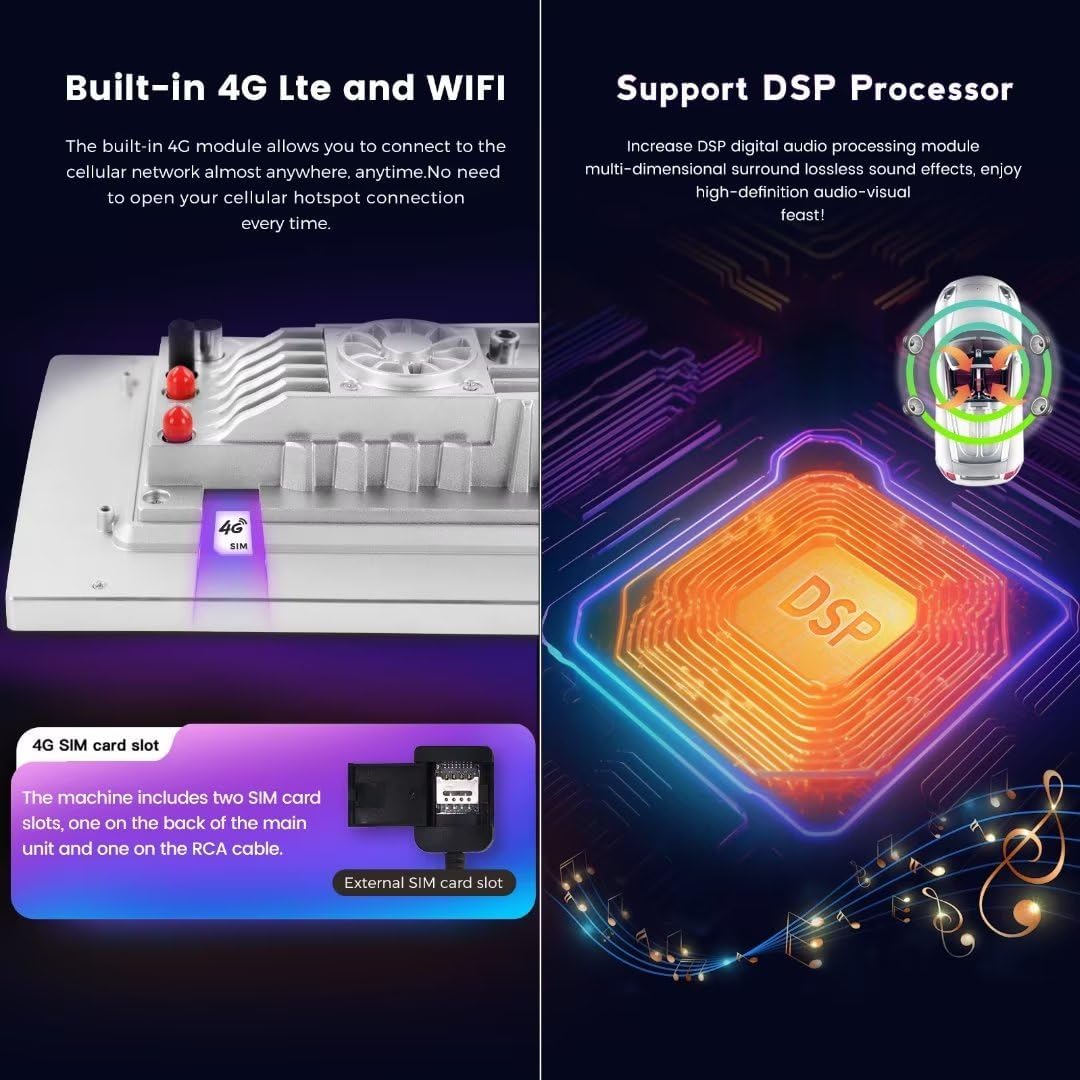
Image: This image highlights the built-in 4G LTE and WiFi capabilities, including the SIM card slot location. It also illustrates the DSP processor for enhanced audio quality.
6.4 Navegació GPS
The unit has built-in GPS navigation. Ensure the GPS antenna is properly installed for accurate positioning. You can use pre-installed maps or download additional navigation applications from the app store when connected to the internet.
6.5 Ràdio FM
Access the FM radio application to tune into local radio stations. Ensure the antenna is connected for optimal reception.
6.6 Reproducció multimèdia
The unit supports various audio and video formats including APE, FLAC, WAV, MP3, WMA for audio, and MKV, RMVB, AVI, MP4, MDV for video. Media can be played from USB devices or internal storage.
6.7 Instal·lació de l'aplicació
Once connected to the internet (via 4G LTE or WiFi), you can download and install various applications from the pre-installed app store, similar to a standard Android tablet.
7. Manteniment
- Neteja: Feu servir un drap suau i sec per netejar la pantalla i l'exterior. Eviteu productes de neteja o dissolvents abrasius.
- Actualitzacions de programari: Comproveu periòdicament si hi ha actualitzacions de programari a través de la configuració del sistema per garantir un rendiment òptim i l'accés a les noves funcions.
- Temperatura: Avoid exposing the unit to extreme temperatures. The cooling fan helps manage internal temperatures during operation.
8. Solució De Problemes
Si teniu problemes, consulteu els següents problemes i solucions habituals:
| Problema | Possible causa/solució |
|---|---|
| Sense poder | Check power harness connections. Ensure vehicle battery is connected and charged. Check vehicle's fuse box. |
| Sense so | Verify speaker connections. Check volume levels. Ensure 'AMP ON' setting is enabled if applicable. |
| Wireless CarPlay/Android Auto Disconnects or Fails to Connect | Ensure Bluetooth is enabled and paired. Restart phone and head unit. Check 'Car Link' app. Try connecting via USB cable. |
| Mala recepció de ràdio | Ensure AM/FM antenna is properly connected. An antenna adapter may be required. |
| Els controls del volant no funcionen | Check harness connections. Access the unit's settings to program or map steering wheel buttons. |
| Unit is Loose in Dashboard | Ensure the frame kit is correctly installed and secured. Recheck mounting points. |
| Slow Performance / App Issues | Close unnecessary background apps. Clear cache. Consider a factory reset if issues persist (Configuració > Sistema > Restablir opcions). |
| Poor WiFi Connection | Ensure the WiFi hotspot SSID is not hidden. Move closer to the hotspot source. |
9. Especificacions
| Característica | Detall |
|---|---|
| Marca | MekedeTech |
| Model | 8-Core 4+64G |
| Sistema operatiu | OS Android 12 |
| CPU | 8-Core A53 1.8GHz |
| Memòria | 4 GB de RAM, 64 GB de ROM |
| Mida de la pantalla | Pantalla tàctil IPS de 9 polzades |
| Resolució de pantalla | 1280*720 |
| Potència de sortida | 4*50W (200 watts en total) |
| Connectivitat | Bluetooth, USB, Wi-Fi, Wireless, 4G LTE |
| Característiques especials | Wireless CarPlay, Android Auto, Built-in DSP, GPS Navigation, FM Radio |
| Dispositius compatibles | Smartphone |
| Formats d'àudio | APE/FLAC/WAV/MP3/WMA, etc. |
| Formats de vídeo | MKV/RMVB/AVI/MP4/MDV, etc. |
| Pes de l'article | 3.5 lliures |
10. Garantia
This MekedeTech product comes with a 1 anys de garantia from the date of purchase. Please retain your proof of purchase for warranty claims. The warranty covers manufacturing defects and malfunctions under normal use. It does not cover damage caused by improper installation, misuse, accidents, or unauthorized modifications.
11. Suport
For technical assistance, troubleshooting, or warranty inquiries, please contact MekedeTech customer support. Refer to the contact information provided with your purchase or visit the official MekedeTech weblloc de recursos de suport.