
BORUIT U7
Manual d'usuari de la llanterna plana EDC BORUIT U7
Model: U7
1. Introducció
Gràcies per la compraasing the BORUIT U7 Flat EDC Flashlight. This compact and powerful flashlight is designed for everyday carry, offering multiple lighting modes including white, 365nm UV, and RGB ambient light. It features a durable aluminum alloy construction, IP65 water resistance, and a built-in power bank function for convenience.

Image: The BORUIT U7 Flat EDC Flashlight, showcasing its compact design and main light output.
2. Què hi ha a la caixa
- BORUIT U7 Flashlight
- Cable de càrrega USB-C
- Manual d'usuari (aquest document)
- Packaged Box
3. Característiques del producte
- Llum principal: White light with Turbo (1100 lumens), High, Medium, Low, Economic, SOS, and Strobe modes.
- Llum negra UV: 365nm UV light for various detection purposes.
- Llum lateral COB: Warm High, Warm Low, White High, White Low, Warm White modes.
- Llum ambiental RGB: White, Red, Green, Blue, Red Flash, and Discoloration modes.
- Independent Control Buttons: Three separate buttons for main light, sidelight, and RGB ambient light, with memory function.
- Compacte i portàtil: Lightweight (5.19oz), with a two-way clip and strong magnetic tail for hands-free use.
- Bateria recarregable: Built-in 2400mAh Lithium-Ion battery with USB-C fast charging.
- Funció del banc d'energia: Can charge other devices in emergencies.
- Construcció duradora: Premium aluminum alloy, 1-meter impact resistance, and IP65 waterproof rating.

Imatge: Més deview of the BORUIT U7 flashlight's 20 light modes and 6 color options, detailing button functions.

Imatge: Detallada view of the BORUIT U7 flashlight's three independent control buttons and their respective light modes (UV, Main White, Sidelight, RGB).
4. Configuració
4.1 Càrrec inicial
Before first use, fully charge the BORUIT U7 flashlight. Connect the provided USB-C cable to the flashlight's charging port and to a USB power source (e.g., wall adapter, computer USB port). The 4-level power indicator will show charging progress. A full charge takes approximately 4 hours.

Image: The BORUIT U7 flashlight connected for USB-C charging, with battery indicator lights visible. Below, the flashlight is shown acting as a power bank, charging a smartphone.

Image: Illustration of the BORUIT U7's Type-C charging capability and its function as a USB power output for other devices.
5. Instruccions de funcionament
The BORUIT U7 features three independent buttons for controlling different light functions.
5.1 Main White Light Operation
- Activar/Desactivar: Long press the Main Light button.
- Modes de cicle: While on, click the Main Light button to cycle through High, Medium, Low, Economic modes.
- Mode turbo: Double-click the Main Light button from any state to activate Turbo mode (1100 lumens).
- SOS/Strobe Mode: Triple-click the Main Light button from any state to activate SOS/Strobe mode.
Image: Visual representation of the main white light modes (Turbo, High, Medium, Low, Economic, SOS, Strobe) and their activation methods.
5.2 UV Black Light Operation
- Activar/Desactivar: Long press the UV Light button.
- Modes de cicle: While on, click the UV Light button to switch between UV High and UV Low modes.

Image: The BORUIT U7 flashlight emitting 365nm UV light, demonstrating its use for banknote security, jade identification, detecting scorpions, pet urine, and fluorescent agents.

Image: Visual guide to the UV light modes (UV High, UV Low) and their activation via the UV button.
5.3 Funcionament de la llum lateral COB
- Activar/Desactivar: Long press the Sidelight button.
- Modes de cicle: While on, click the Sidelight button to cycle through Warm High, Warm Low, White High, White Low, Warm White modes.
Image: Visual guide to the COB sidelight flood modes (Warm High, Warm Low, White High, White Low, Warm White) and their activation.
5.4 RGB Ambient Light Operation
- Activar/Desactivar: Double-click the RGB Ambient Light button.
- Cicle de colors: While on, click the RGB Ambient Light button to switch between White, Red, Green, Blue, Red Flash, and Discoloration modes.
- Apagar: Long press the RGB Ambient Light button.

Image: The BORUIT U7 flashlight providing RGB ambient lighting in a camping setting, showing various color outputs.
Image: Visual guide to the RGB ambient light modes (White, Red, Green, Blue, Red Flash, Discolorations) and their activation.
5.5 Funció de bateria externa
The BORUIT U7 can act as a power bank. Connect your device (e.g., smartphone) to the flashlight's USB-C port using a compatible cable. The flashlight will begin charging your device.
Image: The BORUIT U7 flashlight connected via USB-C to charge a smartphone, demonstrating its power bank functionality.
6. Manteniment
- Neteja: Netegeu la llanterna amb un suau, damp tela. No utilitzeu netejadors abrasius ni dissolvents.
- Emmagatzematge: Store the flashlight in a cool, dry place when not in use. Avoid extreme temperatures.
- Cura de la bateria: For optimal battery life, charge the flashlight regularly, even if not used frequently. Avoid fully discharging the battery for extended periods.
- Resistència a l'aigua: The flashlight is IP65 waterproof, meaning it is protected against low-pressure water jets from any direction. It is not designed for submersion. Ensure the charging port cover is securely closed to maintain water resistance.
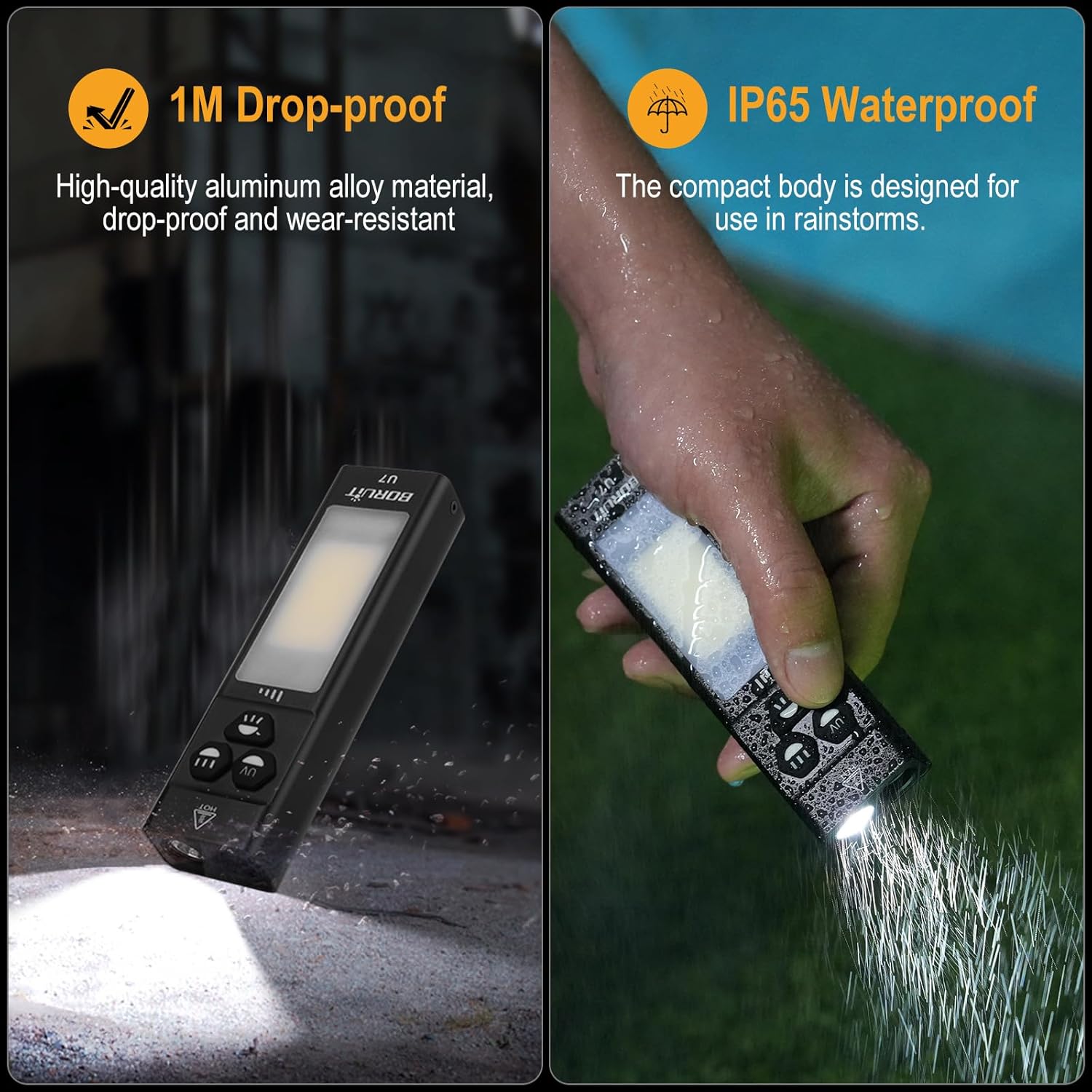
Image: The BORUIT U7 flashlight being exposed to water and shown to be drop-proof, illustrating its durability and IP65 waterproof rating.
7. Solució De Problemes
| Problema | Causa possible | Solució |
|---|---|---|
| La llanterna no s'encén. | La bateria està esgotada. | Charge the flashlight using the provided USB-C cable. |
| La sortida de llum és tènue. | Nivell de bateria baix. | Recarrega la llanterna. |
| La llanterna no es carrega. | Cable o font d'alimentació defectuosos. | Prova un altre cable USB-C o adaptador de corrent. Assegura't que les connexions siguin segures. |
| La funció del banc d'energia no funciona. | Flashlight battery too low or incompatible device. | Ensure the flashlight is sufficiently charged. Verify your device is compatible with USB charging. |
8. Especificacions
| Característica | Detall |
|---|---|
| Model | U7-1 |
| Brillantor de la llum principal | Up to 1100 Lumens (Turbo) |
| Longitud d'ona de la llum UV | 365 nm |
| Capacitat de la bateria | Ió de liti de 2400 mAh |
| Port de càrrega | USB-C |
| Temps de càrrega | Aproximadament 4 hores |
| Temps d'execució | 3 to 58 hours (depending on mode) |
| Material | Aliatge d'alumini |
| Resistència a l'aigua | IP65 |
| Resistència a l'impacte | 1 metres |
| Dimensions (L x A x A) | 4.72" x 1.34" x 0.78" (120 mm x 34 mm x 20 mm) |
| Pes | 5.19 oz (147g) |
9. Garantia i Suport
BORUIT provides a Garantia de devolució de 30 dies i a 1 any de garantia for the U7 Flat EDC Flashlight. For any product inquiries, technical support, or warranty claims, please contact our customer service team through the retailer where you purchased the product.
Video: An official product video demonstrating the features and operation of the BORUIT U7 Flat EDC Flashlight.
Ask a question about this manual
Ask about setup, troubleshooting, compatibility, parts, safety, or missing instructions. Manuals+ will review the question and use this page’s manual context to help answer it.