
Introducció
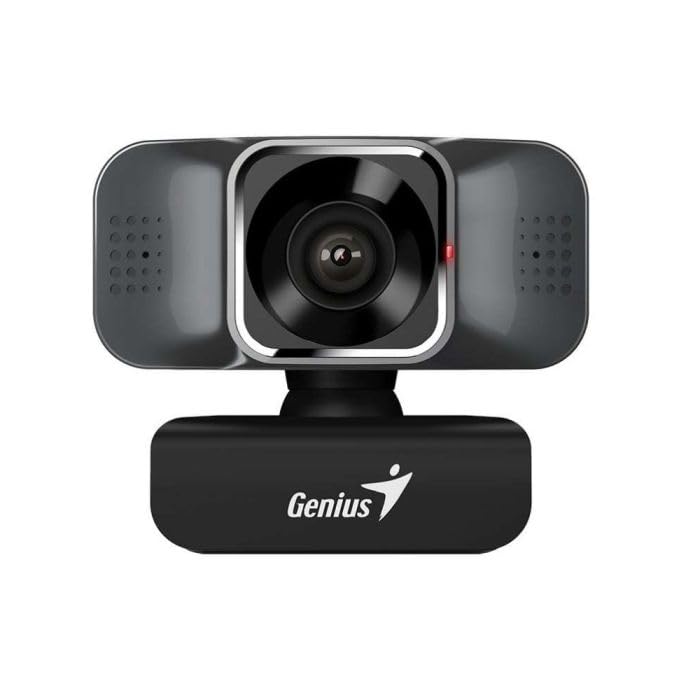
Thank you for choosing the Genius FaceCam Quiet Black Webcàmera. Aquest manual proporciona informació essencial per a la configuració, el funcionament i el manteniment de la vostra webcam. Please read these instructions carefully before use to ensure optimal performance and longevity of your device.
Què hi ha a la caixa
Verifiqueu que tots els components siguin presents al paquet:
- Genius FaceCam Quiet Black Weblleva
Configuració
Follow these steps to set up your Genius FaceCam Quiet Weblleva:
- Col·locació: Col·loca el webcam on top of your computer monitor, laptop screen, or on a flat surface. The flexible clip allows for secure attachment.
- Connexió a l'ordinador: Connecteu el webcam's USB cable into an available USB port on your computer.
- Instal·lació del controlador: El webcam is typically plug-and-play. Your operating system should automatically detect and install the necessary drivers. If prompted, follow the on-screen instructions.
- Ajust d'angle: El webcam features 360-degree rotation. Adjust the camera angle to achieve your desired view.
Instruccions de funcionament
Un cop el webcam is set up, you can begin using it for video communication and recording:
- Llançar l'aplicació: Open your preferred video conferencing software (e.g., Zoom, Skype, Microsoft Teams) or video recording application.
- Seleccioneu Weblleva: In the application's settings, select "Genius FaceCam Quiet" as your video input device.
- Seleccioneu el micròfon: Si el webcam has a built-in microphone, select "Genius FaceCam Quiet" as your audio input device in the application's settings.
- Reducció de soroll: El webcam features a noise reduction function. Refer to the device itself for any physical switches or software settings to activate or adjust this feature for clearer audio.
- Qualitat del vídeo: El webcam supports Full HD 1920x1080p resolution at 30 frames per second (fps). Ensure your application settings are configured to utilize these specifications for optimal video quality.
Manteniment
To ensure the longevity and performance of your webcàmera, seguiu aquestes pautes de manteniment:
- Neteja de la lent: Netegeu suaument el webNetegeu l'objectiu de la càmera amb un drap suau i sense borrissol. Eviteu utilitzar productes químics agressius o materials abrasius que puguin ratllar l'objectiu.
- Neteja del cos: Use a soft, dry cloth to clean the body of the webcam. If necessary, a slightly damp Es pot fer servir un drap, però assegureu-vos que no entri humitat a l'aparell.
- Emmagatzematge: Quan no s’utilitzi, emmagatzemeu el fitxer webguardeu-ho en un lloc net i sec, allunyat de temperatures extremes i de la llum solar directa.
- Cura del cable: Eviteu doblegar o girar excessivament el cable USB per evitar danys.
Resolució de problemes
Si teniu problemes amb el vostre webcàmera, consulteu els següents problemes i solucions habituals:
| Problema | Solució |
|---|---|
| Webcàmera no detectada per l'ordinador. |
|
| Mala qualitat de vídeo o parpelleig. |
|
| No hi ha àudio o hi ha mala qualitat d'àudio. |
|
Especificacions
| Característica | Detall |
|---|---|
| Marca | Geni |
| Nom del model | 32200005400 |
| Resolució | Full HD 1920x1080p |
| Velocitat de fotogrames | 30 fps |
| Rotació | 360 graus |
| Funcions d'àudio | Reducció de soroll |
| Tecnologia del sensor fotogràfic | Altres |
| Format de captura de vídeo | MP4 |
| Components inclosos | Web Cam |
Garantia i Suport
For warranty information, please refer to the documentation included with your product or visit the official Genius website. If you require technical support or have questions not covered in this manual, please contact Genius customer service through their official support channels.
You can typically find support contact details on the Genius official weblloc.