
1. Introducció
This manual provides essential information for the safe and efficient operation of your Philips Evnia 24M2N3200L 24-inch Gaming Monitor. Please read this manual thoroughly before using the product and retain it for future reference.
2. Informació de seguretat
Observeu les següents precaucions de seguretat per evitar danys al monitor i garantir la seguretat de l'usuari:
- No exposeu el monitor a la pluja ni a la humitat.
- No obriu el monitor casing; demaneu totes les tasques de manteniment a personal qualificat.
- Assegureu-vos una ventilació adequada al voltant del monitor.
- Feu servir només l'adaptador de corrent que s'inclou amb el monitor.
- Eviteu col·locar objectes pesats al cable d'alimentació.
- Clean the screen with a soft, lint-free cloth. Do not use liquid cleaners directly on the screen.
3. Contingut del paquet
Verifiqueu que tots els elements siguin presents al paquet:
- Philips Evnia 24M2N3200L Monitor
- Suport de monitor (base i coll)
- Cable d'alimentació
- Cable HDMI
- Cable DisplayPort
- Manual d'usuari (aquest document)

Image: The retail packaging box for the Philips Evnia 24M2N3200L monitor, showing the product name and design awards.
4. Configuració
4.1. Muntatge de l'estand
- Col·loqueu el monitor cara avall sobre una superfície suau i neta per evitar ratllades.
- Fixeu el coll del suport a la zona de muntatge VESA del monitor. Fixeu-lo amb cargols si en teniu.
- Attach the stand base to the bottom of the stand neck. Tighten the thumb screw or screws until secure.

Imatge: Part posterior view of the monitor showing the attached stand and the VESA mounting area.
4.2. Connexió a un ordinador
The monitor supports HDMI and DisplayPort connections.
- Connexió d'alimentació: Connecteu el cable d'alimentació a l'entrada d'alimentació del monitor i després a una presa de corrent.
- Connexió de vídeo:
- For HDMI: Connect one end of the HDMI cable to the monitor's HDMI port and the other end to your computer's HDMI output.
- For DisplayPort: Connect one end of the DisplayPort cable to the monitor's DisplayPort and the other end to your computer's DisplayPort output.
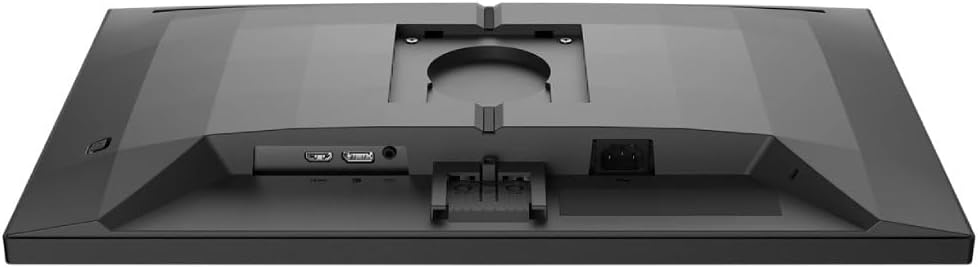
Imatge: Detallada view of the monitor's rear panel, showing the HDMI, DisplayPort, and power input ports.
5. Funcionament del monitor
5.1. Encendre/apagar
Press the power button, usually located on the bottom right or rear of the monitor, to turn it on or off. The power LED will indicate the monitor's status.
5.2. Menú de visualització en pantalla (OSD).
The OSD menu allows you to adjust various monitor settings. Use the joystick or buttons (refer to your monitor's specific layout) to navigate and select options.
- Imatge: Adjust brightness, contrast, sharpness, and gamma.
- Color: Select color temperature, sRGB mode, or user-defined color settings.
- Àudio: Control volume if the monitor has built-in speakers or an audio output.
- Entrada: Seleccioneu manualment la font d'entrada (HDMI, DisplayPort).
- Jocs: Access specific gaming features like SmartImage Game, Low Input Lag, and Adaptive Sync settings.
- Configuració OSD: Adjust OSD language, transparency, and timeout.

Image: The Philips Evnia 24M2N3200L monitor showcasing a high-quality image from a video game, highlighting its display capabilities.
6. Manteniment
6.1. Neteja del monitor
- Desconnecteu sempre el monitor abans de netejar-lo.
- Use a soft, clean, lint-free cloth to gently wipe the screen.
- Per a marques difícils, esbandiu lleugeramentampen the cloth with water or a mild, non-abrasive screen cleaner. Do not spray liquids directly onto the screen.
- Clean the monitor casinamb un drap suau i sec.
6.2. Emmagatzematge
If storing the monitor for an extended period, disconnect all cables and pack it in its original packaging to protect it from dust and physical damage. Store in a cool, dry place.
7. Solució De Problemes
Si teniu problemes amb el monitor, consulteu els problemes i solucions més comuns següents:
| Problema | Causa possible | Solució |
|---|---|---|
| No hi ha imatge a la pantalla | Power cable disconnected, video cable loose, incorrect input source. | Comproveu les connexions del cable d'alimentació i de vídeo. Seleccioneu la font d'entrada correcta mitjançant l'OSD. |
| Imatge parpellejant | Loose video cable, graphics card issue, refresh rate mismatch. | Ensure video cable is secure. Update graphics drivers. Adjust refresh rate in OS settings. |
| Els colors són incorrectes | Incorrect color settings, faulty cable. | Reset color settings in OSD. Try a different video cable. |
| El monitor no s'encén | Sense corrent, adaptador de corrent defectuós. | Check power outlet and cable. Ensure power adapter is functioning. |
8. Especificacions
| Característica | Detall |
|---|---|
| Número de model | 24M2N3200L |
| Mida de la pantalla | 24 polzades |
| Tipus de panell | IPS |
| Resolució | 1920 x 1080 (Full HD) |
| Relació d'aspecte | 16:9 |
| Freqüència d'actualització | 180 Hz |
| Temps de resposta | 0.5 ms (MPRT) |
| Connectivitat | 1x HDMI, 1x DisplayPort |
| Font d'alimentació | Potència elèctrica |
| Dimensions del producte (amb suport) | 19.5 x 54 x 43.3 cm (profunditat x amplada x alçada) |
| Pes del producte (amb suport) | 4.96 quilos |
| Fabricant | Philips |
9. Garantia i Suport
For warranty information and technical support, please refer to the warranty card included in your package or visit the official Philips support weblloc web. Conserveu el rebut de compra com a comprovant de compra per a reclamacions de garantia.
Assistència en línia: www.philips.com/support