
1. Introducció
Thank you for choosing the MageGee MK-Box 60% Mechanical Gaming Keyboard. This compact 68-key keyboard is designed for both gaming and office use, offering a space-saving layout without compromising essential functionality. Featuring responsive red mechanical switches and customizable LED backlighting, the MK-Box provides a comfortable and efficient typing experience. This manual will guide you through the setup, operation, and maintenance of your new keyboard.
2. Producte acabatview
Característiques principals:
- Mini Portable 60% Compact Layout: The MK-Box features 68 keys, including separate arrow keys and Fn function keys, optimizing desk space while retaining necessary functions.
- Interruptors vermells mecànics: Characterized by a linear and smoother feel with minimal resistance, these switches offer fast action without a tactile bump, making typing and gaming effortless.
- Classic Charming Blue LED Backlit: Customize your experience with approximately 16 illuminated LED light effects. Adjust backlight modes, speed, and brightness using simple key combinations.
- Anti-ghosting complet: All 68 keys are conflict-free, ensuring every keystroke is registered accurately during intense gaming sessions.
- Disseny ergonòmic: Features ergonomic suspension double-color injection keycaps, double kickstand feet for adjustable typing angles, and a detachable USB cable for convenience and durability.
- Compatibilitat àmplia: Compatible with Windows (2000, XP, ME, Vista, 7, 8), Linux, and Mac operating systems. Plug and play, no drivers or software required.
Què hi ha a la caixa:
- MageGee MK-Box Mechanical Keyboard x 1
- Detachable USB-C to USB-A Cable x 1
- Extra Keycaps (e.g., 16 purple keycaps, red WASD keys) x 1 set
- Extractor de tecles x 1
- Manual d'usuari x 1
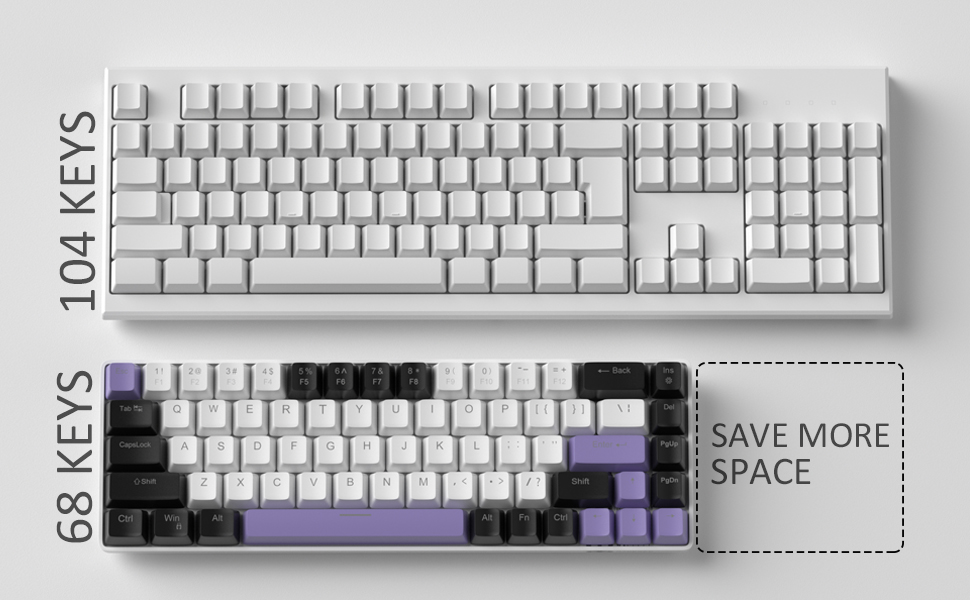
Image: Contents of the MageGee MK-Box packaging, including the keyboard, detachable USB-C cable, extra keycaps, keycap puller, and user manual.
3. Configuració
- Connecteu el teclat: Locate the detachable USB-C cable. Plug the USB-C end into the port on the left side of the keyboard and the USB-A end into an available USB port on your computer (Laptop, PC, Mac).
Image: Close-up of the detachable USB-C port on the side of the MageGee MK-Box keyboard, with the cable being inserted.
- Ajusta l'angle d'escriptura: Flip the keyboard over to reveal the double kickstand feet. Gently pull out the feet to adjust the keyboard to your preferred typing angle for ergonomic comfort. There are two levels of adjustment.
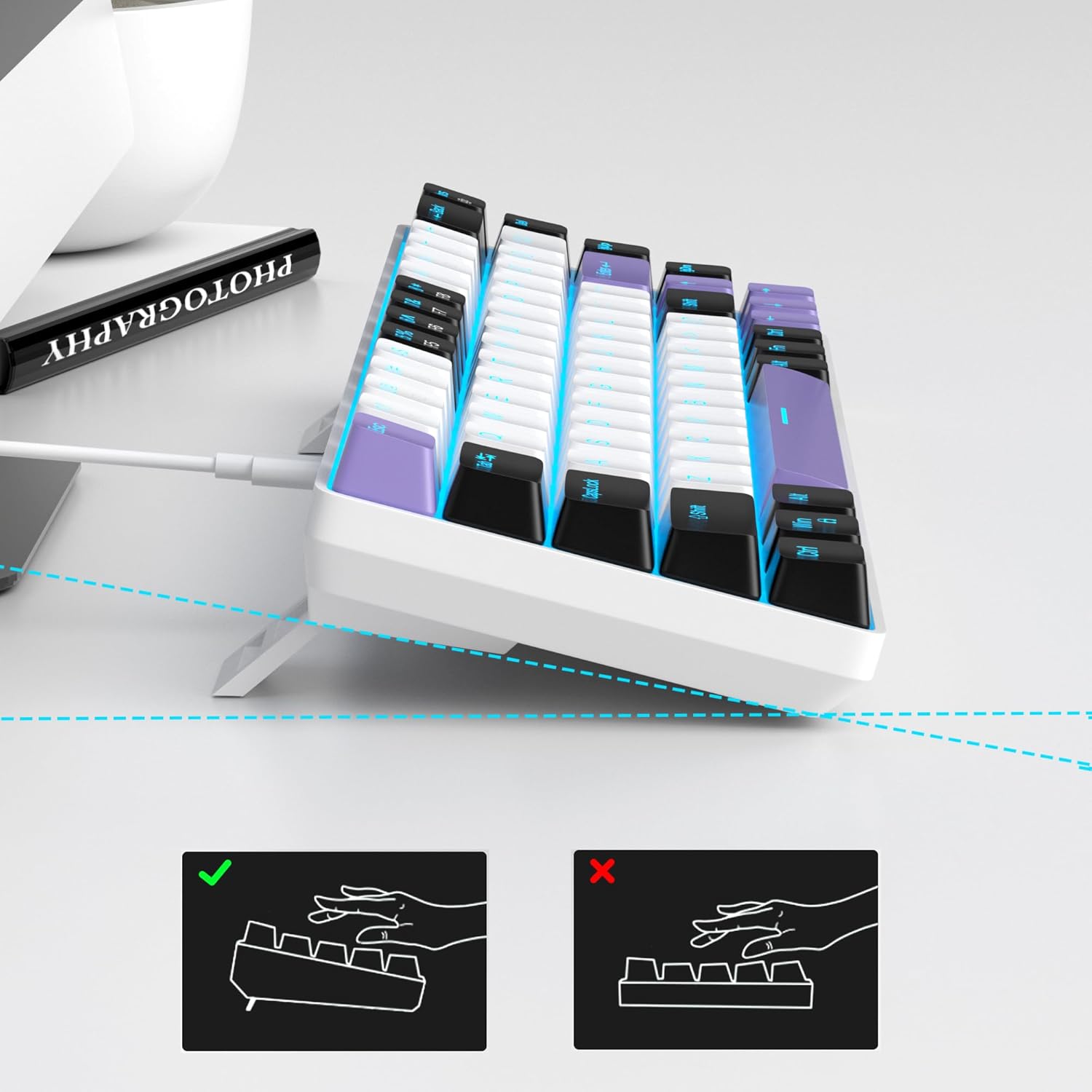
Image: The MageGee MK-Box keyboard shown from a side angle with its adjustable feet extended, illustrating the ergonomic tilt for comfortable typing.
- Reconeixement del sistema: Your computer should automatically recognize the keyboard. No additional drivers or software installation is required.
4. Instruccions de funcionament
Funcions clau bàsiques:
- The keyboard features a standard QWERTY layout with 68 keys.
- Dedicated arrow keys are located on the bottom right.
- Function keys (F1-F12) are accessed via the Fn key in combination with the number row keys.
Control de la llum de fons:
The MageGee MK-Box features a classic blue LED backlight with multiple modes and adjustable settings.
- Canvia el mode de retroiluminació: Premeu Fn + Ins to cycle through approximately 16 different backlight effects.
- Ajusta la velocitat de la llum de fons: Premeu Fn + ← (Fletxa esquerra) to decrease speed or Fn + → (Fletxa dreta) per augmentar la velocitat.
- Ajustar la brillantor de la llum de fons: Premeu Fn + ↓ (Fletxa avall) to decrease brightness or Fn + ↑ (Fletxa amunt) per augmentar la brillantor.

Image: A diagram illustrating the key combinations for controlling the backlight effects, speed, and brightness on the MageGee MK-Box keyboard.
5. Manteniment
- Neteja: Use a soft, dry cloth to wipe down the keyboard surface. For deeper cleaning, you can use a can of compressed air to remove dust and debris from between the keycaps.
- Eliminació de la tapa de les tecles: To clean under the keycaps or replace them with the provided extra keycaps, use the included keycap puller. Gently attach the puller to a keycap and pull straight up. When reattaching, align the keycap with the switch stem and press down firmly until it clicks into place.
- Cura del cable: The detachable USB-C cable should be handled with care. Avoid sharp bends or excessive pulling to prevent damage.

Image: A close-up of the keycap puller tool, used for safely removing and replacing keycaps on the mechanical keyboard.
6. Solució De Problemes
- El teclat no respon:
- Assegureu-vos que el cable USB estigui connectat correctament tant al teclat com a l'ordinador.
- Prova de connectar el teclat a un port USB diferent de l'ordinador.
- Prova el teclat en un altre ordinador per descartar un problema específic de l'ordinador.
- La retroiluminació no funciona/és incorrecta:
- Assegureu-vos que el teclat estigui connectat correctament i que rebi alimentació.
- Premeu Fn + Ins to cycle through backlight modes, as it might be set to an 'off' mode.
- Ajusta la brillantor amb Fn + ↑/↓.
- Keys Not Registering (Ghosting):
- The MK-Box features full anti-ghosting. If you experience issues, ensure no debris is lodged under the keycaps.
- Try reconnecting the keyboard or restarting your computer.
7. Especificacions
| Característica | Detall |
|---|---|
| Marca | MageGee |
| Nom del model | MK-Box |
| Descripció del teclat | Mecànica |
| Nombre de claus | 68 |
| Tipus de canvi | Linear (Red Switch) |
| Tecnologia de connectivitat | USB (per cable) |
| Dispositius compatibles | Portàtil, PC |
| Família de sistemes operatius compatibles | Windows, Linux, Mac |
| Característica especial | 60% Mechanical Design, LED Backlit, Anti-Ghosting |
| Disposició del teclat | QWERTY |
| Material | Plàstic |
| Nivell de resistència a l'aigua | No resistent a l'aigua |
8. Garantia i Suport
MageGee products are designed for durability and performance. For any product-related inquiries, technical support, or warranty claims, please refer to the contact information provided on the product packaging or visit the official MageGee weblloc web. Si us plau, conserveu el comprovant de compra per al servei de garantia.