
1. Introducció
This manual provides detailed instructions for the installation, operation, and maintenance of your INQMEGA 36X Optical Zoom 4G LTE Cellular Solar Camera. This advanced surveillance camera is designed for outdoor use, featuring 4G LTE connectivity, solar power with a high-capacity battery, 36X optical zoom dual lenses, PIR motion detection, and superior night vision capabilities. Please read this manual thoroughly before using the product to ensure proper setup and functionality.
2. Contingut del paquet
Carefully unpack the box and ensure all items listed below are present and in good condition. If any items are missing or damaged, please contact customer support.

Figura 2.1: Detailed list of included products.
- INQMEGA 4G LTE Cellular Solar Camera (1 unit)
- Panell solar (1 unitat)
- Battery Partner (1 unit)
- Suport de muntatge (1 unitat)
- Extension Cord (1 unit)
- Manual d'usuari (1 unitat)
- Power Cable (1 unit)
- Screw Kit (1 set)
3. Producte acabatview
The INQMEGA 4G LTE Cellular Solar Camera is a robust outdoor surveillance solution. It features a dual-lens system, including a wide-angle lens and a 36X optical zoom lens, providing comprehensive coverage. The integrated 10W solar panel and 20000mAh battery ensure continuous operation without external power. Its metal casing offers durability and efficient heat dissipation.

Figura 3.1: Product components and dimensions.
Components clau:
- Lent gran angular: Ofereix un ampli camp de view.
- Lent de zoom: Offers 36X optical zoom for detailed viewing.
- Sensors PIR: Detect human movement to trigger alerts.
- Red-Blue Alarm Light: Visual deterrent and alert indicator.
- White & IR LEDs: Proporcionar il·luminació per a la visió nocturna.
- Micròfon: For audio capture.
- Antena: Per a connectivitat cel·lular 4G LTE.
- Panell solar: Recharges the internal battery.
- Metall Casing: Durable and weather-resistant housing.
4. Característiques clau
The INQMEGA camera is equipped with several advanced features to enhance your surveillance experience:

Figura 4.1: Acabatview de les característiques del producte.
- Connectivitat cel·lular 4G LTE: Operates independently without Wi-Fi, ideal for remote or off-grid locations. Requires a 4G LTE SIM card (not included).
- 36X Optical Zoom Dual Lens: Allows for clear capture of distant details, such as license plate numbers. The UBOX app provides a split-screen view for both lenses.
- High-Capacity Solar Power: Equipped with a 10W solar panel and a 20000mAh battery, providing extended operating times and up to 3 months of continuous function without direct sunlight.
- Detecció de moviment PIR: Advanced sensors detect human movement, sending immediate alert notifications to your smartphone. Note: This camera does not support auto-tracking.
- C de metall resistentasing: Offers superior structural strength, resistance to breaches, excellent heat dissipation, and reduces maintenance costs.
- Visió nocturna superior: Features a night vision range up to 328 feet (100 meters) and daylight visibility up to 650 feet (200 meters). Dual spotlights provide bright illumination up to 20 meters for enhanced security.
- Classificació impermeable IP67: Designed to withstand various weather conditions, including rain, snow, and extreme temperatures.
5. Guia de configuració
5.1. Instal·lació de la targeta SIM
- Locate the SIM card slot on the camera body. This is typically protected by a waterproof cover secured with screws.
- Carefully remove the screws and open the cover.
- Insert a activated 4G LTE Nano SIM card into the designated slot. Ensure the SIM card is inserted correctly according to the diagram near the slot.
- Securely close the waterproof cover and tighten the screws to maintain the IP67 rating.
5.2. Muntatge de la càmera
The camera is designed for wall mounting. Choose a location with good cellular signal and direct sunlight exposure for the solar panel.
- Marqueu els punts de perforació a la paret utilitzant el suport de muntatge com a plantilla.
- Perforeu els forats a les posicions marcades. Inseriu ancoratges de paret si cal.
- Fixeu el suport de muntatge a la paret amb els cargols proporcionats.
- Secure the camera to the mounting bracket. Adjust the camera angle for optimal viewing.
5.3. Connecting the Solar Panel
Ensure the solar panel is positioned to receive maximum direct sunlight throughout the day.
- Connect the solar panel cable to the charging port on the camera.
- If needed, use the extension cord to bridge the distance between the solar panel and the camera.
- Assegureu-vos que totes les connexions siguin segures i impermeables.
5.4. Descàrrega i emparellament de l'aplicació
The camera is controlled via the UBOX app.
- Download the UBOX app from your smartphone's app store (iOS or Android).
- Registra't per obtenir un compte nou o inicia la sessió si ja en tens un.
- Follow the in-app instructions to add your new camera. This typically involves scanning a QR code on the camera or manually entering its device ID.
- Once paired, you can access live view, settings, and recorded footage.
6. Instruccions de funcionament
6.1. Encès / apagat
The camera automatically powers on when the battery is charged and the SIM card is inserted. To power off, you may need to access the power switch located near the SIM card slot or remove the battery.
6.2. Using the UBOX App
The UBOX app is your primary interface for controlling the camera. From the app, you can:
- View live video streams from both lenses (split-screen view).
- Access recorded video footage.
- Adjust camera settings, including motion detection sensitivity and night vision modes.
- Receive real-time alerts and notifications.
- Control the camera's pan and tilt functions (if applicable to your model).
6.3. Funcionalitat de zoom
The camera features a powerful 36X optical zoom lens. In the UBOX app, you can digitally zoom in or out on the live feed to view distant objects with clarity. The optical zoom allows for clear identification of details such as license plates.

Figura 6.1: 36X Optical Zoom demonstration.
6.4. Detecció de moviment
The integrated PIR sensors detect human movement. When motion is detected, the camera will:
- Grava vídeo footage.
- Send an alert notification to your smartphone via the UBOX app.
- Activate the red-blue alarm lights and siren (if enabled in settings).
You can adjust the sensitivity of the PIR sensors within the UBOX app settings to minimize false alarms.
6.5. Visió nocturna
The camera automatically switches to night vision mode in low-light conditions. It utilizes infrared (IR) LEDs and powerful dual spotlights to provide clear visibility up to 328 feet (100 meters) in complete darkness.
6.6. Opcions d'emmagatzematge
The camera supports multiple methods for storing recorded video and audio:

Figura 6.2: Multiple storage methods.
- TF Card (MicroSD Card): Inseriu una targeta TF (fins a 128 GB, no inclosa) a la ranura designada de la càmera per a l'emmagatzematge local.
- Emmagatzematge al núvol: The UBOX app offers optional cloud storage services for secure backup of your recordings. Refer to the app for subscription details.
7. Manteniment
7.1. Battery and Solar Panel Care
The camera's 20000mAh battery is designed for long-term use, recharged by the 10W solar panel. To ensure optimal performance:
- Periodically clean the surface of the solar panel to remove dust, dirt, or debris that may obstruct sunlight.
- Ensure the solar panel is always positioned to receive maximum direct sunlight.
- Avoid placing the camera in shaded areas that would prevent the solar panel from charging effectively.
7.2. Cleaning and Weather Resistance
The camera features an IP67 waterproof metal casing, making it highly resistant to environmental elements.
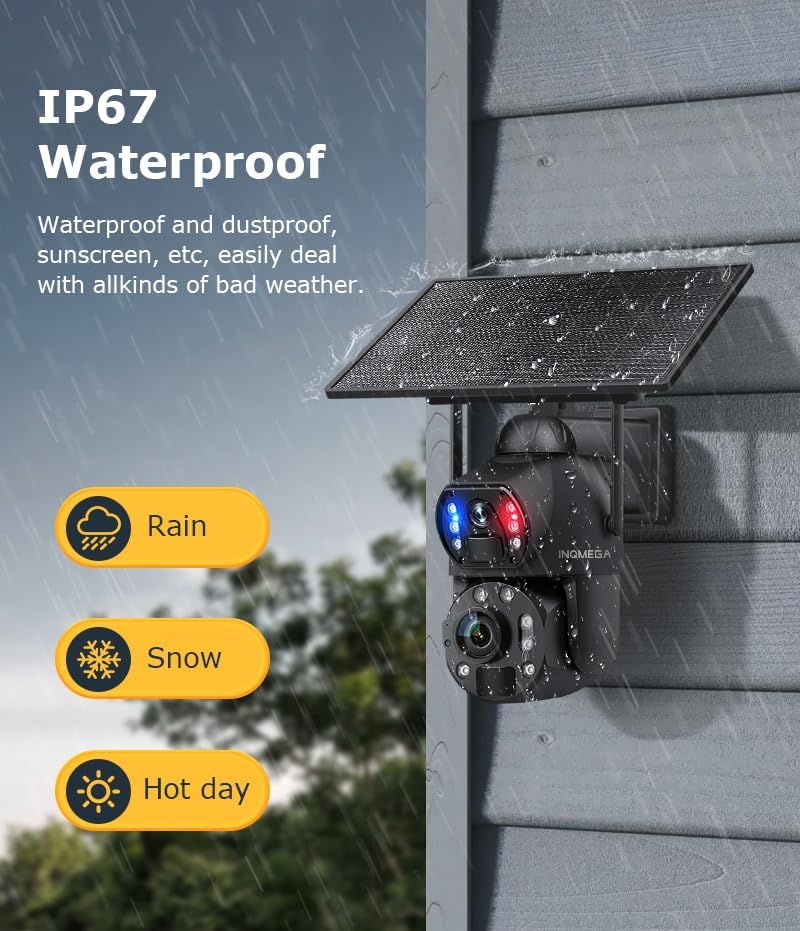
Figura 7.1: IP67 Waterproof rating.
- Netegeu la lent i el cos de la càmera amb un drap suau iamp cloth to remove any accumulated dirt. Do not use harsh chemicals or abrasive materials.
- Regularly check all cable connections to ensure they remain secure and waterproof.
- Ensure the SIM card slot cover is always tightly sealed.
8. Solució De Problemes
If you encounter issues with your INQMEGA camera, please refer to the following common troubleshooting steps:
| Problema | Causa possible | Solució |
|---|---|---|
| La càmera no s'encén | Low battery; Solar panel not charging; Power switch off. | Ensure solar panel is clean and receiving direct sunlight. Check battery connection. Verify power switch is in the 'ON' position. Charge the camera via USB if needed. |
| No 4G LTE signal | SIM card not activated or incorrectly inserted; Poor cellular coverage. | Ensure SIM card is activated and correctly inserted. Relocate the camera to an area with better cellular reception. Contact your cellular provider. |
| La detecció de moviment no funciona | PIR sensitivity too low; Obstructions in detection zone; Incorrect app settings. | Adjust PIR sensitivity in the UBOX app. Clear any obstructions in front of the camera. Verify motion detection is enabled in app settings. |
| Poca qualitat de vídeo | Dirty lens; Low light conditions; Network issues. | Clean the camera lenses with a soft cloth. Ensure sufficient lighting for optimal image quality. Check cellular signal strength. |
| Cannot connect to UBOX app | Incorrect pairing process; App version outdated; Network issues. | Ensure camera is powered on and has cellular signal. Re-attempt pairing process. Update UBOX app to the latest version. Check your smartphone's network connection. |
9. Especificacions
Detailed technical specifications for the INQMEGA 36X Optical Zoom 4G LTE Cellular Solar Camera:
- Número de model: ST-699-6M-36X-10W-4G-US-12.23
- Ús interior/exterior: A l'aire lliure
- Dispositius compatibles: Smartphone
- Font d'alimentació: Energia solar
- Protocol de connectivitat: Cel·lular (4G LTE)
- Tipus de controlador: UBOX App
- Tipus de muntatge: Muntatge de paret
- Resolució de captura de vídeo: 6MP
- Components inclosos: SOLAR CAMERA (main unit)
- Tecnologia de comunicació sense fils: Cel·lular
- Factor de forma: Bala
- Visió nocturna: 300 peus (aprox. 91 metres)
- Material: Metall
- Nivell de resistència a l'aigua: Impermeable (IP67)
- Zoom òptic: 36x
- Tipus d'enfocament: Enfocament automàtic
- Tecnologia de poca llum: Color nocturn
- Format de captura de vídeo: MP4
- Usos específics per al producte: 360 Degree Coverage, Surveillance, Optical Zoom
- Resolució fixa efectiva: 6 MP
- Mètode de control: App
- Pes de l'article: 5.5 lliures (aprox. 2.5 kg)
- Fabricant: INQMEGA
- Usos recomanats per al producte: Game & Trail, Outdoor Security
- Característica especial: 10W Solar Panels, 20000mA Battery, 36X Optical ZOOM, 6MP, Metal case
10. Garantia i Suport
For warranty information and technical support, please refer to the documentation included with your purchase or visit the official INQMEGA website. If you encounter any issues not covered in this manual, please contact INQMEGA customer service for assistance.
Fabricant: INQMEGA
Data de primera disponibilitat: 23 de desembre de 2024