
1. Introducció i finalview
This manual provides instructions for the installation, operation, and maintenance of your MekedeTech Android Car Stereo Head Unit, model 8-Core 4+64G. This unit is specifically designed for VW Golf 7 MK7 vehicles manufactured between 2013 and 2018, offering a seamless upgrade to your vehicle's infotainment system.
Les característiques clau inclouen:
- Sistema operatiu Android 12
- 8-Core A53 1.8GHz CPU with 4GB RAM and 64GB ROM
- 10-inch IPS Touch Screen with 1280x720 resolution
- Built-in 4G LTE and Wi-Fi module for internet access
- Wireless CarPlay and Android Auto support
- Integrated GPS navigation and AM/FM radio
- Support for original steering wheel controls
- 4x50W Power Output with built-in DSP sound system

Figura 1.1: Principal view of the MekedeTech Android Car Stereo Head Unit.
2. Configuració i instal·lació
The MekedeTech Android Car Stereo Head Unit is designed for a plug-and-play installation, utilizing your vehicle's existing wiring harness. No splicing of wires is typically required.
2.1 Contingut del paquet
Abans de començar la instal·lació, assegureu-vos que hi hagi tots els components:
- MekedeTech Android Car Stereo Head Unit
- Vehicle-specific frame kit
- Plug-and-play wiring harness
- Antena GPS
- 4G LTE antenna (if applicable)
- cables USB
- Manual d'usuari (aquest document)
2.2 Passos d'instal·lació
- Preparació: Turn off your vehicle's ignition and disconnect the negative terminal of the car battery to prevent electrical shorts.
- Eliminar la ràdio original: Carefully remove the trim panels and screws securing the factory radio. Refer to your vehicle's service manual for specific instructions on removing the original head unit.
- Connecteu l'arnès de cablejat: Connect the provided plug-and-play wiring harness to the vehicle's factory connectors and then to the new Android head unit. Ensure all connections are secure.
- Connecteu les antenes: Attach the GPS antenna and 4G LTE antenna (if using a SIM card) to their respective ports on the head unit. Position the antennas in a location with clear signal reception, away from metal obstructions.
- Instal·leu la unitat principal: Mount the new head unit into the dashboard opening using the provided frame kit and screws. Ensure it is securely fastened.
- Torneu a connectar la bateria: Torneu a connectar el terminal negatiu de la bateria del cotxe.
- Encesa inicial: Turn on the vehicle's ignition and power on the head unit. Follow any on-screen prompts for initial setup.

Figure 2.1: Visual comparison of the dashboard before and after installing the MekedeTech Android Car Stereo.

Figure 2.2: Illustration of cooling fan support and setup steps for the head unit.
3. Instruccions de funcionament
3.1 Funcionament bàsic
- Encès/apagat: Press and hold the power button (usually located on the front panel) to turn the unit on or off. A short press typically mutes or unmutes the audio.
- Pantalla tàctil: Navigate the Android interface by tapping, swiping, and pinching on the 10-inch IPS touch screen, similar to a smartphone or tablet.
- Control de volum: Adjust volume using the physical knobs/buttons on the unit or via the steering wheel controls.
3.2 CarPlay sense fil i Android Auto
The unit supports wireless CarPlay for iOS devices and wireless Android Auto for Android devices, allowing seamless integration of your smartphone's features.
- Activa el Bluetooth: Ensure Bluetooth is enabled on both your smartphone and the head unit.
- Aparella dispositius: On the head unit, go to the Bluetooth settings and pair with your smartphone.
- Launch CarPlay/Android Auto: Once paired, select the CarPlay or Android Auto icon on the head unit's main screen. Follow any on-screen prompts to complete the connection.
- Connexió USB (opcional): If wireless connection is unstable or unavailable, you can connect your phone via a USB cable to use CarPlay/Android Auto.

Figure 3.1: Steps for connecting to Wireless CarPlay (iOS) and Wireless Android Auto (Android).
3.3 4G LTE and Wi-Fi Connectivity
The head unit features built-in 4G LTE and Wi-Fi for internet access.
- Wi-Fi: Go to Settings > Network & Internet > Wi-Fi to connect to available Wi-Fi networks (e.g., a mobile hotspot).
- 4G LTE: Insert a compatible 4G SIM card into the designated slot on the unit. The unit will automatically connect to the cellular network for data access. This eliminates the need for a constant Wi-Fi hotspot from your phone.
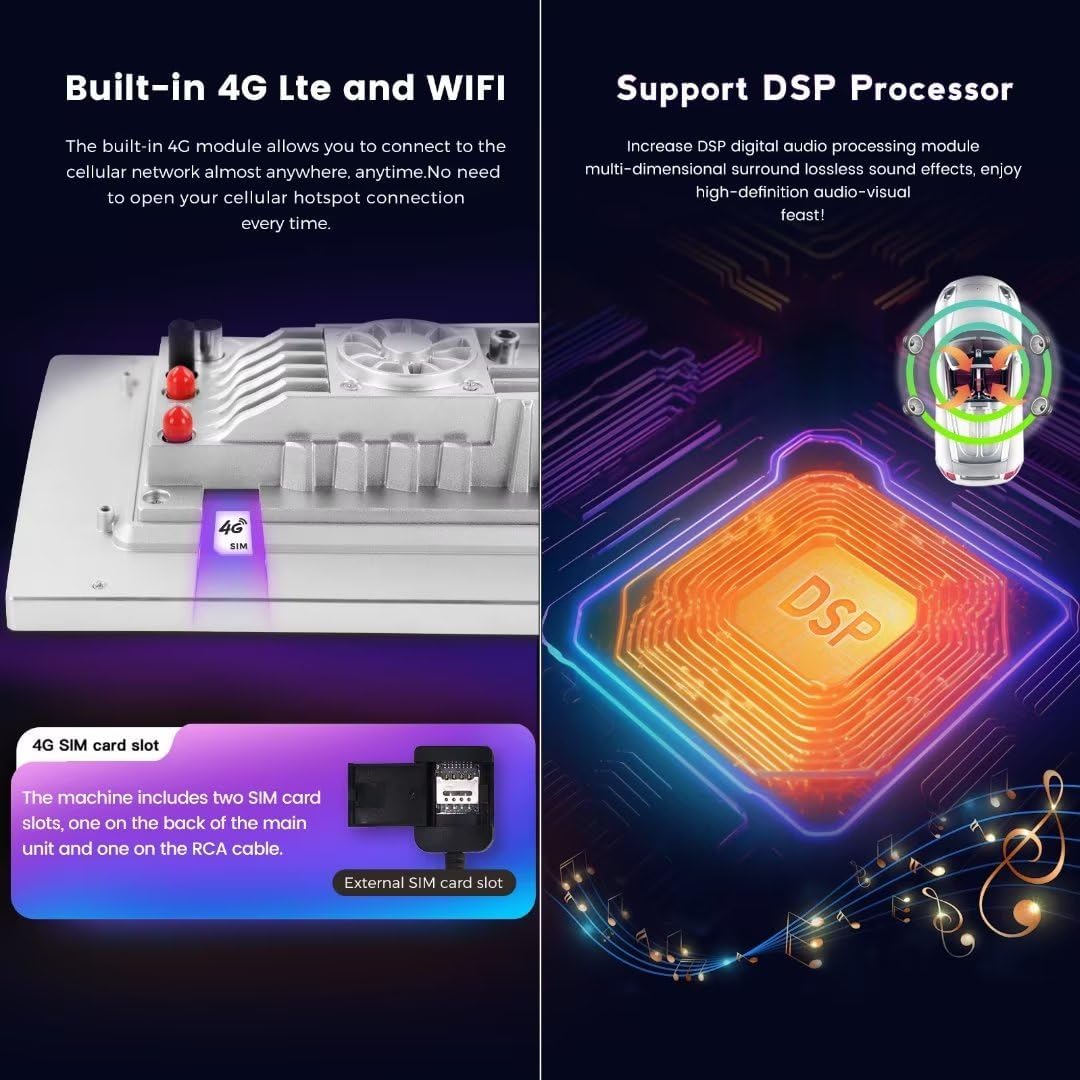
Figure 3.2: Location of the 4G SIM card slot and illustration of the DSP processor.
3.4 Navegació GPS
The unit comes with built-in GPS and supports various navigation applications. Ensure the GPS antenna is properly installed for optimal signal reception.
3.5 Reproducció d'àudio i vídeo
The unit supports a wide range of audio and video formats. The integrated DSP (Digital Signal Processor) enhances audio quality, providing a multi-dimensional surround sound experience.
- Formats d'àudio: APE, FLAC, WAV, MP3, WMA, etc.
- Formats de vídeo: MKV, RMVB, AVI, MP4, MDV, etc.
- Formats d'imatge: PNG, JPEG, JPG, GIF, WBMP, BNP, etc.
3.6 Comandaments al volant
The unit retains compatibility with your vehicle's factory steering wheel controls, allowing you to manage audio, calls, and other functions without taking your hands off the wheel.
4. Manteniment
Proper maintenance ensures the longevity and optimal performance of your car stereo head unit.
- Neteja de pantalla: Feu servir un drap suau i sense borrissol, lleugerament humitampened with water or a screen-safe cleaner, to gently wipe the touch screen. Avoid abrasive materials or harsh chemicals.
- Eliminació de pols: Periodically use a soft brush or compressed air to remove dust from vents and button crevices.
- Actualitzacions de programari: Check for available software updates through the unit's settings menu to ensure you have the latest features and bug fixes.
- Sistema de refrigeració: The unit is equipped with a cooling fan to manage internal temperatures. Ensure the fan vents are not obstructed to allow proper airflow.
5. Solució De Problemes
If you encounter issues with your head unit, refer to the following common troubleshooting steps:
| Problema | Causa possible | Solució |
|---|---|---|
| La unitat no s'encén | Connexió d'alimentació fluixa, fusible cremat, problema amb la bateria del vehicle | Check wiring harness connections. Inspect vehicle fuses. Ensure car battery is charged. |
| Sense so | Volume muted, speaker wires disconnected, incorrect audio settings | Check volume level and mute status. Verify speaker wire connections. Adjust audio output settings. |
| CarPlay/Android Auto no es connecta | Bluetooth/Wi-Fi off, incorrect pairing, phone software issue | Ensure Bluetooth/Wi-Fi is on for both devices. Re-pair devices. Try connecting via USB. Restart phone and head unit. |
| Senyal GPS feble o inexacte | GPS antenna improperly placed or faulty | Relocate GPS antenna to a position with a clear view del cel. Comproveu la connexió de l'antena. |
| La pantalla tàctil no respon | Software glitch, screen calibration issue | Restart the head unit. If issue persists, perform a factory reset (note: this will erase all user data). |
| Sobreescalfament de la unitat | Obstructed cooling vents, prolonged heavy use | Ensure cooling vents are clear. Reduce usage of demanding applications. The built-in cooling fan should help regulate temperature. |
6. Especificacions
Detailed technical specifications for the MekedeTech Android Car Stereo Head Unit (8-Core 4+64G):
| Característica | Especificació |
|---|---|
| Marca | MekedeTech |
| Mida de la pantalla | 10 polzades |
| Sistema operatiu | Android 12 |
| CPU | 8-Core A53 1.8GHz |
| Memòria (RAM) | 4 GB |
| Emmagatzematge (ROM) | 64 GB |
| Resolució de pantalla | IPS de 1280 * 720 |
| Tipus de pantalla tàctil | Capacitiva |
| Tecnologia de connectivitat | Wireless (Bluetooth, Wi-Fi, Cellular) |
| Característiques especials | 4G LTE, Bluetooth, Touchscreen, Wireless Android Auto, Wireless CarPlay, Built-in DSP |
| Potència de sortida | 4 * 50W |
| Tipus de mapa | A tot el món |
| Entrada de la interfície humana | Botons, pantalla tàctil |
| Fabricant | Shenzhen Mekede Technology Co.,Ltd |
7. Informació de la garantia
The MekedeTech Android Car Stereo Head Unit comes with a 1 anys de garantia from the date of purchase. This warranty covers manufacturing defects and malfunctions under normal use. It does not cover damage caused by improper installation, accident, misuse, abuse, unauthorized modifications, or natural disasters.
Conserveu el vostre comprovant de compra per a reclamacions de garantia.
8. Suport
For technical assistance, troubleshooting beyond this manual, or warranty inquiries, please contact MekedeTech customer support through the retailer where the product was purchased or visit the official MekedeTech weblloc per obtenir informació de contacte.
When contacting support, please have your product model (8-Core 4+64G) and proof of purchase readily available.
