
Introducció
This manual provides instructions for the installation, operation, and maintenance of your MekedeTech Android Car Stereo Head Unit, model 8-Core 4+32G. This unit is specifically designed for VW Passat B5 vehicles manufactured between 2000 and 2005, offering an upgrade with modern features such as a 10-inch touch screen, Android operating system, wireless CarPlay, and Android Auto.
Nota important de compatibilitat
Please Note: If your VW Passat B5 vehicle is equipped with a factory seat heating function, this head unit cannot be installed. Verify your vehicle's console configuration before proceeding with installation.

This image illustrates a VW Passat B5 dashboard. The red circles highlight the seat heating control buttons. If these buttons are present in your vehicle, the MekedeTech head unit cannot be installed.
Configuració i instal·lació
The MekedeTech Android Car Stereo Head Unit is designed for a direct fit and includes a frame kit and plug-and-play harness for simplified installation in VW Passat B5 models (2000-2005). This allows for retention of factory steering wheel controls.
Comprovació prèvia a la instal·lació
- Ensure your vehicle does not have factory seat heating controls, as this unit is incompatible with such configurations.
- Gather necessary tools for car stereo removal and installation (e.g., trim removal tools, screwdrivers).
Passos d'instal·lació
- Carefully remove the existing factory radio from your VW Passat B5 dashboard. Refer to your vehicle's service manual for specific removal procedures.
- Connect the provided plug-and-play wiring harness to the vehicle's existing wiring. Ensure all connections are secure.
- Integrate the new head unit into the provided frame kit.
- Carefully insert the new head unit assembly into the dashboard opening. Secure it in place using the appropriate fasteners.
- Test the unit's basic functions (power, audio, touch screen) before fully reassembling the dashboard trim.
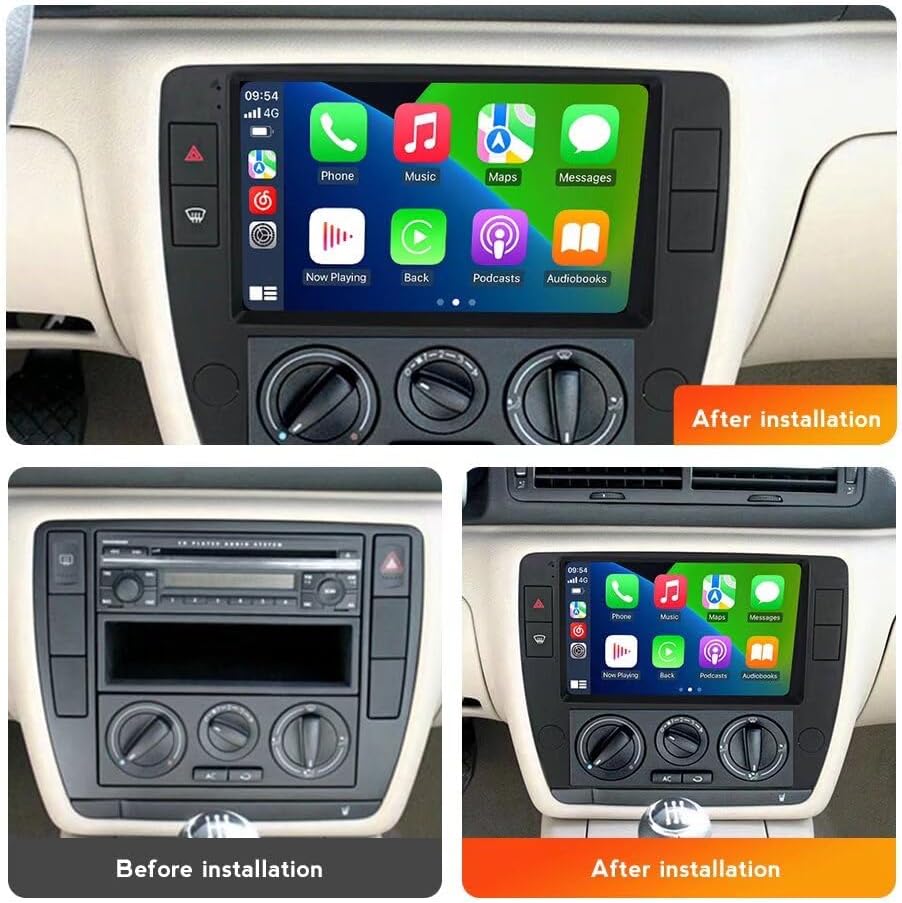
This image displays the dashboard of a VW Passat B5, showing the original radio setup on the left and the new MekedeTech Android head unit installed on the right, demonstrating the visual upgrade.
Instruccions de funcionament
Your MekedeTech Android Car Stereo operates on an Android 12 OS, providing a user-friendly interface similar to a tablet. The 10-inch IPS touch screen allows for intuitive control of all functions.
Funcionament bàsic
- Encès/apagat: The unit typically powers on with the vehicle's ignition. A power button may also be present for manual control.
- Control de volum: Adjust volume using the physical buttons on the unit, steering wheel controls, or the on-screen interface.
- Navegació: Access built-in GPS navigation and maps directly from the main menu.
- Ràdio: Utilize the AM/FM tuner for radio broadcasts.
- Gestió d'aplicacions: Download and install applications from the Google Play Store when connected to the internet.
CarPlay sense fil i Android Auto
The head unit features built-in wireless CarPlay and Android Auto, allowing seamless integration with your smartphone for navigation, music, calls, and messaging.

This image shows the user interface for Wireless CarPlay (iOS system) and Wireless Android Auto (Android system) on the head unit, along with the connection steps.
Wireless CarPlay (iOS System) Connection Steps:
- On the head unit, navigate to the CarPlay/Android Auto application.
- Enable Bluetooth on your iPhone and pair it with the head unit.
- Once paired, select "Car Link" or the equivalent option on the head unit to initiate the CarPlay connection.
- Follow any on-screen prompts on both your iPhone and the head unit to complete the setup.
Passos de connexió sense fil d'Android Auto (sistema Android):
- On the head unit, navigate to the CarPlay/Android Auto application.
- Enable Bluetooth on your Android phone and pair it with the head unit.
- Once paired, select "Car Link" or the equivalent option on the head unit to initiate the Android Auto connection.
- Follow any on-screen prompts on both your Android phone and the head unit to complete the setup.
Note: For initial setup or troubleshooting, a USB cable connection may be required.
4G LTE and Wi-Fi Connectivity
The head unit includes a built-in 4G LTE module and Wi-Fi, allowing internet access directly from the unit. This eliminates the need to constantly use your phone's hotspot.
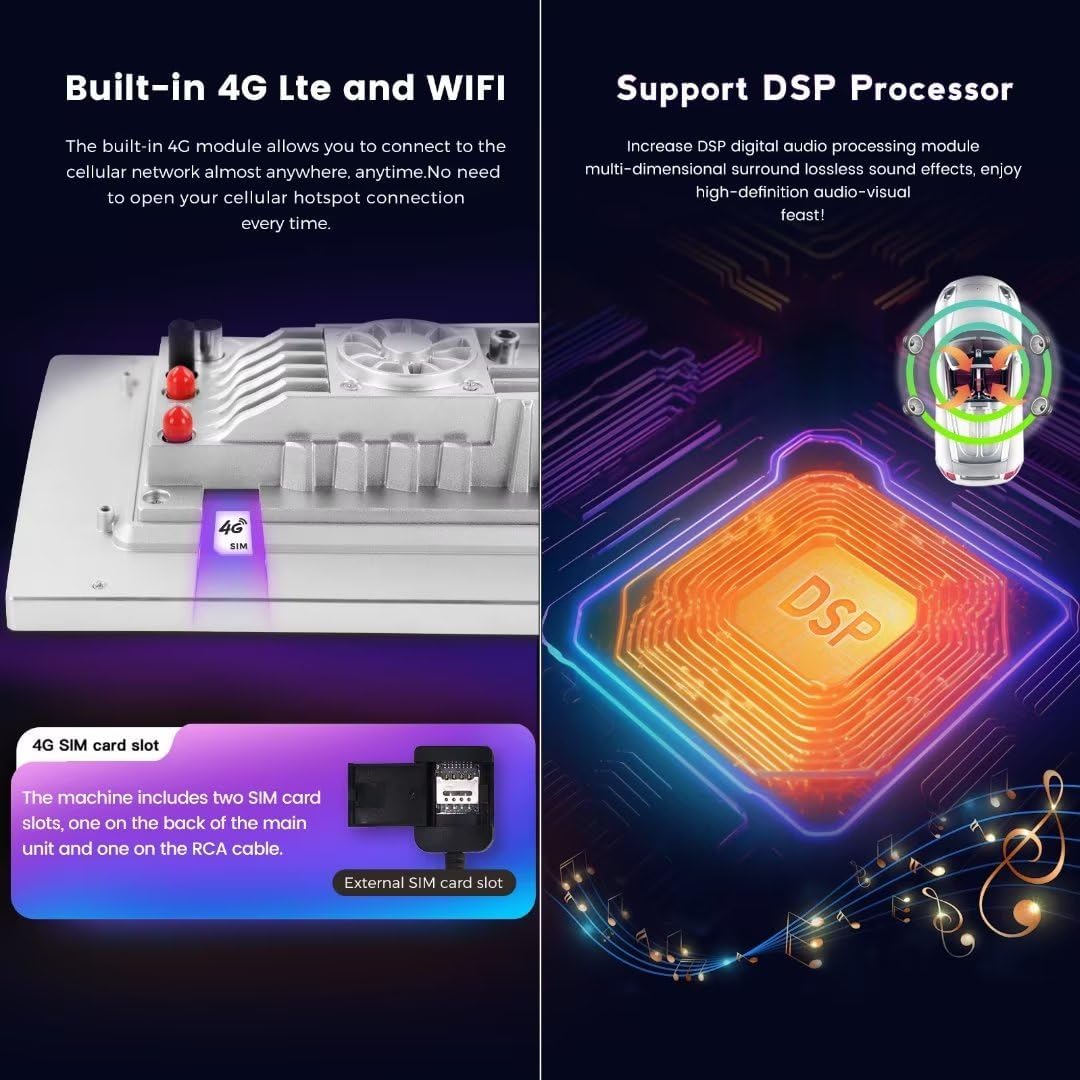
This image displays the internal 4G LTE module with SIM card slots and a visual representation of the Digital Sound Processor (DSP).
Connecting to 4G LTE:
- Locate the 4G SIM card slot(s) on the unit (one on the back of the main unit, one on the RCA cable).
- Insert a compatible 4G SIM card into the slot.
- Navigate to the network settings on the head unit to enable 4G LTE and configure APN settings if necessary.
Connexió a Wi-Fi:
- Go to the "Settings" menu on the head unit.
- Select "Network & Internet" or "Wi-Fi".
- Activeu el Wi-Fi i seleccioneu la xarxa desitjada de la llista.
- Introduïu la contrasenya si se us demana i connecteu-vos.
Manteniment
Regular maintenance ensures the longevity and optimal performance of your MekedeTech Android Car Stereo Head Unit.
- Neteja de pantalla: Utilitzeu un drap suau i sense pelusa lleugerament dampNetegeu-ho amb aigua o amb un netejador de pantalles dissenyat específicament per a electrònica. Eviteu productes químics agressius o materials abrasius.
- Actualitzacions de programari: Periodically check for system software updates through the unit's settings menu. Keeping the software updated can improve performance and add new features.
- Ventilació: Ensure the unit's ventilation areas are not obstructed to prevent overheating. The unit features a cooling fan system to manage internal temperatures.
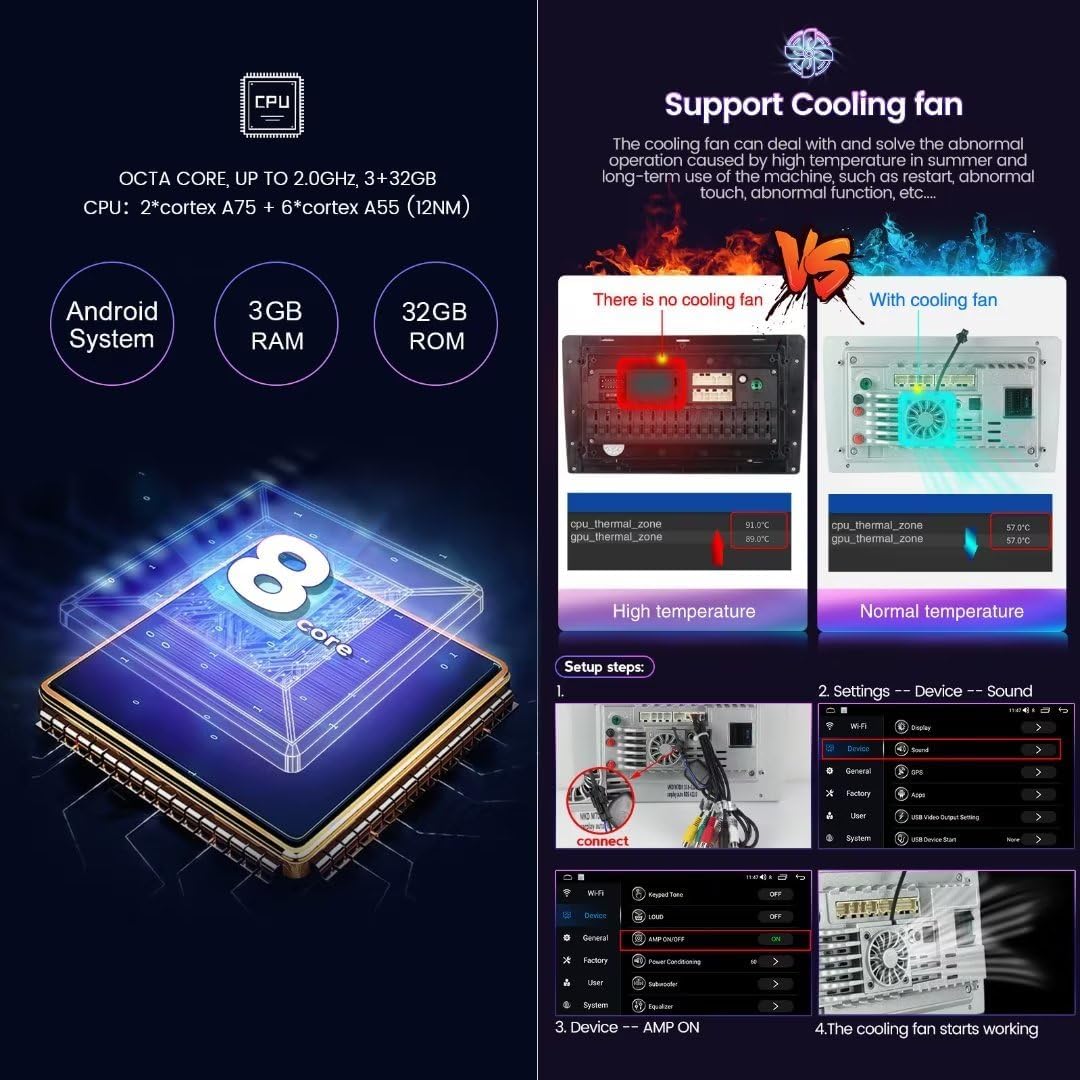
This image highlights the cooling fan system integrated into the head unit, demonstrating its role in maintaining optimal operating temperatures and preventing overheating.
Resolució de problemes
This section addresses common issues you might encounter with your head unit.
Problemes comuns i solucions
| Problema | Causa possible | Solució |
|---|---|---|
| La unitat no s'encén. | Loose power connection, blown fuse, vehicle ignition issue. | Check all power connections. Inspect vehicle fuses. Ensure vehicle ignition is on. |
| No hi ha so dels altaveus. | Incorrect wiring, volume too low, mute activated, speaker issues. | Verify speaker wiring connections. Increase volume. Check if mute is active. Test with different audio sources. |
| La pantalla tàctil no respon. | Error de programari, problema de calibratge de la pantalla. | Restart the unit. Perform a factory reset if necessary (Note: This will erase all user data). |
| El CarPlay/Android Auto no es connecta. | Bluetooth not paired, Wi-Fi interference, app issues. | Ensure Bluetooth is on and paired. Try connecting with a USB cable first. Restart phone and head unit. Update phone OS and apps. |
| Senyal GPS feble o imprecis. | Obstrucció de l'antena, mala recepció del satèl·lit. | Assegureu-vos que l'antena GPS estigui instal·lada correctament i que tingui una visió clara view del cel. Moveu el vehicle a una zona oberta. |
Especificacions
The following are the technical specifications for the MekedeTech Android Car Stereo Head Unit (Model: 8-Core 4+32G).
- Sistema operatiu: OS Android 12
- CPU: 8-Core A53 1.8GHz
- Memòria: 4 GB de RAM + 32 GB de ROM
- Mida de la pantalla: 10 polzades
- Resolució de visualització: 1280x720 IPS Touch Screen
- Potència de sortida: 4 * 50W
- Connectivitat: Built-in 4G LTE, Wi-Fi, Bluetooth, Wireless CarPlay, Wireless Android Auto
- Característiques especials: GPS Navigation, AM/FM Radio, DSP Sound System, Steering Wheel Control Support
- Formats d'àudio: APE/FLAC/WAV/MP3/WMA, etc.
- Formats de vídeo: MKV/RMVB/AVI/MP4/MDV, etc.
- Formats d'imatge: PNG/JPEG/JPG/GIF/WBMP/BNP, etc.
- Entrada de la interfície humana: Buttons, Keyboard, Touchscreen
Garantia i Suport
Your MekedeTech Android Car Stereo Head Unit comes with a manufacturer's warranty and support options.
Informació de la garantia
El producte inclou a 1 anys de garantia des de la data de compra. Aquesta garantia cobreix defectes de fabricació i avaries en condicions d'ús normal. Conserveu el comprovant de compra per a reclamacions de garantia.
Atenció al client
For technical assistance, troubleshooting, or warranty inquiries, please contact MekedeTech customer support. Refer to the contact information provided with your product packaging or visit the official MekedeTech weblloc de recursos de suport.
Pot ser que hi hagi plans de protecció addicionals disponibles per a la compra:
- Pla de protecció de 2 anys
- Pla de protecció de 3 anys