
1. Introducció
This manual provides detailed instructions for the FIDECO H708C43 Powered 7-Port USB 3.2 Gen2 Hub. This device is designed to expand your computer's connectivity with high-speed data transfer and charging capabilities. Please read this manual thoroughly before use to ensure proper operation and to maximize the product's lifespan.

Image 1.1: The FIDECO H708C43 7-Port USB Hub, showcasing its sleek design, power adapter, and connecting cables.
2. Producte acabatview
2.1 Característiques clau
- 7 High-Speed Ports: Equipped with 4 USB-A ports and 3 USB-C ports to accommodate various devices.
- USB 3.2 Gen 2 Standard: Supports data transfer speeds up to 10Gbps, significantly enhancing productivity and connectivity.
- BC1.2 Charging Support: One USB-A port and one USB-C port support BC1.2 charging, allowing simultaneous data transfer and device charging.
- Construcció d'aliatge d'alumini: Durable and ergonomic design for efficient heat dissipation, ensuring stable performance.
- Plug and Play: Driver-free installation for immediate use across compatible operating systems.
- Àmplia compatibilitat: Works seamlessly with Windows, Mac OS, and Linux operating systems.
- Protecció integrada: Features short-circuit, overcurrent, overvoltage, and overheat protection to safeguard connected devices and data.
2.2 Contingut del paquet
- FIDECO H708C43 USB Hub
- USB-C to USB-C Cable with USB-A Adapter
- Adaptador de corrent de 5 V/3 A
- Manual d'usuari
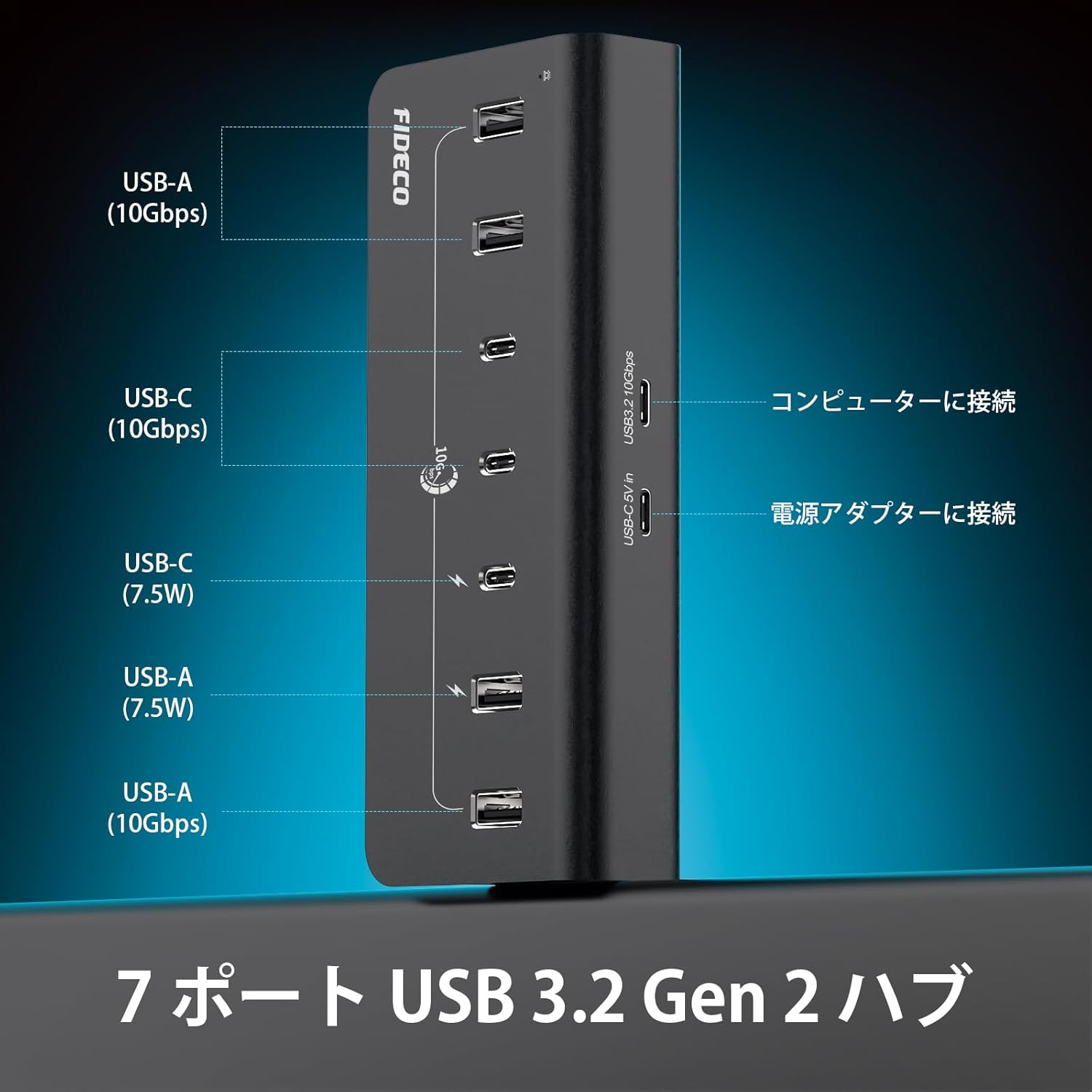
Image 2.1: A diagram illustrating the port layout of the FIDECO USB hub, detailing 4 USB-A (10Gbps), 3 USB-C (10Gbps), and the power input. It also shows connections to a computer and power adapter.
3. Instruccions de configuració
- Connecteu l'adaptador de corrent: Plug the provided 5V/3A power adapter into the DC 5V IN port on the FIDECO USB Hub. Then, plug the power adapter into a wall outlet. This ensures stable power delivery to all connected devices.
- Connecteu-vos al vostre ordinador: Use the included USB-C to USB-C cable to connect the hub to a USB-C port on your computer. If your computer only has USB-A ports, use the provided USB-A adapter with the USB-C cable.
- Verifica la connexió: The hub is plug-and-play, so no drivers are required. Your computer should automatically recognize the hub.
- Connecteu els perifèrics: You can now connect your USB-A and USB-C devices (e.g., external hard drives, USB drives, keyboards, mice, webcams, smartphones, tablets) to the available ports on the hub.

Image 3.1: A user operating a computer setup with the FIDECO USB hub integrated, demonstrating its use in a professional or creative workflow.
4. Instruccions de funcionament
4.1 Transferència de dades
- Connect your USB 3.2 Gen 2 compatible devices to any of the 7 ports for optimal 10Gbps data transfer speeds.
- The hub is backward compatible with USB 3.0, USB 2.0, and USB 1.1 devices, though speeds will be limited by the connected device's standard.

Image 4.1: The FIDECO USB hub connected to a laptop, demonstrating high-speed 10Gbps data transfer with external SSDs.
4.2 Càrrega del dispositiu
- The hub supports BC1.2 charging on one USB-A port and one USB-C port. These ports can deliver up to 7.5W (5V/1.5A) for faster charging of compatible devices.
- Other ports provide standard USB charging capabilities.
- You can simultaneously transfer data and charge devices through the hub, reducing desktop clutter.

Image 4.2: The FIDECO USB hub connected to a laptop, showing two devices (a smartphone and another device) being charged via BC1.2 compatible USB-A and USB-C ports.

Image 4.3: The FIDECO USB hub connected to a laptop, illustrating simultaneous data transfer and device charging for a smartphone and a smartwatch.
5. Manteniment
- Mantingueu el centre net netejant-lo amb un drap suau i sec. Eviteu utilitzar netejadors líquids o dissolvents.
- Ensure the hub is placed on a stable surface. The non-slip rubber pads on the bottom help maintain stability.
- Eviteu exposar el concentrador a temperatures extremes, humitat o llum solar directa.
- Do not attempt to disassemble or repair the hub yourself. This may void the warranty and cause damage.
6. Solució De Problemes
6.1 Dispositiu no reconegut
- Ensure the hub is properly connected to your computer and the power adapter is plugged in.
- Try connecting the device directly to your computer to confirm it is functioning correctly.
- Prova amb un cable USB diferent.
- Reinicieu l'ordinador.
6.2 Slow Data Transfer Speeds
- Verify that both your computer's USB port and the connected device support USB 3.2 Gen 2 (10Gbps).
- Ensure you are using a high-quality USB 3.2 Gen 2 compatible cable.
- Avoid connecting too many high-bandwidth devices simultaneously, as this can share the available bandwidth.
6.3 Problemes de càrrega
- Confirm that the power adapter is securely connected and receiving power.
- Ensure the device you are charging is compatible with BC1.2 charging for optimal speed.
- Some devices may require more power than the hub can provide. Check your device's power requirements.
7. Especificacions
| Número de model | H708C43 |
| Ports USB totals | 7 |
| Ports USB-A | 4 (USB 3.2 Gen 2, 10Gbps) |
| Ports USB-C | 3 (USB 3.2 Gen 2, 10Gbps) |
| Suport de càrrega | 1x USB-A, 1x USB-C with BC1.2 (7.5W) |
| Velocitat de transferència de dades | Fins a 10 Gbps |
| Entrada de potència | 5V/3A Power Adapter (included) |
| Sistema operatiu compatible | Windows, Mac OS, Linux |
| Material | Aliatge d'alumini |
| Dimensions | 17.3 x 9.6 x 6.6 cm |
| Pes | 0.42 kg |
| Característiques addicionals | Surge protection, Plug and Play, Non-slip design, Powered |

Image 7.1: The FIDECO USB hub placed on a tablet, showcasing its broad compatibility with various operating systems (Windows, Mac OS, Linux) and devices like mice, USB drives, webcams, hard drives, PCs, tablets, and phones.
8. Informació de la garantia
Specific warranty details are not provided in the available product information. Please refer to the product packaging or contact FIDECO customer support for warranty terms and conditions.
9. Suport
For technical support or any other inquiries, please contact FIDECO customer service at:
Correu electrònic: support@fideco.cn

Imatge 9.1: Un intern view of the FIDECO USB hub, highlighting its built-in protection features such as short-circuit, overcurrent, overvoltage, i protecció contra sobreescalfament.