1. Introducció
This manual provides detailed instructions for the HURRISE 4G 8MP HD Solar-Powered Outdoor Security Camera. This device is designed for outdoor surveillance, offering high-resolution video, 4G cellular connectivity, and sustainable solar power. Please read this manual thoroughly before installation and operation to ensure proper use and optimal performance.
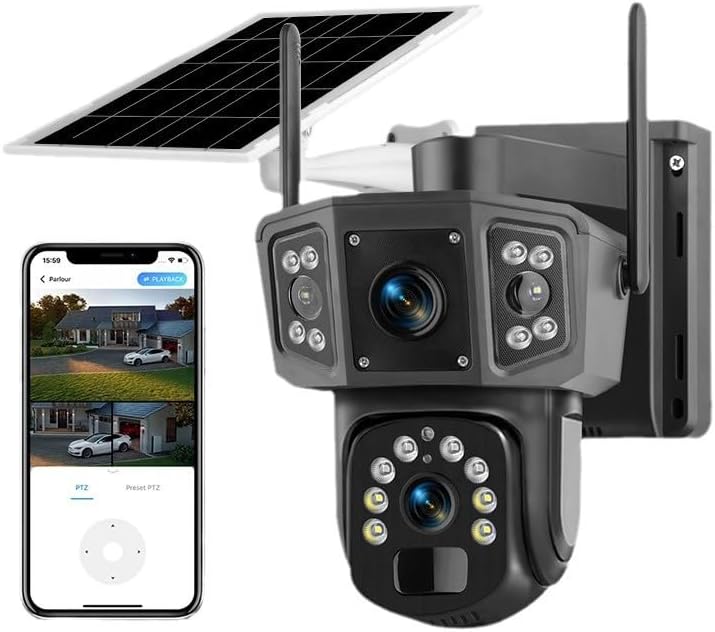
Figure 1.1: HURRISE 4G 8MP HD Solar-Powered Outdoor Security Camera with remote viewing interfície.
2. Característiques del producte
- 4G Connectivity & Solar Power: Operates independently without Wi-Fi or external power. Requires 4G network coverage for remote access. Features an 8000 mAh internal battery and an efficient solar panel for continuous operation.
- Imatges d'alta resolució: Captures video at 8MP 4K HD resolution with H.265 compression for efficient data transfer and storage.
- Funcionalitat de panoràmica, inclinació i zoom (PTZ): Offers 355-degree horizontal rotation and 90-degree vertical tilt for comprehensive area coverage.
- Dual Lens & Multi-Screen Monitoring: Equipped with multiple lenses for wider coverage and supports dual-screen playback for simultaneous monitoring and recording.
- AI Human Detection & Real-time Alerts: Advanced AI detects human movement, triggering instant phone notifications with snapshots and audible alarms. Includes automatic cruise and preset point cruising functions for 24/7 recording.
- Àudio bidireccional: Features a built-in waterproof microphone and speaker for remote communication.
- Classificació de resistència a la intempèrie IP66: Dissenyat per suportar diverses condicions meteorològiques a l'aire lliure.
- Emmagatzematge al núvol: Supports cloud storage to protect recorded data, ensuring access even if the camera unit is compromised.

Figura 2.1: Mésview of the 4K solar outdoor surveillance camera, showing multi-device support.

Figure 2.2: Camera highlighting IP66 weather resistance and 355° horizontal, 90° vertical panoramic coverage.
3. Contingut del paquet
Verifiqueu que tots els elements que s'enumeren a continuació s'inclouen al vostre paquet. Si falta algun element o hi ha algun malmès, poseu-vos en contacte amb l'atenció al client.
- HURRISE 4G 8MP HD Solar-Powered Outdoor Security Camera Unit
- Solar Panel (integrated or separate with cable)
- Cargols de muntatge
- Manual d'instruccions (aquest document)
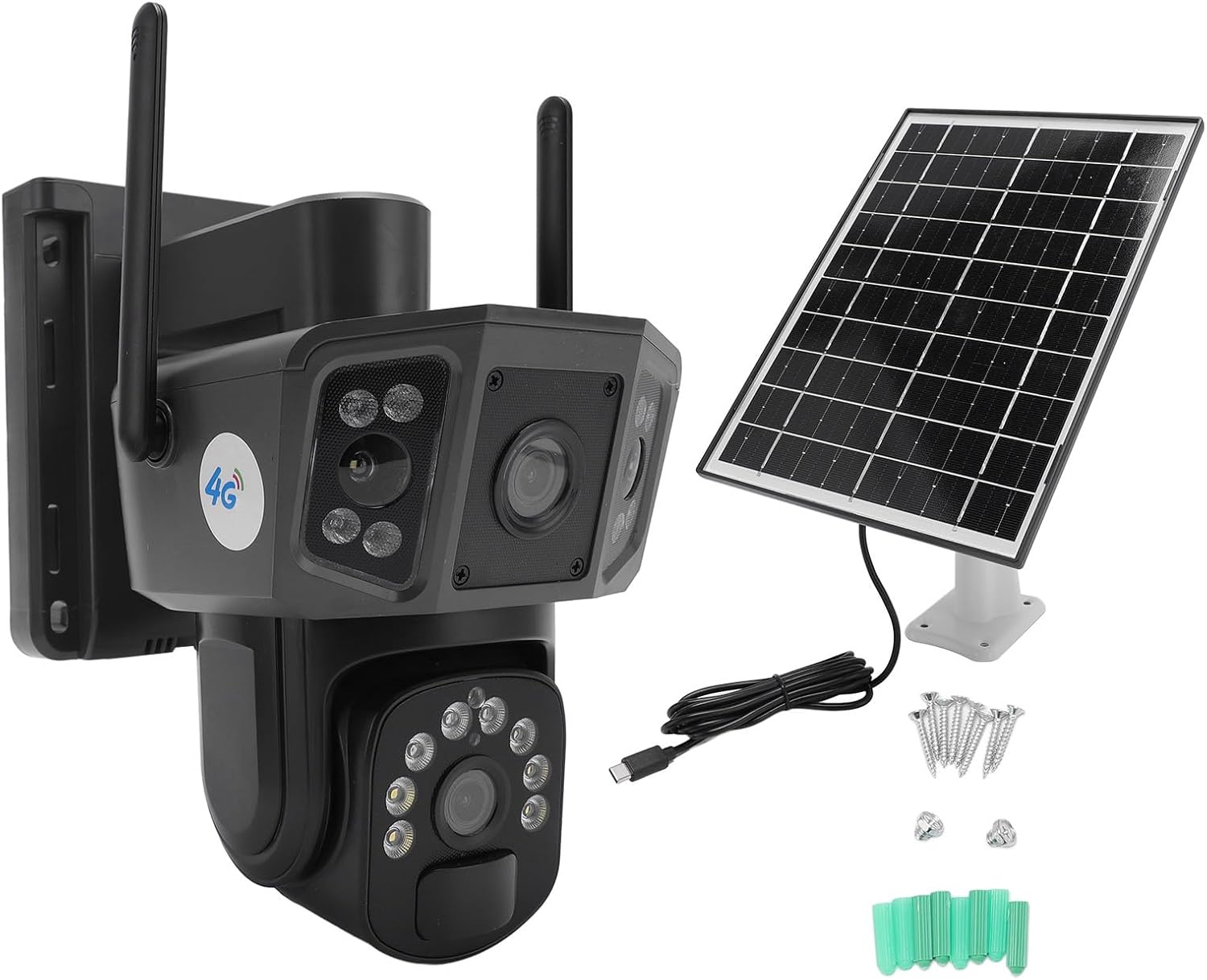
Figure 3.1: Camera unit, solar panel, USB cable, and mounting accessories.
4. Configuració
4.1 Càrrega inicial
Although the camera is solar-powered, it is recommended to fully charge the internal battery using the provided USB cable before the first use. Connect the USB cable to the camera's charging port and a standard 5V USB power adapter (not included).
4.2 Instal·lació de la targeta SIM
This camera requires a 4G cellular SIM card for network connectivity. Locate the SIM card slot on the camera, insert a compatible 4G SIM card (ensure it is activated and has data plan) according to the diagram in the quick start guide or on the camera body. Ensure the SIM card is inserted correctly and securely.
4.3 Descàrrega de l'aplicació i configuració del compte
- Scan the QR code provided in the quick start guide or search for the designated app (e.g., 'Ubox' or similar, refer to packaging) in your smartphone's app store (iOS or Android).
- Baixeu i instal·leu l'aplicació.
- Registra un compte nou o inicia la sessió si ja en tens un.
- Follow the in-app instructions to add your camera device. This typically involves scanning a QR code on the camera or manually entering its ID.
4.4 Muntatge de la càmera
Choose an installation location that provides optimal solar exposure for the solar panel and a clear view of the area you wish to monitor. Ensure the location has stable 4G network coverage.
- Mark the drilling points on the wall or mounting surface using the camera's base or mounting bracket as a template.
- Perfora forats i insereix tacs de paret si cal.
- Secure the camera's mounting bracket using the provided screws.
- Attach the camera unit to the mounted bracket, ensuring it is firmly secured.
- Ajusteu l'angle del panell solar per maximitzar l'exposició a la llum solar durant tot el dia.

Figure 4.1: Camera mounted, illustrating the solar panel connection for continuous power.
5. Instruccions de funcionament
5.1 Remot Viewing
Open the installed application on your smartphone. Select your camera from the device list to access the live video feed. You can view your property in real-time from any location with 4G network access.
5.2 Control PTZ
Within the live view interface of the app, use the on-screen controls to pan (horizontal rotation up to 355 degrees) and tilt (vertical rotation up to 90 degrees) the camera lens. This allows you to adjust the viewangle remot.

Figure 5.1: Illustration of dual lenses and the multi-screen monitoring feature within the app.
5.3 Àudio bidireccional
To use the two-way audio feature, tap the microphone icon in the app's live view. Speak into your phone's microphone to transmit audio through the camera's speaker. Tap the speaker icon to listen to audio from the camera's location.

Figura 5.2: Example of using two-way audio to communicate with someone near the camera.
5.4 Detecció de moviment i alertes
Configure motion detection settings within the app. When human movement is detected, the camera will send real-time notifications to your smartphone, including snapshots. Audible alarms can also be activated. The camera supports automatic tracking of detected subjects and can be set to cruise between preset points for continuous surveillance.

Figure 5.3: Visual representation of PIR human detection triggering an alert on a smartphone.
5.5 Modes de visió nocturna
The camera features intelligent night vision. It can operate in infrared (black and white) mode for standard low-light conditions. When human presence is detected, the camera can automatically switch to full-color night vision for enhanced detail.

Figure 5.4: Comparison of infrared and intelligent full-color night vision capabilities.
5.6 Enregistrament i reproducció
Foo gravattage can be stored locally (if a microSD card is installed, not included) or in the cloud (subscription may be required). Access the playback feature in the app to review enregistraments anteriors per data i hora.
6. Manteniment
6.1 Cura dels panells solars
To ensure optimal charging efficiency, regularly clean the surface of the solar panel to remove dust, dirt, leaves, or snow. A clean, soft cloth and water are usually sufficient. Avoid abrasive cleaners or tools that could scratch the panel.
6.2 Camera Cleaning
Netegeu periòdicament la lent i el cos de la càmera amb un drap suau i sec.amp cloth to remove any accumulated dirt. Do not use harsh chemicals or solvents. Ensure the camera's seals remain intact to maintain its IP66 weatherproof rating.
6.3 Gestió de la bateria
The integrated 8000 mAh battery is designed for long-term use with solar charging. Avoid fully discharging the battery frequently. If the camera is stored for an extended period, ensure it is charged periodically to maintain battery health.
7. Solució De Problemes
- Blurry or Interrupted Images: A stable 4G network connection is crucial. Weak signals can lead to blurry or interrupted image transmission. Try adjusting the camera's distance from potential signal obstructions or relocating it to an area with better 4G coverage. Reconnect the camera to the app if necessary.
- Problemes de qualitat de la imatge: The camera's location and angle can affect image clarity. Ensure there are no physical obstructions blocking the lens. You can also adjust the video resolution settings within the mobile application to optimize image quality based on your network conditions.
- La càmera no s'encén: Ensure the internal battery has sufficient charge. If the solar panel is connected, verify it is receiving adequate sunlight. Try connecting the camera to a USB power source for an initial charge.
- Sense connexió 4G: Verify that the SIM card is correctly inserted, activated, and has an active data plan. Check the 4G signal strength in the camera's location via the app or by testing another 4G device in the same spot.
- Problemes de connectivitat de l'aplicació: Ensure your smartphone has a stable internet connection. Restart the app or your phone. If issues persist, try reinstalling the app and re-adding the camera.
8. Especificacions
| Marca | PRESSA |
| Número de model | HURRISEnydtgh6k8i |
| Tecnologia de comunicació sense fils | Mòbil (4G) |
| Tipus d'instal·lació | Cargol / Muntatge a la paret |
| Material | Acrilonitril butadiè estirè (ABS) |
| Dimensions de l'article (L x A x A) | 5.1 x 2.5 x 7.6 cm (2 x 1 x 3 polzades) |
| Nivell de resistència a l'aigua | IP66 (impermeable) |
| Característiques especials | PTZ Technology, AI Human Detection, Two-Way Audio, Solar Power |
| Piles necessàries | No (Internal rechargeable battery included) |
| Resolució de captura de vídeo | 8MP 4K HD (1024p listed in some specifications, refer to product for actual output) |
| Nombre d'articles | 1 |
| Usos recomanats | Outdoor Security, Indoor Security |
9. Garantia i Suport
For warranty information and customer support, please refer to the documentation provided with your purchase or contact the retailer/manufacturer directly. Keep your proof of purchase for warranty claims.
For technical assistance or further inquiries, please visit the HURRISE official weblloc o poseu-vos en contacte amb el seu departament d'atenció al client.