
1. Introducció
This manual provides essential information for the proper setup, operation, and maintenance of your NUU N30 Cell Phone and NUU Buds A Earbuds. Please read this guide thoroughly before using your devices to ensure optimal performance and longevity. Keep this manual for future reference.
2. Contingut del paquet
Verifiqueu que tots els elements siguin presents al paquet del producte:
- NUU N30 Cell Phone
- NUU Buds A Earbuds with Charging Case
- Cable de càrrega USB-C
- Eina expulsora de SIM
- Guia d'inici ràpid
- Informació de seguretat i garantia

Figura 2.1: The NUU N30 Cell Phone and Buds A Earbuds, as included in the bundle. The phone is purple with a large display, and the white earbuds are shown in their charging case.
3. Producte acabatview
3.1 NUU N30 Cell Phone
The NUU N30 is an unlocked Android smartphone designed for reliable communication and multimedia consumption.
- Visualització: 6.7-inch 1600 x 720 display with a 90Hz refresh rate for smooth visuals.
- Sistema de càmera: Equipped with a 50MP Main AF Camera, 8MP Front Selfie Camera, and a 2MP Macro Camera, alongside a Bokeh Camera (VGA) and LED Flash.
- Rendiment: Powered by a MediaTek Helio G81 processor, featuring 6GB RAM and 128GB internal storage.
- Bateria: A 5000 mAh battery supports 18W Quick Charge for extended usage.
- Connectivitat: Supports 4G LTE and Bluetooth. Includes a 3.5mm audio jack.
- Seguretat: Features a side-mounted Fingerprint ID sensor for secure access.
- Compatibilitat de l'operador: Compatible with T-Mobile, Mint Mobile, Metro, Q Link Wireless, Google Fi, Hello Mobile, Tello Mobile, Lycamobile, Patriot Mobile, Republic Wireless, Simple Mobile, StandUp Wireless, SpeedTalk, and Telcel America. Nota: This device is not compatible with Verizon, AT&T, or Cricket Wireless.
- Control parental: Supports various parental control applications such as Google Family Link, Bark, Qustodio, and Norton Family.

Figura 3.1: posterior view of the NUU N30 phone highlighting the camera module. Specifications indicate a 50MP Main AF Camera, 2MP Macro Camera, VGA Bokeh Camera, LED Flash, and an 8MP Front Selfie Camera.
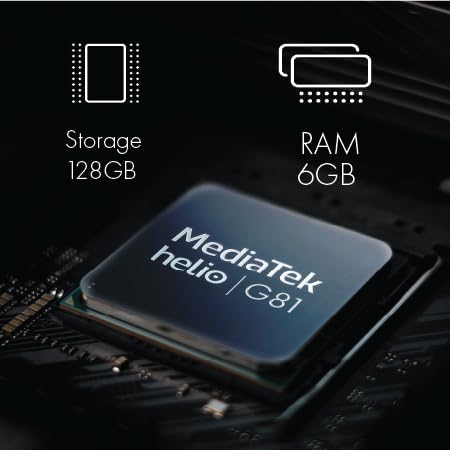
Figura 3.2: Un intern view of the NUU N30 phone's components, showing the MediaTek Helio G81 processor, 128GB storage, and 6GB RAM.

Figura 3.3: The NUU N30 phone with text indicating a 5000 mAh battery and 18W Quick Charge capability.

Figura 3.4: A close-up of the NUU N30 phone showing the triple card slot for SIM cards and microSD, and the 3.5mm audio jack.

Figura 3.5: A visual representation of the fingerprint ID sensor located on the side of the NUU N30 phone.

Figura 3.6: A chart illustrating the U.S. carrier compatibility for the NUU N30 phone, showing supported carriers like T-Mobile, Mint Mobile, and Metro, and unsupported carriers like Verizon, AT&T, and Cricket.
3.2 NUU Buds A Earbuds
The NUU Buds A are wireless earbuds designed for clear audio and communication.
- Tecnologia d'àudio: Features Feedforward Active Noise Cancellation (ANC) and 10mm neodymium magnetic speaker drivers for efficient environmental noise filtering.
- Qualitat de la trucada: Equipped with ENC (Environmental Noise Cancellation) Dual Mic for clear voice calls.
- Durada de la bateria: Provides up to 8 hours of playtime per charge, with the charging case extending total playtime to up to 30 hours.
- Càrrega: The charging case is powered via USB-C.

Figura 3.7: The NUU Buds A earbuds in their charging case. The case contributes to the overall battery life, providing multiple charges for the earbuds.

Figura 3.8: An image depicting a person wearing the NUU Buds A earbuds, illustrating the ENC Dual Mic Noise Reduction feature for improved call clarity.
4. Instruccions de configuració
4.1 NUU N30 Cell Phone Setup
- Insert SIM Card(s) and MicroSD Card: Locate the triple card slot on the side of the phone. Use the provided SIM ejector tool to open the tray. Carefully place your Nano-SIM card(s) and an optional microSD card (for expanded storage) into the designated slots. Ensure the cards are correctly oriented before reinserting the tray.
- Carregar el telèfon: Connect the USB-C charging cable to the phone's charging port and plug the other end into a compatible power adapter. Allow the phone to charge fully before initial use.
- Encès: Press and hold the power button located on the side of the phone until the NUU logo appears.
- Assistent de configuració inicial: Follow the on-screen instructions to select your language, connect to a Wi-Fi network, sign in to your Google account, and set up basic security features.
- Set Up Fingerprint ID: During the initial setup or later via Settings > Security, register your fingerprint(s) for quick and secure unlocking.
4.2 NUU Buds A Earbuds Setup
- Carregueu els auriculars i l'estoig: Place the earbuds into the charging case. Connect the USB-C cable to the charging case and a power source. The indicator light on the case will show charging status. Ensure both the earbuds and case are fully charged before first use.
- Pair with NUU N30 Phone (or other Bluetooth device):
- Obre l'estoig de càrrega. Els auriculars entraran automàticament en mode d'emparellament.
- On your NUU N30 phone, go to Settings > Connected devices > Bluetooth.
- Assegureu-vos que el Bluetooth estigui activat.
- Select "NUU Buds A" from the list of available devices to connect.
- Once connected, a confirmation message will appear on your phone.
5. Instruccions de funcionament
5.1 NUU N30 Cell Phone Operation
- Navegació bàsica: Use touch gestures to navigate the Android interface. Swipe up from the bottom for the app drawer, swipe down from the top for notifications and quick settings.
- Fer trucades i enviar missatges: Use the Phone app to dial numbers or select contacts. Use the Messages app for SMS/MMS communication.
- Ús de la càmera: Open the Camera app. Tap to focus, pinch to zoom. Select between Main, Selfie, and Macro modes. Tap the shutter button to capture photos or videos.
- Parental Control Applications: To utilize parental control features, download and install a compatible application (e.g., Google Family Link, Bark, Qustodio, Norton Family) from the Google Play Store and follow the app's specific setup instructions.
5.2 NUU Buds A Earbuds Operation
- Portar els auriculars: Insert the earbuds gently into your ears, ensuring a comfortable and secure fit for optimal sound and ANC performance.
- Reproducció de música: Once paired, audio from your phone will automatically play through the earbuds. Use the touch controls on the earbuds (refer to the Quick Start Guide for specific gestures) to play/pause, skip tracks, or adjust volume.
- Gestió de trucades: During an incoming call, use the touch controls to answer or end the call. The ENC Dual Mic system will enhance your voice clarity during conversations.
- Cancel·lació activa del soroll (ANC): Activate or deactivate ANC via the touch controls on the earbuds to filter out environmental noise.
6. Manteniment
6.1 NUU N30 Cell Phone Maintenance
- Neteja: Feu servir un drap suau i sense borrissol per netejar la pantalla i la carcassa del telèfon. Eviteu materials abrasius o productes químics agressius.
- Cura de la bateria: To prolong battery life, avoid extreme temperatures. Do not leave the phone fully charged or fully discharged for extended periods.
- Actualitzacions de programari: Regularly check for and install system updates to ensure your phone has the latest features and security patches. Go to Settings > System > System update.
6.2 NUU Buds A Earbuds Maintenance
- Neteja: Gently wipe the earbuds and charging case with a dry, soft cloth. Remove any earwax buildup from the earbud tips using a small brush or cotton swab.
- Cura de la caixa de càrrega: Mantingueu els contactes de càrrega tant dels auriculars com de la funda nets i secs per garantir una càrrega correcta.
- Emmagatzematge: Quan no els utilitzeu, guardeu els auriculars a la seva funda de càrrega per protegir-los i mantenir-los carregats.
7. Solució De Problemes
7.1 NUU N30 Cell Phone Troubleshooting
- Phone will not power on: Ensure the battery is charged. Connect the phone to a charger for at least 15 minutes, then try powering on again.
- Sense senyal de xarxa: Check if your SIM card is correctly inserted. Verify that your carrier is supported by the NUU N30 (refer to Section 3.1). Ensure airplane mode is off.
- La càmera no funciona: Restart the phone. Clear the cache and data of the Camera app via Settings > Apps > Camera > Storage.
- Fingerprint sensor not responding: Assegura't que el dit estigui net i sec. Torna a registrar la teva empremta digital si el problema persisteix.
7.2 NUU Buds A Earbuds Troubleshooting
- Auriculars que no s'emparellan: Ensure Bluetooth is enabled on your phone. Place the earbuds back in the case, close it, then open it again to re-enter pairing mode. Forget the device on your phone's Bluetooth settings and try pairing again.
- No se sent so dels auriculars: Check the volume level on both your phone and the earbuds. Ensure the earbuds are charged and properly connected.
- Problemes de càrrega: Clean the charging contacts on both the earbuds and the case. Ensure the USB-C cable and power adapter are functioning correctly.
8. Especificacions
8.1 NUU N30 Cell Phone Specifications
| Característica | Especificació |
|---|---|
| Número de model | NUU N30 |
| Sistema operatiu | Android |
| Mostra | 6.7 Inches, 1600 x 720 Resolution, 90Hz Refresh Rate |
| Processador | MediaTek Helio G81 |
| RAM | 6 GB |
| Emmagatzematge intern | 128 GB |
| Càmera principal | 50 MP |
| Càmera Selfie | 8 MP |
| Càmera macro | 2 MP |
| Capacitat de la bateria | 5000 mAh (18W Quick Charge) |
| Connectivitat | 4G LTE, Bluetooth |
| Jack d'àudio | 3.5 mm |
| Seguretat | Identificador de l'empremta digital |
8.2 NUU Buds A Earbuds Specifications
| Característica | Especificació |
|---|---|
| Tecnologia d'àudio | Feedforward Active Noise Cancellation (ANC) |
| Controladors d'altaveus | 10mm Neodymium Magnetic |
| Micròfon | ENC Dual Mic (Voice Call Noise Reduction) |
| Temps de reproducció de l'auricular | Fins a 8 hores per recàrrega |
| Temps de reproducció total (amb estoig) | Fins a 30 hores |
| Port de càrrega | USB-C |
9. Garantia i Suport
Your NUU N30 Cell Phone and NUU Buds A Earbuds are covered by a limited manufacturer's warranty. For detailed warranty terms and conditions, please refer to the warranty card included in your package or visit the official NUU Mobile website. For technical support, product registration, or service inquiries, please contact NUU Mobile customer support through their official channels.