
Introducció
This manual provides essential information for the safe and efficient use of your FLEXISPOT E3 Dual Motor Electric Standing Desk. It covers assembly instructions, operational guidelines, maintenance tips, and troubleshooting steps. Please read this manual thoroughly before assembly and first use to ensure proper function and longevity of your desk.
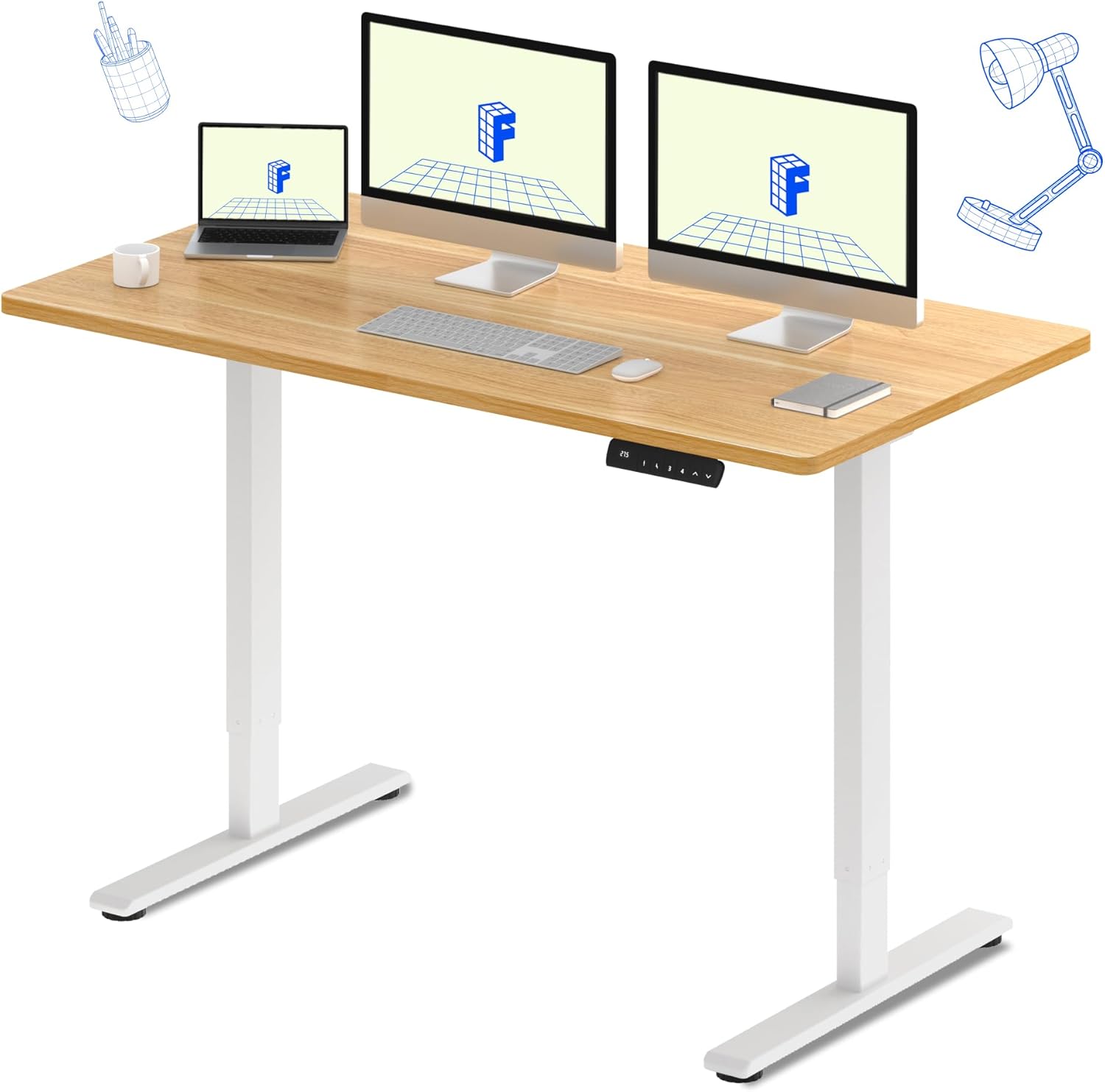
The FLEXISPOT E3 Dual Motor Electric Standing Desk, featuring a spacious 60"x24" maple desktop and a sturdy white frame, designed for a versatile workspace.
Informació de seguretat
Per garantir un funcionament segur i evitar danys, observeu les precaucions de seguretat següents:
- Always ensure the desk is properly assembled and stable before use.
- No supereu el límit màxim de pes de 220 lliures (100 kg) a l'escriptori.
- Be cautious when adjusting the desk height to avoid pinching or crushing objects or body parts. Ensure there are no obstructions in the desk's path.
- Mantingueu els nens i les mascotes allunyats de l'escriptori durant el funcionament.
- No us asseieu ni us poseu drets a l'escriptori.
- Feu servir només l'adaptador de corrent i els components proporcionats.
- Desconnecteu l'alimentació abans de netejar o realitzar qualsevol manteniment.
Característiques clau
- Seamless & Silent Dual Motor Operation: Equipped with dual motors for quiet operation (under 50 dB) and enhanced lifting capacity.
- Capacitat de pes robust: Capable of lifting up to 220 lbs, providing stable support for your equipment.
- Roomy & Ergonomic Workspace: Features a 59" x 23.6" (approx. 60"x24") solid-surface desktop, offering ample space for monitors, laptops, and other work essentials.
- Customizable & Convenient Height Settings: The control panel allows saving up to 4 custom height settings for quick transitions between sitting and standing positions.

Detail of the dual motor frame, illustrating the continuous height adjustment capability of the desk.

Visual representation of the desk's robust 220 lbs weight capacity.
Especificacions
| Atribut | Detall |
|---|---|
| Marca | FLEXISPOT |
| Model | E3 |
| Dimensions del producte (P x A x A) | 60 "P x 23.6" W x 27.6" H |
| Color | White Frame + Maple Top |
| Estil | Modern |
| Material base | Metall |
| Tipus de material superior | Fusta |
| Tipus d'acabat | Fusta |
| Característica especial | Cordat |
| Mida | 60"x24" Whole-piece |
| Components inclosos | Keyboard Tray, Monitor Arm (Note: These may be optional accessories, refer to packaging) |
| Recomanació de pes màxim | 220 lliures (100 kg) |
| Muntatge requerit | Sí |
| Forma | Rectangular |
| Disseny d'escriptori | Escriptori |
| Gruix de la taula | 23.6 Inches (Note: This likely refers to the width, not thickness) |
| Longitud de la diagonal de la superfície de treball | 66.3 polzades |
Muntatge i muntatge
The FLEXISPOT E3 desk requires assembly. It typically arrives in two packages: one for the desktop and one for the frame components. While assembly is generally straightforward, it is recommended to have two people for certain steps due to the weight of the components.
Passos de l'Assemblea General:
- Desempaquetar components: Carefully unpack all parts and verify against the packing list.
- Muntatge del marc: Follow the included instructions to assemble the desk frame, including the legs, crossbar, and motors.
- Adjunta l'escriptori: Secure the desktop to the assembled frame. Note that the desktop may require pre-drilling holes for attachment, as indicated in some user experiences. Ensure proper alignment before securing.
- Instal·leu el tauler de control: Mount the control panel to the underside of the desktop in an accessible location.
- Connecteu el cablejat: Connect all motor and control panel wiring to the control box as per the diagram in your specific instruction manual.
- Encès i prova: Plug in the desk and perform an initial test of the height adjustment functions.
For detailed, step-by-step instructions and diagrams, please refer to the assembly manual included in your product packaging.
Instruccions de funcionament
Your FLEXISPOT E3 desk features an intuitive control panel for easy height adjustments and memory settings.

The programmable control panel for the FLEXISPOT E3 desk, featuring up/down buttons and four memory presets.
Funcionament bàsic:
- Ajust de l'alçada: Utilitza el Amunt (▲) i Avall (▼) arrows on the control panel to raise or lower the desk to your desired height. The current height is displayed on the digital screen.
- Saving Memory Presets: The desk allows you to save up to four preferred height settings. To save a height:
- Ajusteu l'escriptori a l'alçada desitjada.
- Premeu el botó M. or S. button (depending on control panel version).
- Premeu immediatament un dels botons predefinits numerats (1, 2, 3, o 4) before the display stops flashing. The height is now saved to that number.
- Recuperació de preajustos de memòria: Simplement premeu el botó preestablert numerat corresponent (1, 2, 3, o 4) per moure automàticament l'escriptori a l'alçada desada.
Ús ergonòmic:
Regularly switching between sitting and standing positions can help alleviate discomfort associated with prolonged sitting. Utilize the memory presets to easily transition throughout your workday.

The FLEXISPOT E3 desk supports an active workspace, allowing for comfortable standing or walking while working.
Manteniment
Proper maintenance ensures the longevity and smooth operation of your standing desk.
- Neteja: Netegeu l'escriptori i el marc amb un drap suauamp drap. Eviteu netejadors abrasius o productes químics agressius que puguin danyar l'acabat.
- Gestió de cables: Periodically check and organize cables to prevent tangles and ensure they do not interfere with the desk's movement.
- Comproveu les connexions: Assegureu-vos que totes les connexions elèctriques estiguin segures i no presentin danys.
- Lubricació: The motors and lifting columns are generally maintenance-free. Do not attempt to lubricate internal components unless specifically instructed by FLEXISPOT support.
Resolució de problemes
If you encounter issues with your FLEXISPOT E3 desk, refer to the following common problems and solutions:
| Problema | Causa possible | Solució |
|---|---|---|
| Desk does not move / No power | Cable d'alimentació desconnectat; Problema amb la presa de corrent | Comproveu totes les connexions d'alimentació. Assegureu-vos que la presa de corrent funcioni. |
| Desk moves unevenly or stops | Overload; Obstruction; Unbalanced load | Reduce weight on the desk. Remove any obstructions. Distribute weight evenly. |
| Error codes (e.g., ASR/E20) displayed | Motor fault; Sensor issue; Overheat protection | Refer to your specific product manual for error code definitions and reset procedures. Often, unplugging the desk for 10-15 minutes and plugging it back in can clear temporary errors. If the issue persists, contact customer support. |
| Desk makes unusual noises | Loose components; Obstruction | Check for any loose screws or components. Ensure nothing is caught in the lifting mechanism. |
If the problem persists after attempting these solutions, please contact FLEXISPOT customer support for further assistance.
Garantia i Suport
FLEXISPOT stands behind the quality of its products.
- Cobertura de la garantia: Your FLEXISPOT E3 desk comes with a 5 any de garantia on the desk frame and motor, and a 2 any de garantia on the control panel and electronics.
- Plans de protecció: Additional protection plans may be available for purchase, offering extended coverage. Please refer to your purchase details for more information.
- Atenció al client: For any questions, technical assistance, warranty claims, or replacement parts, please contact FLEXISPOT customer service. Have your product model and purchase information ready when contacting support.