
1. Introducció
This manual provides essential information for the proper installation, configuration, and operation of your UAZNJFZ F4V3S Flight Controller. Designed for quadcopters, RC drones, and FPV racing applications, this flight controller offers compatibility with both INAV and Betaflight firmware, providing a robust platform for your aerial vehicle.
Please read this manual thoroughly before attempting to install or operate the device to ensure safe and optimal performance.
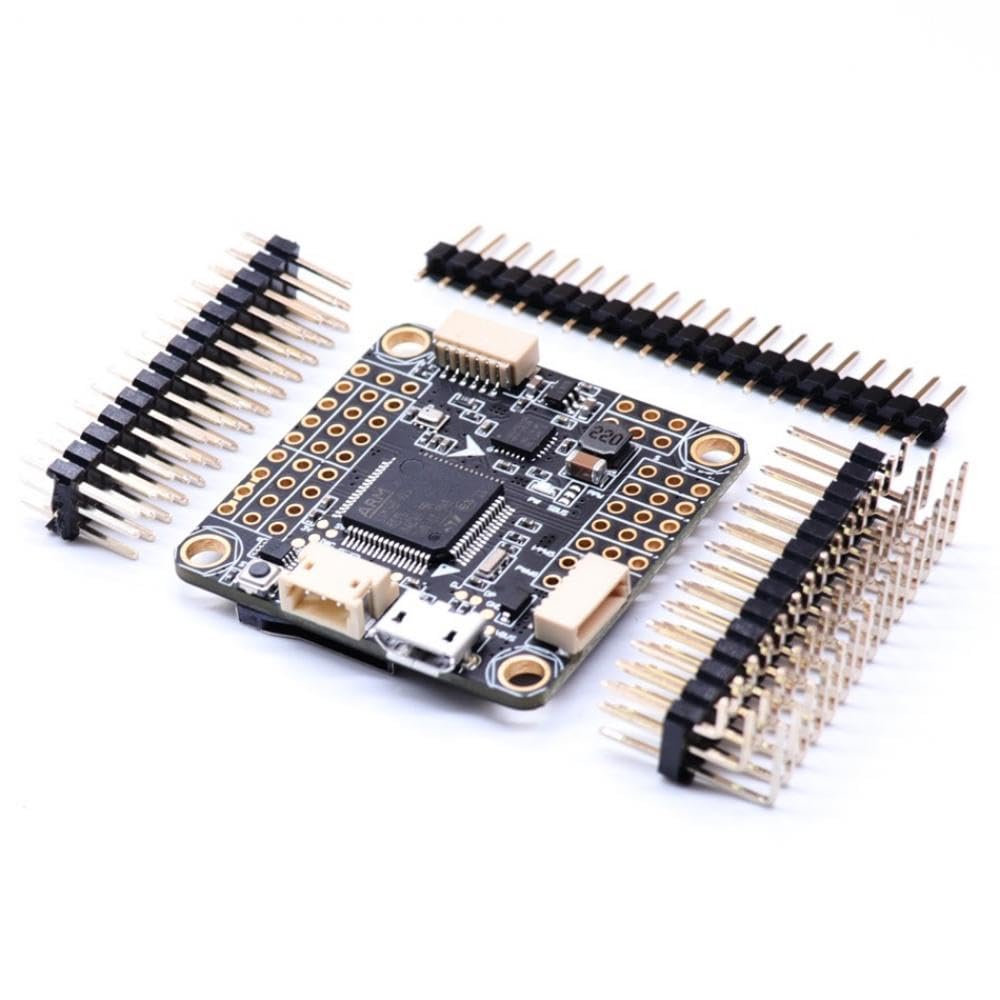
Figura 1: superior view of the UAZNJFZ F4V3S Flight Controller.
2. Característiques del producte
The UAZNJFZ F4V3S Flight Controller integrates several key features to enhance drone performance and user experience:
- Microcontrolador: STM32 F405 MCU for high processing power.
- ESC Protocol Support: Dshot compatible for precise motor control.
- Visualització en pantalla (OSD): Integrated OSD configurable via Betaflight Configurator for real-time flight data.
- Suport d'àudio: Smartaudio v2 support for VTX control.
- Sensors: IC268G 6-axis SPI Gyro & Accelerometer, compatible with MPU6500 in INAV firmware.
- Ports del receptor: Dedicated ports for SBUS/PPM and Spektrum DSMX receivers.
- blackbox: SD card slot for flight data logging (blackbox).
- Baròmetre: BMP280 barometer for accurate altitude holding.
- Font d'alimentació: Integrated 5V 3A SBEC.
- Video Integration: On-board video functionality capable of supplying 5V to VTX and camera.
- VTX Control: SmartAudio V2 via TX6 on J10.
- Connexió ESC: 4x3 pin ESC layout.
- Lap Timing: IR pins for lap timing transponder compatibility.
- GPS Compatibility: Compatible with BN880 GPS modules for navigation.

Figura 2: Detall superior view of the flight controller, highlighting the main processor and various components.

Figura 3: A baix view of the flight controller, featuring the SD card slot for blackbox logging.
3. Configuració
3.1 Instal·lació física
Mount the F4V3S Flight Controller securely onto your drone frame. The standard mounting hole size is 30.5x30.5mm, with M3 screw compatibility. Ensure proper isolation from vibrations using standoffs or dampeners if necessary. Orient the board correctly according to your chosen flight control software's default settings or adjust the board alignment in the configurator.

Figure 4: The flight controller shown with included pin headers, ready for soldering and connection to other drone components.
3.2 Cablejat
Connect your ESCs, receiver, VTX, camera, and GPS module to the appropriate pads on the flight controller. Refer to the pinout diagram (often available on the manufacturer's product page or community wikis) for specific connection points. Ensure all connections are soldered cleanly and securely to prevent intermittent issues or shorts.
- ESC: Connect ESC signal wires to the designated motor output pads.
- Receptor: Connect your SBUS, PPM, or Spektrum DSMX receiver to its respective port.
- VTX & Camera: Connect video input/output and power to the dedicated video pads.
- GPS: Connect the BN880 GPS module to the UART port configured for GPS.
- Potència: Provide main battery power to the designated VBAT pads, ensuring correct polarity.
3.3 Configuració del programari
Connect the flight controller to your computer via a USB cable. Use the Betaflight Configurator or INAV Configurator software to:
- Flash the latest firmware for your F4V3S board.
- Calibrate the accelerometer and gyroscope.
- Configure receiver protocols and channels.
- Set up flight modes, OSD elements, and PID tuning.
- Enable and configure peripherals such as GPS, barometer, and SmartAudio.
4. Funcionament
After successful setup and configuration, ensure all components are functioning correctly before flight. Always perform a pre-flight check.
- Armat: Arm the drone using the configured switch on your remote controller. Ensure propellers are clear before arming.
- Modes de vol: Utilize various flight modes (e.g., Angle, Acro, GPS Hold) configured in your flight control software.
- OSD Usage: Monitor real-time flight data such as battery voltage, current, flight time, and GPS coordinates directly on your FPV feed via the integrated OSD.
- VTX Control: Adjust VTX settings (power, channel) using SmartAudio via your OSD or remote control.
5. Manteniment
Regular maintenance ensures the longevity and reliability of your flight controller.
- Inspecció: Periodically inspect the board for any physical damage, loose connections, or corrosion.
- Neteja: Keep the board free from dust, dirt, and moisture. Use compressed air or a soft brush for cleaning.
- Actualitzacions de firmware: Regularly check for and install the latest firmware versions for Betaflight or INAV to benefit from bug fixes and new features.
- Configuració de còpia de seguretat: Always back up your flight controller configuration settings before performing firmware updates or significant changes.
6. Solució De Problemes
Si teniu problemes, tingueu en compte els passos habituals següents per resoldre'ls:
- Sense energia: Check battery connections, power distribution board (PDB), and flight controller power input pads for correct voltage i polaritat.
- No Connection to Configurator: Ensure USB drivers are installed. Try a different USB cable or port. Verify the correct COM port is selected.
- Motors que no giren: Check ESC connections, motor direction, and ESC calibration. Verify motor output in the configurator.
- Vol inestable: Recalibrate accelerometer. Check PID settings. Inspect propellers for damage. Ensure frame is rigid.
- L'OSD no es mostra: Verify OSD is enabled in the configurator. Check video input/output connections.
- El GPS no es bloqueja: Ensure GPS module is connected correctly and has a clear view of the sky. Check GPS settings in the configurator.
7. Especificacions
| Característica | Detall |
|---|---|
| Número de model | UAZNJFZ888 |
| MCU | STM32 F405 |
| Giroscop i acceleròmetre | IC268G 6-axis SPI (MPU6500 compatible in INAV) |
| Baròmetre | BMP280 |
| OSD | Integrated, configurable via Betaflight Configurator |
| Caixa negra | Ranura per a targeta SD |
| SBEC Output | 5V 3A |
| Dimensions del tauler | Approximately 36x36mm |
| Mida del forat de muntatge | 30.5x30.5mm, M3 |
| Pes de l'article | 14.1 unces (400 grams) |
| Dimensions del paquet | 1.18 x 0.79 x 0.39 polzades |
8. Garantia i Suport
8.1 Informació de la garantia
For specific warranty terms and conditions, please refer to the documentation provided at the time of purchase or contact the seller directly. Warranty coverage typically addresses manufacturing defects and does not cover damage resulting from improper installation, misuse, or modifications.
8.2 Suport tècnic
For technical assistance, please consult the manufacturer's official website or relevant community forums for Betaflight and INAV. These resources often provide extensive documentation, FAQs, and community support for configuration and troubleshooting.