
Introducció
The FIREBAT Mini PC A6 is a compact yet powerful desktop computer designed for a wide range of applications, including office work, business operations, home entertainment, and gaming. It features an advanced AMD Ryzen 7 6800H processor and AMD Radeon 680M graphics, offering a balance of high performance and efficient power consumption. This manual provides essential information for setting up, operating, maintaining, and troubleshooting your Mini PC.

Figura 1: Davant i darrere view of the FIREBAT Mini PC A6.
Contingut del paquet
Abans de començar, assegureu-vos que tots els elements estiguin presents al paquet:
- 1 x FIREBAT A6 AMD R7 6800H Mini PC
- 1 x 19V/6.3A 120W US Adapter
- 1 x Muntatge VESA
- 1 x cable HDMI
- 1 x Manual d'usuari

Figure 2: Contents included in the FIREBAT Mini PC A6 package.
Guia de configuració
Configuració inicial
- Connect the power adapter to the DC-in port on the Mini PC and plug it into a power outlet.
- Connect your monitor or TV to the Mini PC using the provided HDMI cable or a DisplayPort cable. The device supports triple 4K monitor output.
- Connect your keyboard and mouse to the available USB 3.0 ports. Wireless peripherals can also be used.
- Premeu el botó d'engegada a la part frontal del Mini PC per engegar-lo.
- Follow the on-screen instructions to complete the initial setup of the Windows 11 Pro operating system.
Muntatge VESA
The FIREBAT Mini PC A6 includes a VESA mount for convenient installation behind a compatible monitor or TV, saving desk space and creating a clean setup.
- Attach the VESA mount bracket to the back of your monitor/TV using appropriate screws.
- Align the Mini PC with the mounted bracket and slide it into place until it clicks securely.
- Ensure all cables are properly connected and managed for optimal performance and aesthetics.
Video 1: Official unboxing and initial setup of the FIREBAT Mini PC A6, demonstrating the contents and basic connections.
Funcionament del mini PC
Característiques principals i rendiment
The FIREBAT Mini PC A6 is engineered for robust performance across various tasks:
- Processador: Equipped with an AMD Ryzen 7 6800H processor (8 cores/16 threads, up to 4.7GHz), based on ZEN 3+ architecture and TSMC 6nm FinFET technology. This provides excellent performance for multi-threaded tasks.
- Gràfics: Features an integrated AMD Radeon 680M GPU (2200MHz), offering powerful graphics processing capabilities for gaming and multimedia.
- Memòria i emmagatzematge: Comes with 16GB SO-DIMM DDR5 4800MHz RAM and a 512GB M.2 PCIe 3.0 2280 SSD. The system supports dual-channel memory expansion up to 64GB (32GB x 2) and dual M.2 PCIe 3.0/4.0 SSD interfaces for higher performance and capacity.
- Connectivitat: Offers extensive connectivity options including 1x Type-C (PD/DP/DATA, up to 10Gbps), 6x USB 3.0, 1x DisplayPort 1.4 (4K@120Hz), 1x HDMI 2.0 (4K@60Hz), 1x 3.5mm audio jack (HP&MIC), and 1x 2.5Gbps RJ45 LAN port. Wireless connectivity includes WiFi 6 and Bluetooth 5.2.
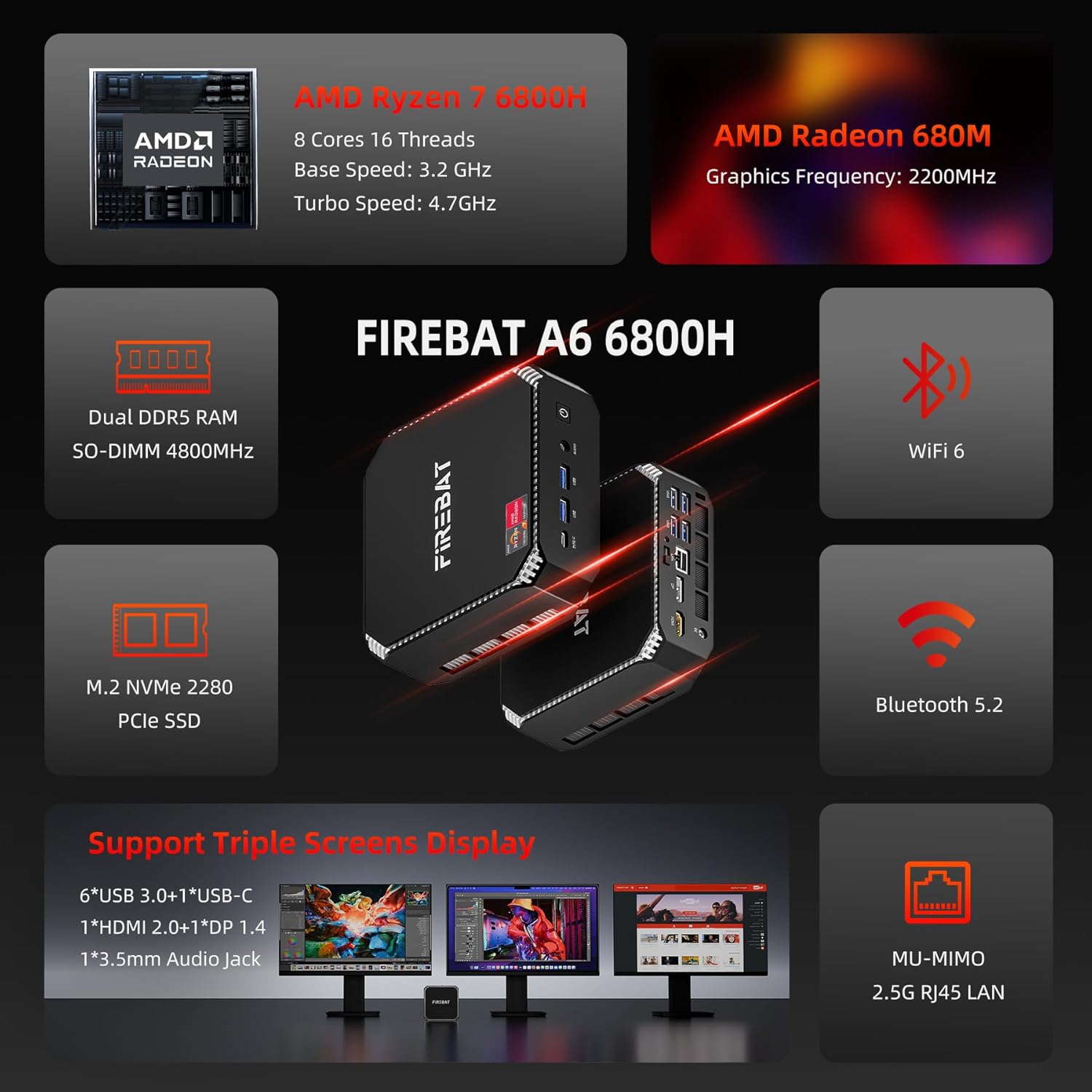
Figura 3: Mésview of the FIREBAT Mini PC A6's core features and specifications.
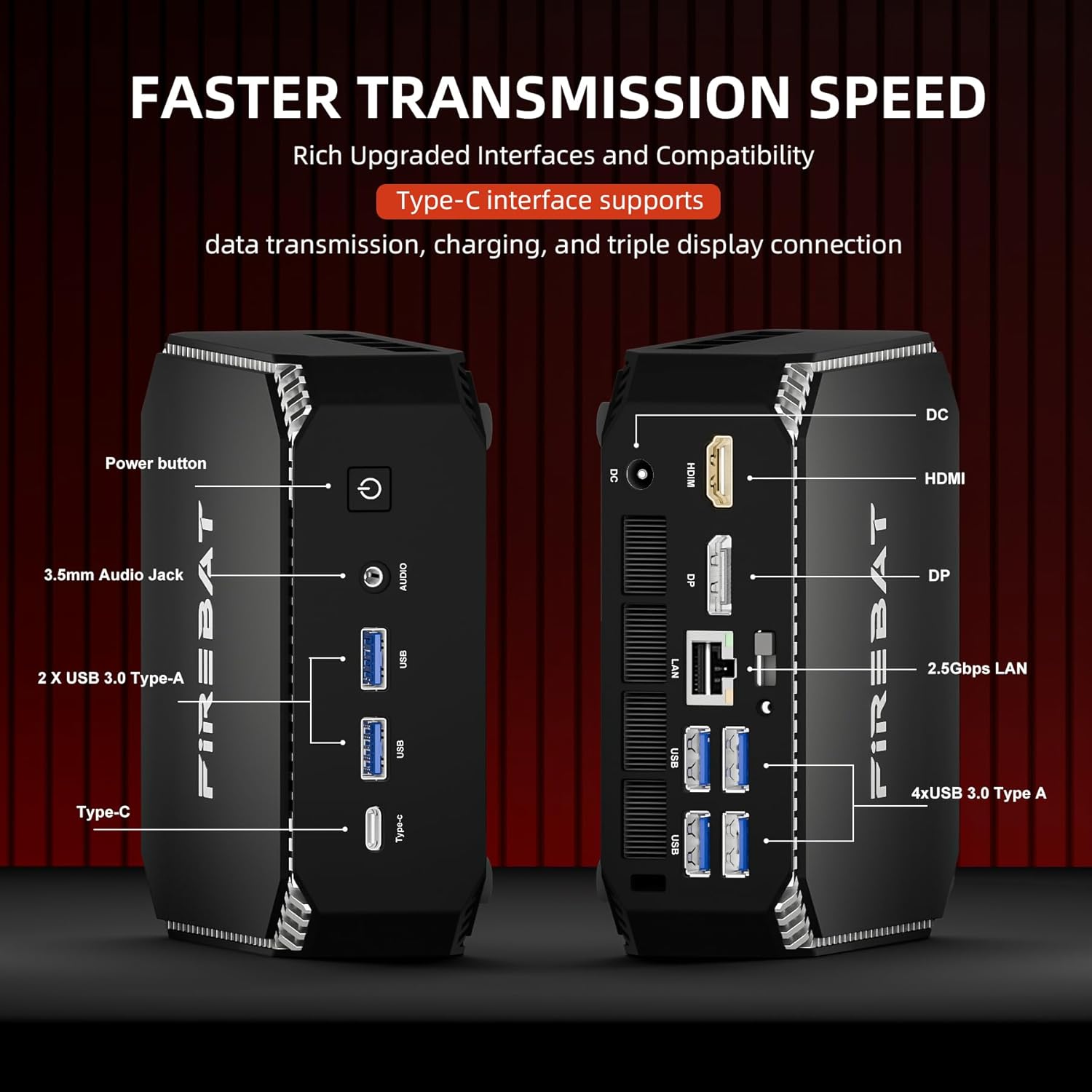
Figura 4: Detallada view of the front and rear ports and interfaces on the Mini PC.

Figure 5: Illustration of the expandable RAM and dual M.2 SSD slots for storage upgrades.
Escenaris d'ús
The Mini PC A6 is versatile and suitable for:
- Business & Office: Efficiently handle demanding applications and multi-threaded tasks.
- Educació: Ideal for learning environments, supporting various educational software and online resources.
- Teatre a casa: Connect to your TV for 4K streaming and media consumption.
- Jocs: Enjoy a smooth gaming experience with its powerful integrated graphics.
Vídeo 2: Un breu resumview of the FIREBAT Ryzen 7 6800H Mini Computer A6 Model, highlighting its compact design and various applications.
Manteniment
To ensure the longevity and optimal performance of your FIREBAT Mini PC, consider the following maintenance tips:
- Refrigeració: The Mini PC features an ultra-efficient and fast cooling system with high-efficiency thermal grease, a cooling fan, and dual heat pipes, enabling 7x24 hours of silent operation. Ensure proper airflow around the device and keep ventilation openings clear of obstructions.
- Neteja: Regularly clean the exterior of the Mini PC with a soft, dry cloth. Avoid using liquid cleaners directly on the device.
- Actualitzacions: When upgrading RAM or SSDs, handle components carefully. Refer to the detailed instructions provided by FIREBAT or consult professional assistance if unsure.

Figure 6: Illustration of the internal cooling components, including the fan and heat pipes.
Figure 7: Chart illustrating the low noise levels of the FIREBAT Mini PC A6 during operation.
Resolució de problemes
If you encounter issues with your Mini PC, consider the following common solutions:
- Sense pantalla: Ensure all video cables (HDMI/DP) are securely connected to both the Mini PC and the monitor. Verify the monitor input source is correctly selected.
- Perifèrics que no funcionen: Check USB connections. If a specific USB port is unresponsive, try another port. Ensure drivers for peripherals are up to date.
- Problemes de rendiment: Close unnecessary applications. Ensure your operating system and drivers (especially AMD Radeon GPU drivers) are updated to the latest versions.
- Accessing Internal Components: If you need to open the Mini PC for upgrades (RAM/SSD), proceed with caution. Some users have reported the top cover can be difficult to remove initially. Apply gentle, even pressure to avoid damage.
- Inestabilitat del sistema: Perform a system restart. If issues persist, consider reinstalling the operating system or contacting support.
Especificacions
| Característica | Detall |
|---|---|
| Marca | FIREBAT |
| Número de model | A6 |
| Processador | AMD Ryzen 7 6800H (8 Cores/16 Threads, up to 4.7GHz) |
| Coprocessador gràfic | Gràfics AMD Radeon 680M |
| RAM | 16GB SO-DIMM DDR5 4800MHz (Expandable to 64GB) |
| Disc dur | 512GB PCIe 3.0 2280 SSD (Dual M.2 slots) |
| Sistema operatiu | Default (Windows 11 Pro pre-installed) |
| Ports USB | 6 x USB 3.0, 1 x USB-C (PD/DP/DATA) |
| Sortida de vídeo | 1 HDMI 2.0 (4K a 60 Hz), 1 DisplayPort 1.4 (4K a 120 Hz) |
| Xarxa | 2.5Gbps RJ45 LAN, WiFi 6 (802.11ax), Bluetooth 5.2 |
| Àudio | 3.5mm Audio Jack (HP&MIC) |
| Consum d'energia | Up to 54W (45W TDP) |
| Pes de l'article | 1 lliures |
| Dimensions del producte | 5 x 5 x 1.5 polzades |
Suport i garantia
FIREBAT is committed to providing quality products and support. For any inquiries, technical assistance, or warranty information, please contact us:
- Correu electrònic: suport@firebatpc.com
- Weblloc: www.firebatpc.com
Si us plau, consulteu la documentació de compra per conèixer els termes i condicions específics de la garantia.