
1. Introducció
This manual provides detailed instructions for the installation, operation, and maintenance of your KCEVE HDMI Wireless Transmitter and Receiver with KVM Function. This device allows for wireless transmission of HDMI video and audio signals, along with KVM (Keyboard, Video, Mouse) functionality, over distances up to 200 meters (656 feet) in an open environment. It is designed for various applications including home entertainment, business presentations, and educational settings.
2. Contingut del paquet
Please verify that all items are present and in good condition upon opening the package. If any items are missing or damaged, please contact customer support.
- 1 x KCEVE HDMI Wireless Transmitter (TX)
- 1 x KCEVE HDMI Wireless Receiver (RX)
- 2 x USB-A to Type-C Power Cables
- 1 x Type-C to USB-A Converter Adapter (OTG)
- 2 x Antennas (pre-attached or to be attached)
3. Producte acabatview
The KCEVE HDMI Wireless Kit consists of a Transmitter (TX) and a Receiver (RX), designed for efficient wireless signal extension. The compact, shell-less design promotes better heat dissipation for stable performance.
3.1. Components i ports

Imatge: Detallada view of the Transmitter (TX) and Receiver (RX) units, highlighting their dimensions, HDMI terminals, Type-C power ports, USB-A port on the receiver, pairing buttons, reset buttons, and LED indicators. Also shown are the included power cables and OTG adapter.
- Transmissor (TX):
- HDMI Terminal: Connects to the HDMI output of your source device (e.g., laptop, camera).
- Port de tipus C: For power supply using the provided USB-A to Type-C cable.
- Botó de sincronització: Used to re-pair the transmitter with the receiver if needed.
- Botó de restabliment: Premeu durant 10 segons per restaurar la configuració de fàbrica.
- Indicador LED: Mostra l'estat de l'alimentació i de l'emparellament.
- Receptor (RX):
- HDMI Terminal: Connects to the HDMI input of your display device (e.g., TV, monitor, projector).
- Port USB-A: Connects to a USB mouse or keyboard for KVM functionality.
- Port de tipus C: For power supply using the provided USB-A to Type-C cable.
- Botó de sincronització: Used to re-pair the receiver with the transmitter if needed. Also functions as a mode switch (tap) for display adjustments.
- Botó de restabliment: Premeu durant 10 segons per restaurar la configuració de fàbrica.
- Indicador LED: Mostra l'estat de l'alimentació i de l'emparellament.
3.2. Indicador LED d'estat

Imatge: Detailed explanation of the pairing button, reset button, pairing indicator light, and power indicator light on both the Transmitter and Receiver units.
- Llum indicador d'alimentació: Stays on when the power cable is connected and the device is receiving power.
- Pairing Indicator Light: Flashes during the pairing process. It will remain solid for approximately 3-5 seconds upon successful pairing.
4. Instruccions de configuració
Follow these steps to set up your KCEVE HDMI Wireless Transmitter and Receiver:
4.1. Initial Connection Diagram
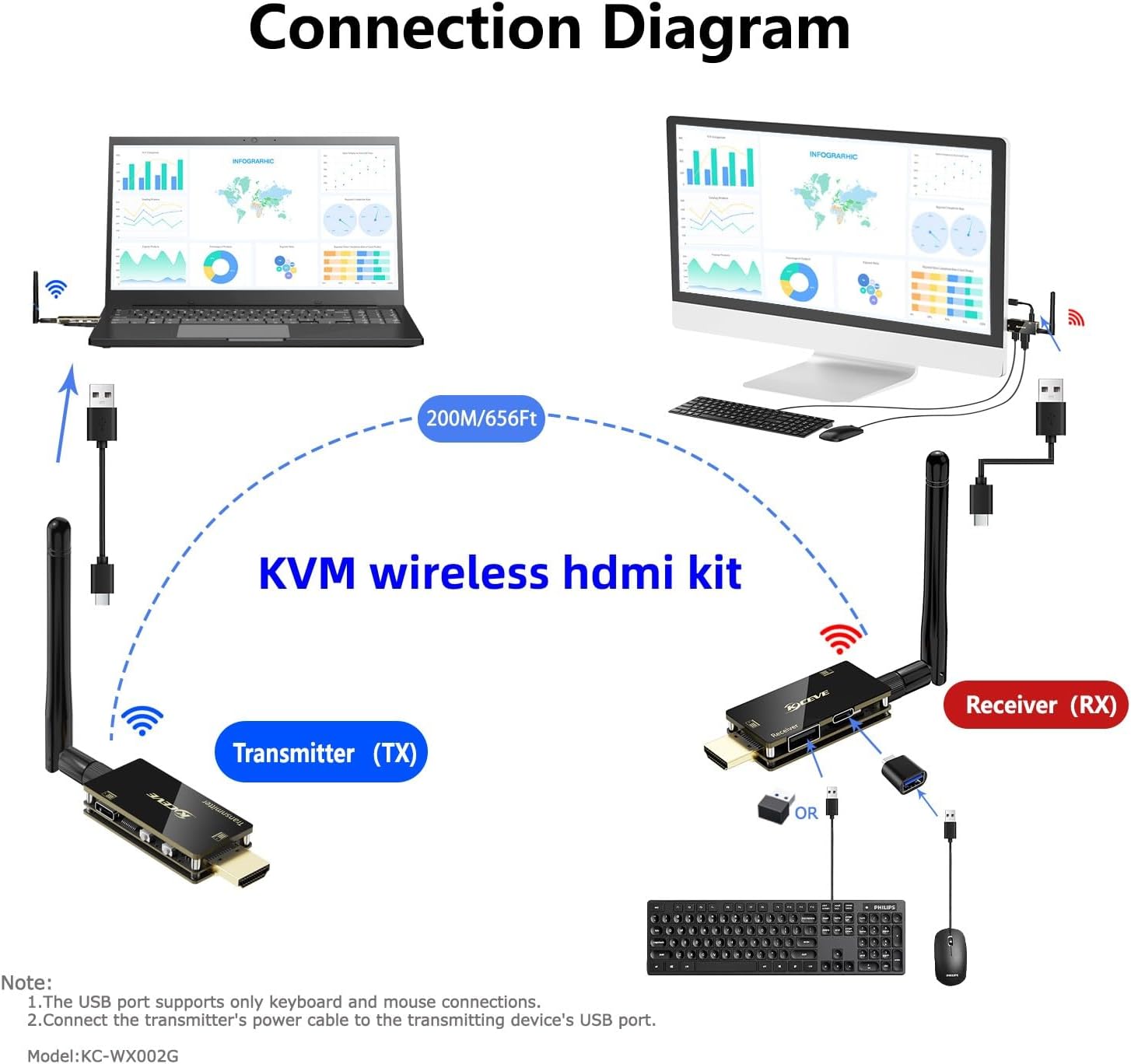
Imatge: A visual guide illustrating how to connect the Transmitter (TX) to a source device (laptop) and the Receiver (RX) to a display device (monitor, including power connections and the optional KVM setup.
- Instal·lació d'antenes: Ensure the antennas are securely attached to both the Transmitter (TX) and Receiver (RX) units.
- Connect Transmitter (TX):
- Plug the HDMI terminal of the Transmitter into the HDMI output port of your source device (e.g., laptop, desktop PC, game console, camera).
- Connect one of the provided USB-A to Type-C power cables to the Type-C port on the Transmitter. Plug the USB-A end into a USB power source (e.g., your device's USB port, a USB wall adapter). Ensure the Transmitter receives sufficient power.
- Connecta el receptor (RX):
- Plug the HDMI terminal of the Receiver into the HDMI input port of your display device (e.g., TV, monitor, projector).
- Connect the second USB-A to Type-C power cable to the Type-C port on the Receiver. Plug the USB-A end into a USB power source (e.g., your display's USB port, a USB wall adapter). Ensure the Receiver receives sufficient power.
- Encès: Engegueu tant el dispositiu font com el dispositiu de visualització.
- Emparellament automàtic: The Transmitter and Receiver are pre-paired at the factory. They should automatically connect within a few seconds. The pairing indicator light will flash and then become solid for 3-5 seconds upon successful connection.
- Verifica la pantalla: Check your display device. The content from your source device should now be mirrored or extended wirelessly.
5. Instruccions de funcionament
5.1. Funcionament bàsic
- Plug and Play: Once connected and powered, the system operates automatically. No software installation or network configuration is required.
- Transmissió del senyal: The device transmits 1080P Full HD video and audio signals using 2.4G/5G dual-band technology for stable, low-latency performance.
- Interval: The wireless transmission range can reach up to 200 meters (656 feet) in an open, unobstructed environment. Obstacles like walls will reduce the effective range (e.g., a single wall may reduce range by approximately 30 meters).
5.2. Re-pairing Devices (If Needed)
If the Transmitter and Receiver fail to connect automatically, you may need to re-pair them:
- Ensure both the Transmitter and Receiver are powered on.
- Press the "Pairing Button" on the Transmitter. The pairing indicator light will begin to flash.
- Within a few seconds, press the "Pairing Button" on the Receiver. Its pairing indicator light will also flash.
- Wait for approximately 3-5 seconds. Both indicator lights should become solid, indicating successful pairing.
5.3. Display Mode Adjustment (Receiver)
The Receiver's pairing button also functions as a mode switch for display adjustments, such as image rotation or zoom. This can be useful if the display appears incorrectly (e.g., rotated) on your monitor or projector.
- Tap the Pairing Button: Briefly press and release the pairing button on the Receiver. Each tap will cycle through different display modes (e.g., rotation, zoom levels).
- Observe Display: Continue tapping until the desired display orientation and size are achieved. There are typically 12 settings, including 6 levels of zoom and the same 6 levels rotated.
6. KVM Functionality
The KCEVE Wireless HDMI Kit includes KVM (Keyboard, Video, Mouse) functionality, allowing you to control your source device remotely from the display location.
6.1. Connecting KVM Peripherals
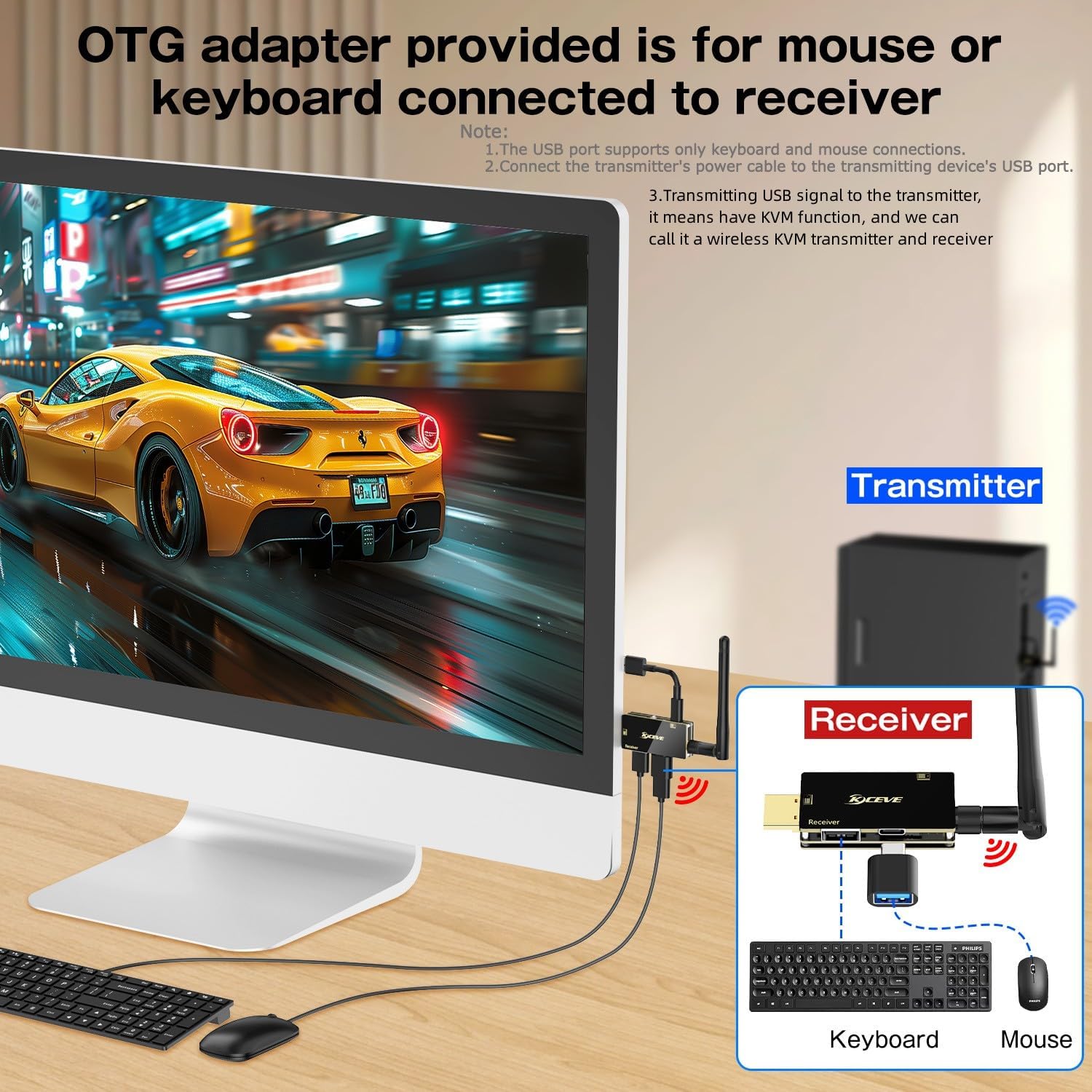
Imatge: Illustration of how to connect a USB mouse and keyboard to the Receiver (RX) using the provided Type-C to USB-A OTG adapter, enabling remote control of the source device.
- Connect OTG Adapter: Plug the Type-C end of the provided Type-C to USB-A Converter Adapter (OTG) into the Type-C port of the Receiver (RX).
- Connecteu els perifèrics USB: Plug your USB mouse and/or keyboard into the USB-A ports of the OTG adapter. If you have multiple USB peripherals, you may need a USB hub (not included).
- Comandament a distància: You can now use the connected mouse and keyboard to control your source device (e.g., laptop) from the location of your display.
Nota: The USB port on the Receiver is primarily designed for keyboard and mouse connections. Compatibility with other USB devices may vary.
7. Solució De Problemes
If you encounter issues with your KCEVE HDMI Wireless Kit, please refer to the following common solutions:
| Problema | Possible causa/solució |
|---|---|
| No signal on display / Black screen |
|
| Image is distorted, flickering, or intermittent |
|
| KVM (mouse/keyboard) not working |
|
| Distància de transmissió curta |
|
| El dispositiu s'escalfa |
|
8. Especificacions
| Marca | KCEVE |
| Model | KC-WX002G (B0DS8RBBM5) |
| Interfície del maquinari | USB 2.0 Type A (for KVM), HDMI |
| Protocol d'enllaç de dades | USB, Wireless (2.4G/5G Dual-band) |
| Rang de transmissió | Up to 200 meters (656 feet) in open field |
| Resolució de vídeo | Supports 4K decoding, 1080P Full HD output |
| Funció KVM | Yes, USB port on receiver for mouse/keyboard |
| Font d'alimentació | USB powered (Type-C) |
| Operating System Compatibility (Transmitter) | Windows, Mac OS, Android (with DP Alt output and USB-C to HDMI adapter) |
| Pes de l'article | 0.19 quilograms (aprox. 0.42 lliures) |
9. Garantia i assistència
9.1. Informació de la garantia
This KCEVE product comes with a Garantia limitada de 1 anys des de la data de compra. Aquesta garantia cobreix els defectes de fabricació i els mals funcionaments en condicions d'ús normal. No cobreix els danys causats per un mal ús, accidents, modificacions no autoritzades o instal·lació incorrecta.
Conserveu el vostre comprovant de compra per a reclamacions de garantia.
9.2. Atenció al client
For technical assistance, troubleshooting, or warranty inquiries, please contact KCEVE customer support through the retailer where you purchased the product or visit the official KCEVE weblloc per obtenir informació de contacte.
When contacting support, please provide your product model number (KC-WX002G) and a detailed description of the issue.