
1. Producte acabatview
The Elitech RCW-800W-TDE-V2 is a digital temperature data logger designed for remote, real-time temperature monitoring. It supports both 5G and 2.4G WiFi networks, offering stable connectivity for continuous data upload and alert notifications. Equipped with dual external temperature probes, it provides accurate measurements and cloud data storage capabilities. Users can receive SMS, email, app, and web alarms for timely intervention.
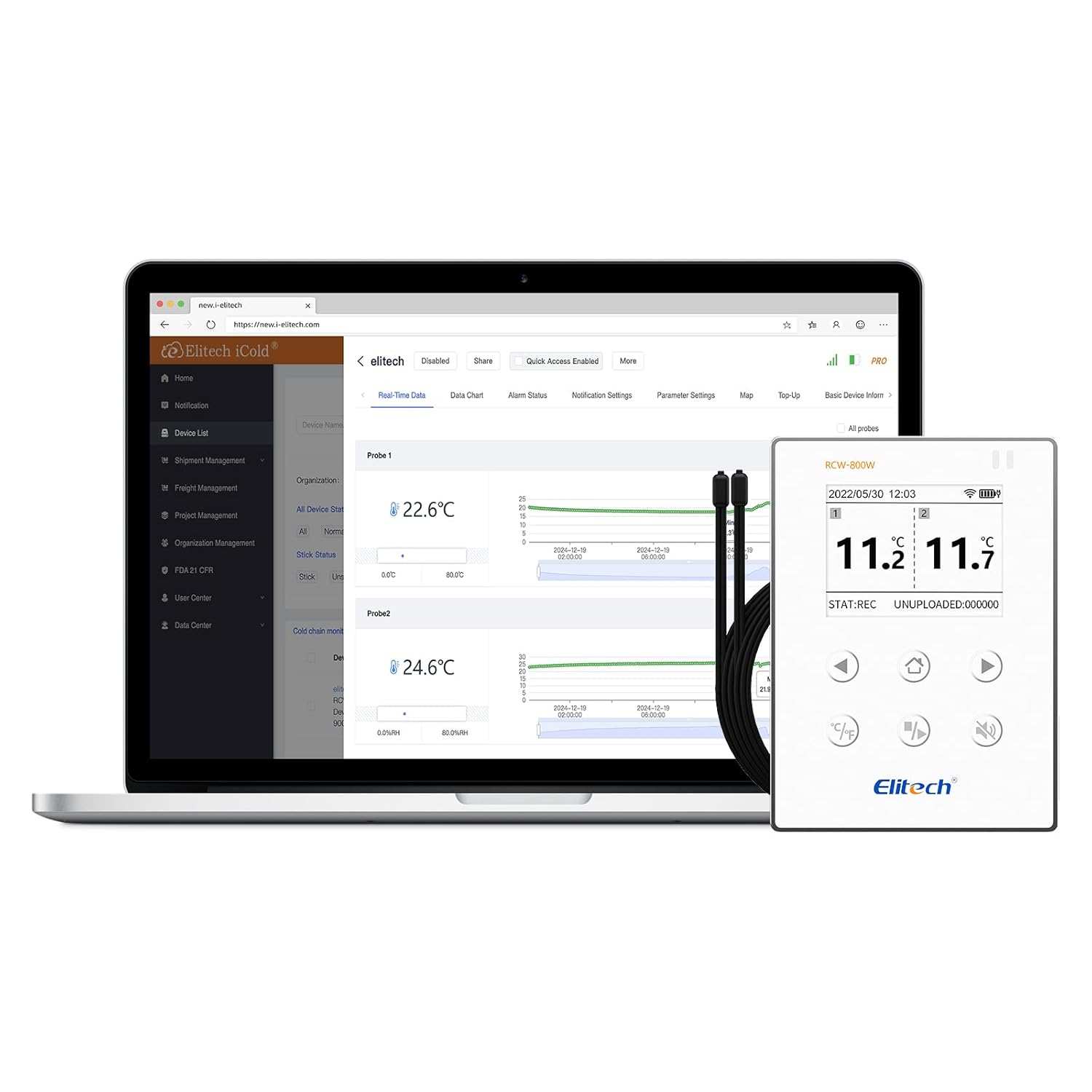
Figure 1: Elitech RCW-800W-TDE-V2 Digital Temperature Data Logger.
2. Característiques clau
- Connexió de xarxa estable: Supports both 5G and 2.4G WiFi, ensuring reliable remote real-time temperature monitoring.
- High Precision Probes: Accurately senses small changes in temperature. Measurement range: -40℉ ~ 176℉ (-40℃ ~ 80℃).
- Parameter Settable: Allows configuration of temperature unit (℃/℉), record interval, upload interval, and alarm interval.
- Alarma audible i visual: Provides immediate alerts for abnormal temperature conditions.
- Bateria de liti recarregable incorporada: Ensures real-time data upload for an extended period (no less than 7 days at 25℃ with 5-minute upload interval) even during power outages.
- Fàcil instal·lació: Features a built-in magnet for direct attachment to metallic surfaces like refrigerators, or can be fixed using screws.
- Cloud Data Storage: Stores data remotely, accessible via mobile app and cloud platform from anywhere.
- Multiple Alert Methods: Receive real-time alerts via LCD screen, SMS, email, and app notifications.
- Offline Data Backup: In case of network interruption, the device can record up to 20,000 offline data points, which will automatically upload once network connection is restored.

Figure 2: Local and Cloud Alarm Capabilities.

Figure 3: Real-time Data Upload and Remote Access.
3. Què hi ha a la caixa
En obrir el paquet, hauríeu de trobar els elements següents:
- Elitech RCW-800W-TDE-V2 Data Logger
- Certificat de calibratge
- Manual d'usuari
- Piles AA (1 incloses)
4. Guia de configuració
Follow these steps to set up your Elitech RCW-800W-TDE-V2 data logger:
- Instal·leu l'aplicació: Download and install the "Elitech iCold" app on your mobile device. You can scan the QR code below or visit the provided link:

Figure 4: App Download and Initial Setup Steps.
Enllaç de descàrrega: http://www.e-elitech.cn/commonAction.do?method=andrioddl
- Account Registration and Login: Open the Elitech iCold app and register a new account if you don't have one, then log in.
- Enceneu el dispositiu: Ensure the data logger has batteries installed or is connected to a power source.
- Bluetooth Distribution Network: In the app, select to add a new device. The app will guide you to enable Bluetooth on your phone and press the reset button on the data logger to enter configuration mode. The Bluetooth symbol will display on the device screen.
- Connecteu-vos a WiFi: Follow the in-app instructions to connect the data logger to your 5G or 2.4G WiFi network. Enter your WiFi password when prompted.
- Install Probes: Connect the dual external temperature probes to the designated ports on the data logger.
- Muntar el dispositiu: The data logger features a magnetic back for easy attachment to metal surfaces. Alternatively, it can be fixed to a wall using screws.

Figure 5: Magnetic Back for Convenient Mounting.
5. Instruccions de funcionament
Once set up, the data logger will begin monitoring and uploading data. Here's how to interact with the device and its data:
5.1 Controls del dispositiu

Figure 6: Device Buttons and Components.
- Clau d'inici (1): Navigates to the main display.
- Celsius or Fahrenheit Switch (2): Toggles the temperature display unit between Celsius (℃) and Fahrenheit (℉).
- Monitoring Start or Stop (3): Initiates or pauses data logging.
- Buzzer On or Off (4): Activates or deactivates the audible alarm.
- Reset button (5): Used for device reset, often during initial setup or troubleshooting.
- Interruptor d'alimentació (6): Encén o apaga el dispositiu.
- Temp Sensor 5M * 2 (7): Ports for connecting the dual 5-meter temperature probes.
5.2 Real-time Data Monitoring
Les dades poden ser viewed in real-time through the Elitech iCold mobile app or the web-based cloud platform. The platform allows you to:
- View current temperature readings from both probes.
- Access historical data charts and graphs.
- Set and modify alarm thresholds and notification preferences.
- Export data for analysis.
Video 1: Elitech Real Time Temperature Monitor in action, demonstrating connectivity and data viewing in various environments like greenhouses, shipping, and laboratories.
6. Manteniment
To ensure optimal performance and longevity of your Elitech data logger, consider the following maintenance tips:
- Neteja: Regularly wipe the device and probes with a soft, dry cloth. Avoid using abrasive cleaners or solvents.
- Gestió de la bateria: The built-in lithium battery is rechargeable. Ensure it is charged periodically, especially if the device is used in areas prone to power outages. For continuous operation, keep the device connected to a power source.
- Inspecció de la sonda: Periodically inspect the temperature probes and their cables for any signs of damage or wear. Replace damaged probes to maintain measurement accuracy.
- Actualitzacions de programari: Check the Elitech iCold app or website for any available firmware or software updates for your device to ensure you have the latest features and bug fixes.
7. Solució De Problemes
If you encounter issues with your Elitech RCW-800W-TDE-V2, try the following troubleshooting steps:
- El dispositiu no es connecta a la xarxa Wi-Fi:
- Ensure your WiFi network is 5G or 2.4G compatible.
- Verify the WiFi password entered during setup is correct.
- Check the device's proximity to the WiFi router. Signal strength may be an issue.
- Try resetting the device using the reset button (5) and re-attempting the WiFi configuration via the app.
- Reinicieu el vostre encaminador WiFi.
- App Login Issues:
- Revisa el teu correu electrònic i la teva contrasenya.
- Assegureu-vos que el vostre dispositiu mòbil tingui una connexió a Internet estable.
- If you've forgotten your password, use the "Forgot Password" option in the app.
- Assegureu-vos que l'aplicació estigui actualitzada a la darrera versió.
- Lectures inexactes:
- Verify that the probes are securely connected to the device.
- Ensure the probes are placed correctly in the environment being monitored and are not obstructed.
- Check for any physical damage to the probes or cables.
- No Data Uploading:
- Confirm the device is connected to WiFi (check the WiFi icon on the display).
- Check the upload interval settings in the app; ensure it's not set to a very long period.
- Verify that the device has sufficient battery power.
If problems persist, please contact Elitech customer support for further assistance.
8. Especificacions
| Especificació | Valor |
|---|---|
| Número de model | RCW-800W-TDE-V2 |
| Marca | Elitech |
| Interval de mesura de temperatura | -40 ℉ ~ 176 ℉ (-40 ℃ ~ 80 ℃) |
| Connectivitat WiFi | 5G/2.4G |
| Tipus de bateria | Necessites 1 piles AA (incloses) |
| Offline Record Capacity | 20,000 punts |
| Dimensions del paquet | 6.85 x 5.08 x 2.87 polzades |
| Pes de l'article | 1.01 lliures |
| Color | Dual External Temp |
9. Garantia i Suport
For warranty information or technical support, please contact Elitech Technology Inc. directly. Their contact details can typically be found on their official website or through the Elitech iCold app. When contacting support, please have your product model number (RCW-800W-TDE-V2) and any relevant purchase information ready.
For common issues, refer to the troubleshooting section of this manual or the FAQ section on the Elitech website. Elitech also offers appointment-based technical support for setup assistance.


