
Introducció
Thank you for choosing the NEWFAST WiFi 6E PCIe Network Card. This card is designed to provide high-speed wireless connectivity and Bluetooth functionality for your desktop PC. Featuring the Intel AX210 chipset, it supports the latest WiFi 6E standard, offering tri-band operation (2.4GHz, 5.8GHz, and 6GHz) with speeds up to 5374Mbps. The integrated Bluetooth 5.3 ensures fast and reliable connections to your wireless peripherals. This manual will guide you through the installation process, operation, and provide troubleshooting tips.

Acabatview of the NEWFAST WiFi 6E PCIe Card's multi-performance features, including WiFi 6E standard, Bluetooth 5.3 upgrade, Tri-Band support (6GHz/5.8GHz/2.4GHz), 5374Mbps speed, WPA-PSK/WPA2-PSK/WPA3 security, OFDMA, MU-MIMO technology, and power saving capabilities.
Què hi ha a la caixa
Si us plau, comproveu el contingut del paquet per assegurar-vos que hi hagi tots els elements:
- 1 x NEWFAST WiFi 6E PCIe Network Card
- 1 x Multi-language Instruction Manual (this document)
- 1 x Bluetooth Cable
- 2 antenes de 5dBi
- 2 x cargols
Especificacions
| Característica | Detall |
|---|---|
| Marca | NEWFAST |
| Model | NF-P395 |
| Chipset | Intel AX210 |
| Estàndard sense fils | WiFi 6E (IEEE 802.11ax) |
| Protocol d'enllaç de dades | IEEE 802.11ac/a/b/g/n, IEEE 802.11ax |
| Bandes de freqüència | 2.4 GHz, 5.8 GHz, 6 GHz (tribanda) |
| Taxa màxima de transferència de dades | 5374 Mbps (2.4GHz: 574Mbps, 5.8GHz: 2400Mbps, 6GHz: 2400Mbps) |
| Versió Bluetooth | Bluetooth 5.3 |
| Interfície del maquinari | PCI-E X1, X4, X8, X16 (PCI slots not supported) |
| Antenes | 2 antenes externes de 5 dBi |
| Característiques de seguretat | WPA-PSK/WPA2-PSK/WPA3 |
| Sistema operatiu compatible | Windows 10 (64 bits), Windows 11 (64 bits) |
| Dimensions (paquet) | 19.9 x 11.9 x 3.4 cm |
| Pes de l'article | 230 g |

Detailed breakdown of WiFi 6E speeds across 6GHz, 5.8GHz, and 2.4GHz bands, highlighting the Intel AX210 chip and Bluetooth 5.3 capabilities.
Instruccions de configuració
1. Instal·lació de maquinari
- Apagueu el vostre PC: Before starting, ensure your computer is completely powered off and unplugged from the power outlet.
- Obriu la carcassa del PC: Traieu el panell lateral de la caixa de l'ordinador per accedir a la placa base.
- Locate a PCI-E Slot: Find an available PCI-E X1, X4, X8, or X16 slot on your motherboard. Note: Standard PCI slots are not compatible.
- Insert the WiFi Card: Carefully align the NEWFAST WiFi 6E PCIe card with the chosen PCI-E slot and press it firmly until it is securely seated.
- Assegureu la targeta: Use the provided screw to fasten the card's bracket to your PC case.
- Connecteu el cable Bluetooth: Connect one end of the provided Bluetooth cable to the 9-pin USB header on the WiFi card and the other end to an available F_USB header on your motherboard. This connection is essential for Bluetooth functionality.
- Col·loca les antenes: Screw the two 5dBi external antennas onto the connectors at the back of the WiFi card. Adjust their orientation for optimal signal reception.
- Tanca la carcassa del PC: Replace the side panel of your computer case and reconnect the power cable.

Illustration of compatible PCI-E slots on a desktop motherboard.
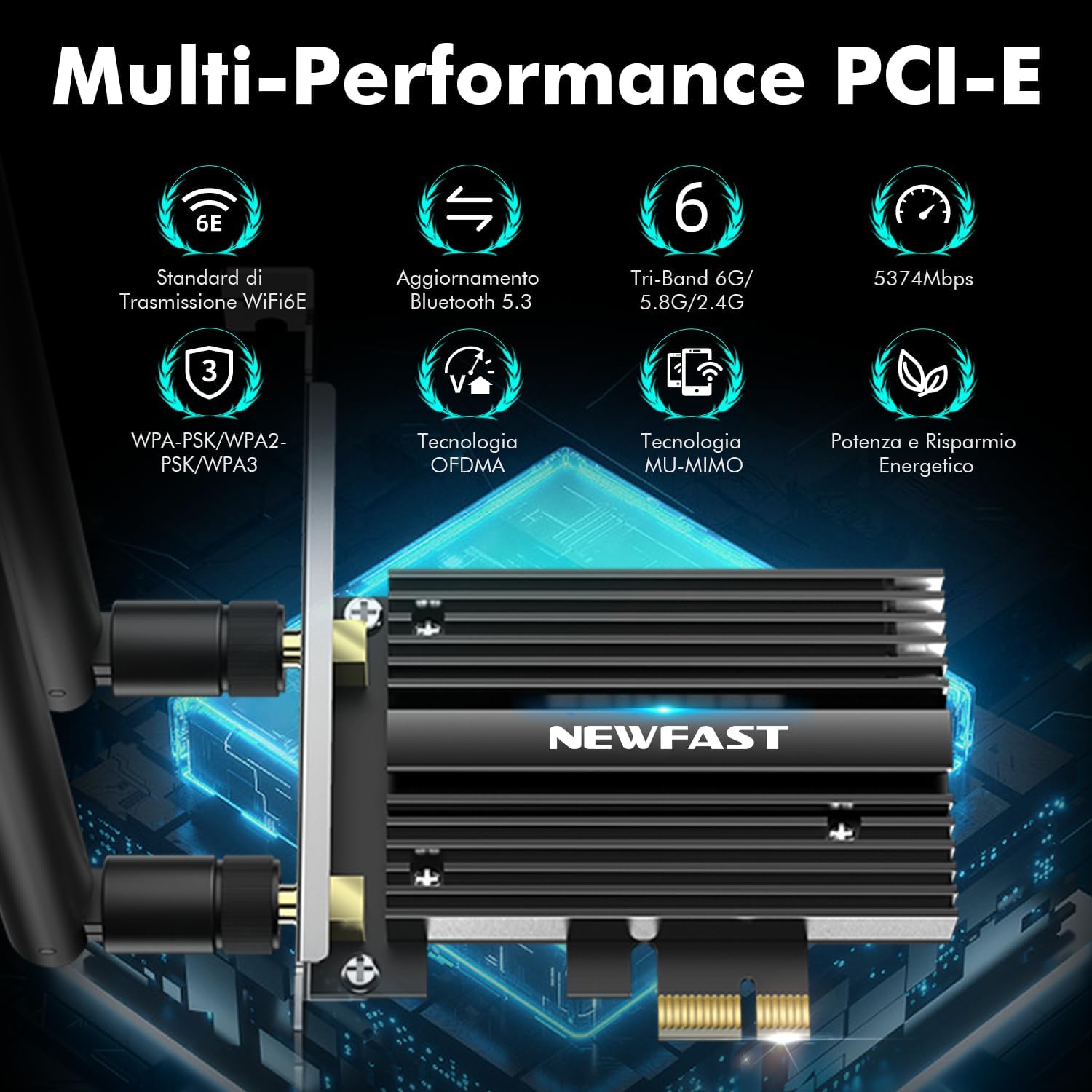
The NEWFAST WiFi 6E PCIe Card with its two external antennas.
2. Instal·lació del controlador
After hardware installation, power on your PC. You will need to install the drivers for both WiFi and Bluetooth functionality. Drivers are typically available on the manufacturer's website. If you do not have internet access, you may need to download them on another device and transfer them via USB.
- Descarrega els controladors: Visit the NEWFAST official website or the Intel support page for the AX210 chipset to download the latest WiFi and Bluetooth drivers for Windows 10 (64-bit) or Windows 11 (64-bit).
- Instal·leu el controlador WiFi: Locate the downloaded WiFi driver file (usually an executable .exe file) and run it. Follow the on-screen instructions to complete the installation.
- Instal·leu el controlador Bluetooth: Similarly, locate and run the Bluetooth driver file. Follow the installation wizard.
- Reiniciar l'ordinador: Després d'instal·lar els dos controladors, reinicieu l'ordinador per assegurar-vos que tots els canvis tinguin efecte.

The WiFi card supports Windows 10 (64-bit) and Windows 11 (64-bit).
Instruccions de funcionament
1. Connexió a una xarxa WiFi
- Accés a la configuració de xarxa: On your Windows desktop, click the WiFi icon in the system tray (usually bottom-right corner).
- Seleccioneu la xarxa: A list of available WiFi networks will appear. Select your desired network.
- Introduïu la contrasenya: Si se us demana, introduïu la clau de seguretat de xarxa (contrasenya) i feu clic a "Connecta".
- Verifica la connexió: Once connected, the WiFi icon will indicate an active connection. You can now browse the internet.
2. Using Bluetooth 5.3
Ensure the Bluetooth cable is correctly connected to your motherboard's F_USB header for Bluetooth functionality.
- Activa el Bluetooth: Go to Windows Settings > Devices > Bluetooth & other devices. Ensure Bluetooth is turned 'On'.
- Pair a Device: Feu clic a "Afegeix Bluetooth o un altre dispositiu" i seleccioneu "Bluetooth".
- Make Device Discoverable: Put your Bluetooth device (e.g., headphones, mouse, controller) into pairing mode. Refer to your device's manual for specific instructions.
- Selecciona i connecta: Your PC will scan for nearby Bluetooth devices. Select your device from the list and follow any on-screen prompts to complete pairing.

The Bluetooth 5.3 feature allows connection to various peripherals with improved speed and range.
Manteniment
The NEWFAST WiFi 6E PCIe Network Card is designed for reliable, long-term performance with minimal maintenance. Follow these guidelines:
- Mantenir els controladors actualitzats: Regularly check the NEWFAST or Intel website for the latest WiFi and Bluetooth drivers to ensure optimal performance and security.
- Assegureu-vos un flux d'aire adequat: Make sure your PC case has adequate ventilation to prevent overheating, which can affect the card's performance. The card's aluminum heatsink is designed for efficient heat dissipation.
- Clean Antennas: Occasionally wipe the antennas with a soft, dry cloth to remove dust.
- Eviteu danys físics: Handle the card with care during installation and avoid bending or stressing the antennas.
Resolució de problemes
If you encounter issues with your NEWFAST WiFi 6E PCIe Network Card, refer to the following common problems and solutions:
- Sense connexió Wi-Fi:
- Ensure the card is properly seated in the PCI-E slot.
- Verify that WiFi drivers are correctly installed and updated.
- Check if the antennas are securely attached.
- Confirm that your router is powered on and broadcasting a WiFi signal.
- Try restarting your PC and router.
- No Bluetooth Functionality:
- Ensure the Bluetooth cable is securely connected to both the WiFi card and the motherboard's F_USB header. This is crucial for Bluetooth.
- Verify that Bluetooth drivers are correctly installed and updated.
- Check Windows Bluetooth settings to ensure Bluetooth is enabled.
- Prova de reiniciar l'ordinador.
- Slow WiFi Speeds:
- Ensure you are connected to a WiFi 6E compatible router for optimal speeds.
- Comproveu si hi ha interferències d'altres dispositius electrònics.
- Adjust antenna orientation for better signal reception.
- Actualitza el firmware del teu encaminador.
- Ensure your PC is within a reasonable range of your WiFi router.
- Dispositiu no detectat:
- Double-check all physical connections, including the PCI-E slot and Bluetooth cable.
- Ensure your operating system is Windows 10 (64-bit) or Windows 11 (64-bit).
- Check Device Manager in Windows for any unknown devices or driver errors.
Garantia i Suport
NEWFAST products are designed for quality and reliability. For specific warranty information, please refer to the warranty card included with your product or visit the official NEWFAST weblloc.
If you encounter any configuration issues, technical problems, or require further assistance, please do not hesitate to contact NEWFAST customer support. Our team is ready to help you.
- Assistència en línia: Visit the NEWFAST official website for FAQs, driver downloads, and support contact information.
- Suport per correu electrònic: Consulteu l'embalatge del producte o la fitxa oficial weblloc web per a l'adreça de correu electrònic d'atenció al client.


