
Introducció
Thank you for choosing the LEPOTEC 4 Pcs RGB LED Wall Lights. These versatile lights are designed to enhance your living space with customizable RGB lighting, app control, music synchronization, and motion sensing capabilities. This manual provides detailed instructions for setup, operation, maintenance, and troubleshooting to ensure optimal performance and longevity of your product.

Image: The LEPOTEC RGB LED Wall Lights demonstrating their color-changing capabilities, including warm white and vibrant RGB, alongside a smartphone displaying the control app interface.
Informació de seguretat
- Do not expose the lights to water or excessive moisture.
- Avoid disassembling or modifying the product, as this may void the warranty and pose safety risks.
- Utilitzeu només el cable USB proporcionat per carregar.
- Mantenir fora de l'abast dels nens.
- Ensure proper ventilation around the lights during operation.
Contingut del paquet
Si us plau, reviseu el paquet per assegurar-vos que hi ha tots els elements:
- 4 x LEPOTEC RGB LED Wall Lights
- USB Charging Cable(s)
- Adhesive Tapes with Iron Sheets (for non-iron surfaces)
- Manual d'usuari (aquest document)
Configuració
1. Carregant els llums
The lights have a built-in 2200mAh rechargeable battery. Before first use, fully charge the lights using the provided USB cable.
- Connect the USB charging cable to the Type-C port on the light.
- Connecteu l'altre extrem del cable a un adaptador de corrent USB (no inclòs) o a un port USB de l'ordinador.
- The charging indicator will show a red light during charging. It will turn green when fully charged.

Image: A detailed diagram illustrating the dimensions of the LEPOTEC light, including the Type-C charging port, switch, and charging indicator light. It highlights the 2000mAh high-capacity battery.
2. Instal·lació
The lights feature a strong built-in magnet for easy attachment.
- On Iron Surfaces: Simply attach the light directly to any iron surface.
- On Non-Iron Surfaces: Use the included adhesive tape with the iron sheet.
- Peel off the protective film from one side of the adhesive tape and stick it onto the iron sheet.
- Peel off the protective film from the other side of the adhesive tape and firmly press the iron sheet onto your desired clean, dry surface.
- Attach the light magnetically to the installed iron sheet.
3. Connexió a l'aplicació
For full control and advanced features, connect your lights to the "HappyLighting" app.
- Pas 1: Download the 'HappyLighting' app from Google Play Store or Apple App Store.
- Pas 2: Activa el Bluetooth al teu telèfon intel·ligent.
- Pas 3: Turn the switch on the light to the 'ON' position.
- Pas 4: Open the 'HappyLighting' app. The app should automatically detect and connect to the lights.
- Pas 5: Once connected, you can control the lights via the app interface.
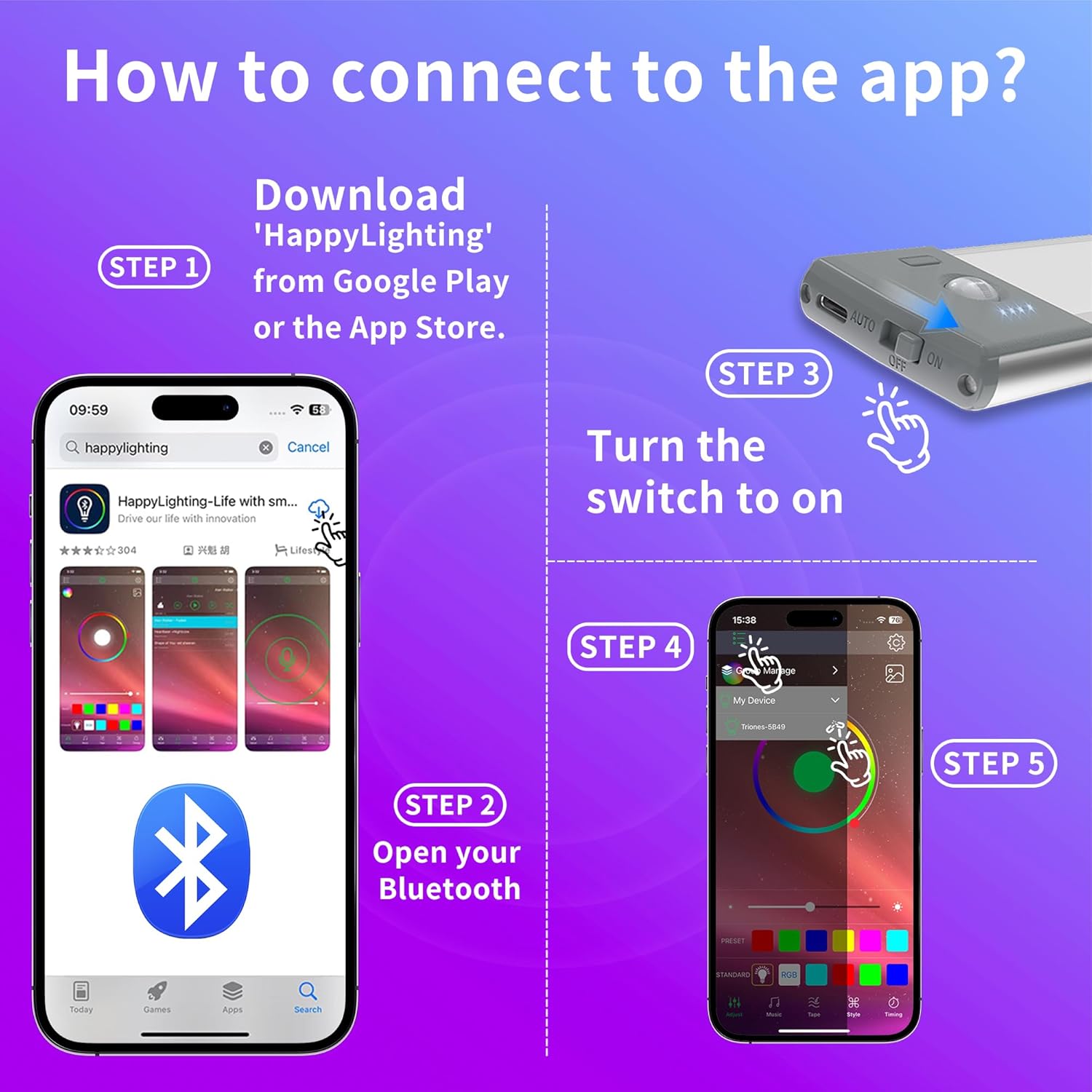
Image: A visual guide detailing the five steps to connect the LEPOTEC lights to the 'HappyLighting' mobile application, from downloading the app to controlling the lights.
Instruccions de funcionament
1. Light Modes (On-Off-AUTO)
The lights feature a physical switch with three modes:
- ACTIVITAT: La llum roman encesa contínuament.
- DESACTIVAT: La llum està apagada.
- AUTOMÀTIC: Activates motion sensor mode. In a dark environment, the light will automatically turn on when motion is detected and turn off after approximately 20 seconds of no movement.

Image: A visual representation of the intelligent induction feature, showing a person walking and the light detecting motion within a 3-5m range, then automatically turning off after 30 seconds of no activity.
2. Funcions de control de l'aplicació
Once connected to the 'HappyLighting' app, you can access various functions:
- Ajust de brillantor: Remotely control the brightness level of the lights.
- Canvi de color: Select from a wide spectrum of RGB colors.
- Funció de temporitzador: Set fixed on/off schedules daily for automated lighting.
- Music & Mic Synchronization: The light color can change with the sound of your microphone or the beat of music. Ensure the app has microphone access. This creates an immersive atmosphere for parties or gaming.

Image: A vibrant scene depicting people enjoying themselves in a room where the LEPOTEC lights are changing colors in sync with music, creating a dynamic party ambiance.

Imatge: Una mostra de collageasing different uses of the LEPOTEC lights, such as backlighting a TV for an enhanced viewing experience and adding ambient lighting to a gaming setup.
Manteniment
- Neteja: Wipe the lights with a soft, dry cloth. Do not use abrasive cleaners or solvents.
- Cura de la bateria: To prolong battery life, avoid fully discharging the battery frequently. Recharge when the light indicates low power. If storing for a long period, charge the battery every 3-6 months.
- Emmagatzematge: Guardeu els llums en un lloc fresc i sec, allunyat de la llum solar directa i de temperatures extremes.
Resolució de problemes
| Problema | Causa possible | Solució |
|---|---|---|
| La llum no s’encén. | La bateria està esgotada. L'interruptor està en posició OFF. | Carregueu la llum completament. Ensure the switch is set to ON or AUTO. |
| L'aplicació no es pot connectar a la llum. | El Bluetooth està desactivat. Light is not in ON mode. Permisos d'aplicació no concedits. | Assegureu-vos que el Bluetooth estigui habilitat al vostre telèfon. Set the light switch to ON. Grant necessary permissions (e.g., location, microphone) to the HappyLighting app. Restart the app. |
| El sensor de moviment no funciona. | La llum no està en mode AUTO. L'entorn és massa brillant. Obstruction in sensing range. | Assegureu-vos que l'interruptor estigui en posició AUTO. Motion sensor only activates in dark environments. Clear any objects blocking the sensor. |
| La durada de la bateria és més curta del que s’esperava. | Frequent use in ON mode. Frequent motion sensor activations. Degradació de la bateria amb el pas del temps. | Battery life is approximately 7 hours in ON mode and 3-5 weeks in AUTO mode (10 activations/day). Adjust usage accordingly. Ensure full charges. |
Especificacions
| Marca | LEPOTEC |
| Model | B0DSHVGX46 |
| Color | Multicolor (RGB) |
| Material | Alumini |
| Font d'alimentació | Funciona amb bateria (recarregable) |
| Capacitat de la bateria | 2200 mAh |
| Tipus de font de llum | LED (30 LED) |
| Mètode de control | Phone App (HappyLighting), Physical Switch |
| Interval del sensor de moviment | 3-5 meters (16.4 ft effective control range via app) |
| Apagat automàtic | 20 seconds (in AUTO mode, no movement) |
| Dimensions | Approx. 8.06 inches (length) x 1.70 inches (width) x 0.55 inches (height) |
| Tipus de muntatge | Wall Mount (Magnetic / Adhesive) |
Garantia i Suport
LEPOTEC products are manufactured with high-quality standards. For any product-related inquiries, technical support, or warranty claims, please contact the seller or refer to your purchase platform for specific warranty terms and customer service contact information.
You can visit the official LEPOTEC store on Amazon for more information: LEPOTEC Store