
1. Introducció
This manual provides essential information for the safe and efficient use of your SBS Powerbank 10K Slim. Please read these instructions carefully before using the device and retain them for future reference.
The SBS Powerbank 10K Slim is a portable charging device designed to provide power to various electronic devices, including smartphones, tablets, and other USB-powered gadgets. It features a 10,000 mAh capacity, intelligent charging technology, and multiple output ports for versatile use.
2. Contingut del paquet
Verifiqueu que tots els elements siguin presents al paquet:
- SBS Powerbank 10K Slim
- Cable USB-A a USB-C
- Manual d'usuari
3. Característiques del producte
- Capacitat de 10,000 mAh: Capable of recharging a smartphone up to 4 times or a tablet up to 2 times.
- Intelligent Charge (IC) 10 Watts: Automatically detects the maximum power your device can accept and adjusts output accordingly, providing protection against overheating and short circuits.
- Disseny prim i compacte: Portable and lightweight for easy transport in a pocket or bag.
- Entrada/sortida USB-C: The USB-C port functions for both charging the power bank and charging external devices.
- Indicadors LED d'estat: Easily monitor the remaining charge level of the power bank.
- Ports de sortida múltiples: Includes 1x USB-C port and 2x USB-A ports for charging various devices simultaneously.
4. Configuració
4.1 Initial Charging of the Powerbank
Before first use, fully charge the power bank. Connect the supplied USB-A to USB-C cable to the power bank's USB-C port and the USB-A end to a compatible USB wall charger (not included) or a computer's USB port. The LED indicators will illuminate to show the charging progress.

Image: The power bank being charged using the included USB-C to USB-A cable connected to a laptop.
4.2 Identificació de ports
The power bank features various ports for charging and discharging:
- USB 1 (USB-A 1A Standard): Output for standard charging (5W).
- USB-C (Type-C Fast Charge): Input/Output for fast charging (10W).
- USB 2 (USB-A 2.1A Intelligent Charge): Output for intelligent fast charging (10W).

Imatge: Detallada view of the power bank's charging ports, indicating their types and power outputs.
5. Instruccions de funcionament
5.1 Càrrega de dispositius externs
To charge your device, connect it to one of the power bank's output ports (USB 1, USB 2, or USB-C) using an appropriate charging cable. The power bank will automatically begin charging. You can charge up to three devices simultaneously.

Image: The power bank actively charging a smartphone and a pair of wireless earbuds.
5.2 Comprovació de l'estat de la bateria
Press the power button once to activate the LED indicators. The blue LEDs will show the remaining charge level of the power bank. Each LED typically represents approximately 25% of the battery capacity.

Image: The power bank's side with the power button and LED indicators displaying the charge level.
5.3 Intelligent Charge (IC) Function
The Intelligent Charge feature on the USB 2 (USB-A 2.1A) and USB-C ports automatically identifies the connected device and delivers the optimal charging current up to 10W. This ensures efficient and safe charging for a wide range of devices.

Image: The power bank charging a smartphone, highlighting its 10,000 mAh capacity and recharge capability.
6. Manteniment
6.1 Atenció general
- Mantingueu el banc d'energia sec i allunyat de la humitat.
- Eviteu les temperatures extremes (calor o fred).
- Netegeu el dispositiu amb un drap suau i sec. No utilitzeu productes químics agressius ni materials abrasius.
- No deixeu caure, desmunteu ni intenteu reparar el banc d'energia vosaltres mateixos.
6.2 Emmagatzematge
When storing the power bank for extended periods, ensure it is charged to approximately 50-75% capacity. Recharge it every 3-6 months to maintain battery health.
6.3 Precaucions de seguretat
- This power bank includes built-in protections against short circuits, overcharging, and over-discharging.
- Do not expose the power bank to fire or direct sunlight.
- Mantenir fora de l'abast dels nens.
7. Solució De Problemes
7.1 El banc d'energia no es carrega
- Assegureu-vos que el cable de càrrega estigui connectat correctament tant al banc d'alimentació com a la font d'alimentació.
- Prova un adaptador de paret USB o un port USB diferent.
- Verifiqueu que la font d'alimentació estigui activa.
7.2 El dispositiu no es carrega des del banc d'alimentació
- Check if the power bank has sufficient charge (press the button to check LEDs).
- Ensure the charging cable connecting your device to the power bank is functional and correctly inserted.
- Prova un port de sortida diferent al banc d'energia.
- Some devices may require a specific charging cable or adapter.
7.3 Càrrega lenta
- Ensure you are using the appropriate port for faster charging (USB-C or USB 2).
- The charging speed can be affected by the cable quality, the device being charged, and the power bank's remaining charge level.
8. Especificacions
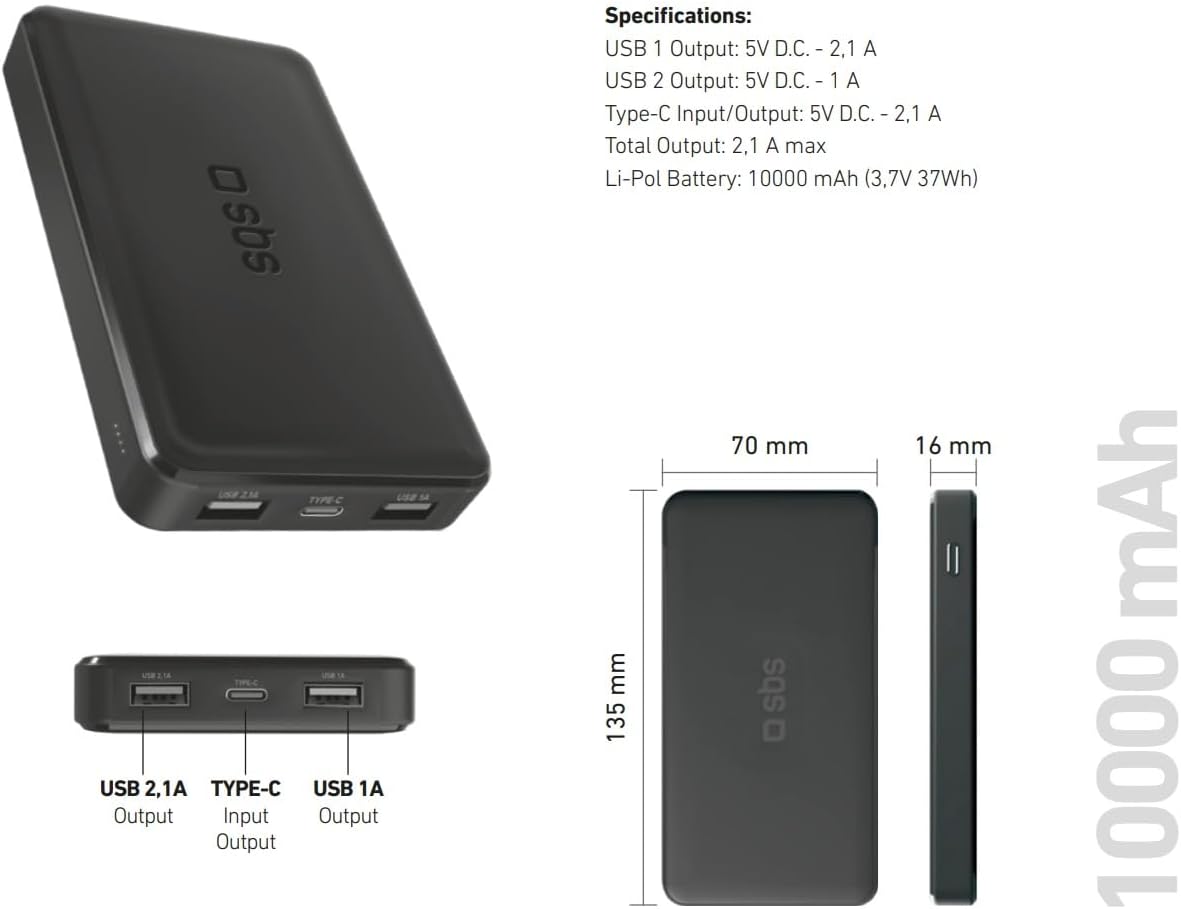
Image: Technical specifications and physical dimensions of the power bank.
| Característica | Detall |
|---|---|
| Nom del model | TTBB10000TCK |
| Capacitat de la bateria | 10,000 mAh (3.7 V 37 Wh) |
| Tipus de bateria | Polímer de liti |
| Sortida USB 1 | 5V D.C. - 1A (5W) |
| Sortida USB 2 | 5V D.C. - 2.1A (10W Intelligent Charge) |
| Entrada/sortida USB-C | 5V D.C. - 2.1A (10W Fast Charge) |
| Sortida total | 2.1A màx |
| Color | Negre |
| Dimensions | 135 mm x 70 mm x 16 mm |
| Pes | 230 grams |
| Característiques especials | Fast Charge, Lightweight, Short-circuit Protection, Over-discharge Protection, Slim Design |
| Dispositius compatibles | Smartphone, Tablet, Smartwatch, Speaker, Laptop (charging only) |
9. Garantia i Suport
9.1 Garantia del fabricant
This SBS Powerbank 10K Slim comes with a Garantia del fabricant de 2 anysSi us plau, conserveu el comprovant de compra per a reclamacions de garantia. La garantia cobreix defectes de materials i fabricació en condicions d'ús normal.
9.2 Atenció al client
For further assistance, technical support, or warranty inquiries, please visit the official SBS website or contact their customer service department. You can find more information and products from SBS by visiting their official store: SBS Brand Store.