
1. Introducció
The ZGCINE PS-W126 is a versatile charging case designed for Fujifilm NP-W126 camera batteries. It features USB-C PD fast charging, dual battery slots, and integrated storage for various memory cards, all monitored via a clear OLED display. This manual provides essential information for the safe and efficient use of your charger.
Característiques clau
- Entrada USB-C PD: Supports 5V/3A and 9V/3A for efficient power delivery.
- Càrrega de bateria dual: Charges two Fujifilm NP-W126 batteries simultaneously with 8.4V/1A output per slot.
- Integrated Card Storage: Includes 2 SD card slots, 2 TF card slots, and 1 CFE Type-B card slot.
- Pantalla OLED: A 0.96-inch OLED screen provides real-time charging status and information.
- Disseny compacte: Lightweight at 135g and compact (66*62*84mm) for portability.
Contingut del paquet
- ZGCINE PS-W126 Charging Case
- Cable de càrrega USB-C
- Manual d'usuari
2. Producte acabatview
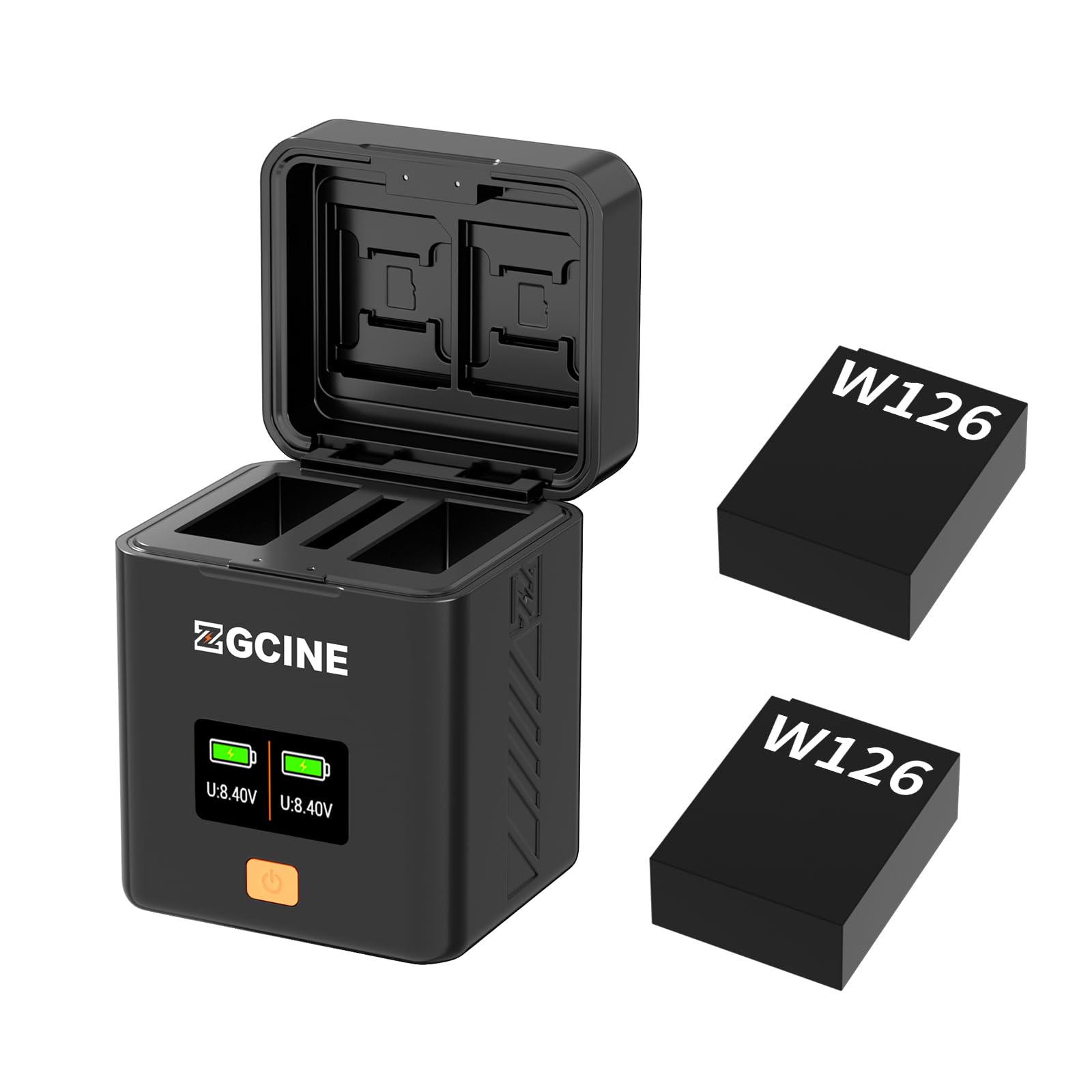
Image: The ZGCINE PS-W126 charging case, showcasing its compact design, dual battery compartments, USB-C input port, and the integrated OLED display. Memory card slots are visible on the side.
3. Configuració
Alimentació del carregador
- Connect the provided USB-C charging cable to the USB-C input port on the ZGCINE PS-W126.
- Connect the other end of the USB-C cable to a compatible USB-C power adapter (not included) that supports PD (Power Delivery) with 5V/3A or 9V/3A output.
- The OLED display will illuminate, indicating the charger is powered on and ready for use.
Inserció de piles
- Open the battery compartment cover on the ZGCINE PS-W126.
- Align your Fujifilm NP-W126 batteries with the battery slots, ensuring the contacts match correctly.
- Gently push the batteries into the slots until they are securely seated. The OLED display will show the charging status for each inserted battery.
4. Funcionament
Procés de càrrega
Once batteries are correctly inserted and the charger is powered, the ZGCINE PS-W126 will automatically begin charging. The OLED display provides real-time information on the charging status of each battery.
Informació de la pantalla OLED
The 0.96-inch OLED screen displays critical information, including:
- Nivell de bateria: Shows the current charge percentage per a cada bateria.
- Estat de càrrega: Indicates if a battery is charging, fully charged, or if an error has occurred.
- Vol d'entrada/sortidatage: May display current voltage informació.
Emmagatzematge de targetes de memòria
The PS-W126 features integrated slots for memory card storage:
- Two (2) SD Card Slots
- Two (2) TF (MicroSD) Card Slots
- One (1) CFE Type-B Card Slot
These slots are for storage only and do not provide data transfer functionality. Insert cards carefully into their respective slots for secure keeping.
5. Manteniment
Neteja
To maintain the charger's performance and appearance:
- Ensure the device is powered off and disconnected from any power source before cleaning.
- Feu servir un drap suau i sec per netejar l'exterior del carregador.
- Do not use liquid cleaners, solvents, or abrasive materials, as these can damage the device.
- Mantingueu els contactes de la bateria nets i lliures de pols o deixalles.
Emmagatzematge
When not in use, store the ZGCINE PS-W126 in a cool, dry place, away from direct sunlight and extreme temperatures. Remove batteries if storing for extended periods.
6. Solució De Problemes
Problemes comuns i solucions
- El carregador no s'encén: Ensure the USB-C cable is securely connected to both the charger and a compatible PD power adapter. Verify the power adapter is functioning correctly.
- Bateries que no es carreguen: Check that batteries are inserted correctly with contacts aligned. Ensure the charger is receiving adequate power. If a battery is severely depleted or damaged, it may not charge.
- OLED display not working: Confirm the charger is powered. If the issue persists, contact customer support.
- Càrrega lenta: Ensure your power adapter supports USB-C PD with 5V/3A or 9V/3A output for optimal charging speed.
7. Especificacions
Especificacions tècniques
| Característica | Detall |
|---|---|
| Marca | ZGCINE |
| Número de model | PS-W126 |
| Bateries compatibles | Fujifilm NP-W126 |
| Tipus de connector d'entrada | USB Type C (PD) |
| Entrada Voltage | 5V/3A; 9 V/3 A |
| Vol. De sortidatage | 8.4 V/1 A * 2 |
| Característica especial | Fast Charging, OLED Display, Card Storage |
| Ranures per a targetes | 2x SD, 2x TF, 1x CFE Tipus B |
| Pes net | 135 g |
| Dimensions | 66 mm * 62 mm * 84 mm |
| UPC | 746555915795 |
| ASIN | B0DSJQ95Z1 |
8. Garantia i Suport
Informació de la garantia
The ZGCINE PS-W126 charging case typically comes with a manufacturer's warranty covering defects in materials and workmanship for a specified period. Please refer to the warranty card included in your package or contact ZGCINE customer support for detailed warranty terms and conditions.
Atenció al client
For technical assistance, troubleshooting, or warranty claims, please contact ZGCINE customer support through their official website or the retailer where the product was purchased. Have your model number (PS-W126) and proof of purchase ready when contacting support.