
Introducció
Thank you for choosing the ZGCINE PS-EL25 Dual Charger. This device is designed to efficiently charge two Nikon EN-EL25 camera batteries simultaneously using USB-C PD fast charging technology. It also features integrated slots for various memory cards, providing a convenient all-in-one solution for photographers.
Si us plau, llegiu aquest manual detingudament abans d'utilitzar el producte per garantir-ne el funcionament correcte i maximitzar-ne la vida útil.
Configuració
- Desembalatge: Carefully remove the ZGCINE PS-EL25 charger from its packaging. Ensure all components are present: the charger unit and a USB-C to USB-C cable (if included).
- Connexió d'alimentació: Connect the provided USB-C cable to the USB-C PD input port on the charger. Connect the other end of the cable to a compatible USB-C PD power adapter (not included) with an output of 5V/3A or 9V/3A.
- Inserció de la bateria: Insert up to two Nikon EN-EL25 batteries into the designated battery slots on the charger. Ensure the battery contacts align correctly with the charger's pins. The OLED screen will display charging status.
- Memory Card Insertion (Optional):
- Insert SD cards into the two SD card slots.
- Insert TF (MicroSD) cards into the two TF card slots.
- Insert CFE Type-B cards into the CFE Type-B card slot.
Note: The memory card slots are for storage and organization; they do not provide data transfer functionality through the charger.
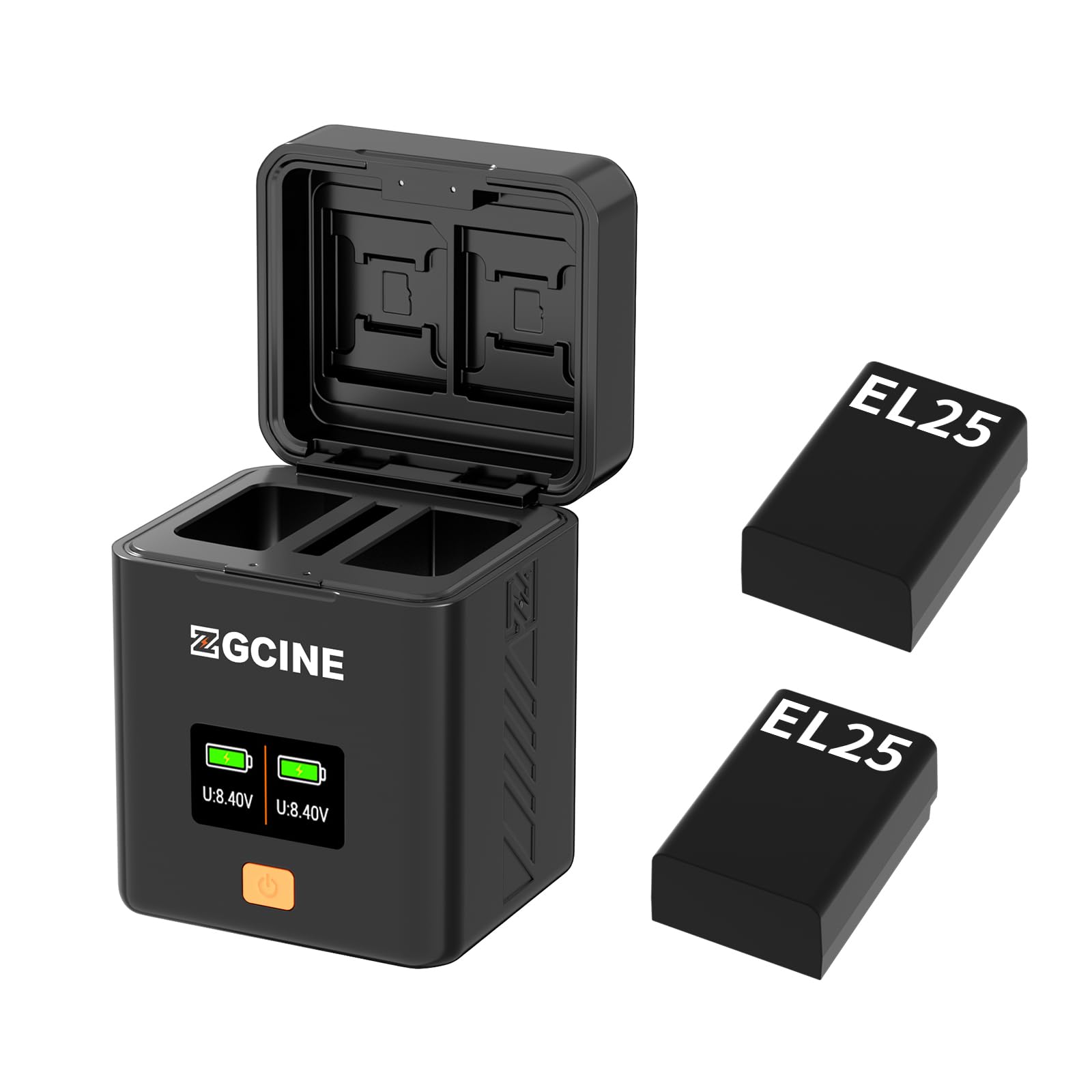
Image: ZGCINE PS-EL25 charger showing battery and memory card slots. The OLED screen is visible, displaying charging information.
Funcionament
- Càrrega de bateries: Once batteries are inserted and the charger is connected to a power source, the OLED screen will activate. It will display the charging status for each battery, including current voltage i nivell de càrrega.
- OLED Screen Information: The 0.96-inch OLED screen provides real-time information. This typically includes:
- Battery 1/2 charging indicator
- Volum actual de la bateriatage
- Charging progress (e.g., percentage or bar)
- Finalització de la càrrega: The charger will automatically stop charging when batteries reach full capacity. The OLED screen will indicate a full charge.
- Extracció de les bateries: Gently pull the fully charged batteries out of their slots.
Notes importants:
- Use only compatible Nikon EN-EL25 batteries.
- Ensure the USB-C power adapter supports Power Delivery (PD) for optimal fast charging.
- The charger is designed for charging batteries and storing memory cards. It does not function as a card reader.
Manteniment
- Neteja: Desconnecteu el carregador de l'alimentació abans de netejar-lo. Feu servir un drap suau i sec per netejar l'exterior. No utilitzeu netejadors líquids ni dissolvents.
- Emmagatzematge: Guardeu el carregador en un lloc fresc i sec, allunyat de la llum solar directa i de temperatures extremes quan no l'utilitzeu.
- Manipulació: Eviteu deixar caure el carregador ni sotmetre'l a impactes forts.
- Contactes de la bateria: Periodically check the battery contacts on both the charger and the batteries for any dirt or corrosion. Clean gently with a dry cotton swab if necessary.
Resolució de problemes
| Problema | Causa possible | Solució |
|---|---|---|
| Charger not powering on / OLED screen is blank. |
|
|
| Les bateries no es carreguen. |
|
|
| Càrrega lenta. |
|
|
Especificacions
- Model: PS-EL25
- Marca: ZGCINE
- Entrada: USB-C PD 5V/3A; 9V/3A
- Sortida: USB-C PD 8.7V/0.6A*2 (for batteries)
- Bateries compatibles: Nikon EN-EL25
- Battery Slots: 2
- Ranures per a targetes de memòria:
- Ranura per a targeta SD: 2
- TF (MicroSD) Card Slot: 2
- CFE Type-B Card Slot: 1
- Visualització: Pantalla OLED d'0.96 polzades
- Dimensions: 66 mm * 62 mm * 84 mm
- Pes net: 135 g
- Color: Negre
- Tipus de connector: USB tipus C
Informació de la garantia
ZGCINE products are covered by a limited warranty against defects in materials and workmanship for a period of un (1) any from the original date of purchase. This warranty does not cover damage caused by misuse, accident, unauthorized modification, or normal wear and tear.
To claim warranty service, please retain your proof of purchase and contact ZGCINE customer support.
Atenció al client
For technical assistance, troubleshooting, or warranty inquiries, please contact ZGCINE customer support through the following channels:
- Weblloc: Visit the official ZGCINE weblloc web per a preguntes freqüents i recursos de suport. ZGCINE Store on Amazon
- Correu electrònic: Refer to your product packaging or the ZGCINE weblloc web per obtenir l'adreça electrònica d'assistència més actualitzada.
When contacting support, please have your product model (PS-EL25) and proof of purchase readily available.