
1. Introducció
This manual provides comprehensive instructions for the installation, operation, and programming of your DieseRC Wireless Roller Shutter Remote Control Switch. This device is designed to wirelessly control AC motors, enabling forward, reverse, and stop functions for applications such as garage doors, electric gates, and roller shutters. Please read this manual carefully before use to ensure proper functionality and safety.
2. Contingut del paquet
- 1 x Relay Receiver Board
- 2 x Transmitters (battery included)
- 1 x manual de producte
3. Especificacions
| Característica | Especificació |
|---|---|
| Receptor treballant voltage | CA 90V~250V |
| Corrent Quiesc | <10 mA |
| Màx. Actual | 3A (Inductive Load), 10A (Resistive Load) |
| Freqüència RF | 433 MHz |
| Temperatura de funcionament | -30 °C a +80 °C |
| Sensibilitat de recepció | >97 dBm |
| Number of Storable Remotes | Fins a 20 |
| Suport a la codificació | 1527 Learning-Code |
| RF Operating Mode | ASK Superheterodyne Wireless Reception |
| Gamma de recepció | Approx. 20 ~ 50 meters (open area) |
| Modes de funcionament | Momentary / Toggle / Latched Mode |
| Bateria del transmissor | 2 x CR2016 (inclòs) |
| Dispositius compatibles | Garage door, electric curtain, electric gate, roller door |
4. Configuració
4.1 Precaucions de seguretat
- Ensure power is disconnected before any wiring.
- Wiring should be performed by a qualified electrician if you are unsure.
- Verify correct polarity (Live, Neutral) to avoid damage or short circuits.
4.2 Cablejat del receptor
Connect the receiver to your AC motor and power supply according to the diagram below. The receiver supports AC 90V-250V input. Ensure secure connections for all wires.

Image: Receiver dimensions and wiring diagram. Note the 'Up' and 'Down' motor connections and AC 90-250V power input.
The receiver features large screw ports for easy installation and metal clips for secure wiring. A transparent flip cover allows for circuit adjustment.

Imatge: Detallada view of the receiver's screw terminals and cable compatibility.
4.3 Engegada inicial
After wiring, apply power to the receiver. The indicator light on the receiver will illuminate, indicating it is ready for operation or programming.
4.4 Producte acabatview Vídeo
Vídeo: Aquest vídeo ofereix una visió generalview of the DieseRC 2201COM receiver and KT03 remote control, highlighting their design and features.
5. Modes de funcionament
The DieseRC remote control switch supports three main operating modes: Momentary, Toggle, and Latched. All products are set to Toggle mode before shipment. If you wish to change the operating mode, you must first reset the receiver (see Section 6.2).
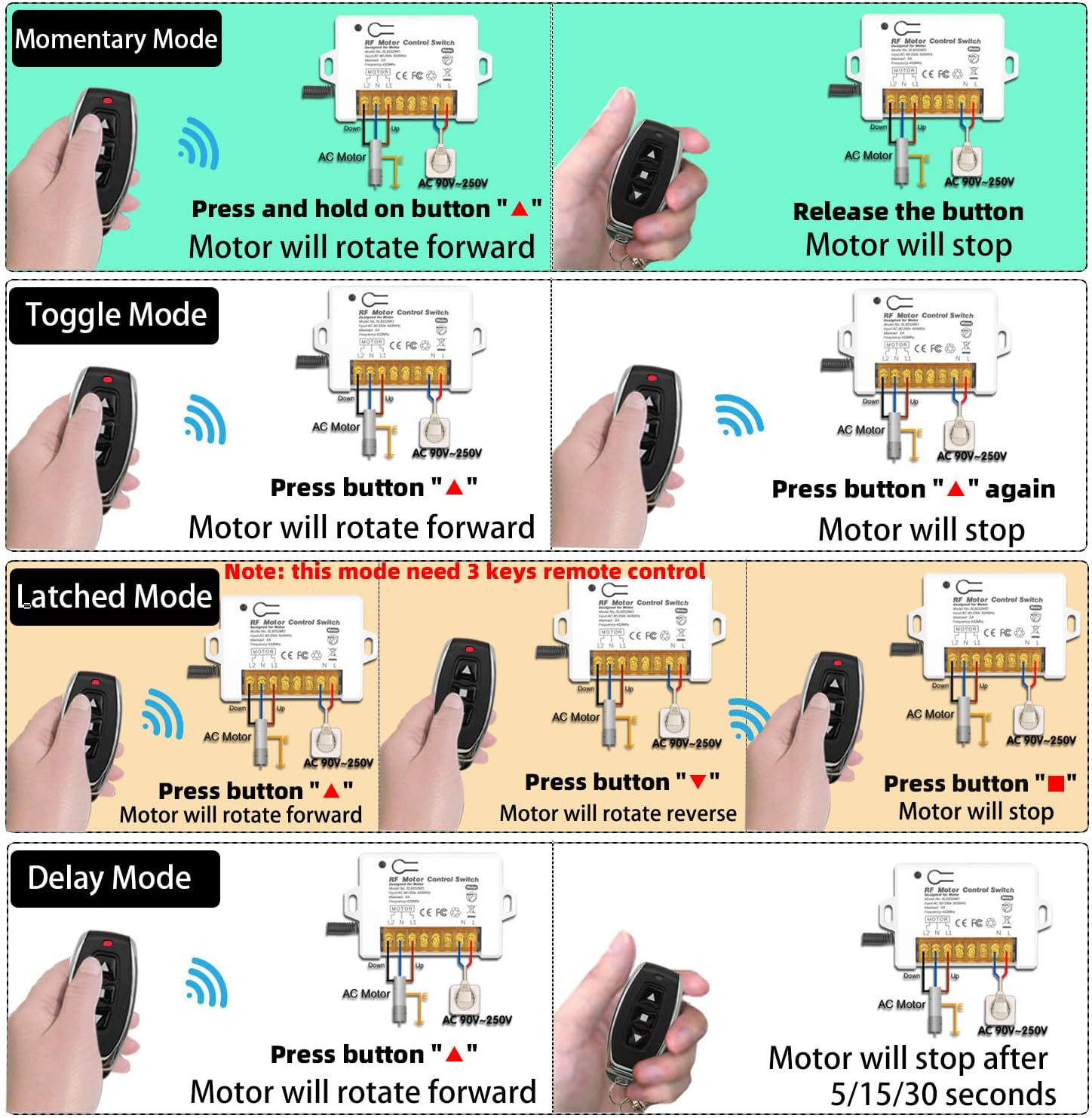
Image: Visual representation of Momentary, Toggle, Latched, and Delay operating modes.
5.1 Momentary Mode
- Premeu i manteniu premuda la tecla "▲" button: The motor rotates forward.
- Release the button: The motor stops.
5.2 Mode de commutació
- Premeu la tecla "▲" button once: The motor rotates forward.
- Premeu la tecla "▲" button again: The motor stops.
5.3 Latched Mode
- Premeu la tecla "▲" button: The motor rotates forward.
- Premeu la tecla "▼" button: The motor rotates backward.
- Premeu la tecla "■" button: The motor stops.
5.4 Aplicació Examples

Imatge: Example of the remote control switch used for a garage door.
Video: This video demonstrates various applications of the DieseRC Wireless Roller Shutter Remote Control Switch, showcasing its functionality in controlling different types of AC motors.
6. Programació de comandaments a distància
The receiver can store up to 20 transmitters. Follow these steps to program your remote control to the desired operating mode.

Image: Step-by-step programming instructions for different modes.
6.1 Learning a Remote Control
- Press the learning button on the receiver:
- Premeu 1 cop for Momentary Mode.
- Premeu 2 vegades for Toggle Mode.
- Premeu 3 vegades for Latched Mode.
- Premeu la tecla "▲" button on your remote control. Wait 3 seconds.
- Premeu la tecla "▼" button on your remote control. The programming is successful.
Note: For Latched Mode, the remote control requires 3 keys (Forward, Reverse, Stop).
6.2 Restabliment del receptor
To clear all programmed remote controls from the receiver's memory:
- Premeu el botó d'aprenentatge del receptor 8 vegades.
Important: After resetting, all previously programmed remote controls will no longer work and must be re-programmed.
6.3 Programming Demonstration Video
Video: A step-by-step video guide on how to program the DieseRC 2201COM receiver, covering the different operating modes and remote control pairing.
7. Manteniment
7.1 Substitució de la bateria del transmissor
The remote control transmitters use 2 x CR2016 batteries. If the remote's range decreases or it becomes unresponsive, replace the batteries. Refer to the transmitter image for visual guidance.

Image: DieseRC remote control transmitter.
7.2 Neteja
Wipe the receiver and transmitters with a dry, soft cloth. Do not use abrasive cleaners or solvents.
7.3 Condicions ambientals
Avoid exposing the device to extreme temperatures, high humidity, or direct sunlight. Ensure the receiver is installed in a location with adequate ventilation.
8. Solució De Problemes
- El comandament a distància no respon:
- Check the battery in the transmitter. Replace if necessary.
- Ensure the receiver has power.
- If the receiver was recently reset, re-program the remote control (see Section 6.1).
- Ensure the remote is within the effective operating range (20-50 meters).
- Motor que no es mou:
- Verifiqueu que totes les connexions del cablejat siguin segures i correctes (vegeu la secció 4.2).
- Check the power supply to the receiver and motor.
- Ensure the motor itself is functioning correctly.
- Interferència:
- While multiple remote control sets can be used in the same area without interference (except in Momentary mode), strong local RF interference might affect performance. Try relocating the receiver if possible.
9. Garantia i Suport
DieseRC products are manufactured to high-quality standards. For specific warranty information, please refer to the product packaging or contact your retailer. If you encounter any issues or require technical assistance, please reach out to DieseRC customer support through the vendor's contact information provided at the point of purchase.