1. Introducció
Thank you for choosing the JVC TiVo LT-40VF5355W 40-inch Full HD Smart TV. This television combines advanced display technology with the intuitive TiVo operating system to provide a comprehensive entertainment experience. Featuring Full HD resolution, HDR10 support, and a triple tuner, this TV offers stunning visuals and versatile content access. This manual provides essential information for safe and efficient use of your new television.

This image displays the JVC TiVo 40-inch Smart TV, highlighting its key display technologies. It features Full HD (1920x1080) resolution, HDR10 support for enhanced contrast and color, and Super Resolution technology for improved image clarity. The 'Powered by TiVo' logo indicates its smart TV capabilities.
2. Informació de seguretat
Please read all safety instructions carefully before operating the television. Keep this manual for future reference.
- Font d'alimentació: Assegureu-vos que el televisor estigui connectat a una presa de corrent amb el volum correctetage. No sobrecarregueu les preses de corrent.
- Ventilació: No bloquegeu les obertures de ventilació. Deixeu prou espai al voltant del televisor per a un flux d'aire adequat.
- Aigua i humitat: No exposeu el televisor a la pluja ni a la humitat. No col·loqueu objectes plens de líquids a sobre del televisor.
- Neteja: Desendolleu el televisor abans de netejar-lo. Feu servir un drap suau i sec. No utilitzeu netejadors líquids ni en aerosol.
- Muntatge: Follow instructions for stand assembly or wall mounting. Ensure the TV is securely placed to prevent falling.
- Llamp: Desendolleu el televisor durant tempestes o quan no l'utilitzeu durant períodes prolongats.
3. Contingut del paquet
Verifiqueu que tots els elements estiguin presents a l'embalatge:
- JVC TiVo LT-40VF5355W Television
- Manual d'usuari
- Control remot amb 2 piles AAA
- TV Stand Feet
4. Configuració
4.1. Muntatge de l'estand
- Col·loqueu amb cura el televisor cara avall sobre una superfície suau i plana per evitar que es facin malbé la pantalla.
- Attach the stand feet to the designated slots on the bottom of the TV using the provided screws.
- Assegureu-vos que el suport estigui ben fixat abans de col·locar el televisor en posició vertical.
4.2. Dispositius de connexió
Your JVC TiVo Smart TV offers various connection options for external devices.

This image displays the various connection ports available on the JVC TiVo Smart TV. It shows 2 HDMI ports, 1 USB port, Digital Audio Output, Antenna (RF/F) input, Headphone jack, Bluetooth connectivity, CI Slot, and a LAN port. These ports allow for connecting external devices such as game consoles, media players, and sound systems.
- HDMI (x2): Connect Blu-ray players, game consoles, or other HDMI-enabled devices. Supports CEC (Consumer Electronics Control) and ARC (Audio Return Channel).
- USB (x1): Connecteu dispositius d'emmagatzematge USB per a la reproducció de contingut multimèdia.
- Antena (RF/F): Connect your terrestrial or cable antenna for DVB-T2/C reception.
- Satellite (F-Type): Connect your satellite dish for DVB-S2 reception.
- Sortida d'àudio digital: Connect to an external sound system for digital audio.
- Auriculars: Connecteu els auriculars per a una escolta privada.
- LAN: Connecteu un cable Ethernet per a una connexió a Internet per cable.
- Bluetooth: Connecteu auriculars sense fil, barres de so o altres dispositius Bluetooth.
- Ranura CI: Insert a Common Interface module for encrypted channels.
4.3. Configuració inicial
- Connecteu el cable d'alimentació al televisor i després a una presa de corrent.
- Premeu el botó d'engegada del comandament a distància o del televisor.
- Follow the on-screen instructions to select your language, country, and network settings (Wi-Fi or wired).
- The TV will guide you through channel scanning for DVB-T2/C/S2.
- Complete the TiVo setup process to personalize your smart TV experience.
5. Funcionament del televisor
5.1. Control remot
The included remote control provides full functionality for your JVC TiVo Smart TV.

This image shows the remote control for the JVC TiVo Smart TV. It features standard navigation buttons, number keys, volume and channel controls, and dedicated quick-access buttons for popular streaming services like YouTube, Netflix, Prime Video, and Disney+. The remote enables easy navigation and control of the TV's functions and smart features.
- Botó d'encesa: Encén o apaga el televisor.
- Botons numèrics: Selecciona els canals directament.
- Volum (+/-): Ajusteu el nivell de so.
- Channel (P+/P-): Canvia de canal seqüencialment.
- Botons de navegació (amunt/avall/esquerra/dreta/d'acord): Navega pels menús i selecciona opcions.
- Tornar/Sortir: Torna a la pantalla anterior o surt d'un menú.
- Inici: Access the TiVo Smart TV home screen.
- Botons d'accés ràpid: Dedicated buttons for popular streaming apps like Netflix, Prime Video, Disney+, and YouTube.
5.2. Smart TV Features (Powered by TiVo)
The TiVo operating system provides a seamless and personalized smart TV experience.

This image illustrates the JVC TiVo Smart TV's user interface, showcasing various streaming applications. Prominently featured are Netflix, Prime Video, Disney+, YouTube, and other media libraries, demonstrating the wide range of entertainment options available through the TiVo operating system.

This image highlights the benefits of TiVo-powered Smart TVs. Key features include intelligent content navigation, a simple and uncluttered user interface, personalized recommendations based on viewing habits, and continuous software updates that add new functions and streaming options. It emphasizes ease of use and a tailored entertainment experience.
- Interfície intuïtiva: Easily navigate through content and applications.
- Descobriment de contingut: Search across streaming apps to find desired content.
- Recomanacions personalitzades: TiVo learns your viewing habits to suggest content you might enjoy.
- Control de veu: Use voice commands to change channels, adjust volume, open apps, and search for content.
- Ecosistema d'aplicacions: Access a wide range of streaming services including Netflix, Prime Video, Disney+, YouTube, DAZN, Twitch, and more.
- Actualitzacions periòdiques: Benefit from continuous software updates that introduce new features and improvements.
5.3. Característiques de la pantalla
Experience superior picture quality with advanced display technologies.

This image demonstrates the High Dynamic Range (HDR10) capability of the JVC Smart TV, showing vibrant colors and enhanced contrast in a dynamic scene. HDR10 provides a more detailed and lifelike picture quality by expanding the range of both color and contrast.

This image illustrates the 'Breathtaking Picture Quality' of the JVC Smart TV, emphasizing Super Resolution and Micro Dimming technologies. Super Resolution enhances image sharpness, while Micro Dimming improves contrast by adjusting backlight levels in different screen areas, resulting in a more detailed and immersive viewexperiència.
- Full HD (1920x1080): Delivers sharp and clear images.
- HDR10: Enhances contrast and color accuracy for a more dynamic and realistic picture.
- Super resolució: Optimizes image details and sharpness.
- Micro atenuació: Improves contrast by analyzing and adjusting backlight levels in different zones of the screen.
5.4. Triple afinador
The integrated triple tuner allows you to receive television programs without an additional receiver.
- DVB-C: Digital Video Broadcasting - Cable
- DVB-T2: Digital Video Broadcasting - Terrestrial, second generation (for antenna reception)
- DVB-S2: Digital Video Broadcasting - Satellite, second generation (for satellite reception)
5.5. Òptim Viewing Distància
Per al millor viewing experience, consider the recommended distance between your TV and seating area.
This image presents a table recommending optimal viewing distances for different TV screen sizes and resolutions (4K, Full HD, HD). For a 40-inch Full HD TV like this model, the recommended viewing distance is approximately 162 cm. This helps users position their TV for the best viewexperiència.
For your 40-inch Full HD TV, the optimal viewing distance is approximately 162 cm (about 5.3 feet).
6. Manteniment
6.1. Neteja
- Desendolla sempre el televisor abans de netejar-lo.
- Feu servir un drap suau, sec i sense borrissol per netejar la pantalla i la carcassa.
- Per a marques persistents a la pantalla, fregueu lleugeramentampNetegeu el drap amb aigua o un netejador de pantalles especialitzat (no ruixeu directament sobre la pantalla).
- Eviteu utilitzar netejadors abrasius, ceres o dissolvents.
6.2. Atenció
- No col·loqueu objectes pesats sobre el televisor.
- Eviteu exposar el televisor a la llum solar directa o a fonts de calor.
- Protect the remote control from spills and impacts.
7. Solució De Problemes
Si teniu problemes amb el televisor, consulteu els problemes i solucions més comuns següents:
| Problema | Causa possible | Solució |
|---|---|---|
| Sense poder | Cable d'alimentació desconnectat; no hi ha alimentació a la presa de corrent | Comproveu la connexió del cable d'alimentació; proveu la presa de corrent amb un altre dispositiu. |
| No hi ha imatge, però hi ha so | Font d'entrada incorrecta; cable defectuós | Press the 'Source' button on the remote to select the correct input; check/replace HDMI/AV cables. |
| No hi ha so, però hi ha imatge | Volum silenciat o massa baix; problema amb el dispositiu d'àudio extern | Unmute or increase volume; check connections to external audio systems. |
| El comandament a distància no funciona | Piles gastades; obstrucció; comandament a distància no emparellat | Replace batteries; remove obstructions; re-pair remote if it's a Bluetooth remote. |
| Les aplicacions de Smart TV no es carreguen/no funcionen | No internet connection; app error | Check Wi-Fi/LAN connection; restart TV; update app if available. |
| Picture quality issues (e.g., blur, pixelation) | Low signal quality; source resolution mismatch | Check antenna/cable connection; ensure source device is outputting optimal resolution. |
Si el problema persisteix després de provar aquestes solucions, poseu-vos en contacte amb l'atenció al client.
8. Especificacions
| Característica | Especificació |
|---|---|
| Marca | JVC |
| Número de model | LT-40VF5355W |
| Mida de la pantalla | 40 polzades (102 cm) |
| Resolució | 1080p (Full HD, 1920x1080) |
| Tecnologia de visualització | LED-LCD |
| Freqüència d'actualització | 50 Hz |
| Sistema operatiu | Powered by TiVo |
| Característiques especials | Smart TV, HDR10, Super Resolution, Micro Dimming, Triple Tuner (DVB-C/T2/S2) |
| Tecnologia de connectivitat | Bluetooth, Wi-Fi, HDMI, USB, LAN |
| Ports HDMI | 2 (CEC + ARC) |
| Ports USB totals | 1 |
| Relació d'aspecte | 16:9 |
| Dimensions del producte (PxWxH) | 23.5 x 90.9 x 57.9 cm (amb suport) |
| Color | Blanc |
| Components inclosos | User Manual, Remote Control with 2 AAA batteries, TV with stand feet |
| Fabricant | JVC |
| País d'origen | Turquia |
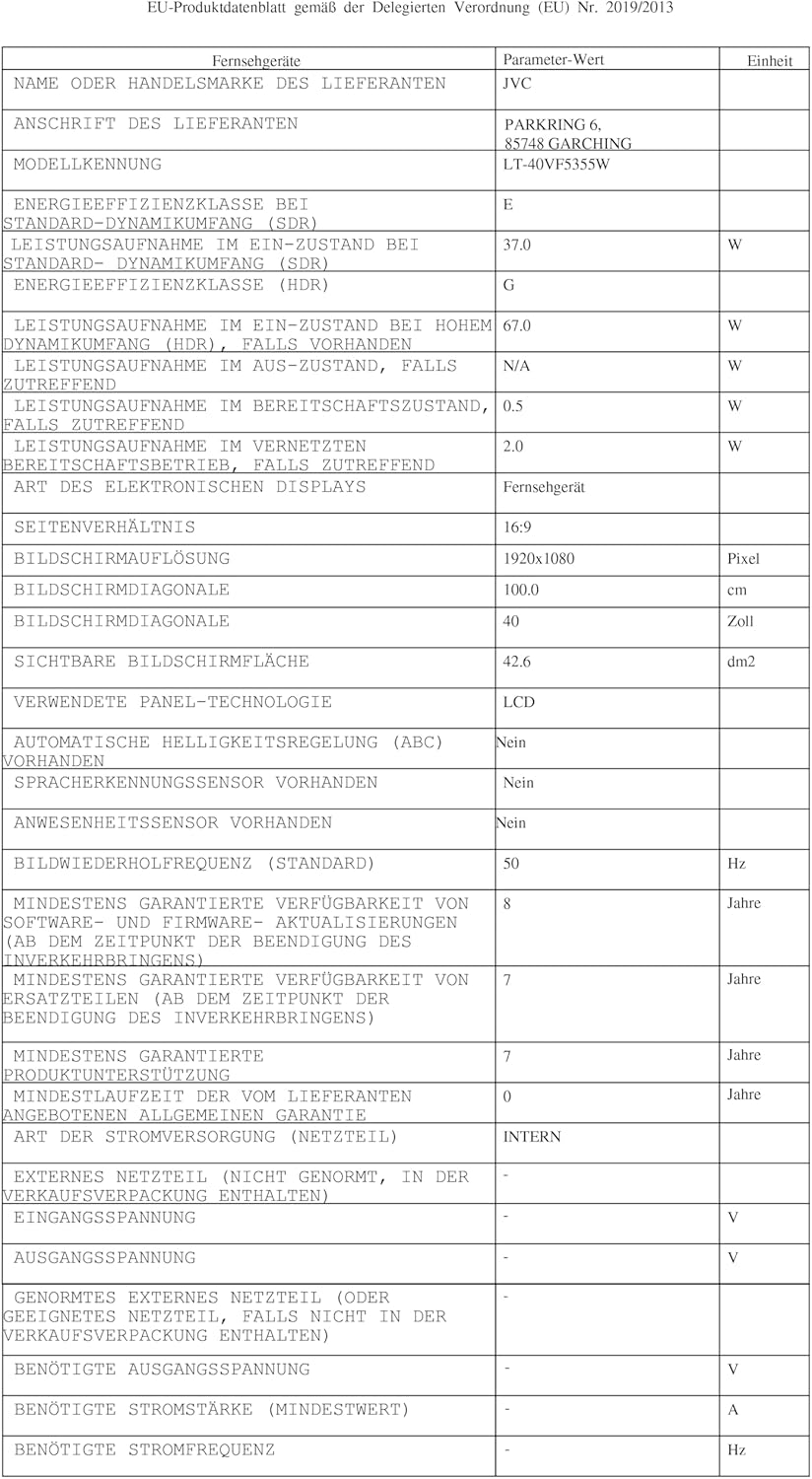
| Disponibilitat de peces de recanvi | 7 Anys |
| Actualitzacions de programari garantides fins | Informació no disponible |
8.1. Eficiència energètica

This image displays the EU energy efficiency label for the JVC LT-40VF5355W television. It shows an energy rating of 'E' for standard dynamic range (SDR) content, with an energy consumption of 37 kWh per 1000 hours. For High Dynamic Range (HDR) content, the rating is 'G' with a consumption of 67 kWh per 1000 hours. The label also indicates the screen size of 40 inches (100 cm) and resolution of 1920x1080 pixels.
- Classe d'eficiència energètica (SDR): E
- Energy Consumption (SDR): 37 kWh/1000h
- Classe d'eficiència energètica (HDR): G
- Energy Consumption (HDR): 67 kWh/1000h
- EPREL Database Link: https://eprel.ec.europa.eu/qr/2198539
9. Garantia i Suport
JVC provides a commitment to spare parts availability for 7 years from the date of purchase. For warranty claims or technical support, please refer to the warranty card included with your product or visit the official JVC support weblloc.
For further assistance, please contact JVC customer service through their official channels.