
1. Introducció
This manual provides detailed instructions for the safe and efficient operation of your Jesverty SPS-3010C DC Power Supply. Please read this manual thoroughly before using the device to ensure proper functionality and to prevent damage or injury. This power supply is designed for various applications including laboratories, educational sites, factory manufacturing tests, maintenance repairs, battery charging, and electronic DIY projects.
2. Instruccions de seguretat
- Always connect the power supply to a grounded electrical outlet.
- No utilitzeu el dispositiu en mullat o damp condicions.
- Ensure proper ventilation around the unit to prevent overheating. Do not block the cooling fan vents.
- Before connecting or disconnecting any load, ensure the output is turned OFF.
- No intenteu obrir ni modificar la font d'alimentació. Envieu totes les tasques de manteniment a personal qualificat.
- Verify the AC input voltage selection (115V/230V) matches your local power supply before connecting.
- Use appropriate test leads and ensure they are in good condition.
3. Producte acabatview
The Jesverty SPS-3010C is a compact and versatile DC power supply featuring a 4-digit LED display, encoder knobs for precise adjustments, and multiple output options.

Figure 3.1: Front and Rear Panel Components of the SPS-3010C
Components del panell frontal:
- Voltage Visualització: Shows the set or actual output voltage.
- Indicador del mode CC: S'il·lumina quan la unitat funciona en mode de corrent constant.
- CHG Mode Indicator: Illuminates when the Intelligent Battery Charging function is active.
- Indicador del mode CV: S'il·lumina quan la unitat funciona a Volum Constanttagmode e.
- Visualització actual: Shows the set or actual output current.
- LED d'estat de l'OCP: S'il·lumina quan la protecció contra sobrecorrent està activa.
- LED d'estat de l'OPN: Indicates the state of the Output Power ON function.
- Pantalla de potència: Shows the calculated output power in Watts.
- Port de càrrega ràpida USB-C: Sortida de càrrega ràpida de 20 W.
- Port de càrrega ràpida USB-A: Sortida de càrrega ràpida de 20 W.
- CHG Setting Button: Activates the Intelligent Battery Charging function.
- Botó de configuració de l'OCP: Toggles Over-Current Protection.
- Botó de control de sortida: Toggles the main DC output ON/OFF.
- VoltagManeta e (gruixuda): Ajusta el voltagvalor e abans del punt decimal.
- VoltagManeta e (Fi): Ajusta el voltagvalor e després del punt decimal.
- Botó de corrent (gruixut): Ajusta el valor actual abans del punt decimal.
- Botó actual (Fi): Ajusta el valor actual després del punt decimal.
- Interruptor d'alimentació: Engegada/apagada de l'alimentació principal de la unitat.
- Terminal de sortida - (Negre): Terminal de sortida negativa.
- Terminal de connexió a terra (verd): Chassis ground connection.
- Terminal de sortida + (vermell): Terminal de sortida positiu.
Components del panell posterior:
- Ventilador de refrigeració: S'activa automàticament per regular la temperatura interna.
- Interruptor seleccionable d'entrada: For selecting AC115V or AC230V input voltage.
- Entrada d'alimentació CA: Es connecta al cable d'alimentació principal.
- Caixa de fusibles (fusible de recanvi a l'interior): Conté el fusible principal per a la protecció.
4. Configuració
- Desembalatge: Carefully remove the power supply from its packaging. Verify all accessories (power cord, test leads, instruction manual) are present.
- Voltage Selecció: Locate the Input Selectable Switch on the rear panel. Ensure it is set to match your local AC mains voltage (115V or 230V). Incorrect selection can damage the unit.
- Connexió d'alimentació: Connect the provided AC power cord to the AC Power Inlet on the rear panel and then to a grounded electrical outlet.
- Encesa inicial: Press the Power Switch on the front panel. The LED display should illuminate.
5. Instruccions de funcionament
5.1. Configuració Voltage i Actual
The SPS-3010C uses encoder knobs for precise digital adjustment of voltage i corrent.

Figure 5.1: Encoder Knob Adjustment for Voltage i Actual
- Voltage Ajust:
- Premeu el botó Voltage Pom (gruixut) to select the digit before the decimal point. Rotate the knob to change the value.
- Premeu el botó Voltage Pom (Fi) to select the digit after the decimal point. Rotate the knob to change the value.
- The resolution for voltagLa configuració és de 0.01 V.
- Ajust actual:
- Premeu el botó Control actual (gruixut) to select the digit before the decimal point. Rotate the knob to change the value.
- Premeu el botó Control actual (Fi) to select the digit after the decimal point. Rotate the knob to change the value.
- The resolution for current setting is 0.001A.
5.2. Control de sortida ON/OFF
Després d'ajustar el volum desitjattage and current, press the Botó de control de sortida to enable or disable the main DC output. The display will show the actual output values when enabled.
5.3. Intelligent Battery Charging Mode
This function allows for safe and efficient charging of various battery types.
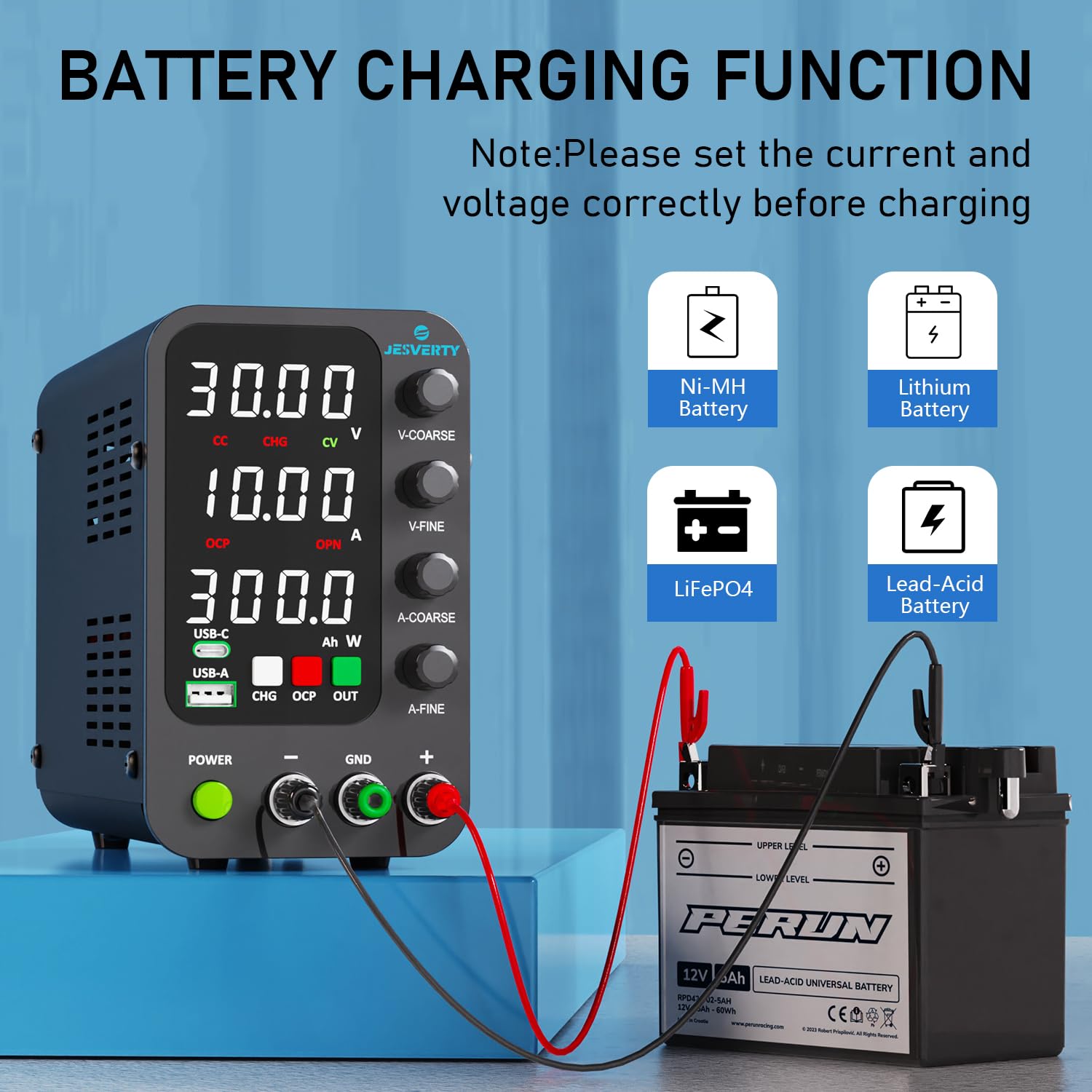
Figure 5.2: Intelligent Battery Charging Function
- Connect the battery to the output terminals, ensuring correct polarity (+ to + and - to -). The unit has built-in reverse connection protection.
- Set the desired charging voltage and current limit using the encoder knobs.
- Premeu el botó CHG Setting Button to activate the Intelligent Battery Charging function. The CHG indicator will illuminate.
- The display will show real-time charging power (Ah). The power supply will automatically stop charging when the battery reaches the set voltage.
5.4. USB-A & USB-C Quick-Charge Ports
The unit includes dedicated USB-A and USB-C ports for quick charging external devices.

Figura 5.3: Funcionalitat de càrrega USB
- Both USB-A and USB-C ports support 20W fast charging.
- These ports provide fixed voltage and current output and are independent of the main DC output settings.
- Simply connect your compatible device to the appropriate USB port for charging.
5.5. OPN (Output Power ON) Function
The OPN function determines the state of the main DC output when the unit is powered on.
- When OPN is enabled, the main DC output will automatically turn ON with the previously set voltage and current parameters as soon as the power switch is engaged.
- When OPN is disabled, the main DC output will remain OFF upon power-up, requiring a manual press of the Botó de control de sortida per activar.
- Consult the full instruction manual for details on how to enable or disable the OPN function.
6. Característiques de protecció
- OCP (Over-Current Protection): This feature protects the connected load from excessive current. When activated, if the output current exceeds the set OCP threshold, the output will be shut off, and the OCP Status LED will illuminate.
- Temperature-Regulated Cooling Fan: An internal fan automatically adjusts its speed based on the unit's temperature to prevent overheating during operation.
- Protecció de connexió inversa: For battery charging, this feature prevents damage to the power supply and battery if the polarity is accidentally reversed.
Figure 6.1: Over-Current Protection in action
7. Manteniment
- Neteja: Disconnect the power supply from the mains before cleaning. Use a soft, dry cloth to wipe the exterior. Do not use abrasive cleaners or solvents.
- Ventilació: Regularly check that the cooling fan vents are clear of dust and debris to ensure proper airflow.
- Emmagatzematge: Guardeu la unitat en un lloc fresc i sec, allunyat de la llum solar directa i de temperatures extremes quan no l'utilitzeu.
8. Solució De Problemes
- Sense energia:
- Check if the power cord is securely connected to both the unit and the electrical outlet.
- Assegureu-vos que l'interruptor d'alimentació estigui en la posició ON.
- Verify the AC Input Selectable Switch on the rear panel is set correctly (115V/230V).
- Check the fuse in the Fuse Box on the rear panel. Replace if blown with a fuse of the same rating.
- Sense Vol de sortidatage/Actual:
- Assegureu-vos el Botó de control de sortida is pressed and the output is enabled.
- Check if OCP is active (OCP Status LED illuminated). If so, clear the fault condition and reset OCP.
- Comproveu que el voltagLa configuració e i actual no estan establertes a zero.
- Inaccurate Current Display at Low Loads: At very low current settings (e.g., below 15mA), the displayed current may show a slight deviation (e.g., 2mA less than actual). This is a characteristic of some switching power supplies and typically does not affect performance for most applications.
- Voltage Transients During Load Changes: When connecting loads with large capacitance, especially if the power supply is already enabled at a high voltage, a brief current surge may occur as the output capacitance discharges into the load. It is recommended to connect the load with the output disabled, then enable the output.
9. Especificacions

Figure 9.1: Dimensions and Weight of the SPS-3010C
| Característica | Especificació |
|---|---|
| Número de model | SPS-3010C |
| Marca | Jesverty |
| Vol. De sortidatage Rang | 0-32V |
| Interval de corrent de sortida | 0-10A |
| Potència de sortidatage (USB/Type-C) | 20 watts |
| Voltage Configuració de la resolució | 0.01 V |
| Resolució de configuració actual | 0.001A |
| Mostra | LED de 4 dígits |
| Entrada Voltage | CA 115V/230V (seleccionable) |
| Dimensions (aprox.) | 7.1(D) x 3.6(W) x 6.2(H) inches (18 x 9 x 16 cm) |
| Pes (aprox.) | 2.5 lliures (1.14 kg) |
| UPC | 680306176946 |
10. Garantia i atenció al client
Jesverty provides professional technical support for its products. For any problems or questions regarding your Jesverty SPS-3010C DC Power Supply, please contact Jesverty Customer Service. Contact information can typically be found on the back of the instruction manual included with your product or through the Amazon message system.