
1. Introducció
This manual provides detailed instructions for the setup, operation, and maintenance of your Vrriis WL081 Wireless HDMI Transmitter and Receiver kit. This system is designed to wirelessly extend a 1080P Full HD HDMI signal up to 1300 feet in open environments, offering features such as HDMI loop out and IR remote control support. Please read this manual thoroughly before using the product to ensure proper functionality and safety.
2. Contingut del paquet
Verifiqueu que tots els elements que s'enumeren a continuació s'inclouen al vostre paquet. Si falta algun element o hi ha algun malmès, poseu-vos en contacte amb l'atenció al client.
- 1 transmissor HDMI sense fil (TX)
- 1 x Receptor HDMI sense fil (RX)
- 2 x Antennas (for TX)
- 2 x Antennas (for RX)
- 2 x USB-C Power Cables
- 2 x Power Adapters (5V2A)
- 2 x IR Extension Cables
- 1 x Manual d'usuari
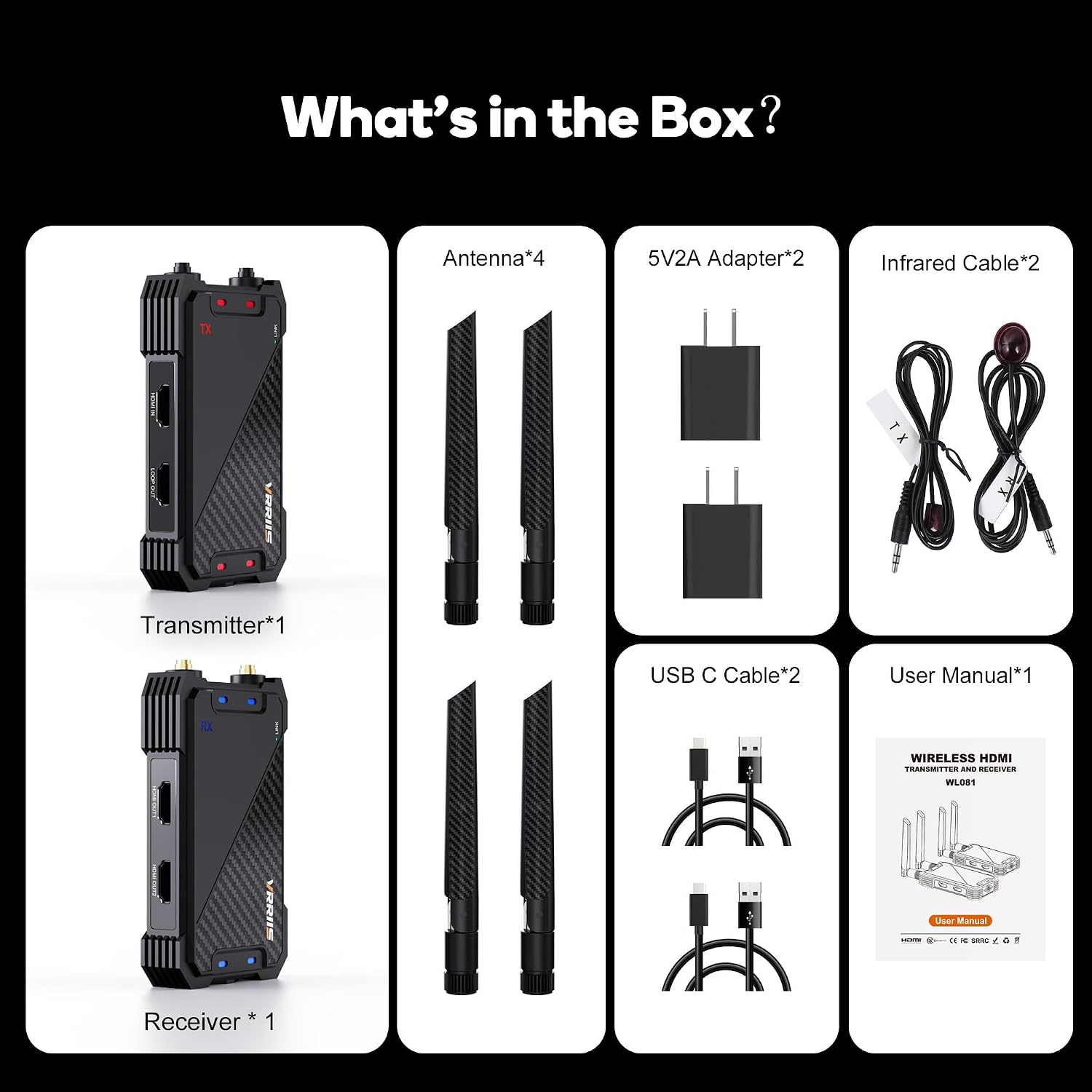
Figure 2.1: Included components in the Vrriis WL081 kit.
3. Producte acabatview
The Vrriis WL081 system consists of a Transmitter (TX) unit and a Receiver (RX) unit, each equipped with specific ports and indicators for seamless operation.
3.1 Transmitter (TX) Unit
- Entrada HDMI: Connects to your HDMI source device (e.g., laptop, set-top box, camera).
- LOOP OUT: Provides a local HDMI output for connecting a monitor near the source.
- SORTIDA IR: Connects the IR extension cable to control the source device remotely.
- USB-C: Port d'entrada d'alimentació.
- Indicador d'enllaç: Indicates connection status with the receiver.
- Indicador POWER: Indica l'estat d'alimentació.
3.2 Receiver (RX) Unit
- SORTIDA HDMI: Connects to your display device (e.g., TV, projector).
- IR IN: Connects the IR extension cable to receive remote control signals.
- USB-C: Port d'entrada d'alimentació.
- Indicador d'enllaç: Indicates connection status with the transmitter.
- Indicador POWER: Indica l'estat d'alimentació.
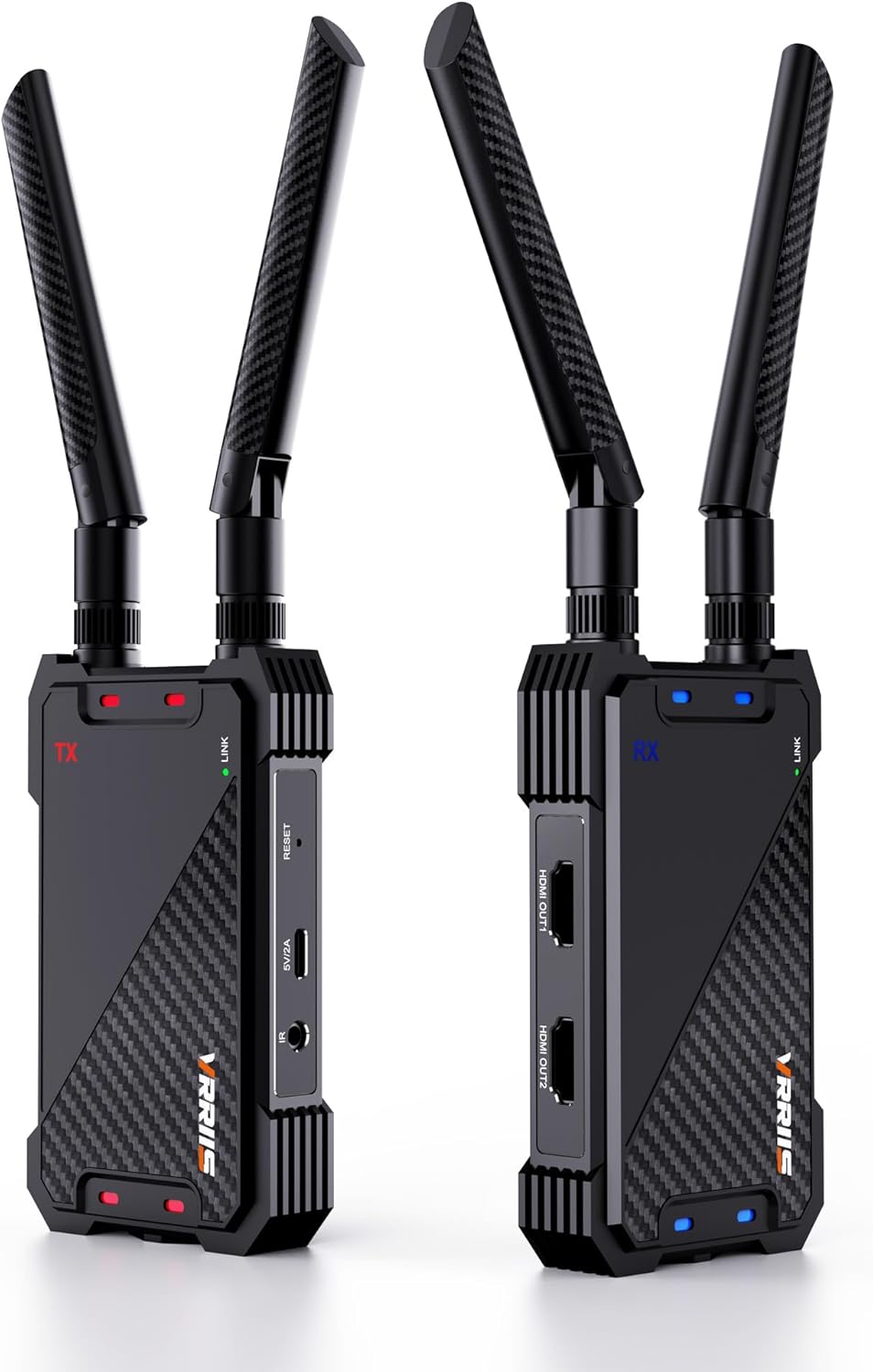
Figure 3.1: Vrriis WL081 Transmitter (left) and Receiver (right) units.
4. Instruccions de configuració
Follow these steps for initial setup and pairing of your wireless HDMI system.
4.1 Connexió inicial
- Attach the antennas to both the Transmitter (TX) and Receiver (RX) units.
- Connect your HDMI source device (e.g., laptop, set-top box) to the Entrada HDMI port of the TX unit using an HDMI cable.
- Connect your display device (e.g., TV, projector) to the SORTIDA HDMI port of the RX unit using an HDMI cable.
- If desired, connect a local monitor to the BULE FUERA port of the TX unit.
- Connect the IR extension cable to the IR OUT port on the TX unit and position the IR emitter near the IR sensor of your source device.
- Connect the IR extension cable to the IR IN port on the RX unit and position the IR receiver in a location where it can receive signals from your remote control.
- Connect the USB-C power cables to both the TX and RX units, then plug the power adapters into electrical outlets. The power indicators on both units should illuminate.

Figure 4.1: Connection diagram for the Vrriis WL081 system, illustrating HDMI IN, LOOP OUT, and HDMI OUT connections.

Figure 4.2: IR pass-back setup for remote control functionality.
4.2 Instruccions d'emparellament
The transmitter and receiver units are typically pre-paired from the factory. If you need to re-pair them or add additional receivers, follow these steps:
- Ensure both the Transmitter (TX) and Receiver (RX) are powered on.
- Observe the green LINK light on both units.
- Connect the HDMI IN port on the TX unit to the HDMI OUT port on the RX unit using an HDMI cable.
- After successful pairing, both the green LINK lights on the TX and RX units will flash. If pairing fails, the lights will not flash.
- Nota: If pairing fails, reset both the transmitter and receiver, re-power them, then re-plug the HDMI cable and repeat the pairing steps.
- Once pairing is complete, disconnect the HDMI cable used for pairing and reconnect your source and display devices for normal use.

Figure 4.3: Pairing procedure for Transmitter and Receiver.
5. Instruccions de funcionament
5.1 Funcionament bàsic
Once the TX and RX units are paired and connected to your source and display devices, the system will automatically transmit the HDMI signal. Ensure both units have a clear line of sight or minimal obstructions for optimal performance.
5.2 Using HDMI Loop Out
The TX unit features an HDMI LOOP OUT port. This allows you to connect a local display (e.g., a monitor) directly to the transmitter, enabling you to view the source content simultaneously at the source location without any additional latency.
5.3 Funcionalitat del comandament a distància per infrarojos
The included IR extension cables enable you to control your HDMI source device from the location of the receiver. Point your remote control at the IR receiver connected to the RX unit. The signal will be transmitted wirelessly back to the TX unit, which then relays the command to your source device via the IR emitter.
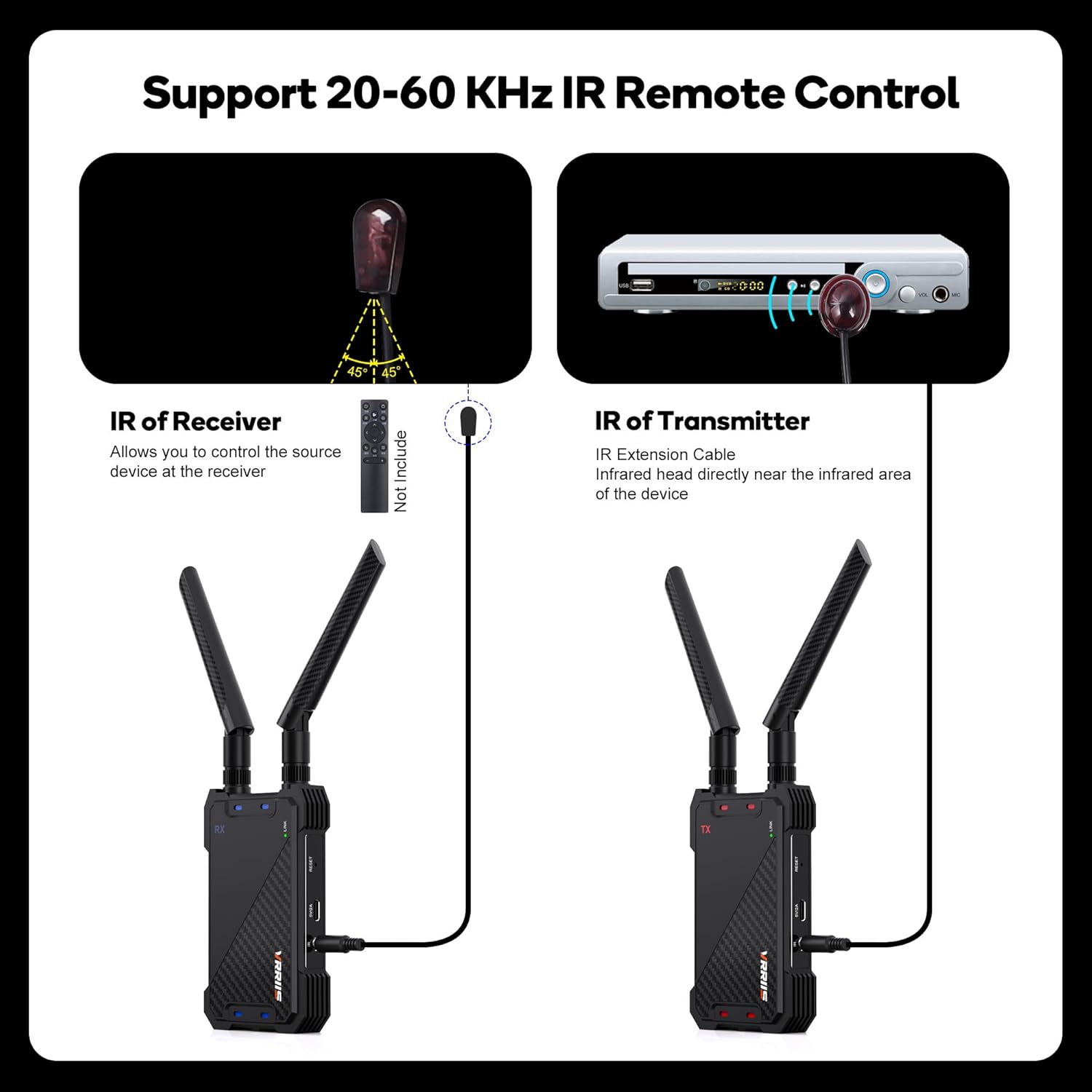
Figure 5.1: IR Remote Control setup.
5.4 Multi-Receiver Support (1 TX to 5 RXs)
The Vrriis WL081 system supports connecting one transmitter to up to five receivers simultaneously. This allows you to distribute the HDMI signal to multiple displays. Each additional receiver must be paired with the original transmitter following the pairing instructions in Section 4.2. Note that as the number of connected receivers increases, the effective wireless transmission distance may decrease.

Figure 5.2: Support for multiple receivers (up to 5 RXs) from a single transmitter.
6. Manteniment
To ensure the longevity and optimal performance of your Vrriis WL081 system, follow these maintenance guidelines:
- Neteja: Use a soft, dry cloth to clean the units. Avoid using liquid cleaners or abrasive materials.
- Emmagatzematge: When not in use for extended periods, store the units in a cool, dry place away from direct sunlight and extreme temperatures.
- Ventilació: Ensure proper ventilation around the units to prevent overheating. Do not block any ventilation openings.
- Potència: Use only the provided power adapters. Using incompatible power sources may damage the device.
7. Solució De Problemes
If you encounter issues with your Vrriis WL081 system, refer to the following troubleshooting steps:
| Problema | Causa possible | Solució |
|---|---|---|
| No picture/signal on display |
|
|
| Intermittent signal/picture drops |
|
|
| El comandament a distància per infrarojos no funciona |
|
|
| Latency/delay in video |
|
|
| Cannot transmit copyrighted content (HDCP) |
|
|
8. Especificacions
Technical specifications for the Vrriis WL081 Wireless HDMI Transmitter and Receiver.
- Model: WL081
- Marca: Vrriis
- Color: Negre
- Distància de transmissió: Up to 1300 feet (line of sight, open field)
- Suport a la resolució: Up to 1080p @60Hz Full HD
- Latència: Uns 0.05 segons
- Freqüència sense fil: 2.4GHz / 5GHz Dual Band
- Control remot IR: 20-60 KHz frequency support
- Sortida de bucle HDMI: Sí
- Multi-Receiver Support: 1 Transmitter to up to 5 Receivers
- Suport HDCP: HDCP 1.4
- Entrada d'alimentació: USB-C, 5V2A
- Dispositius compatibles: Laptop, Projector, Set Top Box, Television, DSLR, etc.
- Pes de l'article: Aproximadament 1.27 lliures (paquet total)
- Dimensions del paquet: Aproximadament 7.83 x 5.98 x 2.44 polzades

Figure 8.1: Key features of the Vrriis WL081.
9. Garantia i Suport
For warranty information or technical assistance, please refer to the product packaging or contact Vrriis customer support directly. You can typically find contact details on the manufacturer's website or through your purchase platform. When contacting support, please have your product model number (WL081) and purchase details ready.