
1. Introducció
This manual provides detailed instructions for the SOLAKAKA SM805 Lightweight Wireless Gaming Mouse. Please read this manual thoroughly before using the product to ensure proper operation and to maximize your gaming and work experience.

Figura 1: Frontal view of the SOLAKAKA SM805 mouse, showcasing its ergonomic shape and the included 2.4GHz USB receiver.
2. Producte acabatview i Característiques
The SOLAKAKA SM805 is a versatile gaming mouse designed for performance and comfort. Key features include:
- Connectivitat trimodal: Supports 2.4GHz wireless, Bluetooth 5.0, and Type-C wired connections.
- Sensor d'alta precisió: Equipped with the PAW3311 sensor, offering adjustable DPI from 100 to 24000.
- Disseny lleuger: Weighs approximately 66g (without cable) for reduced wrist burden.
- Empunyadura ergonòmica: Contoured shape designed for comfortable right-hand use.
- Botons programables: Features 6 customizable buttons for personalized functions and macros.
- Llarga vida útil de la bateria: Integrated 800mAh high-capacity rechargeable battery with intelligent sleep design.
- Alta taxa de votació: Up to 1000Hz polling rate for responsive tracking.

Figura 2: Un excésview of the SOLAKAKA SM805 mouse's main features, including its connectivity options, sensor capabilities, button count, weight, polling rate, and battery capacity.
3. Contingut del paquet
Si us plau, comproveu el paquet per veure si hi ha els elements següents:
- SOLAKAKA SM805 Wireless Gaming Mouse
- Receptor USB de 2.4 GHz
- Cable de càrrega tipus C.
- Manual d'usuari
- AAA Battery (pre-installed or included separately)
4. Configuració
4.1 Càrrega del ratolí
Before first use, it is recommended to fully charge the mouse. Connect the Type-C charging cable to the mouse's front port and the other end to a USB power source (e.g., computer USB port, USB wall adapter). The mouse can be used while charging.
4.2 Connexió del ratolí
The SM805 mouse offers three connection modes:

Figure 3: Image illustrating the three connectivity modes (Bluetooth, 2.4GHz wireless, and Type-C wired) of the SM805 mouse, along with its 800mAh rechargeable battery.
Mode sense fil de 2.4 GHz:
- Locate the 2.4GHz USB receiver, usually stored in a compartment on the underside of the mouse.
- Connecteu el receptor USB a un port USB disponible de l'ordinador.
- On the underside of the mouse, slide the mode switch to the '2.4G' position. The mouse should connect automatically.
Mode Bluetooth 5.0:
- On the underside of the mouse, slide the mode switch to the 'BT' position.
- A l'ordinador o dispositiu, activeu el Bluetooth i cerqueu dispositius nous.
- Select 'SOLAKAKA SM805' from the list of available devices to pair.
Mode amb cable tipus C:
- Connect the Type-C charging cable to the mouse and the other end to your computer's USB port.
- El ratolí canviarà automàticament al mode amb cable i començarà a carregar-se.
5. Instruccions de funcionament
5.1 Ajust de DPI
The SM805 mouse features a dedicated DPI button, typically located behind the scroll wheel, allowing you to cycle through preset DPI levels (800-1200-1600-3200-12000-22000). The DPI indicator light will change to reflect the current setting. Fine-tuning of DPI (100-24000 DPI) is available via the software.
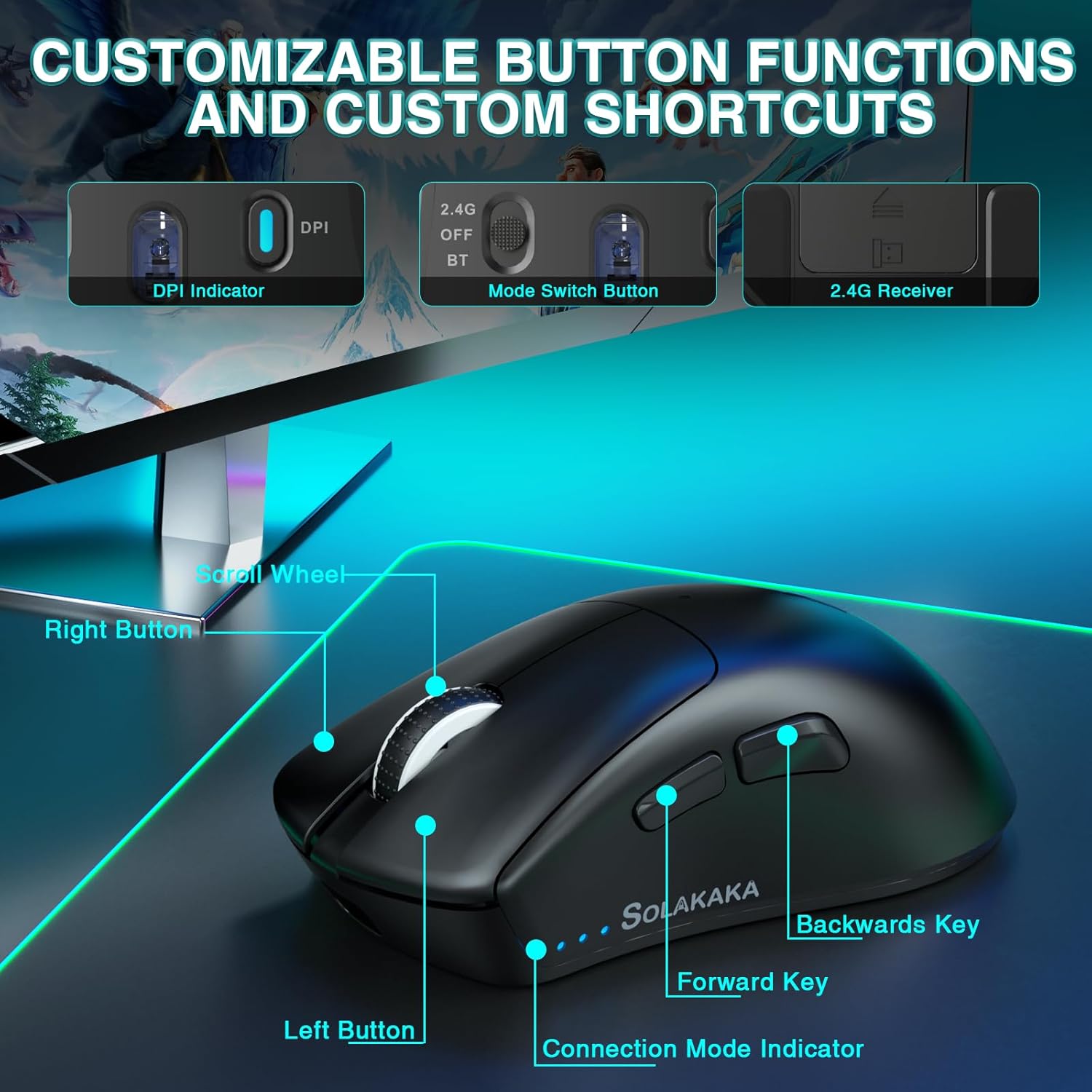
Figure 4: A detailed diagram pointing out the various buttons and indicators on the SM805 mouse, including the DPI indicator, mode switch, scroll wheel, and side buttons.
5.2 Botons programables
The mouse includes 6 programmable buttons: Left Click, Right Click, Middle Click (Scroll Wheel), Forward Key, Backward Key, and DPI Switch. These buttons can be customized using the SOLAKAKA software.
5.3 Intelligent Power Saving
To conserve battery life, the SM805 mouse is equipped with an intelligent sleep design. If the mouse is inactive for a certain period, it will automatically enter hibernation mode. To wake it up, simply click any button.
6. Customization (Software)
For advanced customization, download the official SOLAKAKA software (compatible with Windows). The software allows you to:
- Program all 6 buttons with various functions, multimedia keys, or fire keys.
- Create and assign macro files for complex command sequences.
- Adjust DPI settings in increments of 100, up to 24000 DPI.
- Set the polling rate (report rate) from 125Hz to 1000Hz.
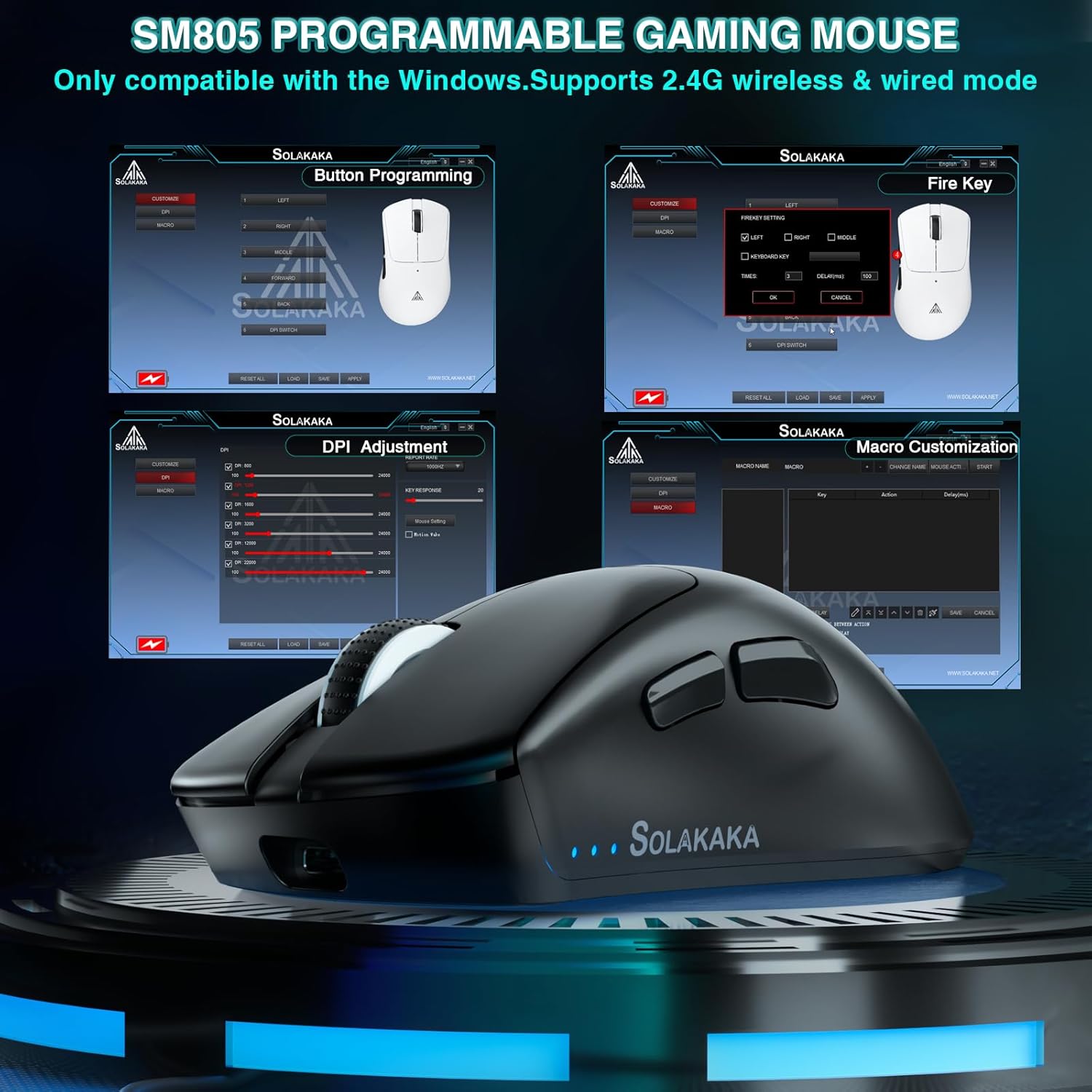
Figure 5: A visual representation of the SM805 mouse's software interface, demonstrating its capabilities for button programming, DPI settings, and macro creation.
Vídeo 1: Aquest vídeo ofereix una visió generalview of the SOLAKAKA SM805 Lightweight Wireless Gaming Mouse, demonstrating its design, tri-mode connectivity, adjustable DPI settings, and customizable features through its software. It shows the mouse in use and highlights its ergonomic shape and lightweight construction.
7. Manteniment
- Neteja: Feu servir un drap suau i sec per netejar el ratolí. Eviteu utilitzar productes químics agressius o materials abrasius.
- Emmagatzematge: Guardeu el ratolí en un lloc fresc i sec, allunyat de la llum solar directa i de temperatures extremes.
- Cura de la bateria: For optimal battery longevity, avoid fully discharging the battery frequently. Charge the mouse when the battery indicator is low.
8. Solució De Problemes
8.1 Problemes de connectivitat
- No connection in 2.4GHz mode: Ensure the USB receiver is securely plugged in and the mouse switch is set to '2.4G'. Try a different USB port.
- Error d'emparellament Bluetooth: Ensure Bluetooth is enabled on your device and the mouse switch is set to 'BT'. Remove previous pairings and try pairing again.
- Connexió intermitent: Ensure the mouse is within range of the receiver/device. Avoid sources of strong electromagnetic interference.
8.2 El ratolí no respon
- Check the battery level. If low, connect the charging cable.
- If in intelligent sleep mode, click any button to wake the mouse.
- Proveu de reiniciar l'ordinador.
9. Especificacions
| Característica | Detall |
|---|---|
| Model | SM805 |
| Tecnologia de connectivitat | 2.4GHz Wireless, Bluetooth 5.0, Type-C Wired |
| Tecnologia de detecció de moviment | Òptic (sensor PAW3311) |
| Rang de DPI | 100-24000 DPI (Adjustable via software) |
| Taxa de votació | Fins a 1000 Hz |
| Botons | 6 Botons programables |
| Capacitat de la bateria | 800 mAh |
| Pes de l'article | 5.6 ounces (approx. 66g without cable) |
| Característica especial | Soundless (referring to silent click switches, if installed) |
| Fabricant | SOLAKAKA |
10. Garantia i Suport
For warranty information and technical support, please refer to the documentation included with your product or visit the official SOLAKAKA brand store. You can find more information at the SOLAKAKA Store on Amazon.