
1. Introducció
This manual provides detailed instructions for the installation, operation, and maintenance of your Eonon GPCX6 10.1-inch Android 13 Car Stereo Navigation System. Please read this manual thoroughly before using the product to ensure proper functionality and safety. Keep this manual for future reference.
2. Producte acabatview
The Eonon GPCX6 is an advanced in-car digital media receiver designed for 2010-2016 Jeep Compass and Patriot models. It features a 10.1-inch IPS HD touchscreen and runs on the Android 13 operating system, offering a comprehensive suite of entertainment and navigation functionalities.
Característiques principals:
- Sistema operatiu: Android 13 (API level 33) with Rockchip processor for smooth performance.
- Visualització: 10.1-inch IPS HD touchscreen (1280x720 resolution) with 178° viewangle de ing.
- Memòria i emmagatzematge: 2GB RAM + 32GB ROM.
- Integració del telèfon intel·ligent: Wireless/Wired Apple CarPlay and Android Auto, plus Screen Mirroring for iOS and Android devices.
- Connectivitat: Built-in Bluetooth 5.4 for hands-free calls and music streaming, Wi-Fi 6 (2.4Gbps), 3 USB ports.
- Àudio: High-quality FM/AM radio with RDS, 36-band graphic equalizer, 6 EQ modes, ST TDA7388 amplifier (4x45W max output power), RCA audio output.
- Integració de vehicles: Supports original steering wheel controls, door information, and driving data display.
- Navegació: Online and offline GPS navigation capabilities.
- Expandabilitat: Supports Eonon dashcam (A100, not included) and DAB+ (V0056, not included).
- Característiques de seguretat: 1080P AHD Backup Camera ready (Eonon A0125 backup camera included).
- Actualitzacions de programari: Over-the-Air (OTA) firmware updates for system stability and security (does not upgrade Android system version).

Figure 2.1: Eonon GPCX6 Car Stereo with included accessories.
3. Configuració i instal·lació
The Eonon GPCX6 is designed for plug-and-play installation in compatible vehicles. Professional installation is recommended to ensure correct wiring and functionality.
3.1 Contingut del paquet:
Abans de la instal·lació, comproveu que tots els components siguin presents al paquet:

Figure 3.1: What's in the Box. Includes main unit, CAN Bus Decoder, Power Cable, Audio Video Adapter Cables, USB Adapter Cables, Backup Camera Video Input Cable, GPS Antenna, External Microphone, Radio Antenna Adapter Cables, Adhesive Pad, Spare Fuse, and User Manual.
3.2 Compatibilitat del vehicle:
This unit is specifically designed for 2010-2016 Jeep Compass and Patriot models. Ensure your vehicle's dashboard matches the compatible configurations shown below.
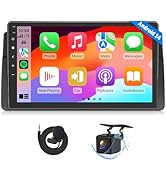
Figure 3.2: Applicable dashboard models for installation.
3.3 Diagrama de cablejat:
Refer to the following diagram for proper wiring connections. Incorrect wiring can damage the unit or vehicle electronics.

Figure 3.3: Wiring Diagram. Key connections include CAN Bus Decoder, Power Cable, RX/TX, AMP, BRAKE, External Microphone, Subwoofer Output, Video Input, AUX Audio In/Out, Front/Rear Audio Out, USB Ports, Backup Camera Input, Brake Shift Control, +12V for Backup Camera, GND Wire, WiFi Antenna, Bluetooth Antenna, GPS Antenna, and Radio Antenna Input.
Notes importants:
- Connect the CAN Bus Decoder (1) to the vehicle's CAN bus system.
- Ensure the Power Cable (2) is correctly connected to the vehicle's power supply.
- The BRAKE wire (5) should be connected to the vehicle's brake signal for safety features.
- The included external microphone (7) should be positioned for optimal voice pickup.
- Connect the GPS Antenna (26) and WiFi Antenna (24) for navigation and internet connectivity.
- The Backup Camera Input (20) is for the included Eonon A0125 camera.
4. Instruccions de funcionament
This section details the primary functions and operations of your Eonon GPCX6 car stereo.
4.1 Power On/Off and Basic Interface:
Press and hold the power button to turn the unit on or off. The unit features a 10.1-inch IPS HD touchscreen. Navigate through applications and settings by tapping and swiping.

Figure 4.1: Android 13 operating system interface.
4.2 Wireless/Wired Apple CarPlay:
Connect your iPhone for a seamless in-car experience, accessing navigation, music, and calls.
- On the car stereo, open the 'Zlink5' application.
- On your iPhone, turn on Wi-Fi and Bluetooth.
- Find 'EONON' in your phone's Bluetooth device list and pair it.
- Once connected, tap 'Use CarPlay' on your iPhone.
- Wait a few seconds for the connection to complete.

Figure 4.2: Wireless Apple CarPlay connection steps.
4.3 Wireless/Wired Android Auto:
Connect your Android device for a smarter, safer way to use your phone while driving.
- On the car stereo, open the 'Zlink5' application.
- On your Android phone, turn on Wi-Fi and Bluetooth.
- Find 'EONON' in your phone's Bluetooth device list and pair it.
- Wait a few seconds for the connection to complete.

Figure 4.3: Wireless Android Auto connection steps.
4.4 Screen Mirroring:
Project your phone's screen onto the car stereo display.
Per a dispositius iOS:
- Click the Zlink5 app on the car stereo, then set the car stereo to iPhone wireless screen mirroring mode.
- Turn on the iPhone hotspot and connect to the car stereo.
- Turn on the iPhone screen mirroring function and select "zj-airplay".

Figure 4.4: iOS Screen Mirroring connection steps.
Per a dispositius Android:
- Click the Zlink5 app on the car stereo, then set the car stereo to Android wireless screen mirroring mode.
- Turn on your phone's hotspot and connect to the car stereo.
- Install the Zplus app on your phone. Turn on the app and select "wireless connection".

Figure 4.5: Android Screen Mirroring connection steps.
4.5 Bluetooth Functions:
The built-in Bluetooth 5.4 module allows for hands-free calling and audio streaming.
- Maridatge: Enable Bluetooth on your phone and search for 'EONON' to pair.
- Trucades mans lliures: Make and receive calls directly from the stereo interface. The external microphone ensures clear communication.
- Transmissió de música: Play audio from your paired device through the car's speakers.

Figure 4.6: Bluetooth module for quick and stable connection, noise reduction, crystal-clear call quality, and high-quality music.
4.6 Audio Equalizer:
Customize your audio experience with the 36-band graphic equalizer and 6 preset EQ modes.

Figure 4.7: Audio equalizer settings for personalized sound.
4.7 Radio (FM/AM):
Access local radio stations using the built-in high-quality FM/AM radio tuner with RDS (Radio Data System).
4.8 Customization:
Personalize the user interface to your preference.
- Temes d'IU: Choose from 3 customizable UI themes.
- Boot Logo: Set a custom boot logo.
- Color del botó: Adjust the color of the physical buttons.
- Fons de pantalla: Change the background wallpaper.

Figure 4.8: Customizable UI themes.

Figure 4.9: Customization options for boot logo, button color, and wallpaper.
4.9 Adaptive Screen Brightness:
The unit features adaptive screen brightness adjustment for optimal visibility in various lighting conditions.

Figure 4.10: Adaptive screen brightness adjustment.
4.10 Backup Camera (A0125):
The included Eonon A0125 backup camera provides a clear view when reversing. It features a 140° rear viewing angle, 720P AHD resolution, and IP68 waterproofing.
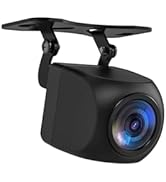
Figure 4.11: Backup camera features with reversing guidelines.
4.11 Dash Cam Support (A100, not included):
The unit supports the Eonon A100 dash cam (sold separately) for recording driving footage. It offers a 120° viewing angle and 1280x720P video playback.

Figure 4.12: Dash cam support features.
4.12 OBD2 Support (V0056, not included):
Connect an Eonon V0056 OBD2 scanner (sold separately) to monitor vehicle fault diagnosis and real-time status.

Figure 4.13: OBD2 functionality for vehicle diagnostics.
5. Manteniment
Regular maintenance helps ensure the longevity and optimal performance of your car stereo.
- Neteja de pantalla: Feu servir un drap suau i sense borrissol per netejar suaument la pantalla tàctil. Per a taques difícils, fregueu lleugeramentampNetegeu el drap amb aigua o un netejador de pantalles. Eviteu productes químics agressius o materials abrasius.
- Actualitzacions de programari: Periodically check for Over-the-Air (OTA) firmware updates in the system settings. These updates can improve system stability, fix bugs, and enhance security. Note that these are firmware updates and do not upgrade the core Android system version.
- Atenció general: Avoid exposing the unit to extreme temperatures, direct sunlight for prolonged periods, or excessive moisture. Ensure all connections remain secure.
Figure 5.1: Over-the-Air (OTA) firmware update interface.
6. Solució De Problemes
If you encounter issues with your Eonon GPCX6, refer to the following common problems and solutions:
| Problema | Causa possible | Solució |
|---|---|---|
| La unitat no s'encén. | Cablejat d'alimentació incorrecte, fusible fundit, problema amb la bateria del vehicle. | Check power cable connections. Inspect vehicle fuses and the spare fuse provided. Ensure vehicle battery is charged. |
| No hi ha so dels altaveus. | Speaker wiring incorrect, volume too low, audio source not selected. | Verify speaker connections. Increase volume. Select the correct audio source (e.g., Radio, Bluetooth, CarPlay). |
| El CarPlay/Android Auto no es connecta. | Bluetooth/Wi-Fi off on phone, incorrect pairing, Zlink5 app not open. | Ensure Bluetooth and Wi-Fi are enabled on your phone. Re-pair the device. Open the Zlink5 app on the stereo. |
| Senyal GPS feble o imprecis. | Antena GPS mal instal·lada o obstruïda. | Ensure the GPS antenna is securely connected and placed in an area with a clear view del cel. |
| La pantalla tàctil no respon. | Error temporal de programari, interferències del protector de pantalla. | Restart the unit. If a screen protector is installed, ensure it is properly applied and not causing issues. |
If the problem persists after attempting these solutions, please contact Eonon customer support for further assistance.
7. Especificacions
Detailed technical specifications for the Eonon GPCX6 car stereo.
| Característica | Especificació |
|---|---|
| Nom del model | GPCX6 |
| Sistema operatiu | Android 13 |
| Mida de la pantalla | 10.1 polzades |
| Resolució de visualització | 1280 x 720 |
| Memòria (RAM) | 2 GB |
| Emmagatzematge (ROM) | 32 GB |
| Tecnologia de connectivitat | Bluetooth 5.4, USB, Wi-Fi 6 |
| Característiques especials | Touchscreen, Wireless/Wired CarPlay & Android Auto, Screen Mirroring, Built-in Mic, Steering Wheel Control Support, OTA Updates |
| Tipus de mapa | Worldwide (Online/Offline GPS) |
| Components inclosos | Backup Camera (A0125) |
| Tipus de muntatge | Muntatge al quadre de comandament |
| Pes de l'article | 5.99 lliures |
| Dimensions del paquet | 17 x 11 x 9 polzades |
8. Garantia i Suport
Your Eonon GPCX6 car stereo is covered by a manufacturer's warranty.
- Període de garantia: 2 any de garantia del fabricant.
- Suport: For technical assistance, troubleshooting beyond this manual, or warranty claims, please contact Eonon customer support through their official weblloc web o el venedor on es va comprar el producte.