
1. Introducció i finalview
Thank you for choosing Joyway luggage. This manual provides essential information for the proper use and care of your 20-inch carry-on suitcase. Designed for durability and convenience, this luggage features a robust aluminum frame, a PC hardshell, and smart functionalities to enhance your travel experience.
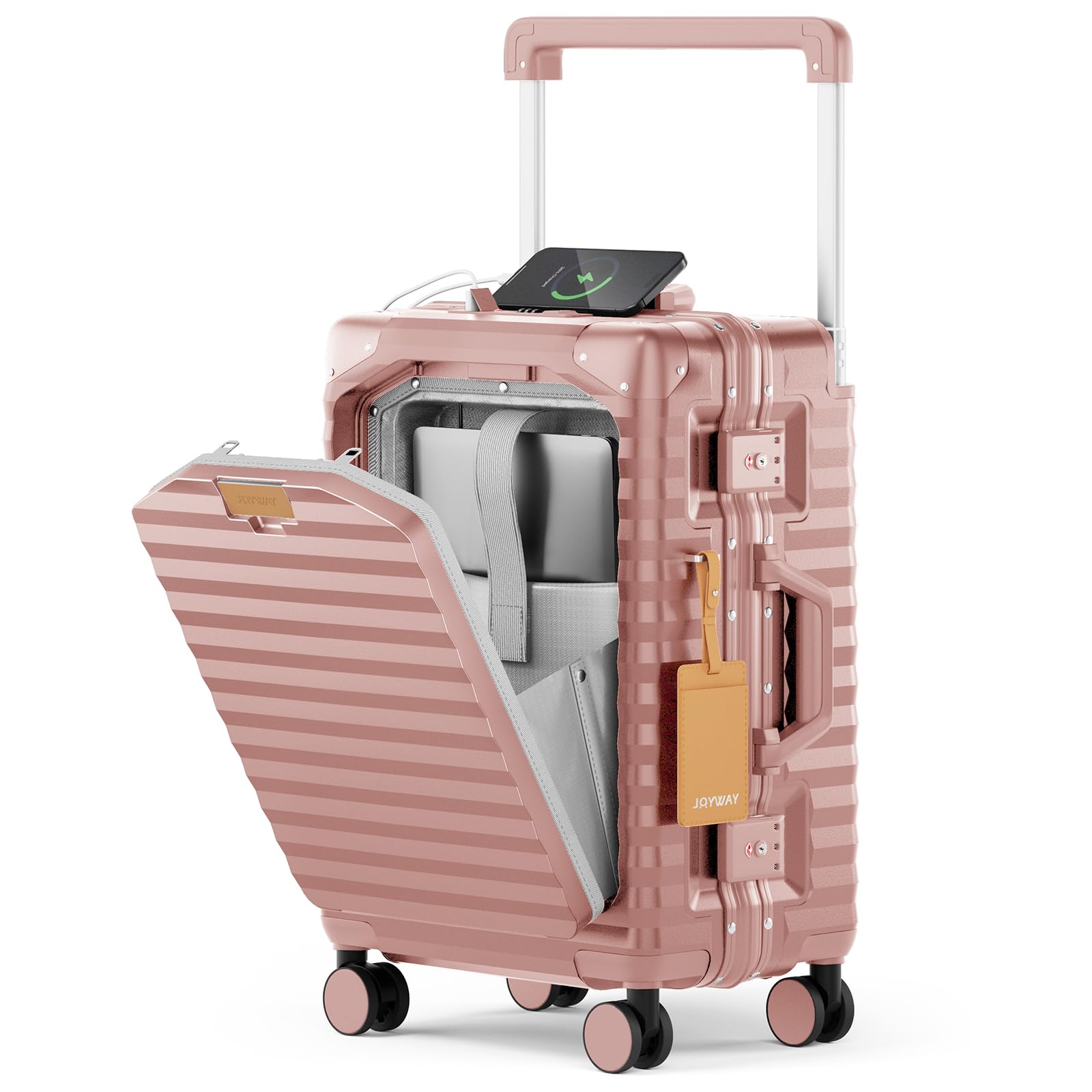
Image: Joyway 20-inch Rose Gold Carry-on Luggage, showcasing its compact design and rose gold finish.
Característiques principals:
- Lightweight & Sturdy Construction: Made from durable PC material with an aluminum frame and corner protectors for enhanced impact resistance. Includes a luggage cover for added protection.
- Disseny multifuncional: Features a built-in USB port for charging devices, a folding cup holder, and a multifunctional hook to keep your hands free.
- Quick Access Front Pocket: A dedicated front compartment provides easy access to laptops up to 15.6 inches and other essentials.
- Secure TSA Locking Mechanism: Equipped with a side TSA-approved combination lock for secure and easy access.
- Mobilitat suau: 360° silent spinner wheels ensure effortless gliding through airports and busy streets.
- Optimized Interior Space: Wide trolley bars maximize internal space, complemented by additional inner lining compartments for organized packing.
2. Configuració
2.1 Setting the TSA Lock
Your luggage comes with a TSA-approved combination lock. The initial factory setting is 0-0-0. To set your personal combination, follow these steps:
- Locate the resettable button (1) on the back of the lock. Slide this button from "OFF" to "SET".
- Dial your desired three-digit code (2) using the number wheels (e.g., 8-8-8).
- Slide the resettable button (1) back to "OFF". Your new code is now set.

Image: A diagram illustrating the steps to reset the TSA combination lock, highlighting the resettable button and number dials.
2.2 Ús del port de càrrega USB
The luggage features an integrated USB and USB-C charging port. To use this feature:
- Connect your portable power bank (not included) to the internal USB cable located within the front pocket.
- Plug your device's charging cable into the external USB or USB-C port on the top of the luggage.

Image: A woman charging her smartphone using the integrated USB port on the luggage, demonstrating the convenience of staying powered on the go.
3. Operating Your Luggage
3.1 Telescopic Handle Operation
The luggage is equipped with a widened tie rod design for comfortable handling and improved stability. Press the button on the handle to extend or retract it to your desired height.

Imatge: Un primer pla view of the luggage's widened telescopic handle, illustrating its ergonomic design and ease of extension.
3.2 360° Spinner Wheels
The four 360° silent swivel wheels allow for smooth, multi-directional movement, reducing strain and making navigation through crowded areas effortless.

Image: An illustration highlighting the smooth, wear-resisting, and mute features of the 360° spinner wheels, along with a close-up of the TSA-approved lock.
3.3 Front Pocket Access
The front compartment is designed for quick access to your laptop (up to 15.6 inches), tablets, documents, and other small items without needing to open the main compartment.

Image: A person opening the front pocket of the luggage to retrieve a laptop, demonstrating the quick access feature for electronics and travel essentials.
3.4 Folding Cup Holder and Multifunctional Hook
Utilize the folding cup holder on the side to securely hold your beverage. The integrated hook allows you to hang small bags or personal items, freeing your hands while on the move.

Image: Two women demonstrating the utility of the luggage's features: one using the folding cup holder for a drink, and the other using the metal hook to hang a shopping bag.
3.5 Organització interior
The main compartment features wide trolley bars for maximum packing space, along with X-shaped straps to secure your belongings and mesh pockets for smaller items.

Imatge: Un interior view of the luggage, highlighting the spacious design with mesh pockets and adjustable X-shaped straps for efficient organization.
4. Manteniment
4.1 Neteja
- Wipe the PC hardshell exterior with a soft, damp drap i sabó suau. Eviteu productes de neteja abrasius.
- For interior cleaning, vacuum or wipe with a damp cloth. Ensure the interior is completely dry before closing.
4.2 Wheel and Handle Care
- Regularly check wheels for debris and clean as needed to maintain smooth operation.
- Ensure the telescopic handle extends and retracts smoothly. Avoid forcing it if it gets stuck.
4.3 Emmagatzematge
Store your luggage in a cool, dry place away from direct sunlight when not in use.
5. Solució De Problemes
5.1 TSA Lock Not Opening
- Double-check that you have entered the correct three-digit combination.
- If you've forgotten your code, you may need to reset it following the instructions in Section 2.1.
5.2 Wheels Not Rolling Smoothly
- Inspect the wheels for any trapped debris (hair, lint, etc.) and remove them carefully.
- Ensure the luggage is not overloaded beyond its capacity.
5.3 USB Port Not Charging
- Verify that your internal power bank is fully charged and correctly connected to the internal USB cable.
- Ensure your device's charging cable is properly inserted into the external port.
6. Especificacions
| Dimensions del producte | 14.96 x 9.45 x 22.44 polzades |
| Airline Approved Dimensions (including wheels and handles) | 21.5 x 14.2 x 9.05 polzades |
| Pes de l'article | 9.96 lliures (4.53 quilograms) |
| Capacitat | 33 litres |
| Número de model de l'article | TR017 |
Note: Always confirm current carry-on size restrictions with your specific airline before travel, as policies may vary.

Image: A visual guide to airline-approved carry-on dimensions, indicating the luggage fits within common size limits for various airlines.
7. Garantia i Suport
7.1 Informació de la garantia
This Joyway luggage comes with a 2 any de garantia covering manufacturing defects. Please retain your proof of purchase for warranty claims.
7.2 Atenció al client
For further assistance, troubleshooting, or warranty inquiries, please visit the official Joyway website or contact their customer service department. Contact details can typically be found on the product packaging or the brand's official online store.
8. Producte acabatview Vídeo
Video: An official product video from Joyway showcasing the features and design of the Aluminium Carry-on Luggage.