
Introducció
The ZTE U50 Pro is a high-performance 5G portable WiFi router designed for reliable and fast internet access on the go. Featuring a powerful Qualcomm Snapdragon X62 processor, it supports dual-mode 5G and global roaming, ensuring connectivity in over 100 countries and regions. This device incorporates 5G NR carrier aggregation and low-frequency ENDC technologies for enhanced speeds and network capacity. With Wi-Fi 6 (802.11ax) technology, it delivers a peak rate of 3600 Mbps and can support up to 64 connected devices simultaneously, making it ideal for various personal and professional uses.
This manual provides essential information for setting up, operating, maintaining, and troubleshooting your ZTE U50 Pro router. Please read it thoroughly before use.
Contingut del paquet
Assegureu-vos que tots els elements siguin presents al paquet:
- ZTE U50 Pro 5G Portable WiFi 6 Router
- Cable de dades USB tipus C
- Quick Guide (English)
- Built-in Lithium-ion Battery (10,000 mAh)
Dispositiu acabatview
Familiarize yourself with the components of your ZTE U50 Pro router.

Imatge: Davant view of the ZTE U50 Pro 5G Portable WiFi Router, showing its 2.4-inch touch screen interface with network status, data usage, and Wi-Fi indicators.

Imatge: Davant i darrere view of the ZTE U50 Pro 5G Portable WiFi Router, illustrating its compact design and the ZTE branding on the rear panel.
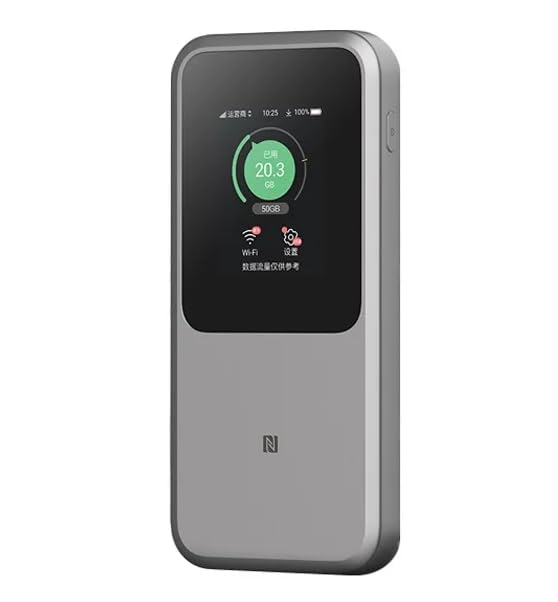
Imatge: The ZTE U50 Pro 5G Portable WiFi Router highlighting its main features: high-performance Snapdragon X62 chip, high-rate Wi-Fi 6 (3600Mbps), 10000mAh ultra-large capacity battery with 27W fast charge, and a 2.4-inch touch screen for easy device management.
Configuració
1. Instal·lació de la targeta SIM
- Localitzeu la ranura de la targeta SIM al dispositiu.
- Carefully open the SIM card slot cover.
- Insert a standard Nano-SIM card into the slot with the gold contacts facing down and the notched corner aligned correctly.
- Empenyeu suaument la targeta SIM fins que encaixi al seu lloc.
- Tanqueu bé la tapa de la ranura de la targeta SIM.
- Nota: The device is unlocked and compatible with any standard Nano-SIM card.
2. Encès / apagat
- Per encendre: Premeu i manteniu premut el botó d'engegada durant uns segons fins que la pantalla s'il·lumini.
- Per apagar: Press and hold the Power button until a power-off option appears on the screen. Select "Power Off" or continue holding the button until the device shuts down.
3. Configuració Inicial
- Upon first power-on, the device may guide you through an initial setup wizard on its 2.4-inch touch screen.
- Follow the on-screen prompts to set basic preferences such as language, time zone, and initial Wi-Fi settings (SSID and password).
- Alternatively, you can connect to the device's default Wi-Fi network (SSID and password usually found on a sticker inside the SIM card slot or on the device packaging) and access the web management interface via a browser (e.g., 192.168.0.1 or 192.168.1.1).
Instruccions de funcionament
1. Connexió de dispositius mitjançant Wi-Fi
- Ensure your ZTE U50 Pro is powered on.
- On your device (smartphone, laptop, tablet, etc.), open the Wi-Fi settings.
- Cerca xarxes Wi-Fi disponibles.
- Select the network name (SSID) broadcast by your ZTE U50 Pro. The default SSID is usually printed on the device or its packaging.
- Enter the Wi-Fi password (key) when prompted. The default password is also typically printed on the device.
- Once connected, your device will have internet access through the ZTE U50 Pro.
- The router supports up to 64 simultaneous device connections.
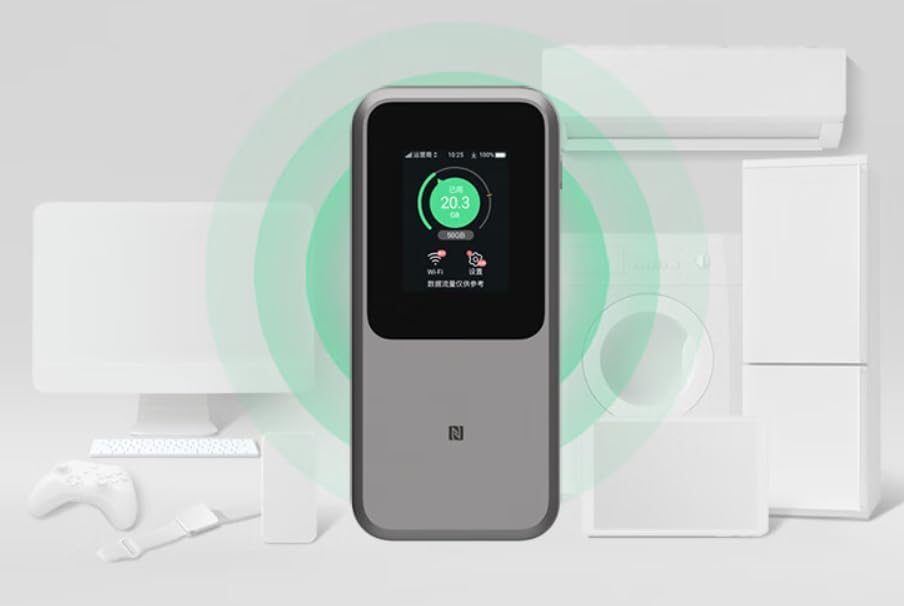
Imatge: The ZTE U50 Pro 5G Portable WiFi Router actively broadcasting a Wi-Fi signal, demonstrating its ability to connect to various devices such as computers, mobile phones, and gaming consoles simultaneously.
2. Gestió de la configuració
- Via Touch Screen: Use the 2.4-inch touch screen to view network status, data usage, connected devices, and access quick settings.
- Via Web Interfície de gestió: For advanced settings, connect a device to the router's Wi-Fi network and open a web browser. Enter the router's IP address (e.g., 192.168.0.1) in the address bar. Log in using the administrator username and password (default credentials are usually on the device or in the quick guide). Here you can configure Wi-Fi names, passwords, security settings, network modes, and more.
3. Càrrega del dispositiu
- Connect the provided USB Type-C data cable to the charging port on the ZTE U50 Pro.
- Connecteu l'altre extrem del cable a un adaptador de corrent USB compatible (no inclòs) o al port USB d'un ordinador.
- The device supports 27W fast charging. Use a compatible fast charger for optimal charging speed.
- L'indicador de bateria a la pantalla mostrarà l'estat de càrrega.
Manteniment
- Cura de la bateria: To prolong battery life, avoid exposing the device to extreme temperatures. For long-term storage, charge the battery to approximately 50% and store in a cool, dry place.
- Neteja: Feu servir un drap suau i sec per netejar el dispositiu. No utilitzeu netejadors líquids ni aerosols.
- Actualitzacions de programari: Comproveu periòdicament si hi ha actualitzacions de firmware a través de web interfície de gestió per garantir un rendiment i una seguretat òptims.
Resolució de problemes
| Problema | Causa possible | Solució |
|---|---|---|
| Sense connexió a Internet | SIM card not inserted correctly, no network signal, data plan expired, incorrect APN settings. |
|
| No es pot connectar a la Wi-Fi | Incorrect Wi-Fi password, Wi-Fi disabled, too many connected devices. |
|
| Velocitat d'Internet lenta | Weak signal, network congestion, distance from router, too many connected devices. |
|
| El dispositiu no s'encén | Bateria baixa, carregador/cable defectuós. |
|
Restabliment de fàbrica
If the device experiences persistent issues, a factory reset may resolve them. This will erase all custom settings and restore the device to its original factory defaults. Refer to the Quick Guide or the web management interface for instructions on how to perform a factory reset.
Especificacions
| Marca | ZTE |
| Nom del model | U50 Pro |
| Sistema operatiu | ZyNOS |
| Tecnologia de connectivitat | 5G, LTE |
| Estàndard sense fils | 802.11ax (Wi-Fi 6) |
| Classe de banda de freqüència | Doble banda (2.4 GHz i 5 GHz) |
| Max Wi-Fi Rate | 3600 Mbps |
| Màxim dispositius connectats | 64 |
| Capacitat de la bateria | 10,000 mAh (ió de liti) |
| Carregant | 27W Fast Charge (USB Type-C) |
| Mostra | Pantalla tàctil de 2.4 polzades |
| Tipus d'antena | Interna |
| Ús recomanat | Aire lliure/Viatges |
| Components inclosos | USB Type-C Data Cable, Quick Guide |
| País d'origen | Xina |
Informació de seguretat
- No exposeu el dispositiu a temperatures extremes, llum solar directa ni humitat elevada.
- Eviteu deixar caure el dispositiu ni sotmetre'l a impactes forts.
- Use only approved accessories, such as the provided USB Type-C cable.
- No intenteu desmuntar ni modificar el dispositiu. Això anul·larà la garantia.
- Mantingueu el dispositiu allunyat de l'aigua i altres líquids.
- Desfeu-vos de la bateria i del dispositiu d'acord amb la normativa local.
Garantia i Suport
Information regarding specific warranty terms and conditions for the ZTE U50 Pro is typically provided with the product packaging or can be found on the manufacturer's official website. Please refer to the included Quick Guide for details on how to contact customer support for technical assistance or warranty claims.
For further assistance, please visit the official ZTE support weblloc o poseu-vos en contacte amb el vostre distribuïdor.