
1. Introducció
Gràcies per la compraasing the Trevi RA 7F50 BT Portable Multiband Radio. This device offers versatile audio entertainment with FM, AM, and SW radio bands, wireless connectivity, and MP3 playback via USB and Micro SD. Its integrated solar panel and USB Type-C charging port ensure power availability wherever you go. Please read this manual carefully to ensure proper use and maintenance of your radio.
2. Informació de seguretat
- No exposeu el dispositiu a la pluja, la humitat ni a temperatures extremes.
- Eviteu deixar caure la ràdio ni sotmetre-la a impactes forts.
- Do not disassemble the unit. Repairs should only be performed by qualified personnel.
- Mantenir fora de l'abast dels nens.
- Assegureu-vos que hi hagi una ventilació adequada durant la càrrega.
- Use only the provided USB Type-C cable for charging or a certified equivalent.
3. Producte acabatview
Familiarize yourself with the components and controls of your Trevi RA 7F50 BT radio.
Davant View
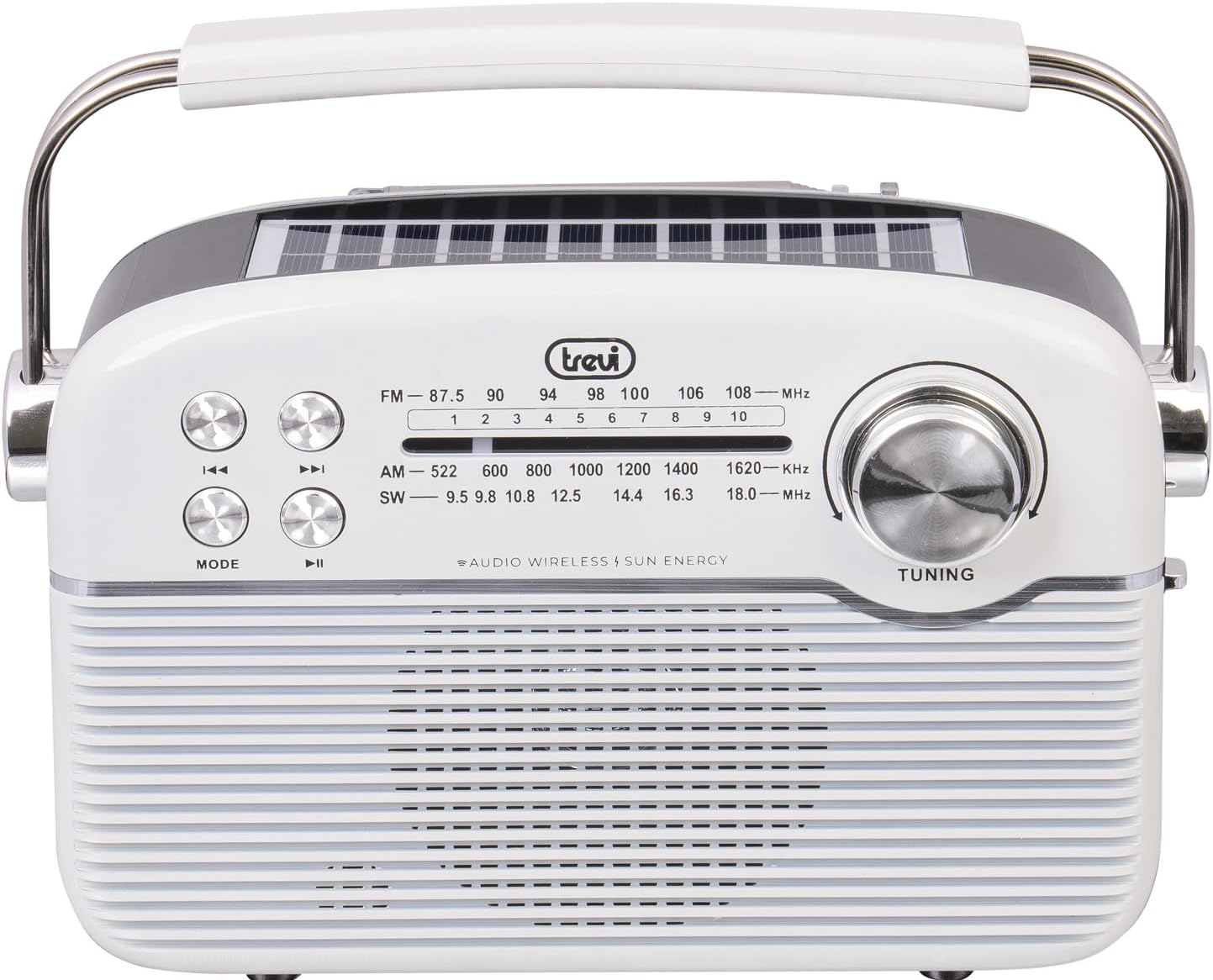
Imatge: Frontal view of the Trevi RA 7F50 BT radio. Visible elements include the main speaker grille, frequency display for FM, AM, and SW bands, control buttons for playback and mode selection, and a large tuning dial on the right side. The Trevi logo is centered above the frequency display.
Superior i lateral View

Imatge: Part superior i lateral view of the Trevi RA 7F50 BT radio. This perspective clearly shows the integrated solar panel on the top surface, designed for charging. The sturdy carrying handle is also prominent, extending across the top of the unit. The side view reveals the rounded edges and overall compact design.
posterior View

Imatge: Part posterior view of the Trevi RA 7F50 BT radio. The telescopic antenna is visible at the top. Below it, the various input ports are shown, including a USB port for flash drives, a Micro SD card slot for memory cards, and a USB Type-C port for charging the internal battery. The back panel also features a textured design.
Controls i ports:
- Dial d'ajust: Per a la selecció de freqüències de ràdio.
- Botó de mode: Switches between radio (FM/AM/SW), Wireless, and MP3 (USB/Micro SD) modes.
- Botó Reproduir/Pausa: Controls playback in MP3 and Wireless modes.
- Botons de pista anterior/següent: Navigates tracks in MP3 and Wireless modes, or fine-tunes radio frequency.
- Control de volum: Ajusta el nivell de sortida d'àudio.
- Port USB: Per connectar unitats flaix USB.
- Ranura per a targetes Micro SD: For inserting Micro SD memory cards.
- Port USB tipus C: Per carregar la bateria interna.
- Antena telescòpica: Per a una millor recepció de ràdio.
- Panell solar: Integrated on top for solar charging.
4. Configuració
4.1 Càrrega de la bateria
The Trevi RA 7F50 BT radio is equipped with a rechargeable lithium battery (1500 mAh) and offers two charging methods:
- Càrrega USB tipus C: Connect the provided USB Type-C cable to the radio's charging port and the other end to a standard USB power adapter (not included) or a computer's USB port. The charging indicator light will illuminate.
- Càrrega solar: Place the radio with its solar panel facing direct sunlight. The integrated 80 mA solar panel will slowly recharge the battery. This method is ideal for maintaining charge or for emergency power in outdoor environments.
Es recomana carregar completament la bateria abans de fer-la servir per primera vegada.
4.2 Encès inicial
Locate the Power On/Off switch, usually on the side or back of the unit. Slide it to the "ON" position. The radio will power on, and the display (if available) will light up.
5. Instruccions de funcionament
5.1 Funcionament de la ràdio (FM/AM/SW)
- Seleccioneu el mode de ràdio: Premeu el botó MODE button repeatedly until you reach the desired radio band (FM, AM, or SW).
- Amplia l'antena: For optimal FM and SW reception, fully extend the telescopic antenna. For AM, the internal ferrite antenna is typically sufficient.
- Sintonitza una emissora: Gira el TUNING dial to scan for stations. The frequency display will show the current frequency.
- Ajustar el volum: Use the volume control knob to set the desired listening level.
5.2 Wireless Connectivity (Bluetooth)
- Enter Wireless Mode: Premeu el botó MODE button repeatedly until "BT" or "Wireless" appears on the display (if applicable), or you hear an audible prompt indicating Bluetooth pairing mode.
- Vincula amb el dispositiu: On your smartphone, tablet, or other Bluetooth-enabled device, go to the Bluetooth settings and search for available devices. Select "Trevi RA 7F50 BT" from the list.
- Confirmació: Once paired, the radio will indicate a successful connection (e.g., an audible tone or stable indicator light).
- Reproduir àudio: You can now play audio from your connected device through the radio's speaker. Use the radio's playback controls (Play/Pause, Previous/Next) or your device's controls.
Reproducció de MP3 5.3 (USB/Micro SD)
- Inserir suports: Insert a USB flash drive into the USB port or a Micro SD card into the Micro SD slot. Ensure the media contains MP3 audio files.
- Enter MP3 Mode: Premeu el botó MODE button repeatedly until the radio automatically switches to MP3 playback mode, or you hear an audible prompt.
- Controls de reproducció: Utilitza el Reproduir/Pausa button to start or pause playback. Use the Pista anterior / següent buttons to skip between tracks.
6. Manteniment
- Neteja: Netegeu la ràdio amb un drap suau i sec. No utilitzeu productes de neteja abrasius ni dissolvents.
- Cura de la bateria: To prolong battery life, avoid fully discharging the battery frequently. Recharge regularly, especially if the unit will be stored for an extended period.
- Emmagatzematge: Guardeu la ràdio en un lloc fresc i sec, allunyat de la llum solar directa i de temperatures extremes.
7. Solució De Problemes
| Problema | Causa possible | Solució |
|---|---|---|
| Sense poder | Battery discharged; Power switch off. | Charge the battery via USB-C or solar panel; Ensure power switch is ON. |
| Mala recepció de ràdio | Antena no estesa; Senyal feble; Interferències. | Fully extend the telescopic antenna; Reposition the radio; Try tuning to a stronger station. |
| Cannot connect via Wireless (Bluetooth) | Radio not in Wireless mode; Device not discoverable; Already connected to another device. | Press MODE to enter Wireless mode; Ensure your device's Bluetooth is on and discoverable; Disconnect from other devices. |
| MP3 fileno està jugant | Incorrecte file format; USB/Micro SD not inserted correctly; Corrupted media. | Assegureu-vos files are MP3 format; Reinsert USB/Micro SD; Try different media. |
8. Especificacions
- Model: RA 7F50 BT
- Bandes de ràdio: FM, AM, SO
- Connectivitat: Wireless (Bluetooth), USB, Micro SD
- Font d'alimentació: Rechargeable Lithium Battery (1500 mAh), Solar Panel (80 mA max), USB Type-C
- Entrada Voltage: 3.7V DC
- Dimensions: 25 L x 11 A x 20 A cm (aprox.)
- Pes: 0.98 kg (aprox.)
- Components inclosos: USB / Type-C charging cable, User Manual
9. Què hi ha a la caixa
- Trevi RA 7F50 BT Portable Multiband Radio
- USB / Type-C Charging Cable
- Manual d'usuari
10. Garantia i Suport
This product is covered by a standard manufacturer's warranty. For detailed warranty information, technical support, or service inquiries, please refer to the warranty card included with your product or visit the official Trevi weblloc web. Conserveu el comprovant de compra per a reclamacions de garantia.