
Introducció
This manual provides detailed instructions for the Rapoo VH650 Virtual 7.1 Channel RGB Gaming Headset. Please read this guide carefully to ensure proper setup, operation, and maintenance of your headset. This will help you maximize your gaming audio experience and prolong the life of your device.
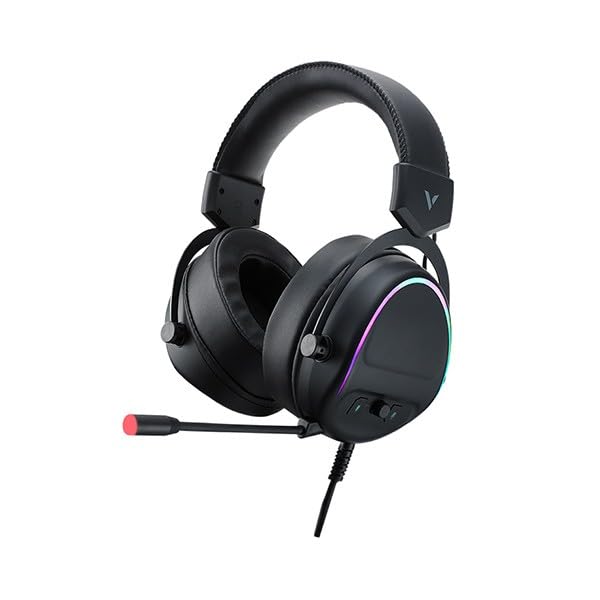
Figure 1: Rapoo VH650 Gaming Headset
Característiques
The Rapoo VH650 Gaming Headset is designed to deliver an immersive audio experience with its advanced features:
- Virtual 7.1 Channel Surround Sound: Experience precise positional audio, crucial for competitive gaming, allowing you to hear every detail from all directions.
- Brilliant RGB LED Backlight: Dynamic RGB lighting on the earcups enhances your gaming setup with vibrant colors and a modern aesthetic.
- Omnidirectional Noise-Canceling Microphone: The 360° adjustable microphone effectively reduces ambient noise, ensuring clear and precise communication with your teammates.
- High-Quality 50mm Sound Drivers: Equipped with powerful 50mm dynamic drivers, the headset delivers rich audio with deep bass and clear highs, optimized for gaming sound effects and music.
- Adjustable Metal Headband: The retractable single-head metal beam design ensures durability and a comfortable fit for various head sizes.
- Multi-function Ear Controls: Convenient controls located on the earcup allow for quick adjustments to volume and microphone settings.
- Over-Ear Design with Thick Ear Covers: Provides comfort during long gaming sessions and helps isolate external noise.

Figure 2: Virtual 7.1 Surround Sound for enhanced audio positioning.

Figure 3: RGB lighting on the earcups adds a vibrant gaming atmosphere.

Figure 4: The adjustable noise-canceling microphone ensures clear voice chat.

Figure 5: 50mm drivers provide powerful and clear audio.
Instruccions de configuració
- Connecteu els auriculars: Plug the USB connector of the Rapoo VH650 headset into an available USB port on your computer or game console.
- Driver Installation (for PC):
- For Windows PCs, the operating system will typically install the necessary drivers automatically.
- To enable and customize the Virtual 7.1 Surround Sound and RGB lighting, download the dedicated Rapoo VH650 software from the official Rapoo weblloc.
- Seguiu les instruccions a la pantalla per completar la instal·lació del programari.
- Configuració d'àudio:
- Windows: Go to 'Sound Settings' (right-click the speaker icon in the taskbar). Ensure 'Rapoo VH650' is selected as the default playback and recording device.
- Consoles de jocs: Navigate to the audio settings within your console's system menu and select the Rapoo VH650 as the audio output and input device.
- Ajustar l'ajust: Adjust the metal headband to ensure a comfortable and secure fit over your ears. Position the microphone appropriately for clear voice capture.
Instruccions de funcionament
- Control de volum: Use the volume wheel or buttons located on the left earcup to adjust the audio output level.
- Silenciar/activar el micròfon: A dedicated button on the earcup or inline control allows you to quickly mute or unmute the microphone. An LED indicator may show the microphone status.
- Control d'il·luminació RGB: If installed, use the Rapoo software on your PC to customize RGB lighting effects, colors, and patterns. Some headsets may have a physical button for cycling through preset lighting modes.
- Virtual 7.1 Surround Sound Activation: Activate and configure the Virtual 7.1 Surround Sound feature through the Rapoo software. This software allows for fine-tuning of audio profiles and positional sound.
Manteniment
- Neteja: Feu servir un drap suau i sec per netejar els auriculars i la diadema. Per a la brutícia persistent, netegeu lleugerament.amp es pot fer servir un drap, però assegureu-vos que no entri humitat a les reixetes de l'altaveu ni al micròfon. No utilitzeu productes químics agressius ni netejadors abrasius.
- Emmagatzematge: When not in use, store the headset in a clean, dry place away from direct sunlight and extreme temperatures. Avoid wrapping the cable tightly to prevent damage.
- Cura del cable: Handle the USB cable gently. Avoid pulling on the cable to disconnect the headset; always grasp the plug.
Resolució de problemes
- Sense so dels auriculars:
- Assegureu-vos que el cable USB estigui connectat correctament al dispositiu.
- Check the headset's volume control and ensure it is not at minimum or muted.
- Verify that the Rapoo VH650 is selected as the default audio output device in your computer's or console's sound settings.
- Prova els auriculars en un altre dispositiu per descartar un problema específic del dispositiu.
- El micròfon no funciona:
- Ensure the microphone is not muted via the headset's control or software.
- Check that the Rapoo VH650 is selected as the default recording device in your sound settings.
- Adjust microphone levels in your device's sound settings.
- Ensure the microphone boom is properly positioned near your mouth.
- RGB Lighting Not Functioning:
- Ensure the headset is properly connected via USB.
- If using PC software, verify that the lighting effects are enabled and configured correctly.
- Check for any physical lighting control buttons on the headset.
Especificacions
| Característica | Especificació |
|---|---|
| Marca | Rapoo |
| Model | VH650 |
| Color | Negre |
| Tecnologia de connectivitat | Wired (USB for 7.1 Virtual Surround Sound) |
| Tipus de controlador d'àudio | Conductor dinàmic |
| Diàmetre del conductor | 50 mm |
| Factor de forma dels auriculars | Sobre l'orella |
| Col·locació de l'orella | Sobre l'orella |
| Impedància | 3 ohms |
| Control de soroll | None (Microphone features noise-canceling) |
| Micròfon | Omnidirectional, Noise-Canceling, Rotary |
| Característiques especials | Virtual 7.1 Channel Sound, RGB Backlight, Gaming-specific sound engine |
| Dispositius compatibles | Desktop Computers, Laptops, Mobile Phones (with adapter, not included), Game Consoles |
| Usos específics per al producte | Jocs |
| Pes de l'article | 150 grams |
| Components inclosos | Manual d'usuari |
| País de fabricació | Xina |
Garantia i Suport
The Rapoo VH650 Gaming Headset comes with a garantia de dos anys des de la data de compra, que cobreix els defectes de fabricació. Conserveu el comprovant de compra per a reclamacions de garantia.
For technical support, troubleshooting assistance, or warranty inquiries, please visit the official Rapoo website or contact their customer service department. You can usually find contact information, FAQs, and driver downloads on the support section of their weblloc.
Recursos en línia:
- Official Rapoo Website (for drivers and support)
- Product registration (if available)