
1. Introducció
Thank you for choosing the FLEXISPOT L-Shaped Electric Standing Desk. This manual provides essential information for the safe assembly, operation, and maintenance of your new desk. Please read it thoroughly before use and retain it for future reference.
The FLEXISPOT L-Shaped Electric Standing Desk offers a spacious 63.0" x 55.1" work surface with electric height adjustment, allowing seamless transitions between sitting and standing positions. It features a robust 3-legged frame, a preset controller for personalized height settings, and a versatile orientation to fit various office layouts.
2. Informació de seguretat
Always ensure the desk is properly assembled and anchored to the floor to prevent tipping. Do not exceed the maximum weight capacity of 220 lbs (100 kg) to maintain stability. Be cautious when adjusting the desk height to avoid injury. Keep children and pets away from the desk during operation. Ensure all cables are managed to prevent tripping hazards or damage during height adjustments.
3. Contingut del paquet
Your FLEXISPOT L-Shaped Electric Standing Desk ships in two separate packages, which may arrive on different days. Please verify all components against the included packing list before beginning assembly. If any parts are missing or damaged, contact FLEXISPOT customer support immediately.
4. Muntatge i muntatge
Assembly of the FLEXISPOT L-Shaped Electric Standing Desk requires careful attention to detail. It is recommended to have two people for certain steps, especially when handling the desktop and flipping the assembled unit. The desk features a flexible design, allowing the wider desktop section to be positioned on either the left or right side to best suit your workspace.
4.1 Desembalatge i preparació
- Carefully unpack all components from both boxes.
- Col·loqueu totes les peces sobre una superfície neta i suau (per exemple, una manta o una catifa) per evitar ratllades.
- Identifica tots els components utilitzant la llista de peces proporcionada.
4.2 Muntatge del marc
Follow the detailed instructions in the separate assembly guide provided with your desk. Ensure all screws are tightened securely. The robust industrial-grade steel frame provides stability for your workstation.
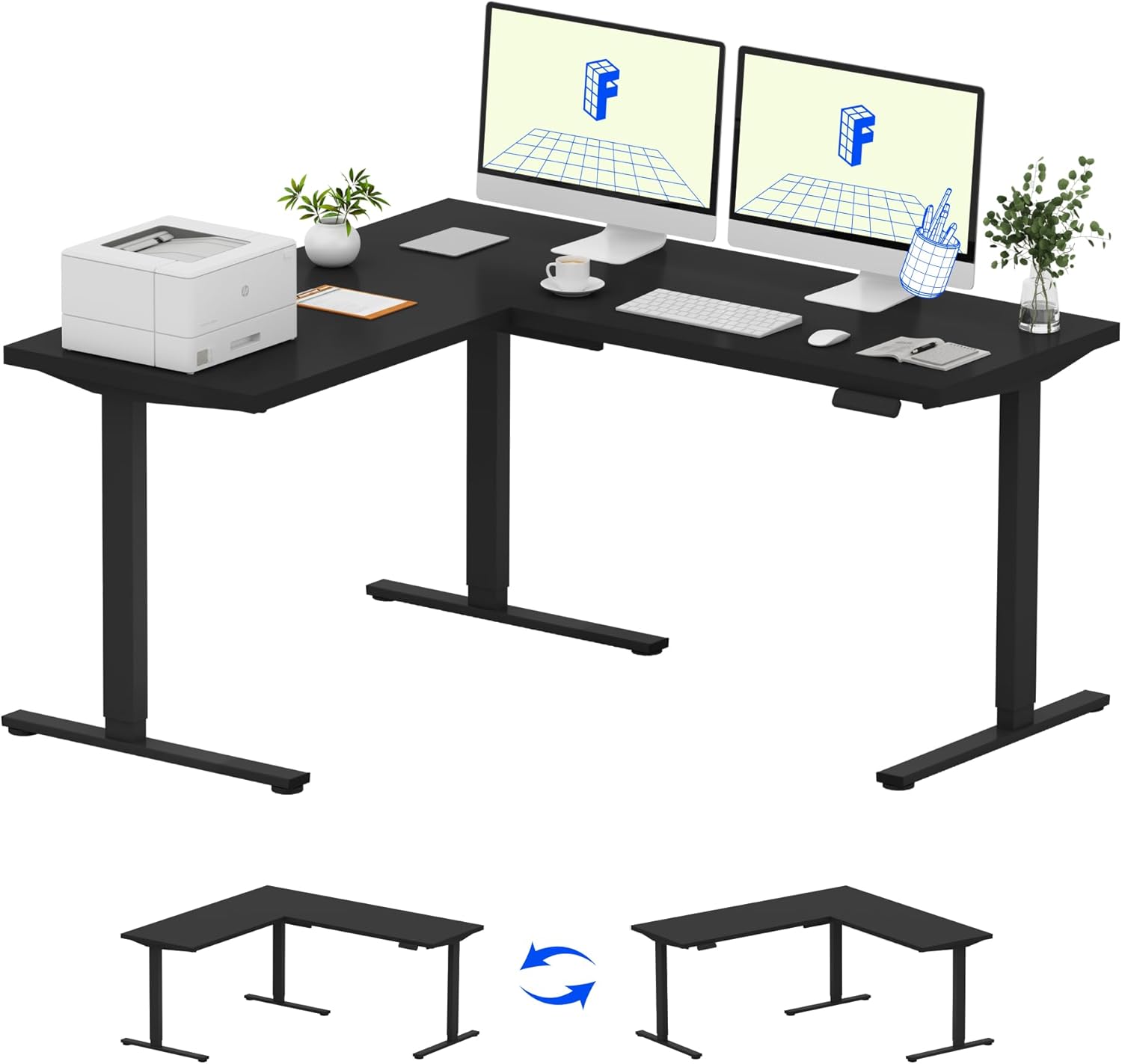
Image: Assembled FLEXISPOT L-Shaped Electric Standing Desk.
4.3 Desktop Attachment and Orientation
The expansive L-shaped desktop can be configured for either a left-hand or right-hand setup. Decide on your preferred orientation before attaching the desktop to the frame. The desktop is crafted from environmentally sourced splice board, measuring 63.0" x 55.1".

Image: Flexible right/left orientation options for the L-shaped desk.
4.4 Gestió de cables
Utilize the included cable management tools to keep your workspace tidy and prevent cables from interfering with the desk's movement.

Image: The desk ships in two packages and has a 220 lbs weight capacity.
5. Instruccions de funcionament
Your FLEXISPOT L-Shaped Electric Standing Desk is equipped with an intuitive LED control panel for easy height adjustments and memory presets.
5.1 Ajust de l'alçada de l'escriptori
- Utilitza el Amunt (▲) i Avall (▼) buttons on the control panel to manually adjust the desk to your desired height.
- The desk offers a large adjustable range, from a minimum height of 28.3 inches to a maximum height of 45.9 inches.

Image: Large adjustable height range of the desk.
5.2 Ús de preajustos de memòria
The LED control panel allows you to save up to four preferred height settings for quick transitions.
- Ajusteu l'escriptori a l'alçada desitjada amb els botons Amunt/Avall.
- Premeu el botó M button (Memory) followed by one of the numbered preset buttons (1, 2, 3 o 4) to save the current height.
- To recall a saved height, simply press the corresponding numbered preset button.

Image: Smart LED control panel with memory presets.
5.3 Anti-Collision Feature
The desk is equipped with an anti-collision system. If the desk encounters an obstacle during height adjustment, it will automatically stop and rebound slightly to prevent damage or injury.

Image: Anti-collision feature in action.
6. Manteniment
Un manteniment regular garanteix la longevitat i el rendiment òptim del vostre escriptori de peu.
- Neteja: Netegeu l'escriptori i el marc amb un drap suauamp drap. Eviteu productes químics agressius o netejadors abrasius que puguin danyar l'acabat.
- Inspeccions: Reviseu periòdicament tots els cargols i perns per assegurar-vos que estiguin ben ajustats. Torneu a apretar-los si cal.
- Gestió de cables: Ensure power cords and other cables are not pinched or tangled, especially during height adjustments.
- Capacitat de pes: No supereu la capacitat màxima de pes de 220 lliures per evitar esforços al motor i al xassís.
7. Solució De Problemes
If you encounter issues with your FLEXISPOT L-Shaped Electric Standing Desk, refer to the following common troubleshooting steps:
- L'escriptori no es mou:
- Comproveu si el cable d'alimentació està ben connectat tant a l'escriptori com a una presa de corrent que funcioni.
- Assegureu-vos que no hi hagi objectes que dificultin el moviment de l'escriptori.
- Try resetting the desk by unplugging it for 30 seconds and then plugging it back in.
- Uneven Movement/Wobbling:
- Verify that all assembly screws are tightened.
- Assegureu-vos que l'escriptori estigui sobre una superfície plana. Ajusteu els peus anivelladors si cal.
- Confirm that the weight distribution on the desktop is balanced and within the maximum capacity.
- El tauler de control no respon:
- Perform a power cycle (unplug and replug).
- Check for any visible damage to the control panel or its cable.
If these steps do not resolve the issue, please contact FLEXISPOT customer support.
8. Especificacions
| Marca | FLEXISPOT |
| Model | B0DV54QLX4 |
| Dimensions del producte | 55.1 "P x 63" W x 45.9" H |
| Color | Black Frame + Black Top |
| Estil | Modern |
| Material base | Acer d'aliatge |
| Tipus de material superior | Fusta |
| Gruix de la taula | 1 polzades |
| Altura mínima | 28 polzades |
| Altura màxima | 45.9 polzades |
| Recomanació de pes màxim | 220 lliures |
| Característica especial | Corded, Preset Controller, Anti-collision |
| Muntatge requerit | Sí |
| UPC | 840460438384 |
9. Garantia i Suport
9.1 Informació de la garantia
FLEXISPOT provides the following warranty coverage for your L-Shaped Electric Standing Desk:
- Cobertura de 5 anys: Applies to the desk frame and motor.
- Protecció de 2 anys: Applies to the control panel and electronics.
Please retain your proof of purchase for warranty claims. The warranty covers manufacturing defects under normal use.
9.2 Atenció al client
For any questions, assistance with assembly, troubleshooting, or warranty inquiries, please contact FLEXISPOT customer support. You can find contact information on the official FLEXISPOT weblloc web o a través de la vostra plataforma de compra.